Learn Coding Visually
Learn to code with interactive, live-preview playgrounds — HTML, CSS, JavaScript, React & more.
 HTML Playground42 lessons · Click-based · Live preview
 CSS PlaygroundLearn CSS with a live editor
 JavaScript Playground60 lessons · DOM · Async · Canvas
 React PlaygroundLearn React with a live code editor
 GSAP PlaygroundLearn GSAP animation interactively
 SVG Playground44 lessons · shapes · paths · animation
 SCSS Playground45 lessons · Sass modules · tokens
 Tailwind PlaygroundLearn Tailwind CSS with a live editor
 Bootstrap 5 Playground50 lessons · live preview
What's included
Features
About this UI Snippet
Robot Loop Programmer Game — Block Programs With Repeat Counts, Stepped Interpretation & Crash Reporting
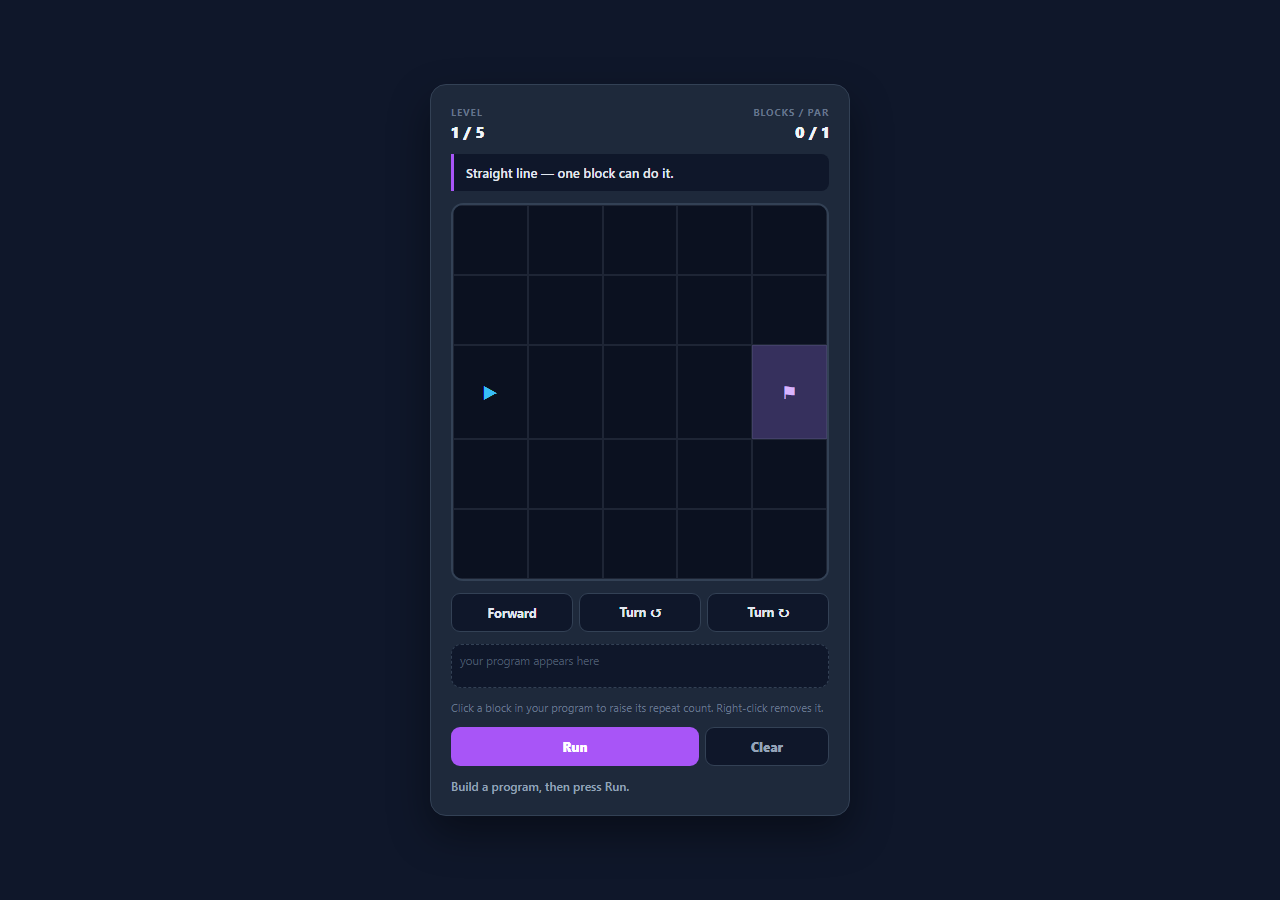
Sequencing, loops, and debugging are the first three ideas in programming, and all three are far easier to feel than to read about. This snippet is a small visual programming game built around exactly those ideas: the player assembles a program from Forward, Turn-left and Turn-right blocks, raises the repeat count on any block, presses Run, and watches a robot execute the program one step at a time across a grid of walls toward a flag. When the robot crashes, the block that was executing is highlighted — which is the whole debugging loop in miniature.
Repeat counts instead of a repeat block
Rather than a nested loop construct, each block carries a times count that the player raises by clicking it. F ×4 is a loop, expressed in the way beginners meet loops first: "do this thing four times". It also creates a genuine optimisation pressure, because every level shows a par block count — solving a spiral with eight separate Forward blocks works but misses par, while four blocks with counts clears it. That gap between "it works" and "it is concise" is the loop lesson, made visible without any syntax to learn.
Expansion, then interpretation
expand() flattens the block list into a list of single steps, each remembering the index of the block it came from. The interpreter then walks that flat list on a setInterval, applying one step per tick — which is what makes the execution watchable rather than instantaneous, and is also how a real stepping debugger works. Because each step retains its source block index, the UI can highlight the currently executing block and, on a crash, mark the exact block that failed. Separating expansion from execution keeps both halves simple: the interpreter never has to think about repeat counts, and the expander never has to think about walls.
Direction as modular arithmetic
Heading is stored as an integer 0-3 indexed into a DIRS table of row/column deltas. Turning right is (dir + 1) % 4 and turning left is (dir + 3) % 4 — adding three rather than subtracting one, which avoids the negative-modulo trap where (0 - 1) % 4 evaluates to -1 in JavaScript rather than 3. The robot's on-screen rotation comes from the same integer via rotate(dir * 90deg), so the sprite can never point somewhere the model disagrees with.
Failure that names the cause and the culprit
applyStep() returns a result object rather than a boolean: { ok: false, why: 'Hit a wall' } or 'Drove off the edge'. The runner stops the interval immediately on a failure, adds a crash class to the robot, marks the offending block red, and prints both the reason and the block number. Distinguishing the two failure modes matters pedagogically — driving off the edge means the program went too far, hitting a wall means it turned too late, and those are different fixes.
A step ceiling as a runaway guard
Because repeat counts can reach nine per block, a program can easily describe hundreds of steps. MAX_STEPS rejects any program whose expanded length exceeds the ceiling before execution begins, which is both a practical guard against a several-minute animation and an honest introduction to the idea that a loop needs a bound. Levels are plain ASCII maps — . floor, # wall, S start, G goal — parsed at load, so adding a level means drawing one, not writing coordinates.
Build with AI
Build, Understand, Optimize, and Extend It With AI
Paste this snippet into an AI assistant like Claude and ask it to add a step-through debugger — a Step button that advances the interpreter one instruction at a time with the robot state visible between steps — which turns the game into a genuine introduction to how debugging works. Other natural extensions: add a nested repeat block that wraps a sub-sequence so the loop concept generalises beyond a per-block count, add collectibles the program must gather in order before reaching the flag, add a "function" block that stores a reusable sub-program to introduce procedures, or add an undo stack for program edits. The expansion-then-interpretation split makes each of these easier than it sounds.
Prompt to recreate it
Copy this into your AI assistant of choice to build the effect from scratch, or as a jumping-off point for your own variant:
Build a playable block-programming robot game in plain HTML, CSS, and JavaScript — no frameworks or libraries.

Requirements:
- Levels authored as plain ASCII maps (an array of equal-length strings using . for floor, # for wall, S for start, G for goal), parsed at load time so start and goal coordinates are never written by hand. Each level also carries a plain-English goal and a par block count.
- A palette of Forward, Turn-left and Turn-right blocks that append to a program strip. Clicking a block in the program cycles its repeat count from 1 to 9 and back; right-clicking removes it.
- Two-phase execution: first expand the blocks into a flat list of single steps where each step remembers the index of the block it came from, then interpret that list one step per interval tick so the run is watchable.
- Highlight the currently executing block during the run, and on a crash stop immediately, mark the failing block, and report a distinct reason for hitting a wall versus driving off the edge.
- Store the robot's heading as an integer 0-3 indexed into a table of row/column deltas. Turn right with (dir + 1) % 4 and turn left with (dir + 3) % 4 — never (dir - 1) % 4, which returns a negative index in JavaScript. Drive the on-screen rotation from the same integer.
- Reject programs whose expanded step count exceeds a MAX_STEPS ceiling before execution begins, as a runaway guard.
- On finishing, win only if the robot is standing on the goal cell, and report the block count against the level's par so players are pushed toward repeat counts rather than repetition. Include at least five levels, with the later ones only reaching par if counts are used.
Want to tighten it up first? Run this prompt through the AI Prompt Studio to score it across 8 quality dimensions, catch anti-patterns, and tune the wording for Claude, ChatGPT, or Gemini before you paste it in.
Source Code
<div class="demo-wrap">
  <div class="rb-game">
    <div class="rb-head">
      <div class="rb-meta"><span class="rb-label">Level</span><span class="rb-value" id="rbLevel">1 / 5</span></div>
      <div class="rb-meta rb-right"><span class="rb-label">Blocks / par</span><span class="rb-value"><span id="rbCount">0</span> / <span id="rbPar">4</span></span></div>
    </div>

    <p class="rb-goal" id="rbGoal">Drive the robot to the flag.</p>

    <div class="rb-board" id="rbBoard">
      <div class="rb-grid" id="rbGrid"></div>
      <div class="rb-robot" id="rbRobot">▲</div>
    </div>

    <div class="rb-palette">
      <button class="rb-cmd" data-cmd="F">Forward</button>
      <button class="rb-cmd" data-cmd="L">Turn ↺</button>
      <button class="rb-cmd" data-cmd="R">Turn ↻</button>
    </div>

    <div class="rb-program" id="rbProgram"></div>
    <p class="rb-tip">Click a block in your program to raise its repeat count. Right-click removes it.</p>

    <div class="rb-controls">
      <button class="rb-btn rb-run" id="rbRun">Run</button>
      <button class="rb-btn rb-ghost" id="rbClear">Clear</button>
    </div>

    <p class="rb-status" id="rbStatus">Build a program, then press Run.</p>
  </div>
</div>
* { box-sizing: border-box; margin: 0; padding: 0; }
body { font-family: system-ui, -apple-system, sans-serif; background: #0f172a; min-height: 100vh; }
.demo-wrap { display: flex; align-items: center; justify-content: center; min-height: 100vh; padding: 26px 16px; }
.rb-game {
width: 100%; max-width: 420px; padding: 20px;
background: #1e293b; border: 1px solid #334155; border-radius: 16px;
display: flex; flex-direction: column; gap: 12px;
box-shadow: 0 18px 40px rgba(0,0,0,0.4);
}
.rb-head { display: flex; justify-content: space-between; }
.rb-meta { display: flex; flex-direction: column; gap: 2px; }
.rb-right { align-items: flex-end; }
.rb-label { font-size: 10px; font-weight: 700; letter-spacing: 0.08em; text-transform: uppercase; color: #64748b; }
.rb-value { font-size: 16px; font-weight: 800; color: #f1f5f9; }
.rb-goal {
font-size: 13px; font-weight: 600; color: #e2e8f0; line-height: 1.5;
background: #0f172a; border-left: 3px solid #a855f7; border-radius: 0 8px 8px 0; padding: 9px 12px;
}
.rb-board { position: relative; width: 100%; aspect-ratio: 1 / 1; border-radius: 12px; overflow: hidden; border: 2px solid #334155; }
.rb-grid { display: grid; width: 100%; height: 100%; }
.rb-cell { border: 1px solid rgba(148,163,184,0.14); background: #0b1120; }
.rb-cell.wall { background: #334155; border-color: #475569; }
.rb-cell.goal { background: rgba(168,85,247,0.18); }
.rb-cell.goal::after { content: '⚑'; display: flex; align-items: center; justify-content: center; height: 100%; font-size: 18px; color: #d8b4fe; }
.rb-robot {
position: absolute; display: flex; align-items: center; justify-content: center;
font-size: 18px; color: #38bdf8; pointer-events: none;
transition: left 0.28s ease, top 0.28s ease, transform 0.22s ease;
}
.rb-robot.crash { color: #f87171; }
.rb-robot.win { color: #4ade80; }
.rb-palette { display: grid; grid-template-columns: repeat(3, 1fr); gap: 6px; }
.rb-cmd {
padding: 10px 0; border-radius: 9px; border: 1.5px solid #334155; background: #0f172a;
color: #e2e8f0; font-size: 12.5px; font-weight: 700; font-family: inherit; cursor: pointer; transition: all 0.12s;
}
.rb-cmd:hover { border-color: #a855f7; color: #d8b4fe; }
.rb-program {
display: flex; flex-wrap: wrap; gap: 5px; min-height: 44px; padding: 8px;
border-radius: 10px; background: #0f172a; border: 1.5px dashed #334155;
}
.rb-program:empty::after { content: 'your program appears here'; font-size: 11.5px; color: #475569; }
.rb-block {
display: inline-flex; align-items: center; gap: 5px; padding: 6px 9px; border-radius: 7px;
background: #312e81; border: 1.5px solid #4f46e5; color: #e0e7ff;
font-family: ui-monospace, SFMono-Regular, Menlo, monospace; font-size: 11.5px; font-weight: 700;
cursor: pointer; user-select: none;
}
.rb-block .times { color: #a5b4fc; }
.rb-block.active { background: #4f46e5; border-color: #a5b4fc; }
.rb-block.failed { background: #7f1d1d; border-color: #ef4444; color: #fecaca; }
.rb-tip { font-size: 11px; color: #64748b; }
.rb-controls { display: grid; grid-template-columns: 2fr 1fr; gap: 6px; }
.rb-btn { padding: 10px 0; border: none; border-radius: 9px; font-size: 13px; font-weight: 800; font-family: inherit; cursor: pointer; }
.rb-run { background: #a855f7; color: #fff; }
.rb-run:hover { background: #9333ea; }
.rb-ghost { background: #0f172a; color: #94a3b8; border: 1.5px solid #334155; }
.rb-ghost:hover { color: #e2e8f0; }
.rb-status { font-size: 12px; font-weight: 600; color: #94a3b8; min-height: 17px; }
.rb-status.ok { color: #4ade80; }
.rb-status.err { color: #f87171; }var LEVELS = [
{
goal: 'Straight line — one block can do it.',
par: 1,
map: [
'.....',
'.....',
'S...G',
'.....',
'.....',
],
},
{
goal: 'Turn the corner, then climb.',
par: 3,
map: [
'....G',
'.....',
'.....',
'.....',
'S....',
],
},
{
goal: 'Walls block the direct route — go around.',
par: 6,
map: [
'.....',
'.###.',
'S.#.G',
'.##..',
'.....',
],
},
{
goal: 'A spiral. Repeat counts keep this short.',
par: 7,
map: [
'S....',
'####.',
'.....',
'.####',
'G....',
],
},
{
goal: 'Zig-zag through the gaps.',
par: 6,
map: [
'S.#..',
'..#..',
'.....',
'..#..',
'..#.G',
],
},
];
var DIRS = [
{ dr: -1, dc: 0 }, // 0 = up
{ dr: 0, dc: 1 }, // 1 = right
{ dr: 1, dc: 0 }, // 2 = down
{ dr: 0, dc: -1 }, // 3 = left
];
var STEP_MS = 300;
var MAX_STEPS = 60; // guards against a program that loops the robot forever
var gridEl = document.getElementById('rbGrid');
var robotEl = document.getElementById('rbRobot');
var programEl = document.getElementById('rbProgram');
var statusEl = document.getElementById('rbStatus');
var goalEl = document.getElementById('rbGoal');
var levelEl = document.getElementById('rbLevel');
var countEl = document.getElementById('rbCount');
var parEl = document.getElementById('rbPar');
var levelIndex = 0;
var size = 5;
var grid = [];
var start = { r: 0, c: 0 };
var goal = { r: 0, c: 0 };
var program = []; // [{ cmd: 'F'|'L'|'R', times: n }]
var robot = { r: 0, c: 0, dir: 1 };
var running = false;
function level() { return LEVELS[levelIndex]; }
function parseMap(map) {
grid = [];
size = map.length;
map.forEach(function (row, r) {
var cells = row.split('');
cells.forEach(function (ch, c) {
if (ch === 'S') start = { r: r, c: c };
if (ch === 'G') goal = { r: r, c: c };
});
grid.push(cells);
});
}
function isWall(r, c) { return grid[r][c] === '#'; }
function inBounds(r, c) { return r >= 0 && c >= 0 && r < size && c < grid[r].length; }
function renderGrid() {
gridEl.style.gridTemplateColumns = 'repeat(' + size + ', 1fr)';
gridEl.innerHTML = '';
for (var r = 0; r < size; r++) {
for (var c = 0; c < grid[r].length; c++) {
var cell = document.createElement('div');
cell.className = 'rb-cell';
if (grid[r][c] === '#') cell.classList.add('wall');
if (r === goal.r && c === goal.c) cell.classList.add('goal');
gridEl.appendChild(cell);
}
}
}
function placeRobot() {
var pct = 100 / size;
robotEl.style.width = pct + '%';
robotEl.style.height = pct + '%';
robotEl.style.left = (robot.c * pct) + '%';
robotEl.style.top = (robot.r * pct) + '%';
robotEl.style.transform = 'rotate(' + (robot.dir * 90) + 'deg)';
}
function renderProgram() {
programEl.innerHTML = '';
program.forEach(function (block, i) {
var el = document.createElement('div');
el.className = 'rb-block';
el.dataset.index = i;
el.innerHTML = block.cmd + (block.times > 1 ? ' <span class="times">×' + block.times + '</span>' : '');
programEl.appendChild(el);
});
countEl.textContent = program.length;
}
function setStatus(msg, kind) {
statusEl.textContent = msg;
statusEl.className = 'rb-status' + (kind ? ' ' + kind : '');
}
// Flatten { cmd, times } blocks into a list of single steps, each remembering
// which block it came from so the UI can highlight the running block.
function expand() {
var steps = [];
program.forEach(function (block, i) {
for (var n = 0; n < block.times; n++) steps.push({ cmd: block.cmd, block: i });
});
return steps;
}
function applyStep(step) {
if (step.cmd === 'L') { robot.dir = (robot.dir + 3) % 4; return { ok: true }; }
if (step.cmd === 'R') { robot.dir = (robot.dir + 1) % 4; return { ok: true }; }
var d = DIRS[robot.dir];
var nr = robot.r + d.dr;
var nc = robot.c + d.dc;
if (!inBounds(nr, nc)) return { ok: false, why: 'Drove off the edge' };
if (isWall(nr, nc)) return { ok: false, why: 'Hit a wall' };
robot.r = nr; robot.c = nc;
return { ok: true };
}
function highlight(blockIndex, cls) {
Array.prototype.forEach.call(programEl.children, function (el, i) {
el.classList.toggle(cls, i === blockIndex);
});
}
function clearHighlights() {
Array.prototype.forEach.call(programEl.children, function (el) {
el.classList.remove('active', 'failed');
});
}
function run() {
if (running) return;
if (!program.length) { setStatus('Add some blocks first.', 'err'); return; }
running = true;
clearHighlights();
robotEl.classList.remove('crash', 'win');
resetRobot();
var steps = expand();
if (steps.length > MAX_STEPS) {
running = false;
setStatus('That program runs more than ' + MAX_STEPS + ' steps — trim it.', 'err');
return;
}
var i = 0;
var timer = setInterval(function () {
if (i >= steps.length) {
clearInterval(timer);
finish();
return;
}
var step = steps[i];
highlight(step.block, 'active');
var result = applyStep(step);
placeRobot();
if (!result.ok) {
clearInterval(timer);
running = false;
robotEl.classList.add('crash');
highlight(step.block, 'failed');
setStatus(result.why + ' on block ' + (step.block + 1) + '.', 'err');
return;
}
i++;
}, STEP_MS);
}
function finish() {
running = false;
clearHighlights();
if (robot.r === goal.r && robot.c === goal.c) {
robotEl.classList.add('win');
var blocks = program.length;
var par = level().par;
var note = blocks <= par ? ' At or under par!' : ' Par is ' + par + ' — try repeat counts.';
if (levelIndex === LEVELS.length - 1) {
setStatus('Solved in ' + blocks + ' blocks.' + note + ' All levels cleared!', 'ok');
setTimeout(function () { levelIndex = 0; loadLevel(); }, 2000);
} else {
setStatus('Solved in ' + blocks + ' blocks.' + note, 'ok');
setTimeout(function () { levelIndex++; loadLevel(); }, 1600);
}
} else {
setStatus('Program finished, but not on the flag. Adjust and run again.', 'err');
}
}
function resetRobot() {
robot = { r: start.r, c: start.c, dir: 1 };
placeRobot();
}
function loadLevel() {
var lv = level();
program = [];
running = false;
parseMap(lv.map);
renderGrid();
resetRobot();
renderProgram();
robotEl.classList.remove('crash', 'win');
goalEl.textContent = lv.goal;
levelEl.textContent = (levelIndex + 1) + ' / ' + LEVELS.length;
parEl.textContent = lv.par;
setStatus('Build a program, then press Run.', '');
}
document.querySelector('.rb-palette').addEventListener('click', function (e) {
var btn = e.target.closest('.rb-cmd');
if (!btn || running) return;
program.push({ cmd: btn.dataset.cmd, times: 1 });
renderProgram();
});
programEl.addEventListener('click', function (e) {
var block = e.target.closest('.rb-block');
if (!block || running) return;
var i = Number(block.dataset.index);
program[i].times = program[i].times >= 9 ? 1 : program[i].times + 1;
renderProgram();
});
programEl.addEventListener('contextmenu', function (e) {
var block = e.target.closest('.rb-block');
if (!block || running) return;
e.preventDefault();
program.splice(Number(block.dataset.index), 1);
renderProgram();
});
document.getElementById('rbRun').addEventListener('click', run);
document.getElementById('rbClear').addEventListener('click', function () {
if (running) return;
program = [];
renderProgram();
resetRobot();
robotEl.classList.remove('crash', 'win');
setStatus('Cleared. Build a new program.', '');
});
loadLevel();Step by step
How to Use
- 1Read the level and find the flagThe purple-bordered line describes the challenge and the board shows walls in grey, the flag in purple, and the robot as an arrow pointing in its current heading — it always starts facing right.
- 2Add blocks from the paletteForward, Turn ↺ and Turn ↻ append a block to your program. The program strip below shows the sequence you have built and the block count against the level's par.
- 3Click a block to raise its repeat countClicking a block in the program cycles its count from 1 up to 9 and back around, so F ×4 replaces four separate Forward blocks. Right-clicking a block removes it.
- 4Press Run and watch it executeThe program is flattened into single steps and executed one every 300ms, with the currently running block highlighted — the same stepped execution a debugger gives you, which is what makes a mistake visible rather than mysterious.
- 5Read the crash reportIf the robot hits a wall or drives off the edge, execution stops immediately, the robot turns red, and the block that was executing is marked — along with whether the cause was a wall or the edge, which point to different fixes.
- 6Beat par to advance wellReaching the flag clears the level and reports your block count against par. Levels four and five are built so that solving at par genuinely requires repeat counts rather than repetition.
Real-world uses
Common Use Cases
Got questions?
Frequently Asked Questions
A count on a block is how beginners first meet iteration — "do this four times" — and it needs no nesting UI, no drag targets, and no block-scope rules. It still creates the real lesson: every level has a par block count, and the later levels only reach par if you use counts instead of repeating blocks, which is exactly the trade a loop exists to make.
expand() flattens the blocks into a flat list of single steps, and each step stores the index of the block it came from. The interpreter walks that list one step per tick, so when applyStep() returns a failure the runner already knows which block produced the failing step and can mark it red while reporting the reason.
Because JavaScript's % operator returns a negative result for negative operands: (0 - 1) % 4 is -1, not 3, which would index outside the direction table. Adding 3 is congruent to subtracting 1 modulo 4 and always stays non-negative, so the heading integer remains a valid index without any extra branching.
Push an object onto LEVELS with a goal string, a par block count, and a map: an array of equal-length strings where . is floor, # is a wall, S is the start and G is the flag. parseMap() reads the start and goal positions out of the characters at load time, so no coordinates need to be written by hand and the grid size is derived from the map length.
Yes. Keep LEVELS, DIRS, expand() and applyStep() in a plain module — they are all pure data and pure functions. Hold the program array, robot position and running flag in component state, and render the grid, program strip and robot position from that state. The one thing to get right is the interval: start it in an effect when running turns true and clear it in the cleanup (useEffect return, onUnmounted, ngOnDestroy) so a level change or unmount cannot leave the interpreter ticking.