

Learn Coding Visually
Learn to code with interactive, live-preview playgrounds — HTML, CSS, JavaScript, React & more.
 HTML Playground42 lessons · Click-based · Live preview
 CSS PlaygroundLearn CSS with a live editor
 JavaScript Playground60 lessons · DOM · Async · Canvas
 React PlaygroundLearn React with a live code editor
 GSAP PlaygroundLearn GSAP animation interactively
 SVG Playground44 lessons · shapes · paths · animation
 SCSS Playground45 lessons · Sass modules · tokens
 Tailwind PlaygroundLearn Tailwind CSS with a live editor
 Bootstrap 5 Playground50 lessons · live preview
Matter.js Slingshot Tower Knockdown Game — Free Physics Game Snippet
Matter.js Slingshot Tower Knockdown Game · Games · Plain HTML, CSS & JS · Live preview
What's included
Features
About this UI Snippet
A Slingshot in Matter.js — Springs, Release Detection and Destructible Towers
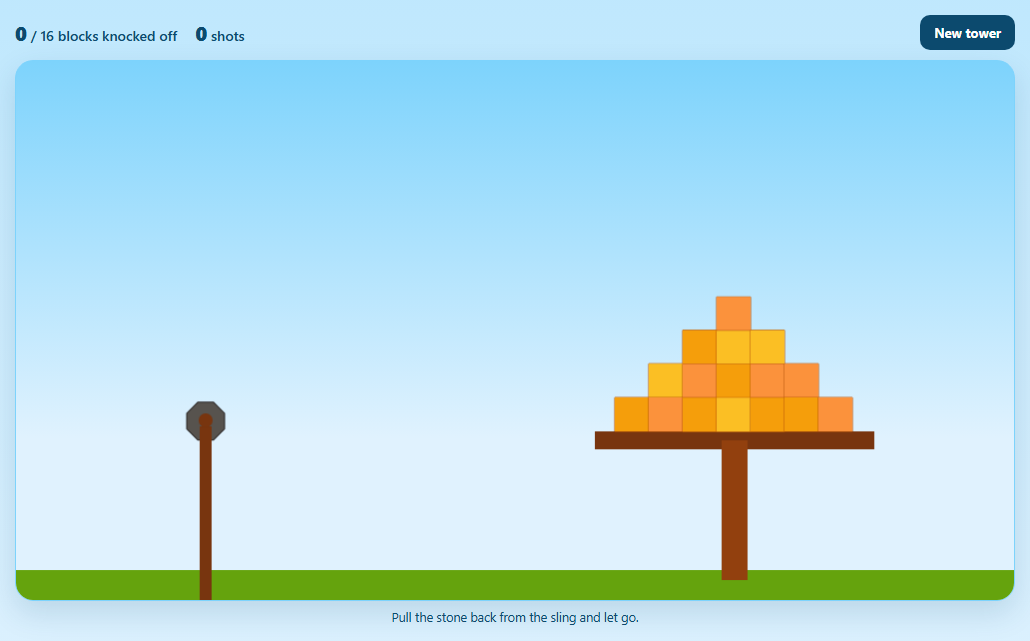
Pull back, let go, watch a tower collapse: slingshot games are the classic physics-engine showcase. The mechanics come down to three ideas — a spring, a way to detect the moment of release, and a structure worth knocking over — and each is a few lines of Matter.js.
The sling is a spring constraint
A Constraint with a very low stiffness (0.05) and near-zero rest length behaves like an elastic band: dragging the stone stretches it, and on release the constraint pulls the stone back toward the anchor with growing speed. damping stops it oscillating forever.
Detecting release
The engine's afterUpdate event checks three conditions every step: the mouse button is up (mouse.button === -1), the stone has passed the anchor, and it's moving forward fast. That is the moment it would snap back — so the constraint's bodyB is set to null, freeing the stone to fly. A new stone is created after a short delay and attached by setting bodyB again.
Only the ammo is draggable
MouseConstraint would happily let you pick up tower blocks. Its startdrag event checks which body was grabbed and releases anything that isn't the current stone.
A tower from a composite
Composites.pyramid builds a triangular stack of blocks from a callback that returns each body. The blocks rest on a static platform; a block counts as knocked off once it falls below the platform, and the HUD counts shots and knocked blocks.
Tuning
The stone's density controls its momentum — raise it for a heavier hit. The sling's stiffness controls launch speed. Block friction decides how easily the tower slides apart.
Housekeeping
Stones that fly off-screen are removed so the world doesn't fill with bodies.
Build with AI
Build, Understand, Optimize, and Extend It With AI
Paste this game into an AI assistant like Claude and ask it to explain how the release detection works frame by frame. Ask it to add a trajectory preview dotted line while aiming, several levels loaded from JSON, target "enemies" that pop when hit hard (using collision impulse), or a limited shot count with stars. It can also help tune stiffness and density for a satisfying launch.
Prompt to recreate it
Copy this into your AI assistant of choice to build the effect from scratch, or as a jumping-off point for your own variant:
Build a slingshot tower-knockdown game with Matter.js 0.20 (from a CDN) in plain HTML, CSS and JavaScript with a sky gradient background.

Requirements:
- A ground, a static wooden platform on a post, and a pyramid of 16 coloured blocks (7 columns wide) on the platform built with Composites.pyramid.
- A stone attached to a fixed anchor by a springy constraint (very low stiffness, near-zero length, small damping), with the sling fork drawn in afterRender.
- Mouse dragging limited to the current stone (reject other bodies in the startdrag event); remove the mouse wheel listeners so the page scrolls.
- In afterUpdate, detect release (mouse up, stone past the anchor and moving forward), detach the constraint, count the shot, and after a short delay create a new stone and re-attach the constraint.
- Count blocks that have fallen below the platform, show knocked-off, total and shots in a HUD, congratulate when the tower is cleared, remove stones that leave the scene, and add a New tower button.
Want to tighten it up first? Run this prompt through the AI Prompt Studio to score it across 8 quality dimensions, catch anti-patterns, and tune the wording for Claude, ChatGPT, or Gemini before you paste it in.
Source Code
<div class="sl">
  <div class="sl-hud">
    <div><b id="slKnocked">0</b> / <span id="slTotal">0</span> blocks knocked off</div>
    <div><b id="slShots">0</b> shots</div>
    <button type="button" id="slReset">New tower</button>
  </div>
  <div class="sl-stage" id="slStage"></div>
  <p class="sl-hint" id="slHint">Pull the stone back from the sling and let go.</p>
</div>*{box-sizing:border-box;margin:0;padding:0}
body{font-family:system-ui,-apple-system,sans-serif;background:linear-gradient(#bae6fd,#e0f2fe);color:#0c4a6e;min-height:100vh;display:flex;align-items:center;justify-content:center;padding:18px}
.sl{width:100%;max-width:1000px}
.sl-hud{display:flex;align-items:center;gap:18px;margin-bottom:10px;font-size:14px;font-weight:600}
.sl-hud b{font-size:20px;font-variant-numeric:tabular-nums}
.sl-hud button{margin-left:auto;border:0;border-radius:10px;background:#0c4a6e;color:#fff;font:700 13px system-ui;padding:9px 14px;cursor:pointer}
.sl-hud button:focus-visible{outline:2px solid #f59e0b;outline-offset:2px}
.sl-stage{border-radius:18px;overflow:hidden;background:linear-gradient(#7dd3fc 0%,#e0f2fe 70%);border:1px solid #7dd3fc;box-shadow:0 12px 30px rgba(12,74,110,.15)}
.sl-stage canvas{display:block;width:100%;height:auto;cursor:grab;touch-action:none}
.sl-hint{font-size:12.5px;margin-top:8px;text-align:center;min-height:18px}var M = Matter, Engine = M.Engine, Render = M.Render, Runner = M.Runner, Bodies = M.Bodies, Body = M.Body,
Composite = M.Composite, Composites = M.Composites, Constraint = M.Constraint, Mouse = M.Mouse, MouseConstraint = M.MouseConstraint, Events = M.Events;
var W = 1000, H = 540, GROUND = H - 30;
var ANCHOR = { x: 190, y: 360 };
var engine = Engine.create();
var render = Render.create({
element: document.getElementById('slStage'),
engine: engine,
options: { width: W, height: H, wireframes: false, background: 'transparent', pixelRatio: window.devicePixelRatio || 1 },
});
var ground = Bodies.rectangle(W / 2, H + 20, W * 2, 100, { isStatic: true, render: { fillStyle: '#65a30d' } });
var platform = Bodies.rectangle(720, 380, 280, 18, { isStatic: true, render: { fillStyle: '#78350f' } });
var post = Bodies.rectangle(720, 450, 26, 140, { isStatic: true, render: { fillStyle: '#92400e' } });
Composite.add(engine.world, [ground, platform, post]);
var stone, elastic, tower = [], shots = 0, flying = false;
function newStone() {
stone = Bodies.polygon(ANCHOR.x, ANCHOR.y, 8, 20, {
density: 0.004, restitution: 0.2, frictionAir: 0.004,
render: { fillStyle: '#57534e', strokeStyle: '#292524', lineWidth: 2 },
});
Composite.add(engine.world, stone);
return stone;
}
// The sling is a SPRINGY constraint between a fixed point and the stone.
// Low stiffness + damping makes it stretch when you drag and pull back
// when you let go.
function newElastic() {
elastic = Constraint.create({ pointA: ANCHOR, bodyB: stone, length: 0.01, damping: 0.01, stiffness: 0.05,
render: { strokeStyle: '#78350f', lineWidth: 3 } });
Composite.add(engine.world, elastic);
}
function buildTower() {
tower.forEach(function (b) { Composite.remove(engine.world, b); });
// A pyramid of blocks sitting on the platform (Composites.pyramid).
var pyr = Composites.pyramid(600, 170, 7, 6, 0, 0, function (x, y) {
return Bodies.rectangle(x, y, 34, 34, { friction: 0.6, render: { fillStyle: ['#f59e0b', '#fb923c', '#fbbf24'][Math.floor(Math.random() * 3)], strokeStyle: '#b45309', lineWidth: 1 } });
});
tower = Composite.allBodies(pyr);
Composite.add(engine.world, tower);
document.getElementById('slTotal').textContent = tower.length;
shots = 0;
document.getElementById('slShots').textContent = '0';
}
newStone();
newElastic();
buildTower();
var mouse = Mouse.create(render.canvas);
var mc = MouseConstraint.create(engine, { mouse: mouse, constraint: { stiffness: 0.2, render: { visible: false } } });
['mousewheel', 'DOMMouseScroll', 'wheel'].forEach(function (t) { mouse.element.removeEventListener(t, mouse.mousewheel); });
Composite.add(engine.world, mc);
render.mouse = mouse;
// Only the stone in the sling may be dragged — not the tower blocks.
Events.on(mc, 'startdrag', function (e) {
if (e.body !== stone) { mc.body = null; mc.constraint.bodyB = null; }
});
// Release detection: once the mouse is up and the stone has been pulled
// past the anchor and is flying forward, cut it loose and load a new one.
Events.on(engine, 'afterUpdate', function () {
if (mouse.button === -1 && !flying && stone.position.x > ANCHOR.x + 18 && stone.velocity.x > 2) {
flying = true;
shots++;
document.getElementById('slShots').textContent = shots;
elastic.bodyB = null; // detach from the sling
setTimeout(function () {
newStone();
elastic.bodyB = stone; // re-attach the sling to a new stone
elastic.pointB = { x: 0, y: 0 };
flying = false;
}, 700);
}
// A block counts as knocked off once it falls well below the platform.
var knocked = tower.filter(function (b) { return b.position.y > platform.position.y + 40; }).length;
document.getElementById('slKnocked').textContent = knocked;
document.getElementById('slHint').textContent = knocked === tower.length ? 'Tower cleared in ' + shots + ' shots! Press New tower.' : 'Pull the stone back from the sling and let go.';
});
// Draw the sling fork on top.
Events.on(render, 'afterRender', function () {
var ctx = render.context, pr = render.options.pixelRatio;
ctx.save(); ctx.scale(pr, pr);
ctx.fillStyle = '#78350f';
ctx.fillRect(ANCHOR.x - 6, ANCHOR.y + 6, 12, GROUND - ANCHOR.y + 30);
ctx.beginPath(); ctx.arc(ANCHOR.x, ANCHOR.y, 7, 0, Math.PI * 2); ctx.fill();
ctx.restore();
});
// Clean up stones that leave the scene so bodies don't pile up forever.
Events.on(engine, 'afterUpdate', function () {
Composite.allBodies(engine.world).forEach(function (b) {
if (b !== stone && b.label === 'Polygon Body' && (b.position.x > W + 200 || b.position.y > H + 200)) Composite.remove(engine.world, b);
});
});
document.getElementById('slReset').addEventListener('click', buildTower);
Render.run(render);
Runner.run(Runner.create(), engine);Step by step
How to Use
- 1AimDrag the stone back and down from the sling.
- 2ReleaseLet go; the sling launches the stone toward the tower.
- 3ReloadA new stone appears automatically.
- 4Clear the towerKnock every block below the platform.
- 5Try againNew tower resets the blocks and shot count.
Real-world uses
Common Use Cases
Got questions?
Frequently Asked Questions
Attach the projectile to a fixed point with a Constraint that has low stiffness and a tiny length, so it stretches like a spring. Let the user drag the projectile with a MouseConstraint, and when released past the anchor, set the constraint's bodyB to null so the projectile flies free.
In an afterUpdate handler, check that mouse.button is -1 (no button pressed) and that the projectile has passed the anchor while moving forward. That is the moment to detach it.
Listen to the MouseConstraint's startdrag event and, if the body isn't allowed, clear mc.body and mc.constraint.bodyB. You can also use collision filtering on the mouse constraint.
Use Composites.stack or Composites.pyramid with a callback that returns a body for each position, then add the composite (or its bodies) to the world.
Very fast, small bodies can tunnel through thin bodies between steps. Make targets thicker, lower the launch speed, or increase engine.positionIterations.