

Learn Coding Visually
Learn to code with interactive, live-preview playgrounds — HTML, CSS, JavaScript, React & more.
 HTML Playground42 lessons · Click-based · Live preview
 CSS PlaygroundLearn CSS with a live editor
 JavaScript Playground60 lessons · DOM · Async · Canvas
 React PlaygroundLearn React with a live code editor
 GSAP PlaygroundLearn GSAP animation interactively
 SVG Playground44 lessons · shapes · paths · animation
 SCSS Playground45 lessons · Sass modules · tokens
 Tailwind PlaygroundLearn Tailwind CSS with a live editor
 Bootstrap 5 Playground50 lessons · live preview
Matter.js Hill Climb Car Game — Free Physics Driving Snippet
Matter.js Hill Climb Car Game · Games · Plain HTML, CSS & JS · Live preview
What's included
Features
About this UI Snippet
Building a Hill Climb Car in Matter.js — Suspension, Terrain and a Follow Camera
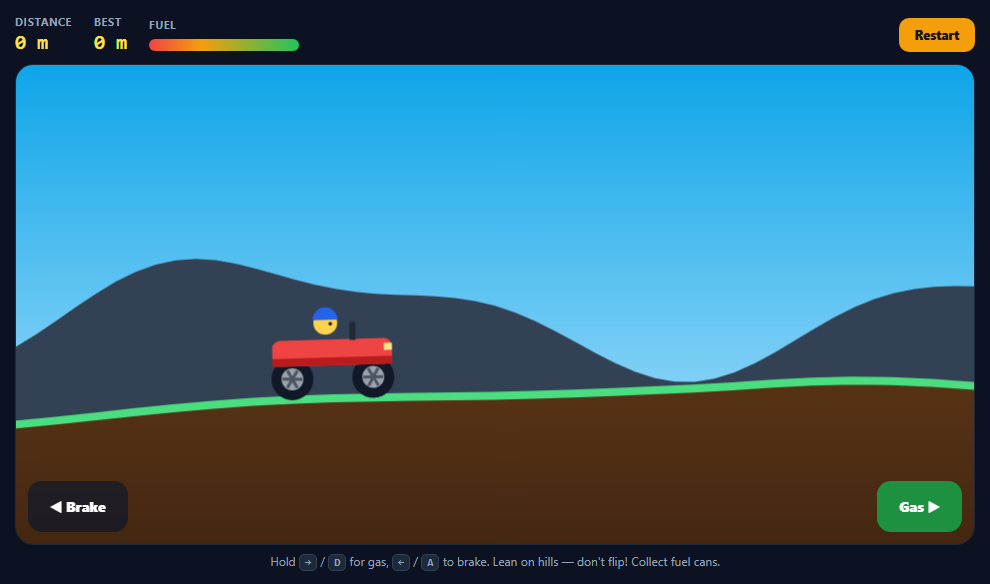
Hill Climb Racing's charm is pure physics: a floppy little car, bumpy hills and a driver whose head must never touch the ground. This snippet rebuilds that loop with Matter.js and explains each part.
The car: three bodies and some springs
The chassis is a chamfered rectangle; each wheel is a circle joined to it by two constraints — a soft, short spring from above (the suspension) and a diagonal one that stops the wheel sliding forward or back. A small head body sits on a stiff neck. All parts share one negative collision group from Body.nextGroup(true), so wheels never collide with their own chassis.
Driving by spinning wheels
The engine never pushes the car. Each frame, while a pedal is held, the wheels' angular velocity is eased toward a maximum with Body.setAngularVelocity. High wheel friction against the ground turns that spin into motion — so you get wheelspin on steep slopes, wheelies from hard acceleration and natural braking.
Air control
When neither wheel touches the ground (Query.collides against the terrain), the pedals nudge the chassis' angular velocity instead, letting you lean forward or back mid-jump to land on your wheels.
Terrain without poly-decomp
Hills come from a few summed sine waves whose amplitude grows with distance. Rather than one huge concave body (which would need poly-decomp), the ground is 520 thin static rectangles, each rotated to the slope between two sample points and offset so its top edge sits exactly on the curve. The visible ground is drawn separately as a filled path with a grass stroke.
A follow camera with render.bounds
With hasBounds: true, Matter's renderer only draws what's inside render.bounds. Every frame the bounds ease toward the car, giving a smooth camera; custom drawing uses the same offset via setTransform. The sky and parallax mountains are painted last with destination-over so they land behind everything.
Rules
Fuel drains while a pedal is held and yellow sensor cans refill it; the head touching the ground, being upside-down for 1.5 seconds, or stopping on an empty tank ends the run.
Build with AI
Build, Understand, Optimize, and Extend It With AI
Paste this snippet into an AI assistant like Claude and ask it to explain how the suspension constraints and wheel spin produce driving. Ask it to add coins and upgrades for engine and fuel, a boost button, sound for the engine revving, different vehicles, or endless terrain generated in chunks as you drive. It can also help tune the car's handling for steeper maps.
Prompt to recreate it
Copy this into your AI assistant of choice to build the effect from scratch, or as a jumping-off point for your own variant:
Build a Hill Climb Racing-style game with Matter.js 0.20 (from a CDN) in plain HTML, CSS and JavaScript.

Requirements:
- Terrain: a height function of summed sine waves that steepens with distance; build it from thin static rectangles rotated to each segment's slope, and draw it as a filled brown path with a green grass edge.
- Car: a rounded chassis, two circle wheels (high friction) each joined by a soft suspension spring and a diagonal locating constraint, and a head body on a stiff neck, all in one negative collision group.
- Drive by easing the wheels' angular velocity toward a max; when both wheels are airborne (Query.collides), pedals tilt the chassis instead.
- A smooth follow camera using hasBounds and render.bounds, with custom drawing offset to match and a sky/parallax background painted with destination-over.
- Fuel that drains while driving and refills from sensor fuel cans; game over when the head touches the ground, the car is upside down 1.5s, or it stops with no fuel.
- HUD with distance in metres, best distance and a fuel bar; distance markers every 50 m; keyboard arrows/A/D and on-screen touch pedals.
Want to tighten it up first? Run this prompt through the AI Prompt Studio to score it across 8 quality dimensions, catch anti-patterns, and tune the wording for Claude, ChatGPT, or Gemini before you paste it in.
Source Code
<div class="hc">
  <div class="hc-hud">
    <div><span>Distance</span><b id="hcDist">0 m</b></div>
    <div><span>Best</span><b id="hcBest">0 m</b></div>
    <div><span>Fuel</span><i class="hc-fuel"><em id="hcFuel"></em></i></div>
    <button type="button" id="hcReset">Restart</button>
  </div>
  <div class="hc-stage" id="hcStage">
    <div class="hc-over" id="hcOver" hidden>
      <strong id="hcOverTitle">Flipped!</strong>
      <span id="hcOverText"></span>
      <button type="button" id="hcAgain">Drive again</button>
    </div>
    <div class="hc-pedals">
      <button type="button" class="hc-pedal" id="hcBrake" aria-label="Brake / reverse">◀ Brake</button>
      <button type="button" class="hc-pedal gas" id="hcGas" aria-label="Accelerate">Gas ▶</button>
    </div>
  </div>
  <p class="hc-hint">Hold <kbd>→</kbd> / <kbd>D</kbd> for gas, <kbd>←</kbd> / <kbd>A</kbd> to brake. Lean on hills — don't flip! Collect fuel cans.</p>
</div>*{box-sizing:border-box;margin:0;padding:0}
body{font-family:system-ui,-apple-system,sans-serif;background:#0c1222;color:#e2e8f0;min-height:100vh;display:flex;align-items:center;justify-content:center;padding:18px}
.hc{width:100%;max-width:960px}
.hc-hud{display:flex;align-items:center;gap:22px;margin-bottom:10px;flex-wrap:wrap}
.hc-hud div{display:flex;flex-direction:column;gap:2px}
.hc-hud span{font-size:10.5px;text-transform:uppercase;letter-spacing:.08em;color:#94a3b8;font-weight:700}
.hc-hud b{font:800 20px ui-monospace,monospace;color:#fde047}
.hc-fuel{display:block;width:150px;height:12px;border-radius:99px;background:#1e293b;overflow:hidden;margin-top:5px}
.hc-fuel em{display:block;height:100%;width:100%;background:linear-gradient(90deg,#ef4444,#f59e0b 35%,#22c55e);transition:width .15s}
.hc-hud button,.hc-over button{margin-left:auto;border:0;border-radius:10px;background:#f59e0b;color:#1c1917;font:800 12.5px system-ui;padding:9px 16px;cursor:pointer}
.hc :focus-visible{outline:2px solid #fde047;outline-offset:2px}
.hc-stage{position:relative;border-radius:18px;overflow:hidden;border:1px solid #1e293b}
.hc-stage canvas{display:block;width:100%;height:auto}
.hc-over{position:absolute;inset:0;display:flex;flex-direction:column;align-items:center;justify-content:center;gap:10px;background:rgba(12,18,34,.72);backdrop-filter:blur(3px);text-align:center}
.hc-over[hidden]{display:none}
.hc-over strong{font-size:34px;color:#fde047}
.hc-over span{font-size:14px;color:#cbd5e1}
.hc-over button{margin:6px 0 0}
.hc-pedals{position:absolute;left:12px;right:12px;bottom:12px;display:flex;justify-content:space-between;pointer-events:none}
.hc-pedal{pointer-events:auto;border:0;border-radius:14px;background:rgba(15,23,42,.72);color:#fff;font:800 14px system-ui;padding:16px 22px;cursor:pointer;user-select:none;-webkit-user-select:none;touch-action:none}
.hc-pedal.gas{background:rgba(22,163,74,.85)}
.hc-pedal.on{transform:scale(.95);filter:brightness(1.25)}
.hc-hint{font-size:12px;color:#94a3b8;margin-top:8px;text-align:center}
.hc kbd{font:700 11px ui-monospace,monospace;background:#1e293b;border:1px solid #334155;border-radius:5px;padding:1px 5px}var M = Matter, Engine = M.Engine, Render = M.Render, Runner = M.Runner, Bodies = M.Bodies, Body = M.Body,
Composite = M.Composite, Constraint = M.Constraint, Events = M.Events, Vector = M.Vector;
var W = 960, H = 480;
var PX_PER_M = 40;
var engine = Engine.create();
engine.gravity.y = 1;
engine.positionIterations = 10;
engine.velocityIterations = 8;
var render = Render.create({
element: document.getElementById('hcStage'),
engine: engine,
options: { width: W, height: H, wireframes: false, background: 'transparent', pixelRatio: window.devicePixelRatio || 1, hasBounds: true },
});
document.getElementById('hcStage').prepend(render.canvas);
// ---------- Terrain ----------
// Smooth rolling hills from a few summed sine waves that get steeper the
// further you go. The ground is a chain of thin static rectangles, each
// rotated to match the slope between two sample points. (Bodies.fromVertices
// for concave terrain would need poly-decomp; segments need nothing.)
var SEG = 40, SEGMENTS = 520;
function groundY(x) {
var d = Math.max(0, x - 500) / 4000;
var amp = Math.min(1, d) * 1.6 + 0.25;
return 360
- Math.sin(x / 260) * 45 * amp
- Math.sin(x / 97 + 1.3) * 16 * amp
- Math.sin(x / 610 + 0.4) * 70 * amp;
}
var terrain = [], groundPts = [];
function buildTerrain() {
groundPts = [];
for (var i = 0; i <= SEGMENTS; i++) groundPts.push({ x: i * SEG - 200, y: groundY(i * SEG - 200) });
for (i = 0; i < SEGMENTS; i++) {
var a = groundPts[i], b = groundPts[i + 1];
var len = Math.hypot(b.x - a.x, b.y - a.y);
var ang = Math.atan2(b.y - a.y, b.x - a.x);
// 20px thick, shifted down half its thickness so its TOP edge sits on the line.
var cx = (a.x + b.x) / 2 - Math.sin(ang) * -10, cy = (a.y + b.y) / 2 + Math.cos(ang) * 10;
terrain.push(Bodies.rectangle(cx, cy, len + 2, 20, { isStatic: true, angle: ang, friction: 1, label: 'ground', render: { visible: false } }));
}
terrain.push(Bodies.rectangle(-220, 200, 40, 600, { isStatic: true, render: { visible: false } }));
Composite.add(engine.world, terrain);
}
// ---------- Car ----------
// A chassis plus two wheels, joined by springy constraints that act as
// suspension. All three share a negative collision group so the wheels
// don't collide with their own chassis. Driving = setting the wheels'
// angular velocity; the wheel friction against the ground does the rest.
var car, chassis, wheelA, wheelB, head;
function buildCar(x, y) {
var group = Body.nextGroup(true);
chassis = Bodies.rectangle(x, y, 120, 26, { collisionFilter: { group: group }, density: 0.002, chamfer: { radius: 8 }, label: 'chassis', render: { visible: false } });
head = Bodies.circle(x - 6, y - 30, 12, { collisionFilter: { group: group }, density: 0.0005, label: 'head', render: { visible: false } });
wheelA = Bodies.circle(x - 42, y + 24, 21, { collisionFilter: { group: group }, friction: 1, frictionStatic: 10, density: 0.0016, restitution: 0.1, render: { visible: false } });
wheelB = Bodies.circle(x + 42, y + 24, 21, { collisionFilter: { group: group }, friction: 1, frictionStatic: 10, density: 0.0016, restitution: 0.1, render: { visible: false } });
function axle(wheel, offX) {
// Two constraints per wheel: a soft vertical spring for suspension and
// a stiffer diagonal one to stop the wheel sliding along the chassis.
return [
Constraint.create({ bodyA: chassis, pointA: { x: offX, y: 10 }, bodyB: wheel, stiffness: 0.3, damping: 0.12, length: 16, render: { visible: false } }),
Constraint.create({ bodyA: chassis, pointA: { x: offX + (offX < 0 ? 30 : -30), y: 0 }, bodyB: wheel, stiffness: 0.25, damping: 0.1, render: { visible: false } }),
];
}
var neck = Constraint.create({ bodyA: chassis, pointA: { x: -6, y: -14 }, bodyB: head, stiffness: 0.9, length: 16, render: { visible: false } });
var neck2 = Constraint.create({ bodyA: chassis, pointA: { x: 14, y: -10 }, bodyB: head, stiffness: 0.9, render: { visible: false } });
car = Composite.create({ label: 'car' });
Composite.add(car, [chassis, head, wheelA, wheelB, neck, neck2].concat(axle(wheelA, -42), axle(wheelB, 42)));
Composite.add(engine.world, car);
}
// ---------- Fuel cans ----------
var cans = [];
function buildCans() {
cans = [];
for (var x = 1400; x < SEGMENTS * SEG - 400; x += 1100 + Math.random() * 500) {
var c = Bodies.rectangle(x, groundY(x) - 34, 24, 30, { isStatic: true, isSensor: true, label: 'fuel', render: { visible: false } });
cans.push(c);
}
Composite.add(engine.world, cans);
}
// ---------- State ----------
var input = { gas: false, brake: false };
var fuel, best = 0, over, startX, flippedFor;
function reset() {
Composite.clear(engine.world, false);
terrain = [];
buildTerrain();
buildCar(120, groundY(120) - 60);
buildCans();
fuel = 1; over = false; startX = chassis.position.x; flippedFor = 0;
document.getElementById('hcOver').hidden = true;
}
function gameOver(title, text) {
if (over) return;
over = true;
document.getElementById('hcOverTitle').textContent = title;
document.getElementById('hcOverText').textContent = text;
document.getElementById('hcOver').hidden = false;
}
Events.on(engine, 'collisionStart', function (e) {
e.pairs.forEach(function (p) {
var labels = [p.bodyA.label, p.bodyB.label];
var can = p.bodyA.label === 'fuel' ? p.bodyA : p.bodyB.label === 'fuel' ? p.bodyB : null;
if (can && !can.taken) { can.taken = true; fuel = 1; Composite.remove(engine.world, can); }
if (labels.indexOf('head') > -1 && labels.indexOf('ground') > -1) gameOver('Ouch!', 'Head hit the ground.');
});
});
var MAX_SPIN = 0.42;
Events.on(engine, 'beforeUpdate', function () {
if (over) return;
var drive = 0;
if (fuel > 0) drive = input.gas ? 1 : input.brake ? -1 : 0;
[wheelA, wheelB].forEach(function (w) {
if (drive !== 0) {
// Ease the wheel toward full speed so the car doesn't wheelie instantly.
var target = drive * MAX_SPIN;
Body.setAngularVelocity(w, w.angularVelocity + (target - w.angularVelocity) * 0.12);
}
});
// In the air, the pedals tilt the car — the classic hill-climb trick.
var airborne = true;
[wheelA, wheelB].forEach(function (w) { if (M.Query.collides(w, terrain).length) airborne = false; });
if (airborne && drive !== 0) Body.setAngularVelocity(chassis, chassis.angularVelocity - drive * 0.006);
if (drive !== 0) fuel = Math.max(0, fuel - 0.0009);
// Flipped: upside-down for more than ~1.5s.
var up = Math.cos(chassis.angle);
flippedFor = up < -0.2 ? flippedFor + 1 : 0;
if (flippedFor > 90) gameOver('Flipped!', 'Keep the car upright on steep hills.');
if (fuel <= 0 && Math.abs(chassis.velocity.x) < 0.05 && !over) gameOver('Out of fuel', 'Grab the yellow cans to refuel.');
});
// ---------- Camera ----------
// With hasBounds, Render draws only what's inside render.bounds. Easing the
// bounds toward the car gives a smooth follow camera.
var cam = { x: 0, y: 0 };
Events.on(render, 'beforeRender', function () {
var tx = chassis.position.x - W * 0.33, ty = chassis.position.y - H * 0.6;
cam.x += (tx - cam.x) * 0.12;
cam.y += (ty - cam.y) * 0.08;
render.bounds.min.x = cam.x; render.bounds.max.x = cam.x + W;
render.bounds.min.y = cam.y; render.bounds.max.y = cam.y + H;
});
function drawWheel(ctx, w) {
ctx.save();
ctx.translate(w.position.x, w.position.y); ctx.rotate(w.angle);
ctx.fillStyle = '#111827'; ctx.beginPath(); ctx.arc(0, 0, 21, 0, Math.PI * 2); ctx.fill();
ctx.fillStyle = '#9ca3af'; ctx.beginPath(); ctx.arc(0, 0, 11, 0, Math.PI * 2); ctx.fill();
ctx.strokeStyle = '#4b5563'; ctx.lineWidth = 3;
for (var i = 0; i < 3; i++) { ctx.rotate(Math.PI / 3); ctx.beginPath(); ctx.moveTo(-10, 0); ctx.lineTo(10, 0); ctx.stroke(); }
ctx.restore();
}
Events.on(render, 'afterRender', function () {
var ctx = render.context, pr = render.options.pixelRatio;
var b = render.bounds;
ctx.save();
ctx.setTransform(pr, 0, 0, pr, -b.min.x * pr, -b.min.y * pr);
// Ground fill + grass edge.
var i0 = Math.max(0, Math.floor((b.min.x + 200) / SEG) - 1), i1 = Math.min(groundPts.length - 1, i0 + Math.ceil(W / SEG) + 3);
ctx.beginPath();
ctx.moveTo(groundPts[i0].x, b.max.y + 50);
for (var i = i0; i <= i1; i++) ctx.lineTo(groundPts[i].x, groundPts[i].y);
ctx.lineTo(groundPts[i1].x, b.max.y + 50);
ctx.closePath();
var g = ctx.createLinearGradient(0, b.min.y, 0, b.max.y + 50);
g.addColorStop(0, '#7c4a1f'); g.addColorStop(1, '#3f2410');
ctx.fillStyle = g; ctx.fill();
ctx.beginPath();
for (i = i0; i <= i1; i++) ctx[i === i0 ? 'moveTo' : 'lineTo'](groundPts[i].x, groundPts[i].y);
ctx.strokeStyle = '#4ade80'; ctx.lineWidth = 8; ctx.lineJoin = 'round'; ctx.stroke();
// Distance markers every 50 m.
ctx.fillStyle = 'rgba(255,255,255,.75)'; ctx.font = '700 12px system-ui'; ctx.textAlign = 'center';
for (var m = 50; m < 3000; m += 50) {
var mx = startX + m * PX_PER_M;
if (mx < b.min.x - 40 || mx > b.max.x + 40) continue;
var my = groundY(mx);
ctx.fillRect(mx - 1.5, my - 44, 3, 44);
ctx.fillText(m + ' m', mx, my - 50);
}
// Fuel cans.
cans.forEach(function (c) {
if (c.taken) return;
ctx.save(); ctx.translate(c.position.x, c.position.y + Math.sin(Date.now() / 250) * 3);
ctx.fillStyle = '#facc15'; ctx.fillRect(-12, -15, 24, 30);
ctx.fillStyle = '#b91c1c'; ctx.fillRect(-12, -4, 24, 8);
ctx.fillStyle = '#facc15'; ctx.fillRect(-4, -21, 8, 6);
ctx.restore();
});
// Car.
drawWheel(ctx, wheelA); drawWheel(ctx, wheelB);
ctx.save();
ctx.translate(chassis.position.x, chassis.position.y); ctx.rotate(chassis.angle);
ctx.fillStyle = '#ef4444';
ctx.beginPath(); ctx.roundRect(-60, -13, 120, 26, 8); ctx.fill();
ctx.fillStyle = '#b91c1c'; ctx.fillRect(-60, 5, 120, 8);
ctx.fillStyle = '#fde68a'; ctx.fillRect(52, -8, 8, 7);
ctx.fillStyle = '#1f2937'; ctx.fillRect(18, -30, 6, 18);
ctx.restore();
ctx.save();
ctx.translate(head.position.x, head.position.y); ctx.rotate(chassis.angle);
ctx.fillStyle = '#fcd34d'; ctx.beginPath(); ctx.arc(0, 0, 12, 0, Math.PI * 2); ctx.fill();
ctx.fillStyle = '#2563eb'; ctx.beginPath(); ctx.arc(0, -3, 12.5, Math.PI, 0); ctx.fill();
ctx.fillStyle = '#111'; ctx.beginPath(); ctx.arc(5, 1, 1.8, 0, Math.PI * 2); ctx.fill();
ctx.restore();
ctx.restore();
// Background, painted behind everything drawn so far.
ctx.save();
ctx.setTransform(pr, 0, 0, pr, 0, 0);
ctx.globalCompositeOperation = 'destination-over';
ctx.fillStyle = '#334155';
ctx.beginPath(); ctx.moveTo(0, H);
for (var x = 0; x <= W; x += 20) ctx.lineTo(x, 250 - Math.sin((x + b.min.x * 0.25) / 130) * 50 - Math.sin((x + b.min.x * 0.25) / 57) * 18);
ctx.lineTo(W, H); ctx.fill();
var sky = ctx.createLinearGradient(0, 0, 0, H);
sky.addColorStop(0, '#0ea5e9'); sky.addColorStop(1, '#bae6fd');
ctx.fillStyle = sky; ctx.fillRect(0, 0, W, H);
ctx.restore();
// HUD.
var dist = Math.max(0, Math.round((chassis.position.x - startX) / PX_PER_M));
if (dist > best) best = dist;
document.getElementById('hcDist').textContent = dist + ' m';
document.getElementById('hcBest').textContent = best + ' m';
document.getElementById('hcFuel').style.width = (fuel * 100).toFixed(1) + '%';
});
// ---------- Input ----------
function key(e, down) {
var k = e.key.toLowerCase();
if (k === 'arrowright' || k === 'd') { input.gas = down; e.preventDefault(); }
if (k === 'arrowleft' || k === 'a') { input.brake = down; e.preventDefault(); }
syncPedals();
}
document.addEventListener('keydown', function (e) { key(e, true); });
document.addEventListener('keyup', function (e) { key(e, false); });
function syncPedals() {
document.getElementById('hcGas').classList.toggle('on', input.gas);
document.getElementById('hcBrake').classList.toggle('on', input.brake);
}
[['hcGas', 'gas'], ['hcBrake', 'brake']].forEach(function (p) {
var el = document.getElementById(p[0]);
el.addEventListener('pointerdown', function (e) { input[p[1]] = true; el.setPointerCapture(e.pointerId); syncPedals(); });
['pointerup', 'pointercancel', 'lostpointercapture'].forEach(function (t) { el.addEventListener(t, function () { input[p[1]] = false; syncPedals(); }); });
});
document.getElementById('hcReset').addEventListener('click', reset);
document.getElementById('hcAgain').addEventListener('click', reset);
reset();
Render.run(render);
Runner.run(Runner.create(), engine);Step by step
How to Use
- 1Press gasHold → or D, or the green on-screen pedal.
- 2Brake and reverseHold ← or A to slow down or roll back.
- 3Lean in the airPedals tilt the car when both wheels are off the ground.
- 4Grab fuelDrive through yellow cans to refill the tank.
- 5Beat your bestDistance markers every 50 m; hills get steeper.
Real-world uses
Common Use Cases
Got questions?
Frequently Asked Questions
Make a chassis body and two circle wheels, connect each wheel to the chassis with Constraints (a soft spring for suspension plus one to hold it in place) and put all parts in one negative collision group. Drive by setting the wheels' angular velocity.
Create the renderer with hasBounds: true and update render.bounds.min and max every frame (for example in beforeRender) to centre on the body. Easing toward the target makes it smooth. Render.lookAt is another option.
Sample a height function and create a thin static rectangle between each pair of points, rotated to the slope. Draw the visible ground yourself as a filled path.
Use Matter.Query.collides(wheel, terrainBodies); if neither wheel returns a collision, the car is airborne.
Setting full wheel speed instantly creates a huge torque. Ease the angular velocity toward the target, lower the maximum, or make the chassis heavier relative to the wheels.