Source Code
<div class="th-app">
  <div class="th-header">
    <h2>Tower of Hanoi</h2>
    <div class="stats">
      <div class="stat"><span class="stat-label">Moves</span><span class="stat-val" id="th-moves">0</span></div>
      <div class="stat"><span class="stat-label">Minimum</span><span class="stat-val" id="th-min">7</span></div>
    </div>
  </div>

  <p class="th-goal">Move the whole stack to the last peg. A larger disk can never sit on a smaller one.</p>

  <div class="th-board" id="th-board"></div>

  <p class="th-feedback" id="th-feedback">Click a peg to pick up its top disk, then click another peg to drop it.</p>

  <div class="th-actions">
    <label class="th-select-wrap">
      Disks
      <select id="th-disks">
        <option value="3">3</option>
        <option value="4" selected>4</option>
        <option value="5">5</option>
        <option value="6">6</option>
      </select>
    </label>
    <button class="ghost-btn" id="th-reset">Reset</button>
  </div>
</div>
* { box-sizing: border-box; margin: 0; padding: 0; }
body { font-family: system-ui, sans-serif; background: #f8fafc; min-height: 100vh; }
.th-app { max-width: 460px; margin: 0 auto; padding: 32px 20px; display: flex; flex-direction: column; align-items: center; gap: 14px; }
.th-header { width: 100%; display: flex; align-items: center; justify-content: space-between; }
.th-header h2 { font-size: 19px; font-weight: 800; color: #1e293b; }
.stats { display: flex; gap: 10px; }
.stat { background: #fff; border: 1px solid #e2e8f0; border-radius: 12px; padding: 6px 14px; min-width: 60px; text-align: center; }
.stat-label { display: block; font-size: 9.5px; font-weight: 700; letter-spacing: 0.04em; text-transform: uppercase; color: #94a3b8; }
.stat-val { display: block; font-size: 15px; font-weight: 800; color: #6366f1; }
.th-goal { font-size: 12.5px; color: #475569; text-align: center; line-height: 1.6; }
.th-board { width: 100%; display: flex; justify-content: space-around; align-items: flex-end; height: 200px; background: #fff; border: 1px solid #e2e8f0; border-radius: 14px; padding: 16px 12px 0; }
.th-peg { position: relative; width: 30%; height: 100%; display: flex; flex-direction: column-reverse; align-items: center; cursor: pointer; padding-bottom: 10px; }
.th-peg::before { content: ''; position: absolute; bottom: 10px; left: 50%; width: 6px; height: 160px; background: #cbd5e1; border-radius: 4px; transform: translateX(-50%); z-index: 0; }
.th-peg.selected::before { background: #6366f1; }
.th-base { position: absolute; bottom: 0; left: 8%; right: 8%; height: 8px; background: #e2e8f0; border-radius: 4px; }
.th-disk { position: relative; z-index: 1; height: 20px; border-radius: 6px; margin-bottom: 3px; box-shadow: 0 2px 4px rgba(0,0,0,0.15); transition: transform 0.1s; }
.th-peg.selected .th-disk:last-child { transform: translateY(-6px); }
.th-feedback { font-size: 12.5px; font-weight: 600; color: #64748b; text-align: center; min-height: 16px; }
.th-feedback.bad { color: #dc2626; }
.th-feedback.win { color: #16a34a; font-weight: 800; }
.th-actions { display: flex; gap: 10px; align-items: center; }
.th-select-wrap { display: flex; align-items: center; gap: 6px; font-size: 12px; font-weight: 700; color: #475569; }
.th-select-wrap select { padding: 6px 8px; border-radius: 8px; border: 1.5px solid #e2e8f0; font-family: inherit; font-size: 12px; }
.ghost-btn {
background: none; border: 1.5px solid #e2e8f0; border-radius: 10px;
padding: 8px 16px; font-size: 12px; font-weight: 700; color: #475569;
cursor: pointer; font-family: inherit; transition: border-color 0.15s, color 0.15s;
}
.ghost-btn:hover { border-color: #6366f1; color: #6366f1; }const DISK_COLORS = ['#f87171', '#fb923c', '#facc15', '#4ade80', '#38bdf8', '#a78bfa'];
let numDisks = 4;
let pegs = [[], [], []];
let selectedPeg = null;
let moves = 0;
let won = false;
const boardEl = document.getElementById('th-board');
const movesEl = document.getElementById('th-moves');
const minEl = document.getElementById('th-min');
const feedback = document.getElementById('th-feedback');
const disksSelect = document.getElementById('th-disks');
function buildBoard() {
boardEl.innerHTML = '';
for (let p = 0; p < 3; p++) {
const pegEl = document.createElement('div');
pegEl.className = 'th-peg';
pegEl.dataset.peg = String(p);
pegEl.addEventListener('click', () => onPegClick(p));
const base = document.createElement('div');
base.className = 'th-base';
pegEl.appendChild(base);
boardEl.appendChild(pegEl);
}
}
function renderPegs() {
const pegEls = boardEl.querySelectorAll('.th-peg');
pegEls.forEach((pegEl, p) => {
pegEl.querySelectorAll('.th-disk').forEach((d) => d.remove());
pegEl.classList.toggle('selected', selectedPeg === p);
pegs[p].forEach((size) => {
const disk = document.createElement('div');
disk.className = 'th-disk';
const widthPct = 30 + (size / numDisks) * 65;
disk.style.width = widthPct + '%';
disk.style.background = DISK_COLORS[(size - 1) % DISK_COLORS.length];
pegEl.appendChild(disk);
});
});
}
function onPegClick(p) {
if (won) return;
if (selectedPeg === null) {
if (pegs[p].length === 0) {
feedback.textContent = 'That peg is empty — pick a peg with a disk.';
feedback.className = 'th-feedback bad';
return;
}
selectedPeg = p;
feedback.textContent = 'Now click the peg to drop it on.';
feedback.className = 'th-feedback';
renderPegs();
return;
}
if (selectedPeg === p) {
selectedPeg = null;
feedback.textContent = 'Selection cleared.';
feedback.className = 'th-feedback';
renderPegs();
return;
}
const fromStack = pegs[selectedPeg];
const toStack = pegs[p];
const moving = fromStack[fromStack.length - 1];
const target = toStack[toStack.length - 1];
if (target !== undefined && moving > target) {
feedback.textContent = 'A larger disk cannot sit on a smaller one.';
feedback.className = 'th-feedback bad';
selectedPeg = null;
renderPegs();
return;
}
toStack.push(fromStack.pop());
selectedPeg = null;
moves++;
movesEl.textContent = String(moves);
feedback.textContent = 'Nice move.';
feedback.className = 'th-feedback';
renderPegs();
checkWin();
}
function checkWin() {
if (pegs[2].length === numDisks) {
won = true;
feedback.textContent = 'Solved in ' + moves + ' moves! Minimum possible was ' + minMoves(numDisks) + '.';
feedback.className = 'th-feedback win';
}
}
function minMoves(n) {
return Math.pow(2, n) - 1;
}
function reset() {
numDisks = parseInt(disksSelect.value, 10);
pegs = [[], [], []];
for (let size = numDisks; size >= 1; size--) pegs[0].push(size);
selectedPeg = null;
moves = 0;
won = false;
movesEl.textContent = '0';
minEl.textContent = String(minMoves(numDisks));
feedback.textContent = 'Click a peg to pick up its top disk, then click another peg to drop it.';
feedback.className = 'th-feedback';
renderPegs();
}
disksSelect.addEventListener('change', reset);
document.getElementById('th-reset').addEventListener('click', reset);
buildBoard();
reset();Learn Coding Visually
Learn to code with interactive, live-preview playgrounds — HTML, CSS, JavaScript, React & more.
 HTML Playground42 lessons · Click-based · Live preview
 CSS PlaygroundLearn CSS with a live editor
 JavaScript Playground60 lessons · DOM · Async · Canvas
 React PlaygroundLearn React with a live code editor
 GSAP PlaygroundLearn GSAP animation interactively
 SVG Playground44 lessons · shapes · paths · animation
 SCSS Playground45 lessons · Sass modules · tokens
 Tailwind PlaygroundLearn Tailwind CSS with a live editor
 Bootstrap 5 Playground50 lessons · live preview
Tower of Hanoi Game — Free HTML CSS JS Snippet
Tower of Hanoi Game · Games · Plain HTML, CSS & JS · Live preview
What's included
Features
About this UI Snippet
Tower of Hanoi Game — Click-to-Move Peg Puzzle with 2^n - 1 Minimum-Moves Tracking
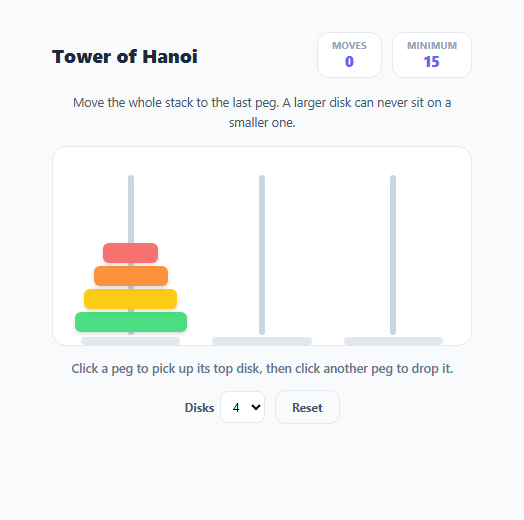
Tower of Hanoi is one of the most famous puzzles in computer science: move an entire stack of differently-sized disks from one peg to another, using a spare peg, moving one disk at a time and never placing a larger disk on top of a smaller one. It is the canonical example used to teach recursion, and its minimum solution length follows the exact formula 2^n - 1 for n disks. This snippet implements the puzzle as a click-to-select, click-to-drop interaction — no drag-and-drop required — along with move counting and a live minimum-moves reference for whatever disk count is selected.
Representing the board as three stacks
The board state lives in a pegs array of three arrays, pegs[0], pegs[1], pegs[2], each holding disk sizes from bottom to top. reset() populates the first peg with every size from numDisks down to 1, pushed in descending order so the largest disk ends up at index 0 (the visual bottom) and the smallest ends up last (the visual top) — matching how Array.push/pop naturally model a stack where the "top" is always the last element.
Click-to-select instead of drag-and-drop
onPegClick(p) implements a two-click interaction: the first click on a non-empty peg sets selectedPeg and highlights it; a second click on a *different* peg attempts the move, while clicking the *same* peg again deselects it. This avoids the complexity and touch-device inconsistency of implementing real drag-and-drop for stacked, differently-sized elements, while still feeling direct and immediate to use.
The one rule that defines the entire puzzle
Before completing a move, the code compares moving (the top disk size of the source peg) against target (the top disk size of the destination peg, or undefined if empty). The move is rejected with visible feedback if target !== undefined && moving > target — in plain terms, if the destination isn't empty and the disk being placed is bigger than what's already there. This single comparison is the entire legality rule of Tower of Hanoi; every other mechanic in the game exists just to support it.
Live minimum-moves reference via 2^n - 1
minMoves(n) returns Math.pow(2, n) - 1, the proven-optimal number of moves required to solve an n-disk Hanoi puzzle (3 disks: 7 moves, 4 disks: 15 moves, and so on, growing exponentially). This value is shown live in the header stats and again in the win message, so the player has a concrete, mathematically exact benchmark to compare their own move count against — turning an abstract recursive result into something tangible during play.
Disk-count difficulty and rendering
The disk-count <select> lets the player choose between 3 and 6 disks, calling reset() on change to rebuild the stacks, recompute the minimum-moves target, and clear all game state. Disk widths are rendered proportionally (30 + (size / numDisks) * 65 percent) so larger disk counts still render a clearly readable size gradient across the stack.
Build with AI
Build, Understand, Optimize, and Extend It With AI
Paste this snippet's HTML, CSS, and JS into an AI coding assistant like Claude and ask it to explain exactly why moving > target is sufficient to enforce every rule of Tower of Hanoi, and how the pegs array of three stacks models the board state so cleanly with just push and pop. It's also a great candidate for extension — ask the assistant to implement the classic recursive solver and animate it move-by-move as an auto-solve demonstration, add a step-by-step hint system based on that same recursive algorithm, or add keyboard controls (arrow keys plus Enter) as an alternative to clicking pegs.
Prompt to recreate it
Copy this into your AI assistant of choice to build the effect from scratch, or as a jumping-off point for your own variant:
Build a Tower of Hanoi puzzle game in plain HTML, CSS, and JavaScript — no libraries, no drag-and-drop, click-to-select interaction only.

Requirements:
- Model the board as three stacks (arrays) of disk sizes, with the puzzle starting fully stacked in descending size order (largest at the bottom) on the first peg, and the goal being to move the entire stack onto the third peg.
- Clicking a peg with at least one disk selects it as the source and visually highlights it; clicking the same peg again deselects it; clicking a different peg attempts to move the top disk from the selected source peg onto it.
- A move must be rejected with a clear inline message if the destination peg is not empty and its top disk is smaller than the disk being moved — this is the one rule of the game and must be enforced by a simple comparison between the two top disk sizes.
- Track and display a live move counter that increments only on legal, completed moves.
- Compute and display the mathematically optimal minimum number of moves for the current number of disks using the formula 2^n - 1, and show it next to the live move counter for comparison.
- Add a disk-count selector (e.g. 3 to 6 disks) that rebuilds the board, resets the move counter, and recalculates the minimum-moves value when changed, plus a separate Reset button that restarts the current disk count without changing it.
- Detect the win condition the instant all disks are stacked correctly on the third peg, and show a message confirming the puzzle was solved along with how many moves it took compared to the optimal count.
Want to tighten it up first? Run this prompt through the AI Prompt Studio to score it across 8 quality dimensions, catch anti-patterns, and tune the wording for Claude, ChatGPT, or Gemini before you paste it in.
Step by step
How to Use
- 1Click a peg to pick up its top diskClicking a peg with disks on it sets selectedPeg and highlights the peg and its top disk.
- 2Click a different peg to drop itThe move only succeeds if the destination peg is empty or its top disk is larger than the one you are moving — enforced by the moving > target check.
- 3Move the whole stack to the last pegcheckWin() watches pegs[2].length === numDisks, so the puzzle is solved the instant every disk sits on the rightmost peg.
- 4Compare against the minimumThe header shows the proven-optimal move count from minMoves(n) = 2^n - 1 for the current disk count, so you can measure your own efficiency.
- 5Change the disk countUse the Disks dropdown to pick 3 to 6 disks — this calls reset() and recalculates the minimum-moves target automatically.
- 6Reset at any timeClick Reset to rebuild the starting stack on the first peg and clear the move counter without changing the disk count.
Real-world uses
Common Use Cases
Got questions?
Frequently Asked Questions
A move is illegal only if the destination peg is not empty and its top disk is smaller than the disk being moved. This is checked with a single comparison: target !== undefined && moving > target, where moving and target are the top disk sizes of the source and destination pegs.
minMoves(n) returns Math.pow(2, n) - 1, the proven-optimal solution length for an n-disk Tower of Hanoi puzzle. For 4 disks (the default), that is 15 moves; for 6 disks, 63 moves.
Click-to-select (pick a source peg, then a destination peg) is simpler to implement correctly across mouse and touch devices than drag-and-drop with stacked, variably-sized elements, while still feeling direct — click once to pick up, click again to place.
Use the Disks dropdown in the actions row. Selecting a new value calls reset(), which rebuilds all three peg stacks from scratch on the first peg and recalculates the minimum-moves target for that disk count.
Yes — implement the classic recursive Hanoi algorithm (move n-1 disks to the spare peg, move the largest disk to the target, move the n-1 disks from the spare peg to the target) and step through the resulting move list, calling the same peg-to-peg move logic used by onPegClick.
Clicking the currently selected peg a second time deselects it (selectedPeg is set back to null) instead of attempting an invalid same-peg move, and the feedback message confirms the selection was cleared.