You Might Also Like
Learn Coding Visually
Learn to code with interactive, live-preview playgrounds — HTML, CSS, JavaScript, React & more.
 HTML Playground42 lessons · Click-based · Live preview
 CSS PlaygroundLearn CSS with a live editor
 JavaScript Playground60 lessons · DOM · Async · Canvas
 React PlaygroundLearn React with a live code editor
 GSAP PlaygroundLearn GSAP animation interactively
 SVG Playground44 lessons · shapes · paths · animation
 SCSS Playground45 lessons · Sass modules · tokens
 Tailwind PlaygroundLearn Tailwind CSS with a live editor
 Bootstrap 5 Playground50 lessons · live preview
Maze Runner Arrow-Key Game — Free HTML CSS JS Snippet
Maze Runner Arrow-Key Game · Games · Plain HTML, CSS & JS · Live preview
What's included
Features
About this UI Snippet
Maze Runner Arrow-Key Game — Recursive Backtracking Maze Generation with Real Wall Collision
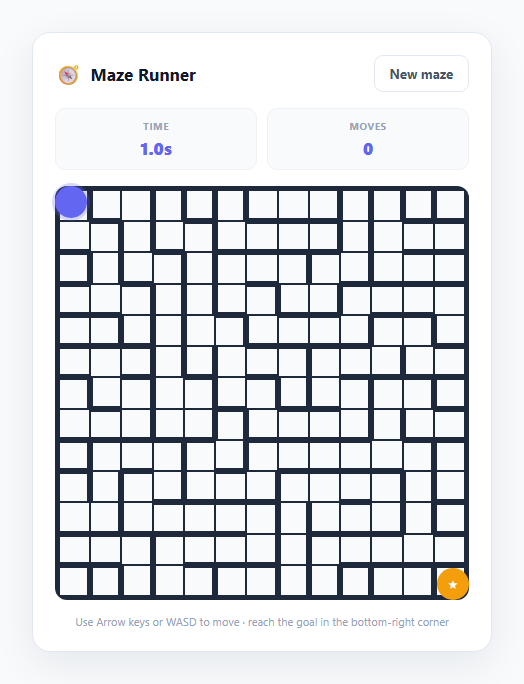
Procedural maze generation is one of the most rewarding small algorithms to implement because the result is instantly verifiable — you can see, and play, whether the maze actually works. This snippet builds a genuinely playable maze runner: a fresh 13×13 maze is generated on every load using recursive backtracking (a randomised depth-first search), rendered as a CSS grid of walled cells, and navigated with real per-cell wall-collision checking rather than a simulated or pre-baked path.
How recursive backtracking generates a solvable maze
The algorithm starts by treating every cell as a sealed room — each cell begins with all four walls (N | E | S | W, stored as a 4-bit bitmask) intact. generateMaze() pushes the starting cell [0, 0] onto a stack and marks it visited. On each iteration, it looks at the cell on top of the stack, shuffles the four compass directions into random order via a Fisher-Yates shuffle (shuffleDirs()), and tries each one in turn looking for an unvisited neighbour. When it finds one, it knocks down the wall between the current cell and that neighbour — by clearing the matching bit on both cells' wall masks using cells[cy][cx].walls &= ~dir and the opposite direction on the neighbour — marks the neighbour visited, and pushes it onto the stack. If none of the four directions leads to an unvisited neighbour, the algorithm pops the current cell off the stack and backtracks, trying again from there. This continues until the stack empties, at which point every cell has been visited exactly once.
Why this guarantees a maze with exactly one path between any two points
Because a wall is only removed when moving from a visited cell to a *previously unvisited* one, the set of removed walls forms a spanning tree over the grid graph — connected, with no cycles. A spanning tree by definition has exactly one path between any two nodes, so this is what guarantees the maze is always fully solvable, with no dead-end ambiguity about which corridor is "correct."
Rendering walls without drawing lines
Rather than drawing wall segments with borders or SVG lines, each .maze-cell is rendered as a dark background square containing a smaller white .cell-inner square inset by 1px on all sides by default. When a cell's bitmask indicates an open passage in a given direction (checked with !(cell.walls & N), etc.), a corresponding class like .wall-top extends that one edge of the inner square outward to meet the neighbouring cell's inner square, visually merging the two into one open corridor — walls are simply the dark grid background showing through the 1px gaps, a lightweight technique needing no canvas or SVG.
Movement and real collision checking
The player and goal are absolutely positioned circular markers layered on top of the grid, each sized and positioned as a percentage of the grid (100 / SIZE) so they align perfectly with cell boundaries regardless of container size. tryMove(dir) is the collision gate: before updating playerX/playerY, it calls canMove(), which checks whether the current cell's wall bitmask has the requested direction's bit cleared. If the bit is still set (a wall exists), the move is silently rejected — this is genuine per-cell wall data driving movement, not a visual-only maze with unrestricted player motion. Arrow keys and WASD are both mapped to the same four direction constants via a single KEY_DIR lookup table.
Timer, move counter, and regeneration
A setInterval ticking every 100ms updates an elapsed-time display from Date.now() - startTime, and every accepted move increments a visible move counter. Reaching the bottom-right cell triggers handleWin(), which stops the timer and shows a win overlay with the final time and move count. New maze calls generateMaze() again with a fresh random seed, producing an entirely different, independently solvable layout every time.
Build with AI
Build, Understand, Optimize, and Extend It With AI
Paste this snippet's HTML, CSS, and JS into an AI coding assistant like Claude and ask it to explain step by step how generateMaze()'s stack-based recursive backtracking guarantees a spanning tree, and how the wall bitmask on each cell is read both for rendering (renderMaze()) and for movement (canMove()). It's a great candidate for extension — ask the assistant to add a fog-of-war visibility radius around the player, generate a shortest-path solution overlay using breadth-first search for a "show hint" button, add collectible items at algorithmically-detected dead ends, or implement a date-seeded pseudo-random generator so every player gets an identical daily maze for leaderboard comparison. You could also ask it to profile whether the DOM-based rendering approach (one div per cell) would benefit from a canvas rewrite at much larger maze sizes, or to review the bitmask wall representation for any edge cases at the grid boundaries. Use it to interrogate and reshape the algorithm, not just to copy the code as-is.
Prompt to recreate it
Copy this into your AI assistant of choice to build the effect from scratch, or as a jumping-off point for your own variant:
Build a procedurally generated maze game in plain HTML, CSS, and JavaScript with arrow-key navigation and real wall collision — no frameworks, canvas, or external libraries required.

Requirements:
- Generate a grid-based maze (roughly 11x11 to 15x15 cells) using a real recursive backtracking / randomized depth-first search algorithm: start from one cell, randomly visit unvisited neighboring cells while carving a passage (removing the wall) between the current and new cell, and backtrack when a cell has no unvisited neighbors, continuing until every cell has been visited. This must guarantee the maze is always fully solvable with exactly one path between any two cells (no loops, fully connected).
- Represent each cell's walls in a way that both the visual rendering and the movement logic read from the same source of truth, so there is no possibility of a mismatch between what's drawn and what blocks movement.
- Render the maze as a grid of cells with visible walls/passages reflecting the generated layout, plus a distinct player marker starting at the top-left cell and a distinct goal marker at the bottom-right cell.
- Support movement via both Arrow keys and WASD, with real collision checking: an attempted move must be silently blocked if a wall exists between the player's current cell and the target cell in that direction, not just visually obstructed.
- Include a live running timer (updating at least every second) and a move counter that increments only on successful, unblocked moves.
- Detect when the player reaches the goal cell and show a clear win message including the final elapsed time and total move count, pausing further movement until a new maze is started.
- Provide a "New maze" control that generates a completely fresh random maze layout using the same algorithm and resets the player position, timer, and move counter.
Want to tighten it up first? Run this prompt through the AI Prompt Studio to score it across 8 quality dimensions, catch anti-patterns, and tune the wording for Claude, ChatGPT, or Gemini before you paste it in.
Step by step
How to Use
- 1Navigate with Arrow keys or WASDPress ArrowUp/W, ArrowRight/D, ArrowDown/S, or ArrowLeft/A to move the indigo player marker one cell at a time. tryMove() checks canMove() before allowing the move, so you are physically blocked by any wall the maze generator left standing.
- 2Reach the goal markerThe amber star marker sits in the bottom-right cell. Reaching that exact cell triggers handleWin(), which stops the timer and shows a win overlay with your final time and move count.
- 3Watch the live timer and move counterA setInterval ticking every 100ms updates the Time stat from Date.now() - startTime as soon as a new maze loads. The Moves stat increments only on successful (unblocked) moves, so bumping into a wall does not count against you.
- 4Generate a fresh maze at any timeClick "New maze" to call generateMaze() again with SIZE set to 13x13, producing a completely different randomised layout via recursive backtracking, resetting the player to the top-left, and restarting the timer from zero.
- 5Replay after winningOn the win overlay, click "Play again" to trigger the same newMaze() reset — a new maze, timer, and move counter, with the win overlay hidden again — so you can immediately attempt a fresh layout.
- 6Adjust maze size or corridor renderingChange the SIZE constant in the JS panel to any odd or even number (larger values create a harder, longer maze). The .maze-cell and .cell-inner CSS controls corridor thickness — reduce the inset value for thinner walls or increase it for a more open feel.
Real-world uses
Common Use Cases
grid-template-columns/rows, while the player and goal markers show how to layer freely positioned elements over a grid using percentage-based coordinates rather than pixel maths — a technique reusable in any grid-aligned overlay UI.&, |, ~) used for genuinely practical state tracking.Got questions?
Frequently Asked Questions
Every wall removal happens exactly once, when the algorithm moves from an already-visited cell into a brand-new unvisited one. Because no wall is ever removed between two cells that are both already visited, the resulting graph of open connections is a spanning tree — connected (every cell reachable) with zero cycles. A connected, cycle-free graph has exactly one path between any two nodes, which is precisely the property that makes the maze solvable and unambiguous.
Change the SIZE constant near the top of the JS panel — it controls both the grid dimensions (SIZE × SIZE cells) and, together with the CSS aspect-ratio: 1/1 rule on .maze-grid, the automatic per-cell sizing. Larger values like 21 create a substantially longer, harder maze since recursive backtracking on more cells produces more twisting corridors; smaller values like 7 create a quick, easy maze suitable for younger players.
Yes — add a CSS radial-gradient mask or an overlay div with a transparent circular cutout centred on the player's pixel position (derived the same way positionMarkers() computes percentage coordinates), updated on every tryMove() call. This is a common difficulty-increasing variant that forces players to rely on memory and exploration rather than seeing the full maze layout upfront.
No — the while (stack.length) loop is bounded because every cell can be pushed onto the stack at most once (cells are only pushed when newly marked visited), and the loop terminates precisely when the stack empties after all SIZE × SIZE cells have been visited and backtracked through. There is no scenario where the algorithm revisits a cell or loops indefinitely.
canMove(x, y, dir) checks the actual wall bitmask stored on the current cell: grid[y][x].walls & dir evaluates to a non-zero value only if that direction's wall bit is still set. tryMove() calls this check before updating playerX/playerY, so an attempted move into a standing wall is rejected before any position change happens — the collision logic operates on the same data structure used to render the walls, so what you see is exactly what blocks movement.