You Might Also Like
Learn Coding Visually
Learn to code with interactive, live-preview playgrounds — HTML, CSS, JavaScript, React & more.
 HTML Playground42 lessons · Click-based · Live preview
 CSS PlaygroundLearn CSS with a live editor
 JavaScript Playground60 lessons · DOM · Async · Canvas
 React PlaygroundLearn React with a live code editor
 GSAP PlaygroundLearn GSAP animation interactively
 SVG Playground44 lessons · shapes · paths · animation
 SCSS Playground45 lessons · Sass modules · tokens
 Tailwind PlaygroundLearn Tailwind CSS with a live editor
 Bootstrap 5 Playground50 lessons · live preview
Quick Math Arithmetic Game — Free HTML CSS JS Snippet
Quick Math Arithmetic Game · Games · Plain HTML, CSS & JS · Live preview
What's included
Features
About this UI Snippet
Quick Math Arithmetic Game — Timed Arithmetic Quiz with Live Feedback and localStorage Best Score
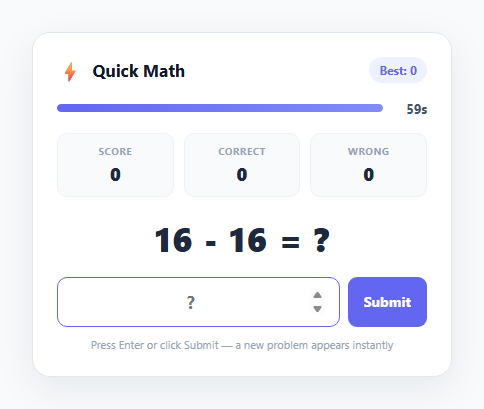
Speed-arithmetic games like this one are a staple of mental maths practice apps because they combine two things that make casual games sticky: a hard time constraint and instant right/wrong feedback. This snippet builds a complete 60-second rapid-fire arithmetic quiz in vanilla JavaScript — random addition, subtraction, and multiplication problems, a live countdown, immediate visual feedback on every submission, and a persisted best score using localStorage so returning players have something to beat.
Problem generation and difficulty-appropriate ranges
generateProblem() randomly selects one of three operators — addition, subtraction, or multiplication — and generates operands within ranges chosen specifically to keep each problem type roughly equally difficult under time pressure. Addition and subtraction use operands from 1 to 50, which keeps sums in a comfortably mental-maths range without ever needing carrying-heavy three-digit arithmetic. Subtraction specifically generates b as randInt(1, a), which guarantees a - b is always non-negative — the game deliberately avoids negative-number answers to keep the input format simple (a plain numeric field, no minus-sign parsing ambiguity). Multiplication uses the classic 1-to-12 times-table range, matching how most people actually memorise multiplication facts, which keeps multiplication problems fast to solve rather than requiring long multiplication.
The countdown timer and its visual language
A setInterval running once per second decrements timeLeft and updates both a numeric 60s-style label and a horizontal progress bar whose width is set to (timeLeft / GAME_SECONDS) * 100 percent. In the final ten seconds, a .low class swaps the bar's gradient from the indigo accent to a red gradient, giving players a clear, low-cost visual cue that time is running out without needing to read the numeric label. When timeLeft reaches zero, endGame() fires immediately, stops the interval, and swaps the play area for a results summary — there is no grace period, matching how real speed-round games behave.
Instant feedback without breaking flow
Every submission — whether via the Submit button or the Enter key on the numeric input — is handled by a single handleSubmit() function that parses the input, compares it to currentAnswer, and immediately calls generateProblem() regardless of whether the answer was right or wrong, so play never pauses to wait for acknowledgement. Correct answers trigger a green colour flash on the problem text via a .flash-correct class; incorrect answers trigger a red CSS shake keyframe animation via .flash-wrong. Both classes are removed and a layout reflow is forced with void playArea.offsetWidth before re-adding the class, which is the standard trick for restarting a CSS animation that was already applied on the previous problem — without it, two wrong answers in a row would only animate once.
Scoring, accuracy, and the results screen
The game tracks three separate counters: answered (total problems submitted), correct (correct answers), and a derived score that in this implementation equals correct — each correct answer is worth one point, keeping the scoring model transparent and easy to read at a glance during play. When the timer expires, the results screen computes accuracy as Math.round((correct / answered) * 100) and displays answered count, correct count, and accuracy percentage side by side.
Persisting a best score with localStorage
getBest() and setBest() wrap localStorage.getItem/setItem in try/catch blocks (some browser contexts, like sandboxed iframes with storage disabled, throw on access) around a single numeric key, quick-math-best-score. At the end of each round, if the current correct count exceeds the stored best, the game updates localStorage, refreshes the header badge, and shows a "New best score!" message — the score persists across page reloads and browser sessions since localStorage survives until explicitly cleared, unlike sessionStorage or in-memory state.
Build with AI
Build, Understand, Optimize, and Extend It With AI
Paste this snippet's HTML, CSS, and JS into an AI coding assistant like Claude and ask it to walk through how generateProblem(), the setInterval-driven tick(), and the localStorage best-score functions fit together across a full 60-second round. It's a strong candidate for extension — ask the assistant to add a division operator with whole-number-safe generation, introduce difficulty tiers (easy/medium/hard) that change the operand ranges, or add a combo/streak multiplier that rewards several correct answers in a row with bonus points. You could also ask it to review the setInterval cleanup logic for edge cases, such as what happens if a user clicks Play Again rapidly, or to help port the timer and feedback-flash logic into a React component using useEffect and useState instead of direct DOM manipulation. Use it as a jumping-off point for a real conversation about the tradeoffs in this implementation, not as a black box to copy unmodified.
Prompt to recreate it
Copy this into your AI assistant of choice to build the effect from scratch, or as a jumping-off point for your own variant:
Build a 60-second rapid-fire arithmetic quiz game in plain HTML, CSS, and JavaScript with a live countdown timer and a persisted best score — no frameworks or libraries.

Requirements:
- Randomly generate addition, subtraction, or multiplication problems with difficulty-appropriate operand ranges (e.g. 1-50 for addition/subtraction, 1-12 for multiplication), ensuring subtraction never produces a negative answer.
- A numeric input for the answer, submittable via both the Enter key and a Submit button, that checks correctness immediately on submit and generates the next problem instantly with no pause, regardless of whether the answer was right or wrong.
- Clear, re-triggerable visual feedback for each submission: a distinct success state (e.g. a green flash) for correct answers and a distinct error state (e.g. a shake animation) for incorrect ones, both of which must visibly restart even when the same outcome happens on consecutive problems.
- A visible countdown timer starting at 60 seconds, shown as both a numeric label and a progress bar that visually communicates urgency as time runs low (e.g. changing color in the final seconds).
- When the timer reaches zero, end the round immediately, disable further answer submission, and show a results summary with total problems answered, number correct, and accuracy percentage, plus a "Play again" button that fully resets the timer and all counters.
- Persist the best score (most correct answers achieved in a single round) using localStorage, wrapped defensively in case storage access throws, and display it in the UI at all times, updating it and showing a "new best" indicator whenever the current round beats the stored value.
Want to tighten it up first? Run this prompt through the AI Prompt Studio to score it across 8 quality dimensions, catch anti-patterns, and tune the wording for Claude, ChatGPT, or Gemini before you paste it in.
Step by step
How to Use
- 1Answer problems as fast as you canA random addition, subtraction, or multiplication problem appears in generateProblem(). Type your answer into the numeric input and press Enter or click Submit — handleSubmit() checks it immediately and generates the next problem with zero delay, so keep typing without pausing.
- 2Watch the live countdown barThe horizontal timer-fill bar and the numeric label both count down from 60 seconds via a setInterval tick() call. In the final 10 seconds the bar switches to a red gradient using the .low class as an urgency cue.
- 3Read the instant right/wrong feedbackA correct answer flashes the problem text green via the flash-correct class; an incorrect answer triggers a red shake animation via flash-wrong. Both are re-triggered on every submission using a forced reflow (void playArea.offsetWidth) so consecutive same-outcome answers still animate.
- 4Review your results when time runs outWhen timeLeft hits zero, endGame() stops the timer and shows problems answered, correct count, and accuracy percentage (Math.round((correct / answered) * 100)). Click "Play again" to call startGame() and reset the timer, score, and problem generator.
- 5Beat your persisted best scoreThe Best badge in the header reads from localStorage via getBest(). If your correct count this round beats the stored best, setBest() updates localStorage and a "New best score!" message appears on the results screen — this persists across page reloads.
- 6Adjust difficulty and durationChange GAME_SECONDS at the top of the JS panel to make rounds longer or shorter. Adjust the randInt() ranges inside generateProblem() — e.g. raise addition/subtraction to randInt(1, 100) or the multiplication range to randInt(1, 20) — to tune difficulty for different age groups or skill levels.
Real-world uses
Common Use Cases
Got questions?
Frequently Asked Questions
The subtrahend b is generated as randInt(1, a) — a random integer between 1 and the already-chosen minuend a — which guarantees a - b is always zero or positive. This is a deliberate design choice to keep the answer input a plain non-negative numeric field; supporting negative answers would require either a signed-number keypad affordance or extra input parsing for a leading minus sign.
Add '÷' to the ops array, and inside the operator branch generate the answer first and derive the operands from it to guarantee a whole-number result: const answer = randInt(1, 12); const b = randInt(1, 12); const a = answer * b; currentAnswer = answer; then display a + ' ÷ ' + b + ' = ?'. Generating from the answer outward avoids fractional results, which the numeric-only input cannot represent.
Yes. The best score is stored under the localStorage key quick-math-best-score, which is scoped to the browser and origin — clearing site data, using a different browser, or playing in a private/incognito window all start best-score tracking fresh. To sync a best score across devices you would need to send it to a backend and associate it with a user account.
Yes — change the GAME_SECONDS constant at the top of the JS panel to any value in seconds, for example 30 for a faster round or 120 for an extended session. The timer bar, numeric label, and low-time red-gradient threshold (currently the final 10 seconds) all derive from GAME_SECONDS automatically, so no other code needs to change.
In this implementation score and correct always move together — every correct answer adds exactly one to both. They are tracked as separate variables so you can extend the scoring model independently later, for example weighting multiplication problems higher than addition, or adding a speed bonus for very fast consecutive correct answers, without having to change how the correct-answer accuracy statistic is calculated.