You Might Also Like
Learn Coding Visually
Learn to code with interactive, live-preview playgrounds — HTML, CSS, JavaScript, React & more.
 HTML Playground42 lessons · Click-based · Live preview
 CSS PlaygroundLearn CSS with a live editor
 JavaScript Playground60 lessons · DOM · Async · Canvas
 React PlaygroundLearn React with a live code editor
 GSAP PlaygroundLearn GSAP animation interactively
 SVG Playground44 lessons · shapes · paths · animation
 SCSS Playground45 lessons · Sass modules · tokens
 Tailwind PlaygroundLearn Tailwind CSS with a live editor
 Bootstrap 5 Playground50 lessons · live preview
Rhythm Tap Game — Free HTML CSS JS Snippet
Rhythm Tap Game · Games · Plain HTML, CSS & JS · Live preview
What's included
Features
About this UI Snippet
Rhythm Tap Game — Falling-Note Timing Windows, Combo Streaks & Nearest-Note Hit Detection
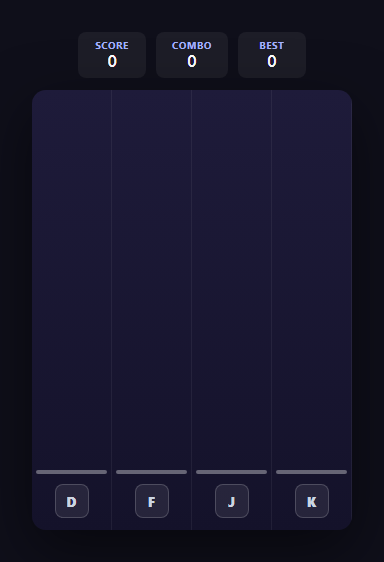
Rhythm games boil down to one core mechanic done well: judging how close a player's input is to a moving target in time, then translating that closeness into a graded result. This snippet implements a genuine four-lane falling-note rhythm game — no audio library, no timing engine dependency, just requestAnimationFrame, delta-time movement, and a nearest-note matching algorithm that decides what counts as a Perfect, a Good, or a Miss.
Falling notes driven by delta time
Every note is a small div absolutely positioned inside its lane's track, spawned at spawnNote() with a starting y of roughly -24px (just above the visible stage). Each frame of the game loop advances every unhit note's y position by NOTE_SPEED * dt, where dt is the real elapsed seconds since the previous frame — exactly the same delta-time approach used in the Flap & Dodge Obstacle Game snippet — so notes fall at a constant real-world speed no matter the device's refresh rate. Notes are spawned into a random lane on a fixed real-time interval (SPAWN_INTERVAL) up to a total of TOTAL_NOTES, giving the run a simple but genuine fixed pattern without needing an actual audio track to sync against.
Judging a hit: nearest note, distance-based grading
When a lane's key is pressed, laneKeyDown() does not simply check "is any note near the line" — it scans every unhit note currently in that lane and finds the one whose vertical distance from the hit line is smallest, because more than one note could theoretically be near the line in a dense pattern. If that closest note's distance falls within GOOD_WINDOW pixels, it counts as a hit; if it falls within the tighter PERFECT_WINDOW, it is upgraded to a Perfect. This two-tier distance check is the same principle every rhythm game from arcade cabinets to mobile hits uses, just expressed in pixels-from-the-line instead of milliseconds-from-the-beat, since this snippet is deliberately visual-timing-only rather than audio-synced.
Combo streaks and score weighting
A successful hit increments a combo counter and both Perfect and Good hits scale their score reward by the current combo (100 + combo * 2 for Perfect, 50 + combo for Good), rewarding sustained accuracy the way real rhythm games do. Missing — whether by a note scrolling past the hit line unhit, tracked in the game loop as note.y > hitLineY + GOOD_WINDOW + NOTE_HEIGHT, or simply never pressing the right key in time — resets combo back to zero immediately, breaking the streak. The best combo achieved is compared against the running value on every successful hit and persisted to localStorage the moment a new record is set, so it survives page reloads.
Ending the run and reporting accuracy
The run considers itself finished once notesSpawned reaches TOTAL_NOTES and the notes array is empty (meaning every spawned note has either been hit or has scrolled past and been counted as a miss). endRun() then computes a simple accuracy percentage from hits divided by total judged notes and renders a summary breaking down Perfect, Good, and Miss counts alongside the final score and best combo — giving the player a clear, honest readout of how the run actually went rather than just a single number.
Build with AI
Build, Understand, Optimize, and Extend It With AI
Paste this snippet's HTML, CSS, and JS into an AI coding assistant like Claude and ask it to explain exactly how laneKeyDown() picks which note to judge when a key is pressed — the "closest unhit note in this lane" search is the crux of the whole timing system, and understanding it makes every other rhythm-game mechanic easier to reason about. It's also a great snippet to extend with AI assistance: ask it to build a real beatmap-driven variant using the Web Audio API's currentTime as the timing source instead of a fixed spawn interval, add a difficulty mode that shortens the spawn interval and tightens the Perfect/Good windows as the run progresses, or add a visual multiplier badge that appears once your combo crosses certain thresholds. Ask the assistant to sanity-check the miss-detection boundary condition too, since off-by-one errors there are easy to introduce.
Prompt to recreate it
Copy this into your AI assistant of choice to build the effect from scratch, or as a jumping-off point for your own variant:
Build a four-lane falling-note rhythm tap game in plain HTML, CSS, and JavaScript — no frameworks, no libraries, and no real audio/music sync required (visual timing only).

Requirements:
- Four vertical lanes, each mapped to one keyboard key (for example D, F, J, K), with the key shown as an on-screen label at a fixed "hit line" near the bottom of its lane.
- Notes spawn at the top of a randomly chosen lane on a timed schedule and fall downward at a constant speed, using requestAnimationFrame with delta-time-based movement so speed is not tied to frame rate.
- Pressing the correct lane's key while a note is within a small timing window of the hit line must register as a hit, removing that note and awarding a graded result (for example "Perfect" for very close timing versus "Good" for looser timing) rather than a single flat hit result.
- A note that passes the hit line without being hit must count as a "Miss" and immediately reset the current combo streak to zero.
- Track and display a live score, the current combo streak, and the best combo achieved, persisting the best combo across page reloads using localStorage.
- Include a "Start" button that begins spawning notes on a simple fixed pattern, and automatically end the run after a fixed number of notes (for example 30) or a fixed duration, showing a final summary with accuracy percentage and a breakdown of Perfect/Good/Miss counts.
- Support both a physical keydown listener for the mapped keys and a click/tap fallback directly on each lane for touch devices.
Want to tighten it up first? Run this prompt through the AI Prompt Studio to score it across 8 quality dimensions, catch anti-patterns, and tune the wording for Claude, ChatGPT, or Gemini before you paste it in.
Step by step
How to Use
- 1Start a runClick "Start" on the opening screen. Notes begin spawning into a random lane on a fixed interval (SPAWN_INTERVAL) and immediately start falling toward the hit line at the bottom.
- 2Watch the four lanesEach of the four lanes is mapped to a key — D, F, J, K — shown as an on-screen label at the bottom hit line of its lane, matching the classic rhythm-game control layout.
- 3Hit notes as they cross the linePress the matching key (or click/tap the lane) the moment a falling note reaches the hit line. laneKeyDown() finds the closest unhit note in that lane and grades it Perfect or Good based on how close it is to the line.
- 4Chain hits into a comboConsecutive successful hits build a combo streak shown in the HUD, and both Perfect and Good hits award more score the higher your current combo climbs.
- 5Avoid breaking your streakA note that scrolls past the hit line without being pressed in time counts as a Miss, immediately resetting your combo back to zero — shown briefly as red "Miss" feedback text.
- 6Review your accuracy summaryAfter 30 notes have been spawned and resolved, the run ends automatically and shows your final score, Perfect/Good/Miss breakdown, overall accuracy percentage, and your best-ever combo, which persists across sessions via localStorage.
Real-world uses
Common Use Cases
Got questions?
Frequently Asked Questions
When a lane key is pressed, laneKeyDown() finds the closest unhit note currently in that lane by comparing each note's vertical distance from the hit line. If that distance is within PERFECT_WINDOW (14px), the hit is graded Perfect and scores 100 plus a combo bonus; if it is further but still within GOOD_WINDOW (30px), it is graded Good and scores 50 plus a smaller combo bonus. If no unhit note in that lane is within GOOD_WINDOW of the line, the key press is simply ignored with no penalty.
A Miss is only registered when a spawned note fully scrolls past the hit line without ever being hit, tracked each frame in the game loop by checking note.y against the hit line plus the timing window. Pressing a lane key when no note is currently in range is treated as a harmless "air tap" with no consequence, which matches the leniency most rhythm games offer for slightly early or exploratory key presses, rather than punishing every mistimed press as a full miss.
No — this snippet is deliberately visual-timing-only, spawning notes on a fixed SPAWN_INTERVAL with no audio dependency, as noted in the howToUse steps. To sync it to real music, you would replace the fixed spawn interval with a schedule of timestamps read from an audio analysis or a hand-authored beatmap, and use the Web Audio API's currentTime as the authoritative clock instead of requestAnimationFrame's delta time alone.
bestCombo is compared against the current combo on every successful hit inside laneKeyDown(), and the moment a new record is set it is written to localStorage under the key rhythm-tap-best-combo and immediately reflected in the HUD. To also persist best score, add a similar comparison and localStorage.setItem call inside endRun() (or after every score update) using a separate storage key, following the same pattern used for bestCombo.
Yes. Add a matching key to the LANE_KEYS array (and its display label to LANE_LABELS), duplicate a .rt-lane block in the HTML with the next track id and key label, and add a corresponding track div reference in the JS tracks array. Because spawnNote() picks a random lane using Math.floor(Math.random() * 4), you would also update that 4 to match your new total lane count.