You Might Also Like
Learn Coding Visually
Learn to code with interactive, live-preview playgrounds — HTML, CSS, JavaScript, React & more.
 HTML Playground42 lessons · Click-based · Live preview
 CSS PlaygroundLearn CSS with a live editor
 JavaScript Playground60 lessons · DOM · Async · Canvas
 React PlaygroundLearn React with a live code editor
 GSAP PlaygroundLearn GSAP animation interactively
 SVG Playground44 lessons · shapes · paths · animation
 SCSS Playground45 lessons · Sass modules · tokens
 Tailwind PlaygroundLearn Tailwind CSS with a live editor
 Bootstrap 5 Playground50 lessons · live preview
Word Search Puzzle Grid — Free HTML CSS JS Snippet
Word Search Puzzle Grid · Games · Plain HTML, CSS & JS · Live preview
What's included
Features
About this UI Snippet
Word Search Puzzle Grid — Click-and-Drag Word Placement, Straight-Line Matching, and Puzzle Generation
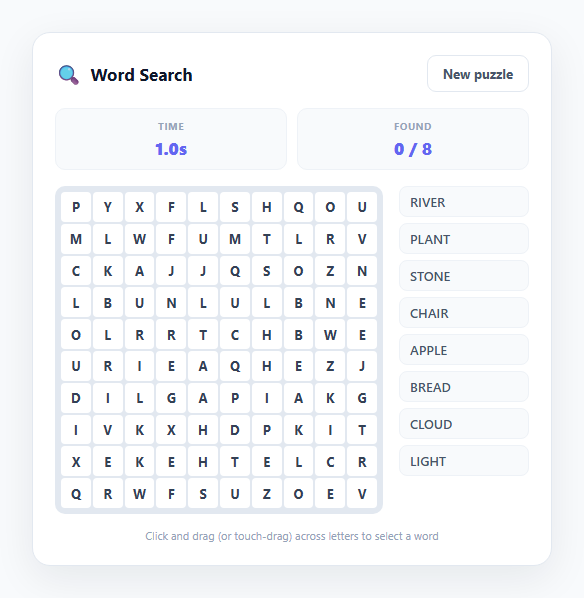
Word search puzzles look simple from the player's side — find the hidden words in a grid of letters — but building one that actually works requires solving two distinct problems: placing words into a grid without illegal overlaps, and detecting a valid straight-line selection dragged across that grid. This snippet solves both from scratch in vanilla JavaScript, producing a genuinely playable 10×10 puzzle with eight target words, click-and-drag (and touch-drag) selection, and permanent per-word highlight colours.
Placing words without silently failing
buildPuzzle() iterates the word list in shuffled order and, for each word, repeatedly attempts a random placement: pick one of three directions — horizontal, vertical, or diagonal down-right — then pick a random starting cell constrained so the word fits fully inside the 10×10 bounds (maxX/maxY subtract the word's length from the grid size along the axis that direction moves). Before committing a placement, the code walks every cell the word would occupy and checks existing !== null && existing !== word[i] — meaning a placement is only rejected if a cell is already occupied by a different letter than the one this word needs there. This deliberately allows words to legitimately cross and share a letter (a common, expected word-search feature) while still preventing letter corruption. Each word gets up to 200 randomised attempts before giving up, which in practice is more than enough headroom for eight words of five letters on a 100-cell grid.
Filling the gaps and the direction set
After every word is placed, any grid cell still null is filled with a uniformly random letter from A-Z. The three supported directions — horizontal (dx:1, dy:0), vertical (dx:0, dy:1), and diagonal down-right (dx:1, dy:1) — cover the requested scope of straight lines in forward orientations without needing to support reversed/backwards placement, keeping the generation logic and the matching logic symmetric and simple.
Detecting a valid drag selection
As the player drags across the grid, cellsBetween(a, b) determines whether the current start and end cell form a legitimate straight line: it computes the sign of the x and y deltas (Math.sign) to get a per-step direction, then rejects the selection if the horizontal and vertical distances aren't equal (which would mean the drag isn't running along a true horizontal, vertical, or 45-degree diagonal). If the line is valid, it builds the ordered list of cells from start to end using that per-step direction — this is the same directional-stepping logic used by the placement algorithm, just running in reverse to validate rather than generate.
Matching in either direction along the line
On release, tryMatchSelection() reads the letters under the selected cells in order (selectionWord()) and also computes the reversed string, then checks both against the list of not-yet-found target words. This means a player can drag a horizontal word either left-to-right or right-to-left, and a vertical word either top-to-bottom or bottom-to-top, and it will still register correctly — natural behaviour for click-and-drag selection where the player doesn't necessarily know which end of a word they'll spot first.
Distinct per-word highlight colours and persistent state
Each placed word is assigned an index at generation time, and a found match adds both a shared .found class and a word-specific .found-N class (mapped to eight distinct accent colours in CSS) to its cells — so once a word is found, its path through the grid stays permanently and distinctly highlighted, and it's struck through in the sidebar checklist via renderWordList(). Touch support uses document.elementFromPoint() to resolve which grid cell is currently under the user's finger during a touchmove, since touch events don't naturally target the element being dragged over the way mouse events do.
Build with AI
Build, Understand, Optimize, and Extend It With AI
Paste this snippet's HTML, CSS, and JS into an AI coding assistant like Claude and ask it to trace exactly how buildPuzzle() places words with retry-based random placement, and how cellsBetween() and tryMatchSelection() together validate a straight-line drag and check it against the word list in both directions. It's a good candidate to extend — ask the assistant to add reversed diagonal directions (bottom-to-top, right-to-left) to the DIRECTIONS array, add a difficulty setting that changes grid size and word count together, implement a hint button that briefly flashes one letter of an unfound word, or add a shareable puzzle seed so two players can solve the exact same grid layout. You could also ask it to review the placement algorithm's retry logic for correctness at higher word counts, or help port the mouse/touch selection handling into a React component using refs instead of raw DOM queries. Use the conversation to genuinely understand and reshape the puzzle generation and matching logic, not just to copy the snippet unexamined.
Prompt to recreate it
Copy this into your AI assistant of choice to build the effect from scratch, or as a jumping-off point for your own variant:
Build a click-and-drag word search puzzle in plain HTML, CSS, and JavaScript with real word placement and straight-line selection matching — no frameworks or libraries.

Requirements:
- Generate a fixed-size letter grid (around 10x10) and randomly place a list of 6-8 target words along real straight lines: horizontal, vertical, and diagonal, in forward orientations only, using a retry-based random placement algorithm that allows legitimate letter overlaps between crossing words but never overwrites a cell with a conflicting letter.
- Fill every remaining empty cell with a random filler letter after all target words are placed.
- Support selecting a word by clicking-and-dragging with the mouse across a straight line of letters, with live visual highlighting of the currently selected cells as the drag progresses, and validate that the drag path is a genuine straight line (horizontal, vertical, or diagonal) before accepting it as a candidate selection.
- Support the same selection interaction via touch-drag on touch devices, resolving which grid cell is under the user's finger as it moves.
- On release, check whether the selected cell sequence spells one of the unfound target words when read in either direction along that line (forwards or backwards), and if so, permanently and distinctly highlight that word's cells (a different color per word is a nice touch) and mark it as found in a sidebar checklist.
- Track and display a live timer and a "words found" counter (e.g. "3 / 8"), and when every target word has been found, show a clear completion message including the total elapsed time.
- Provide a "New puzzle" control that regenerates the grid with a fresh random word placement and filler letters, resetting all found-word state and the timer.
Want to tighten it up first? Run this prompt through the AI Prompt Studio to score it across 8 quality dimensions, catch anti-patterns, and tune the wording for Claude, ChatGPT, or Gemini before you paste it in.
Step by step
How to Use
- 1Find a word by dragging across itClick (or touch) the first letter of a word visible in the grid and drag to its last letter in a straight horizontal, vertical, or diagonal line. cellsBetween() validates the line is genuinely straight as you drag, highlighting the cells in light indigo.
- 2Release to check your selectionReleasing the mouse or lifting your finger calls tryMatchSelection(), which reads the letters under your selection both forwards and backwards and compares them against the unfound target words — so you can drag in either direction along a word's line.
- 3Watch words get permanently highlightedA correct match adds a distinct colour class (found-1 through found-8) to that word's cells, which stays applied for the rest of the puzzle, and strikes the word through in the sidebar checklist via renderWordList().
- 4Track your progress and timeThe Found stat counts foundWords.size against the total word count, and the Time stat ticks up every 100ms from a setInterval started when the puzzle loads. Both reset automatically on New puzzle.
- 5Complete the puzzleFinding all 8 words triggers handleWin(), which stops the timer and shows a win overlay reporting your final elapsed time — click "New puzzle" on that overlay to immediately generate a fresh grid.
- 6Generate a fresh grid at any timeClick "New puzzle" in the header to call newPuzzle(), which reshuffles word order, re-runs the random placement algorithm in buildPuzzle(), refills empty cells with new random letters, and resets found-word state, the timer, and the win overlay.
Real-world uses
Common Use Cases
Got questions?
Frequently Asked Questions
Each word gets up to 200 randomised placement attempts, trying a new random direction and starting position each time, and only committing a placement once every cell along the word's path is either empty or already holds the exact same letter the word needs there. With 8 words of five letters each on a 100-cell grid, this retry budget is comfortably more than enough in virtually all cases; if you significantly increase the word count or word length relative to grid size, you may need to raise the 200-attempt limit or the SIZE constant.
tryMatchSelection() computes both the forward string read from your selected cells and its character-reversed form, then checks each target word against both. This mirrors how people naturally play word search — you often spot the middle or end of a word before its start, and dragging in either direction along the correct line should count as finding it.
Add additional entries to the DIRECTIONS array, such as { dx: 1, dy: -1 } for diagonal up-right — buildPuzzle() already loops over whatever directions exist in that array when placing words, and no other placement code needs to change. Just make sure the maxX/maxY bounds logic in buildPuzzle() correctly accounts for negative dy when computing valid starting rows, since a word placed upward needs enough rows above its start point.
The placement check existing !== null && existing !== word[i] rejects any placement where a cell is already filled with a different letter than the current word needs — so incompatible crossings are simply avoided by trying a different random position or direction on the next attempt, rather than corrupting an already-placed word. This is why placement uses many retry attempts rather than committing to the first randomly chosen position.
Touch events report only the coordinates of the touch point, not which DOM element it is currently over, so the snippet uses document.elementFromPoint(clientX, clientY) inside the touchmove handler to look up whichever .grid-cell element is currently beneath the finger and feeds those coordinates into the same updateSelection() logic used by mouse dragging — meaning mouse and touch share nearly all of the selection code past the initial coordinate lookup.