Learn Coding Visually
Learn to code with interactive, live-preview playgrounds — HTML, CSS, JavaScript, React & more.
 HTML Playground42 lessons · Click-based · Live preview
 CSS PlaygroundLearn CSS with a live editor
 JavaScript Playground60 lessons · DOM · Async · Canvas
 React PlaygroundLearn React with a live code editor
 GSAP PlaygroundLearn GSAP animation interactively
 SVG Playground44 lessons · shapes · paths · animation
 SCSS Playground45 lessons · Sass modules · tokens
 Tailwind PlaygroundLearn Tailwind CSS with a live editor
 Bootstrap 5 Playground50 lessons · live preview
What's included
Features
About this UI Snippet
Battleship Ship-Finding Game — Randomised Fleet Placement, Hit Detection & Accuracy Tracking
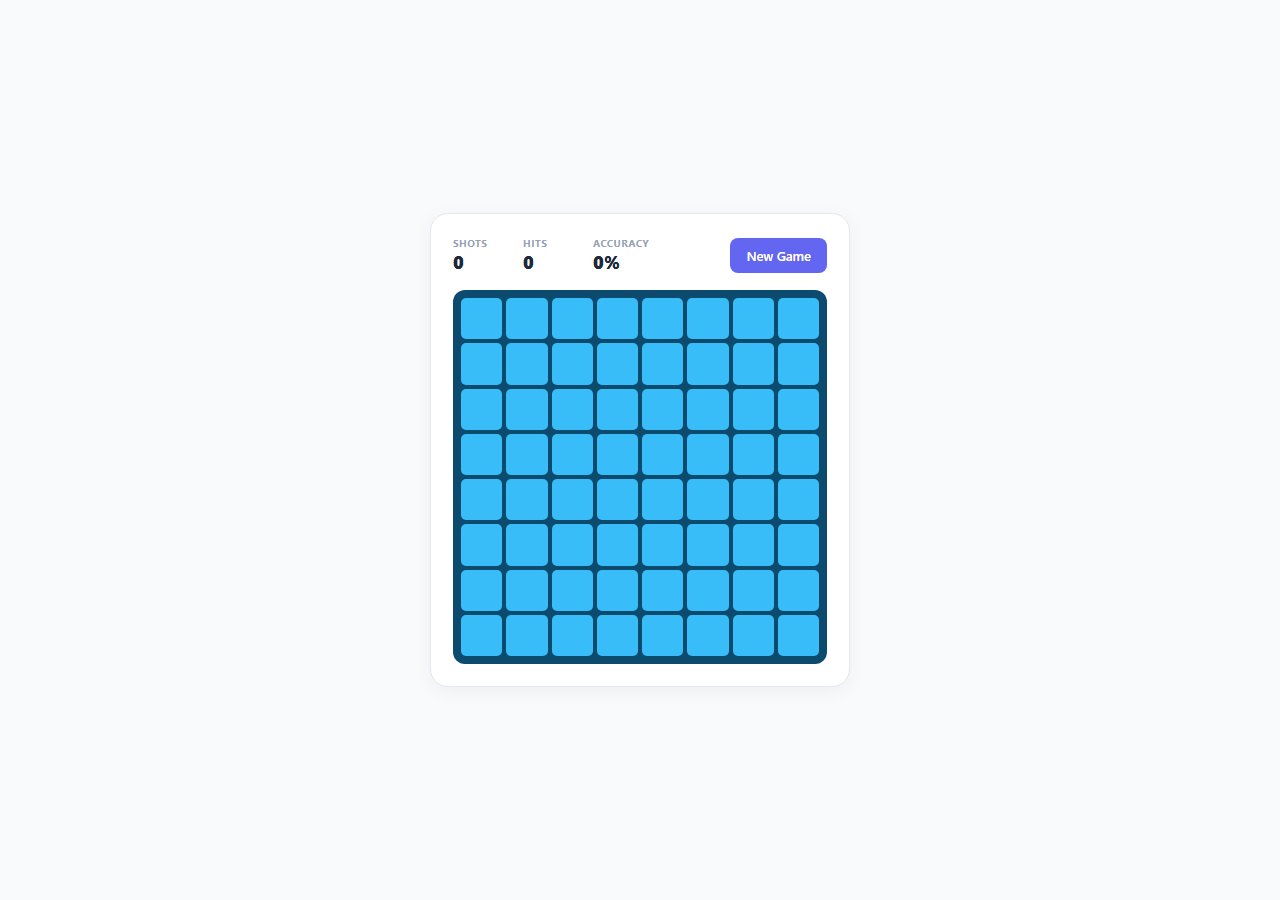
Battleship is one of the oldest "search and destroy" grid games, and building a working single-player version is a genuinely useful exercise in constraint-based random placement, coordinate-based state lookup, and win-condition detection. This snippet implements a complete, playable version entirely in vanilla JavaScript — a hidden fleet is randomly placed on an 8x8 grid with real collision and boundary checking, and the player fires at cells to locate and sink every ship.
Randomised fleet placement with retry-on-collision
The fleet consists of four ships defined in SHIP_DEFS — a 4-cell Carrier, two 3-cell ships (Cruiser and Submarine), and a 2-cell Destroyer — mirroring a simplified version of the classic fleet composition. placeFleet() places each ship in turn: it picks a random starting row and column, a random orientation (horizontal or vertical), computes the full list of cells the ship would occupy, and calls canPlace() to verify every one of those cells is within the 8x8 boundary and currently unoccupied on the board array. If the random placement collides with another ship or runs off the grid, the loop simply tries again with a fresh random position and orientation, up to 200 attempts per ship. Because ship placement order and position are both randomised independently for every new game, no two games have the same fleet layout. placeFleetSafe() wraps the whole process in a retry loop that restarts fleet placement entirely from scratch if any single ship exhausts its attempts (extremely rare on an 8x8 grid with this fleet size, but a real safeguard against ever leaving the game unplayable).
Board representation and coordinate lookup
The hidden board is a 2D array, board[row][col], where each cell holds either null (empty water) or the numeric index of the ship occupying it. This gives instant O(1) lookup of "what ship, if any, lives at this cell" via findShipAt(), which is the core operation every fired shot needs. Each ship object separately tracks its own cells array (its full list of occupied coordinates) and a hits Set of coordinate keys that have been successfully struck — using a Set rather than a counter means the sunk check, ship.hits.size === ship.length, is both correct and cannot be thrown off by a duplicate hit being counted twice.
Firing, hit/miss rendering, and the shot log
Every fired cell is recorded in a shotLog object keyed by a "row-col" string, storing either 'hit' or 'miss' — this both prevents firing at the same cell twice and drives the entire visual re-render. cellState() derives what a cell should look like purely from shotLog and the ship data: a miss renders as a pale dot on a darker water tile, a hit renders as a red cross, and a hit whose owning ship is now fully sunk gets an additional sunk class for a darker red treatment, visually distinguishing "you hit something" from "you finished it off." This derive-from-source-of-truth approach means the render function never needs its own separate tracking state — it always reflects shotLog and ships exactly.
Sunk detection and win condition
After every shot, isShipSunk() compares a ship's accumulated hit count against its length; when they match, a "Ship sunk!" toast names the specific ship. checkWin() runs after every shot and checks whether ships.every(isShipSunk) — only when every ship in the fleet independently satisfies the sunk condition does the game declare victory, at which point it reports the final accuracy percentage, calculated as hits / shotsFired, rounded to the nearest whole percent.
Why this is a strong constraint-placement exercise
The interesting engineering problem in Battleship isn't the UI, it's guaranteeing a valid random layout under real constraints (no overlaps, no out-of-bounds cells, both orientations supported) without ever falling into an infinite loop or producing an invalid board. The retry-with-attempt-cap pattern used here — try random placement, validate, retry on failure, cap total attempts — is broadly reusable any time you need procedurally generated content that must satisfy hard non-overlap constraints, from level generation to seating charts.
Build with AI
Build, Understand, Optimize, and Extend It With AI
Paste this snippet's HTML, CSS and JS into an AI coding assistant like Claude and ask it to explain exactly how placeFleet() avoids overlapping ships and what happens in the rare case a placement keeps failing — tracing through canPlace() and the retry-with-attempt-cap logic is a good way to understand defensive procedural generation. You could also ask it to add a simple "hunt and target" AI opponent that fires back at your own hidden fleet between turns, add a visual ship-placement phase where the player manually places their own fleet with drag-and-drop before the computer's fleet is generated, or extend the accuracy stats with a "shots remaining until guaranteed sink" probability hint based on which cells are already ruled out. Each is a natural next step once the core hit-detection and placement logic already works correctly.
Prompt to recreate it
Copy this into your AI assistant of choice to build the effect from scratch, or as a jumping-off point for your own variant:
Build a single-player Battleship-style grid game in plain HTML, CSS, and JavaScript with genuine randomised fleet placement — no frameworks, no libraries.

Requirements:
- An 8x8 (or similar) grid and a fleet of at least 4 ships of varying lengths (e.g. 4, 3, 3, 2 cells), placed with real random position and orientation (horizontal or vertical) selection per ship.
- A placement algorithm with real collision and boundary detection: no two ships may overlap, no ship may extend off the grid, and failed placement attempts must retry with a new random position/orientation rather than silently allowing an invalid placement.
- Click-to-fire interaction where each cell can only be fired at once; a hit renders with a distinct visual marker from a miss, and already-fired cells become non-interactive.
- Per-ship hit tracking so that when every cell of a specific ship has been hit, a "Ship sunk!" notification appears naming that specific ship (not just a generic hit message).
- Live stats showing total shots fired, total hits, and a calculated accuracy percentage (hits divided by shots fired), updating after every shot.
- Win detection that fires only when every ship in the fleet is fully sunk, showing a final summary with shot count and accuracy.
- A "New Game" action that re-places the entire fleet randomly and resets all stats and grid state cleanly.
- Ensure the game state (which ship occupies which cell, which cells have been hit) is the single source of truth, with all rendering derived from it rather than tracked separately.
Want to tighten it up first? Run this prompt through the AI Prompt Studio to score it across 8 quality dimensions, catch anti-patterns, and tune the wording for Claude, ChatGPT, or Gemini before you paste it in.
Source Code
<div class="demo-wrap">
  <div class="game-panel">
    <div class="hud">
      <div class="hud-stat"><span class="hud-label">Shots</span><span class="hud-value" id="stat-shots">0</span></div>
      <div class="hud-stat"><span class="hud-label">Hits</span><span class="hud-value" id="stat-hits">0</span></div>
      <div class="hud-stat"><span class="hud-label">Accuracy</span><span class="hud-value" id="stat-accuracy">0%</span></div>
      <button class="btn btn-primary" id="btn-new">New Game</button>
    </div>

    <div class="grid" id="grid"></div>

    <p class="toast hidden" id="toast"></p>
  </div>
</div>
* { box-sizing: border-box; margin: 0; padding: 0; }
body { font-family: system-ui, sans-serif; background: #f8fafc; min-height: 100vh; }
.demo-wrap { display: flex; align-items: center; justify-content: center; min-height: 100vh; padding: 32px 16px; }
.game-panel {
width: 100%; max-width: 420px; padding: 22px;
background: #fff; border-radius: 18px; border: 1px solid #e2e8f0;
box-shadow: 0 4px 20px rgba(0,0,0,0.05);
display: flex; flex-direction: column; gap: 16px;
}
.hud { display: flex; align-items: center; gap: 16px; flex-wrap: wrap; }
.hud-stat { display: flex; flex-direction: column; min-width: 54px; }
.hud-label { font-size: 10px; font-weight: 700; color: #94a3b8; text-transform: uppercase; letter-spacing: 0.05em; }
.hud-value { font-size: 18px; font-weight: 800; color: #1e293b; }
.btn { margin-left: auto; padding: 9px 16px; font-size: 13px; font-weight: 600; border-radius: 8px; cursor: pointer; font-family: inherit; border: none; }
.btn-primary { background: #6366f1; color: #fff; }
.btn-primary:hover { background: #4f46e5; }
.grid {
display: grid; grid-template-columns: repeat(8, 1fr); gap: 4px;
background: #0c4a6e; padding: 8px; border-radius: 12px;
}
.cell {
aspect-ratio: 1; border-radius: 5px; background: #38bdf8;
cursor: pointer; display: flex; align-items: center; justify-content: center;
transition: background 0.12s, transform 0.1s;
position: relative;
}
.cell:hover:not(.hit):not(.miss) { background: #7dd3fc; transform: scale(1.05); }
.cell.miss { background: #075985; cursor: default; }
.cell.miss::after { content: ''; width: 30%; height: 30%; border-radius: 50%; background: #bae6fd; }
.cell.hit { background: #dc2626; cursor: default; }
.cell.hit::after { content: '✕'; color: #fff; font-weight: 800; font-size: 14px; }
.cell.sunk { background: #7f1d1d; }
.toast {
text-align: center; font-size: 13px; font-weight: 700; color: #4338ca;
background: #eef2ff; border: 1px solid #c7d2fe; border-radius: 10px; padding: 10px;
}
.toast.win { color: #16a34a; background: #f0fdf4; border-color: #bbf7d0; }
.hidden { display: none; }const GRID_SIZE = 8;
const SHIP_DEFS = [
{ name: 'Carrier', length: 4 },
{ name: 'Cruiser', length: 3 },
{ name: 'Submarine', length: 3 },
{ name: 'Destroyer', length: 2 },
];
let board = []; // board[r][c] = shipId or null
let ships = []; // { id, name, length, cells: [[r,c],...], hits: Set }
let shotsFired = 0;
let hitsCount = 0;
let gameOver = false;
function emptyBoard() {
return Array.from({ length: GRID_SIZE }, () => Array(GRID_SIZE).fill(null));
}
function canPlace(b, cells) {
for (const [r, c] of cells) {
if (r < 0 || r >= GRID_SIZE || c < 0 || c >= GRID_SIZE) return false;
if (b[r][c] !== null) return false;
}
return true;
}
function placeFleet() {
const b = emptyBoard();
const placedShips = [];
SHIP_DEFS.forEach((def, idx) => {
let placed = false;
let attempts = 0;
while (!placed && attempts < 200) {
attempts++;
const horizontal = Math.random() < 0.5;
const row = Math.floor(Math.random() * GRID_SIZE);
const col = Math.floor(Math.random() * GRID_SIZE);
const cells = [];
for (let i = 0; i < def.length; i++) {
cells.push(horizontal ? [row, col + i] : [row + i, col]);
}
if (canPlace(b, cells)) {
cells.forEach(([r, c]) => { b[r][c] = idx; });
placedShips.push({ id: idx, name: def.name, length: def.length, cells, hits: new Set() });
placed = true;
}
}
// In the rare case placement fails after many attempts, retry the whole fleet.
if (!placed) throw new Error('placement-retry');
});
return { b, placedShips };
}
function placeFleetSafe() {
for (let tries = 0; tries < 50; tries++) {
try {
return placeFleet();
} catch (e) { /* retry whole fleet */ }
}
// Fallback: extremely unlikely, but never leave the game unplayable.
return placeFleet();
}
function cellKey(r, c) { return r + '-' + c; }
function findShipAt(r, c) {
const shipId = board[r][c];
if (shipId === null) return null;
return ships.find(s => s.id === shipId);
}
function isShipSunk(ship) {
return ship.hits.size === ship.length;
}
function renderGrid() {
const grid = document.getElementById('grid');
grid.innerHTML = '';
for (let r = 0; r < GRID_SIZE; r++) {
for (let c = 0; c < GRID_SIZE; c++) {
const cell = document.createElement('div');
cell.className = 'cell';
cell.dataset.r = r;
cell.dataset.c = c;
const state = cellState(r, c);
if (state === 'hit') cell.classList.add('hit');
if (state === 'miss') cell.classList.add('miss');
if (state === 'sunk') cell.classList.add('hit', 'sunk');
cell.addEventListener('click', () => fireAt(r, c));
grid.appendChild(cell);
}
}
}
const shotLog = {}; // key -> 'hit' | 'miss'
function cellState(r, c) {
const key = cellKey(r, c);
if (!(key in shotLog)) return 'unknown';
if (shotLog[key] === 'miss') return 'miss';
const ship = findShipAt(r, c);
if (ship && isShipSunk(ship)) return 'sunk';
return 'hit';
}
function showToast(msg, isWin) {
const toast = document.getElementById('toast');
toast.textContent = msg;
toast.classList.remove('hidden');
toast.classList.toggle('win', !!isWin);
}
function hideToast() {
document.getElementById('toast').classList.add('hidden');
}
function updateStats() {
document.getElementById('stat-shots').textContent = shotsFired;
document.getElementById('stat-hits').textContent = hitsCount;
const accuracy = shotsFired === 0 ? 0 : Math.round((hitsCount / shotsFired) * 100);
document.getElementById('stat-accuracy').textContent = accuracy + '%';
}
function fireAt(r, c) {
if (gameOver) return;
const key = cellKey(r, c);
if (key in shotLog) return; // already fired here
shotsFired++;
const shipId = board[r][c];
if (shipId === null) {
shotLog[key] = 'miss';
hideToast();
} else {
shotLog[key] = 'hit';
hitsCount++;
const ship = ships.find(s => s.id === shipId);
ship.hits.add(key);
if (isShipSunk(ship)) {
showToast(ship.name + ' sunk!', false);
} else {
hideToast();
}
}
updateStats();
renderGrid();
checkWin();
}
function checkWin() {
const allSunk = ships.every(isShipSunk);
if (allSunk) {
gameOver = true;
const accuracy = shotsFired === 0 ? 0 : Math.round((hitsCount / shotsFired) * 100);
showToast('Fleet destroyed! ' + shotsFired + ' shots, ' + accuracy + '% accuracy.', true);
}
}
function newGame() {
const { b, placedShips } = placeFleetSafe();
board = b;
ships = placedShips;
Object.keys(shotLog).forEach(k => delete shotLog[k]);
shotsFired = 0;
hitsCount = 0;
gameOver = false;
updateStats();
hideToast();
renderGrid();
}
document.getElementById('btn-new').addEventListener('click', newGame);
newGame();Step by step
How to Use
- 1Fire at a cellClick any cell on the 8x8 grid. If it hits part of the hidden fleet, it turns red with a cross marker and the ship's hit count updates internally; if it misses, it darkens with a small dot marker and cannot be clicked again.
- 2Watch for the sunk notificationWhen every cell belonging to a specific ship has been hit, a toast message names that ship (e.g. "Destroyer sunk!") and its hit cells switch to a darker red sunk styling so you can visually distinguish finished ships from ones still in play.
- 3Track your shots and hitsThe HUD keeps a live count of Shots fired and Hits landed, with Accuracy calculated as hits divided by shots fired as a rounded percentage, updating after every single click.
- 4Sink the entire fleet to wincheckWin() runs after every shot and compares every ship's hit count against its length; once all four ships are fully sunk, a win toast reports your final shot count and accuracy percentage.
- 5Start a new gameClick "New Game" to call placeFleetSafe() again, which randomly re-places all four ships with fresh positions and orientations and clears the shot log, hit count, and accuracy back to zero.
- 6Adjust the fleet compositionEdit the SHIP_DEFS array to add, remove, or resize ships, and change GRID_SIZE for a larger or smaller board — both the placement algorithm and the render loop read from these constants directly.
Real-world uses
Common Use Cases
Got questions?
Frequently Asked Questions
canPlace() checks every single cell a candidate ship placement would occupy against two conditions: the coordinates must fall within 0 to GRID_SIZE - 1 on both axes, and the corresponding board cell must currently be null (unoccupied). If either check fails for any cell in the candidate placement, the whole placement is rejected and placeFleet() tries a new random position and orientation, up to 200 attempts per ship before placeFleetSafe() restarts the entire fleet.
A Set of coordinate keys guarantees that firing at the same already-hit cell twice (which fireAt() actually prevents via the shotLog check) can never inflate a ship's hit count past its true length. It also lets isShipSunk() do an exact comparison, ship.hits.size === ship.length, which is more robust than an incrementing counter that could theoretically drift if hit-recording logic changed elsewhere in the code.
Yes. Increase GRID_SIZE for a larger board (the CSS grid-template-columns and cell sizing adapt automatically since they use repeat() and aspect-ratio), and add more entries to the SHIP_DEFS array with a name and length for each additional ship. The placement algorithm and rendering both read these constants directly with no hard-coded assumptions about fleet size.
Accuracy is hitsCount divided by shotsFired, converted to a percentage and rounded to the nearest whole number with Math.round(). It recalculates after every single shot via updateStats(), so it is always current, and the same calculation is reused for the final win-toast accuracy figure shown when the whole fleet is sunk.
fireAt() checks whether the cell's coordinate key already exists in shotLog and returns immediately without incrementing shotsFired or changing any state if it does. Already-fired cells also have no click behaviour visually since hit and miss cells lose the hover/pointer cursor styling in CSS, making it clear they are no longer interactive.