Learn Coding Visually
Learn to code with interactive, live-preview playgrounds — HTML, CSS, JavaScript, React & more.
 HTML Playground42 lessons · Click-based · Live preview
 CSS PlaygroundLearn CSS with a live editor
 JavaScript Playground60 lessons · DOM · Async · Canvas
 React PlaygroundLearn React with a live code editor
 GSAP PlaygroundLearn GSAP animation interactively
 SVG Playground44 lessons · shapes · paths · animation
 SCSS Playground45 lessons · Sass modules · tokens
 Tailwind PlaygroundLearn Tailwind CSS with a live editor
 Bootstrap 5 Playground50 lessons · live preview
Sokoban Box Pushing Game — Free HTML CSS JS Snippet
Sokoban Box Pushing Game · Games · Plain HTML, CSS & JS · Live preview
What's included
Features
About this UI Snippet
Sokoban Box Pushing Game — Grid Puzzle with Push-Only Physics and Undo History
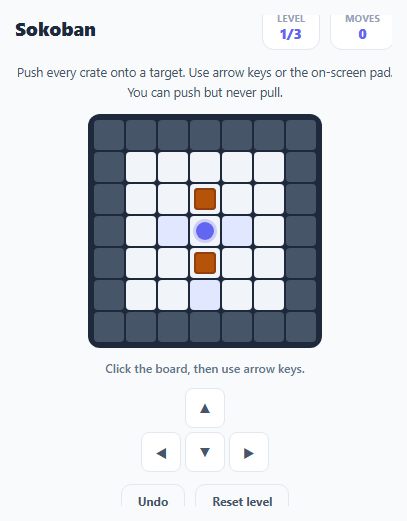
Sokoban ("warehouse keeper" in Japanese) is a classic grid-based puzzle: push crates onto target squares by walking into them, one at a time, in a warehouse full of walls. The core constraint that makes it a genuine puzzle rather than a maze is that crates can only ever be pushed, never pulled — a bad push can permanently trap a crate against a wall. This snippet implements a complete playable version in vanilla JavaScript: level parsing from plain text grids, push physics with full collision checking, an undo stack, and automatic progression through multiple bundled levels.
Levels as plain text grids
Each entry in LEVELS is an array of equal-purpose strings using standard Sokoban notation: # for a wall, a space for open floor, . for a target square, $ for a crate, * for a crate already on a target, @ for the player, and + for the player standing on a target. parseLevel() walks every character of every row once and sorts each symbol into a Set — walls, targets, or boxes — keyed by a "r,c" string, plus the player's starting { r, c } position. Using plain text for level data means new levels can be authored by just typing a grid, with no separate level editor or JSON schema required.
Push physics: the collision chain
attemptMove(dir) is the entire physics engine. It first checks whether the player's destination cell is a wall — if so, the move is silently rejected. If the destination holds a crate, it computes where *that* crate would land one more step in the same direction, and rejects the whole move if that landing cell is a wall or already holds another crate (isWall(br, bc) || isBox(br, bc)) — this is what prevents pushing a crate into another crate or into a wall. Only after both checks pass does the function actually mutate state: the crate's key moves from its old position to its new one in the boxes Set, and the player advances into the crate's old cell.
An undo stack instead of a full board-state history
Rather than snapshotting the entire board after every move, history stores only the minimal delta needed to reverse one step: the player's previous position, plus pushedBoxFrom/pushedBoxTo keys if a crate moved on that turn (both null if it didn't). undo() pops the most recent entry, restores the player position, and — if a crate was involved — deletes it from its new key and re-adds it at its old key. This keeps undo cheap regardless of board size and trivially supports unlimited undo depth since every entry is small and independent.
Win detection and auto-advance
checkWin() runs after every completed move and checks whether every key currently in the boxes Set also exists in the targets Set — the moment that's true, every crate is correctly placed regardless of which specific crate sits on which specific target. On a win, the game shows the final move count and, after a short delay, automatically advances to the next bundled level via levelIndex++ and a fresh loadLevel() call, or stays on the final level if none remain.
Build with AI
Build, Understand, Optimize, and Extend It With AI
Paste this snippet's HTML, CSS, and JS into an AI coding assistant like Claude and ask it to explain exactly how attemptMove() chains its wall and crate collision checks before mutating any state, and why the undo stack only needs to store a small delta per move rather than a full board snapshot. It's also a strong candidate for extension — ask the assistant to add a level editor that lets you paint walls, crates, and targets directly on the grid and export the resulting text-grid level string, add a move-counter-based star rating per level, or implement a breadth-first-search solvability checker that validates a hand-authored level can actually be won before it ships.
Prompt to recreate it
Copy this into your AI assistant of choice to build the effect from scratch, or as a jumping-off point for your own variant:
Build a Sokoban-style box-pushing puzzle game in plain HTML, CSS, and JavaScript — no libraries, no backend.

Requirements:
- Represent each level as a plain-text grid using standard Sokoban notation: a wall character, a floor character (or space), a target character, a crate character, a crate-on-target character, and player-start characters for on-floor and on-target. Parse this text grid into wall, target, and crate coordinate sets plus a starting player position.
- Support arrow-key movement (with a focusable board element) and an on-screen directional pad for touch devices, both routed through one shared move function.
- Implement full push physics: moving into an empty floor cell just moves the player; moving into a crate must check whether the cell one further step in the same direction is free (not a wall and not another crate) before allowing the push, and must reject the entire move (player included) if that check fails — crates can only ever be pushed, never pulled.
- Implement an undo stack that stores, for each completed move, only the player's previous position and (if a crate was pushed) that crate's previous and new position — not a full board snapshot — and can reverse any number of moves in sequence.
- Detect a win the moment every crate coordinate is also a target coordinate, regardless of which specific crate ended up on which target, and show a completion message with the total move count.
- Bundle at least three levels of increasing difficulty as separate text grids in an array, and automatically advance to the next level a short moment after the current one is cleared.
- Add a Reset button that reloads the current level from its original text grid, discarding all progress and undo history for that attempt.
Want to tighten it up first? Run this prompt through the AI Prompt Studio to score it across 8 quality dimensions, catch anti-patterns, and tune the wording for Claude, ChatGPT, or Gemini before you paste it in.
Source Code
<div class="sk-app">
  <div class="sk-header">
    <h2>Sokoban</h2>
    <div class="stats">
      <div class="stat"><span class="stat-label">Level</span><span class="stat-val" id="sk-level">1/3</span></div>
      <div class="stat"><span class="stat-label">Moves</span><span class="stat-val" id="sk-moves">0</span></div>
    </div>
  </div>

  <p class="sk-goal">Push every crate onto a target. Use arrow keys or the on-screen pad. You can push but never pull.</p>

  <div class="sk-board" id="sk-board" tabindex="0"></div>

  <p class="sk-feedback" id="sk-feedback">Click the board, then use arrow keys.</p>

  <div class="sk-pad" id="sk-pad">
    <button class="pad-btn pad-up" data-dir="up" aria-label="Up">▲</button>
    <button class="pad-btn pad-left" data-dir="left" aria-label="Left">◀</button>
    <button class="pad-btn pad-down" data-dir="down" aria-label="Down">▼</button>
    <button class="pad-btn pad-right" data-dir="right" aria-label="Right">▶</button>
  </div>

  <div class="sk-actions">
    <button class="ghost-btn" id="sk-undo">Undo</button>
    <button class="ghost-btn" id="sk-reset">Reset level</button>
  </div>
</div>
* { box-sizing: border-box; margin: 0; padding: 0; }
body { font-family: system-ui, sans-serif; background: #f8fafc; min-height: 100vh; }
.sk-app { max-width: 420px; margin: 0 auto; padding: 32px 20px; display: flex; flex-direction: column; align-items: center; gap: 12px; }
.sk-header { width: 100%; display: flex; align-items: center; justify-content: space-between; }
.sk-header h2 { font-size: 19px; font-weight: 800; color: #1e293b; }
.stats { display: flex; gap: 10px; }
.stat { background: #fff; border: 1px solid #e2e8f0; border-radius: 12px; padding: 6px 14px; min-width: 56px; text-align: center; }
.stat-label { display: block; font-size: 9.5px; font-weight: 700; letter-spacing: 0.04em; text-transform: uppercase; color: #94a3b8; }
.stat-val { display: block; font-size: 14px; font-weight: 800; color: #6366f1; }
.sk-goal { font-size: 12.5px; color: #475569; text-align: center; line-height: 1.6; }
.sk-board { display: grid; gap: 2px; background: #1e293b; padding: 6px; border-radius: 12px; outline: none; }
.sk-board:focus { box-shadow: 0 0 0 3px rgba(99,102,241,0.35); }
.sk-cell { width: 30px; height: 30px; border-radius: 4px; display: flex; align-items: center; justify-content: center; font-size: 16px; }
.sk-wall { background: #475569; }
.sk-floor { background: #f1f5f9; }
.sk-target { background: #e0e7ff; }
.sk-box { background: #f1f5f9; }
.sk-box .icon { width: 22px; height: 22px; border-radius: 4px; background: #b45309; box-shadow: inset 0 0 0 2px #92400e; }
.sk-box-on-target .icon { background: #16a34a; box-shadow: inset 0 0 0 2px #15803d; }
.sk-player .icon { width: 18px; height: 18px; border-radius: 50%; background: #6366f1; box-shadow: 0 0 0 3px rgba(99,102,241,0.25); }
.sk-feedback { font-size: 12px; font-weight: 600; color: #64748b; text-align: center; min-height: 16px; }
.sk-feedback.win { color: #16a34a; font-weight: 800; }
.sk-pad { display: grid; grid-template-columns: repeat(3, 40px); grid-template-rows: repeat(2, 40px); gap: 4px; justify-content: center; }
.pad-btn { background: #fff; border: 1px solid #e2e8f0; border-radius: 8px; font-size: 14px; cursor: pointer; color: #475569; }
.pad-btn:hover { border-color: #6366f1; color: #6366f1; }
.pad-up { grid-column: 2; grid-row: 1; }
.pad-left { grid-column: 1; grid-row: 2; }
.pad-down { grid-column: 2; grid-row: 2; }
.pad-right { grid-column: 3; grid-row: 2; }
.sk-actions { display: flex; gap: 10px; }
.ghost-btn {
background: none; border: 1.5px solid #e2e8f0; border-radius: 10px;
padding: 8px 16px; font-size: 12px; font-weight: 700; color: #475569;
cursor: pointer; font-family: inherit; transition: border-color 0.15s, color 0.15s;
}
.ghost-btn:hover { border-color: #6366f1; color: #6366f1; }// Level format: # wall, space floor, . target, $ box, * box-on-target, @ player, + player-on-target
const LEVELS = [
[
'#######',
'# #',
'# $ #',
'# .@. #',
'# $ #',
'# . #',
'#######',
],
[
'########',
'# . #',
'# $$ #',
'# @. #',
'# $ #',
'# . #',
'########',
],
[
'#########',
'# . #',
'# $$$ #',
'# ..@.. #',
'# $ $ #',
'# . #',
'#########',
],
];
let levelIndex = 0;
let grid = [];
let player = { r: 0, c: 0 };
let boxes = [];
let targets = [];
let walls = [];
let moves = 0;
let history = [];
let won = false;
const boardEl = document.getElementById('sk-board');
const feedback = document.getElementById('sk-feedback');
const levelEl = document.getElementById('sk-level');
const movesEl = document.getElementById('sk-moves');
function key(r, c) { return r + ',' + c; }
function parseLevel(idx) {
const rows = LEVELS[idx];
walls = new Set();
targets = new Set();
boxes = new Set();
let rowCount = rows.length;
let colCount = Math.max(...rows.map((row) => row.length));
rows.forEach((row, r) => {
for (let c = 0; c < row.length; c++) {
const ch = row[c];
if (ch === '#') walls.add(key(r, c));
if (ch === '.' || ch === '*' || ch === '+') targets.add(key(r, c));
if (ch === '$' || ch === '*') boxes.add(key(r, c));
if (ch === '@' || ch === '+') player = { r, c };
}
});
return { rowCount, colCount };
}
function isWall(r, c) { return walls.has(key(r, c)); }
function isBox(r, c) { return boxes.has(key(r, c)); }
function isTarget(r, c) { return targets.has(key(r, c)); }
function render(dims) {
boardEl.style.gridTemplateColumns = 'repeat(' + dims.colCount + ', 30px)';
boardEl.innerHTML = '';
for (let r = 0; r < dims.rowCount; r++) {
for (let c = 0; c < dims.colCount; c++) {
const cell = document.createElement('div');
if (isWall(r, c)) {
cell.className = 'sk-cell sk-wall';
} else {
cell.className = 'sk-cell ' + (isTarget(r, c) ? 'sk-target' : 'sk-floor');
if (isBox(r, c)) {
cell.classList.add(isTarget(r, c) ? 'sk-box-on-target' : 'sk-box');
const icon = document.createElement('div');
icon.className = 'icon';
cell.appendChild(icon);
} else if (player.r === r && player.c === c) {
cell.classList.add('sk-player');
const icon = document.createElement('div');
icon.className = 'icon';
cell.appendChild(icon);
}
}
boardEl.appendChild(cell);
}
}
}
const DIRS = {
up: [-1, 0],
down: [1, 0],
left: [0, -1],
right: [0, 1],
};
function attemptMove(dir) {
if (won) return;
const [dr, dc] = DIRS[dir];
const nr = player.r + dr;
const nc = player.c + dc;
if (isWall(nr, nc)) return;
let pushedBoxFrom = null;
let pushedBoxTo = null;
if (isBox(nr, nc)) {
const br = nr + dr;
const bc = nc + dc;
if (isWall(br, bc) || isBox(br, bc)) {
feedback.textContent = 'Nowhere to push that crate.';
feedback.className = 'sk-feedback';
return;
}
pushedBoxFrom = key(nr, nc);
pushedBoxTo = key(br, bc);
boxes.delete(pushedBoxFrom);
boxes.add(pushedBoxTo);
}
history.push({ player: { ...player }, pushedBoxFrom, pushedBoxTo });
player = { r: nr, c: nc };
moves++;
movesEl.textContent = String(moves);
feedback.textContent = 'Keep going.';
feedback.className = 'sk-feedback';
render(currentDims);
checkWin();
}
function undo() {
if (won || history.length === 0) return;
const last = history.pop();
player = last.player;
if (last.pushedBoxFrom) {
boxes.delete(last.pushedBoxTo);
boxes.add(last.pushedBoxFrom);
}
moves = Math.max(0, moves - 1);
movesEl.textContent = String(moves);
render(currentDims);
}
function checkWin() {
const allOnTarget = [...boxes].every((b) => targets.has(b));
if (allOnTarget) {
won = true;
feedback.textContent = 'Level cleared in ' + moves + ' moves!';
feedback.className = 'sk-feedback win';
setTimeout(() => {
if (levelIndex < LEVELS.length - 1) {
levelIndex++;
loadLevel();
}
}, 1100);
}
}
let currentDims = null;
function loadLevel() {
currentDims = parseLevel(levelIndex);
moves = 0;
history = [];
won = false;
levelEl.textContent = (levelIndex + 1) + '/' + LEVELS.length;
movesEl.textContent = '0';
feedback.textContent = 'Click the board, then use arrow keys.';
feedback.className = 'sk-feedback';
render(currentDims);
}
boardEl.addEventListener('keydown', (e) => {
const map = { ArrowUp: 'up', ArrowDown: 'down', ArrowLeft: 'left', ArrowRight: 'right' };
if (map[e.key]) {
e.preventDefault();
attemptMove(map[e.key]);
}
});
document.getElementById('sk-pad').addEventListener('click', (e) => {
const btn = e.target.closest('.pad-btn');
if (btn) attemptMove(btn.dataset.dir);
boardEl.focus();
});
document.getElementById('sk-undo').addEventListener('click', undo);
document.getElementById('sk-reset').addEventListener('click', loadLevel);
loadLevel();Step by step
How to Use
- 1Click the board to focus itThe board is a focusable div; clicking it (or an on-screen pad button) lets arrow-key input register via the keydown listener.
- 2Push crates onto targetsMove with arrow keys or the on-screen directional pad. Walking into a crate pushes it one cell further in the same direction, if that cell is open.
- 3Watch for dead-end pushesA push is rejected outright if the crate would land on a wall or another crate — attemptMove() checks this before allowing the move at all, so you cannot lock a crate in place by accident from the push itself.
- 4Undo a bad moveClick Undo to pop the last entry off the history stack, restoring the player position and reversing any crate push from that turn.
- 5Clear the levelcheckWin() watches whether every crate key also exists in the targets set. Getting every crate onto a target completes the level and auto-advances to the next one.
- 6Add your own levelsAppend a new grid of equal-length strings to the LEVELS array using #, space, ., $, *, @, and + — no additional configuration is needed.
Real-world uses
Common Use Cases
Got questions?
Frequently Asked Questions
No. The player can only walk into a crate to push it one cell further in the same direction; there is no pull mechanic, matching the classic Sokoban rule set. This means a poorly planned push can trap a crate against a wall or corner with no way to free it except undo.
attemptMove() computes the crate's would-be landing cell one step past its current position and checks isWall(br, bc) || isBox(br, bc) before allowing the move. If either is true, the entire move (including the player's own step) is rejected and neither the player nor the crate moves.
Each history entry stores only the player's previous position and, if a crate was pushed that turn, its previous and new key. undo() reverses exactly that delta: it restores the player position and moves the pushed crate's key back to its previous position in the boxes Set.
checkWin() checks that every key in the boxes Set also exists in the targets Set, using [...boxes].every(b => targets.has(b)). This is true regardless of which specific crate ends up on which specific target, as long as every crate is on some target.
Append a new array of equal-length strings to the LEVELS array using # for walls, space for floor, . for targets, $ for crates, * for a crate already on a target, and @ (or + for on a target) for the player start position. No other code changes are required.
checkWin() calls loadLevel() again with an incremented levelIndex inside a short setTimeout after showing the "Level cleared" message, so players can chain through the bundled level set without clicking a manual next-level button — it simply stays on the final level if none remain.