Learn Coding Visually
Learn to code with interactive, live-preview playgrounds — HTML, CSS, JavaScript, React & more.
 HTML Playground42 lessons · Click-based · Live preview
 CSS PlaygroundLearn CSS with a live editor
 JavaScript Playground60 lessons · DOM · Async · Canvas
 React PlaygroundLearn React with a live code editor
 GSAP PlaygroundLearn GSAP animation interactively
 SVG Playground44 lessons · shapes · paths · animation
 SCSS Playground45 lessons · Sass modules · tokens
 Tailwind PlaygroundLearn Tailwind CSS with a live editor
 Bootstrap 5 Playground50 lessons · live preview
Mini Sudoku Puzzle (6x6) — Free HTML CSS JS Snippet
Mini Sudoku Puzzle (6x6) · Games · Plain HTML, CSS & JS · Live preview
What's included
Features
About this UI Snippet
Mini Sudoku Puzzle (6x6) — Backtracking Generator, Live Constraint Checking & Number Pad Input
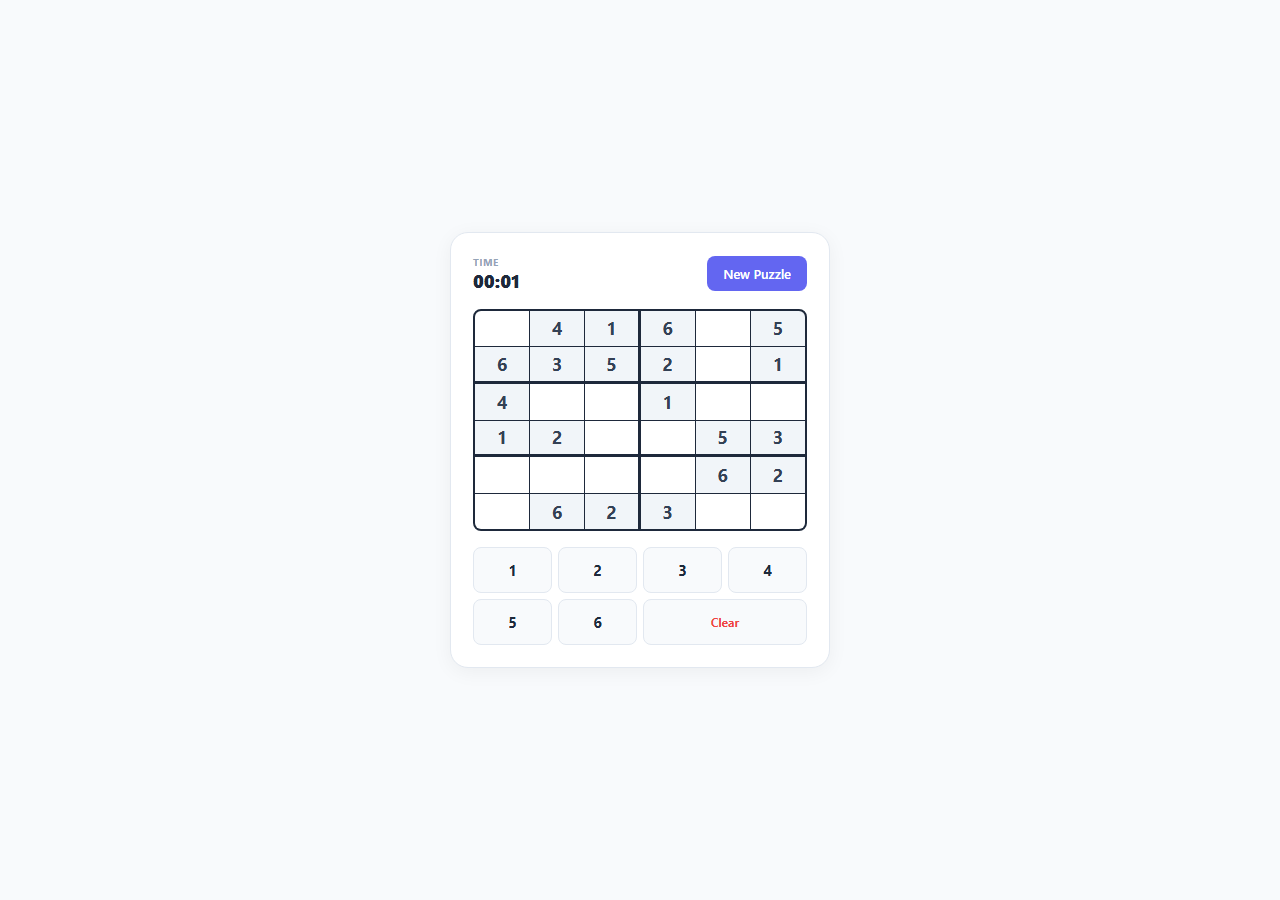
Full 9x9 Sudoku is too large a puzzle to comfortably fit and finish inside a UI snippet demo, but the underlying constraint-satisfaction rules — every digit unique within its row, column, and box — are exactly the same on a smaller board. This snippet implements a genuinely playable 6x6 variant using digits 1 through 6 arranged in six 2x3 boxes, built with a real randomised backtracking generator and live constraint validation on every keystroke, teaching the identical algorithmic technique as the full-size game at a scope that is actually completable in a couple of minutes.
Generating a valid solved grid with randomised backtracking
generateSolution() starts from an empty 6x6 grid and calls fillGrid(), a recursive backtracking function that fills cells one at a time in row-major order. At each empty position, it shuffles the candidate digits 1 through 6 with a Fisher-Yates shuffle() (rather than trying them in fixed numeric order, which would always generate the same handful of grids) and attempts each candidate via isValidPlacement(). If a candidate is valid, it is placed and the function recurses into the next position; if the recursion eventually fails to complete the grid, that candidate is undone (reset to 0) and the next shuffled candidate is tried. This is the standard constraint-satisfaction backtracking pattern — try, recurse, undo on failure — and because the candidate order is randomised at every cell, repeated calls produce different valid solved grids rather than the same one every time.
Row, column, and 2x3 box validation
isValidPlacement(grid, r, c, val) is the single function responsible for enforcing every Sudoku rule, and it is reused both during generation and during live gameplay. It checks the target value does not already appear elsewhere in row r or column c, then computes the top-left corner of the containing 2x3 box with Math.floor(r / BOX_H) * BOX_H and Math.floor(c / BOX_W) * BOX_W (where BOX_H is 2 and BOX_W is 3, since a 6x6 grid divides into six boxes each spanning 3 columns and 2 rows) and scans every cell inside that box for a duplicate. Because the box dimensions are named constants rather than hard-coded literals, the same function would work unmodified on a differently-shaped mini-Sudoku variant if the constants were changed.
Puzzle creation and live conflict detection
makePuzzle() takes the completed solution and blanks out a fixed number of cells (16 of the 36, leaving 20 clues) at positions chosen by shuffling every cell index and taking the first N — ensuring the removed cells are different on every new puzzle. Cells that still hold their original solved value render as read-only .clue cells; blanked cells become editable. Crucially, validation does not wait until the grid is full: every render calls findConflicts(), which loops over every filled cell in the current userGrid and re-runs isValidPlacement() against it, adding any cell that now violates a row, column, or box constraint to a Set of conflict coordinates. Those cells immediately render with a red .conflict background, giving the player real-time feedback the instant an entry creates a duplicate, rather than only at a final "check" action.
Number pad and keyboard input working together
Selecting an editable cell highlights it and enables entry via two equivalent input paths: clicking a digit on the on-screen .pad-btn number pad, or pressing 1 through 6 on the keyboard while a cell is selected (handled by a single document-level keydown listener). Both paths call the same enterNumber() function, so validation and win-checking logic exists in exactly one place regardless of input method. A "Clear" pad button and the Backspace/Delete keys both route to enterNumber(0), blanking the selected cell.
Win detection and the timer
checkWin() first confirms every cell in the grid is non-zero via isGridComplete(), then re-runs findConflicts() — the puzzle only counts as solved when the grid is completely filled *and* zero conflicts exist simultaneously, which correctly rejects a full-but-invalid grid. A live timer starts the moment a new puzzle is generated, using Date.now() deltas updated on a 500ms interval, and stops the instant the win condition is met, with the final elapsed time shown in the win message via the same formatTime() helper used for the live display.
Build with AI
Build, Understand, Optimize, and Extend It With AI
Paste this snippet's HTML, CSS and JS into an AI coding assistant like Claude and ask it to trace exactly how fillGrid()'s backtracking recursion works, including what happens at the moment a dead-end forces it to undo a placement and try the next shuffled candidate — walking through that trace is one of the clearest ways to actually understand backtracking algorithms. You could also ask it to add a solution-uniqueness check after clue removal so every generated puzzle is guaranteed to have exactly one valid solution rather than potentially several, implement a difficulty selector that adjusts the cellsToRemove count, or add a "hint" button that reveals one correct cell using the stored solution array without giving away the whole puzzle. Each is a natural next step once the core generation and validation logic is already understood.
Prompt to recreate it
Copy this into your AI assistant of choice to build the effect from scratch, or as a jumping-off point for your own variant:
Build a playable 6x6 mini Sudoku puzzle in plain HTML, CSS, and JavaScript with real constraint-satisfaction logic — no frameworks, no libraries.

Requirements:
- A 6x6 grid divided into six 2x3 boxes, using digits 1 through 6, generated by first producing a fully valid solved grid via randomised recursive backtracking (shuffle candidate order at each cell, place if valid, recurse, undo and try the next candidate on failure).
- A single reusable validation function that checks row, column, and 2x3 box uniqueness for a given cell and value, used both during generation and during live gameplay.
- After generating the solution, remove a subset of cells (leaving a reasonable number of clues) to form the playable puzzle; clue cells must render as fixed/read-only while removed cells become editable inputs.
- Live validation on every entry: if a newly entered digit creates a duplicate within its row, column, or box, immediately highlight the conflicting cells (not just the new one) — re-check the whole grid on every input since one entry can retroactively invalidate a different existing cell.
- Support both an on-screen number pad UI for entering 1-6 and native keyboard 1-6 input when a cell is focused/selected, both routed through the same entry-handling logic so there is no duplicated validation code.
- Detect the win state only when the grid is both completely filled and has zero constraint conflicts simultaneously — a full but invalid grid must not count as solved.
- Track and display elapsed time from puzzle start to solve, and provide a "New Puzzle" action that regenerates a fresh solution and clue layout.
Want to tighten it up first? Run this prompt through the AI Prompt Studio to score it across 8 quality dimensions, catch anti-patterns, and tune the wording for Claude, ChatGPT, or Gemini before you paste it in.
Source Code
<div class="demo-wrap">
  <div class="sudoku-panel">
    <div class="hud">
      <div class="hud-stat"><span class="hud-label">Time</span><span class="hud-value" id="stat-time">00:00</span></div>
      <button class="btn btn-primary" id="btn-new">New Puzzle</button>
    </div>

    <div class="grid-6x6" id="sudoku-grid"></div>

    <div class="number-pad" id="number-pad">
      <button class="pad-btn" data-num="1">1</button>
      <button class="pad-btn" data-num="2">2</button>
      <button class="pad-btn" data-num="3">3</button>
      <button class="pad-btn" data-num="4">4</button>
      <button class="pad-btn" data-num="5">5</button>
      <button class="pad-btn" data-num="6">6</button>
      <button class="pad-btn pad-clear" data-num="0">Clear</button>
    </div>

    <p class="win-banner hidden" id="win-banner">Solved! Time: <span id="win-time">00:00</span></p>
  </div>
</div>
* { box-sizing: border-box; margin: 0; padding: 0; }
body { font-family: system-ui, sans-serif; background: #f8fafc; min-height: 100vh; }
.demo-wrap { display: flex; align-items: center; justify-content: center; min-height: 100vh; padding: 32px 16px; }
.sudoku-panel {
width: 100%; max-width: 380px; padding: 22px;
background: #fff; border-radius: 18px; border: 1px solid #e2e8f0;
box-shadow: 0 4px 20px rgba(0,0,0,0.05);
display: flex; flex-direction: column; gap: 16px; align-items: center;
}
.hud { display: flex; align-items: center; justify-content: space-between; width: 100%; }
.hud-stat { display: flex; flex-direction: column; }
.hud-label { font-size: 10px; font-weight: 700; color: #94a3b8; text-transform: uppercase; letter-spacing: 0.05em; }
.hud-value { font-size: 18px; font-weight: 800; color: #1e293b; }
.btn { padding: 9px 16px; font-size: 13px; font-weight: 600; border-radius: 8px; cursor: pointer; font-family: inherit; border: none; }
.btn-primary { background: #6366f1; color: #fff; }
.btn-primary:hover { background: #4f46e5; }
.grid-6x6 {
display: grid; grid-template-columns: repeat(6, 1fr); grid-template-rows: repeat(6, 1fr);
width: 100%; aspect-ratio: 3 / 2; gap: 1px;
background: #1e293b; border: 2px solid #1e293b; border-radius: 8px; overflow: hidden;
}
.cell {
background: #fff; display: flex; align-items: center; justify-content: center;
font-size: 18px; font-weight: 700; color: #1e293b;
cursor: pointer; user-select: none; position: relative;
}
.cell.clue { background: #f1f5f9; color: #334155; cursor: default; }
.cell.selected { background: #e0e7ff; }
.cell.conflict { background: #fee2e2; color: #dc2626; }
.cell.solved-flash { background: #dcfce7; }
/* Box borders: 2x3 boxes -> thick border every 2 cols / every 3 rows within the 6-col/6-row grid.
Box width = 3 cols, box height = 2 rows. */
.cell:nth-child(3n) { border-right: 2px solid #1e293b; }
.cell:nth-child(6n) { border-right: none; }
.cell:nth-child(n) { }
.row-boundary { border-bottom: 2px solid #1e293b; }
.number-pad { display: grid; grid-template-columns: repeat(4, 1fr); gap: 6px; width: 100%; }
.pad-btn {
padding: 12px 0; border: 1.5px solid #e2e8f0; border-radius: 8px;
background: #f8fafc; font-size: 15px; font-weight: 700; color: #1e293b;
cursor: pointer; font-family: inherit; transition: all 0.12s;
}
.pad-btn:hover { border-color: #6366f1; color: #6366f1; }
.pad-clear { grid-column: span 2; font-size: 12px; color: #ef4444; }
.win-banner {
text-align: center; font-size: 14px; font-weight: 700; color: #16a34a;
background: #f0fdf4; border: 1px solid #bbf7d0; border-radius: 10px; padding: 10px; width: 100%;
}
.hidden { display: none; }const SIZE = 6;
const BOX_W = 3; // box spans 3 columns
const BOX_H = 2; // box spans 2 rows
let solution = []; // 6x6 fully solved grid
let puzzle = []; // 6x6 with 0 = empty (editable)
let userGrid = []; // current player-entered state (mirrors puzzle, editable cells can change)
let selected = null; // {r, c}
let startTime = null;
let timerId = null;
let solvedFlag = false;
function emptyGrid() {
return Array.from({ length: SIZE }, () => Array(SIZE).fill(0));
}
function boxIndex(r, c) {
return Math.floor(r / BOX_H) * (SIZE / BOX_W) + Math.floor(c / BOX_W);
}
function isValidPlacement(grid, r, c, val) {
for (let i = 0; i < SIZE; i++) {
if (i !== c && grid[r][i] === val) return false;
if (i !== r && grid[i][c] === val) return false;
}
const boxRowStart = Math.floor(r / BOX_H) * BOX_H;
const boxColStart = Math.floor(c / BOX_W) * BOX_W;
for (let br = boxRowStart; br < boxRowStart + BOX_H; br++) {
for (let bc = boxColStart; bc < boxColStart + BOX_W; bc++) {
if ((br !== r || bc !== c) && grid[br][bc] === val) return false;
}
}
return true;
}
function shuffle(arr) {
const a = arr.slice();
for (let i = a.length - 1; i > 0; i--) {
const j = Math.floor(Math.random() * (i + 1));
[a[i], a[j]] = [a[j], a[i]];
}
return a;
}
function fillGrid(grid, pos) {
if (pos === SIZE * SIZE) return true;
const r = Math.floor(pos / SIZE);
const c = pos % SIZE;
const candidates = shuffle([1, 2, 3, 4, 5, 6]);
for (const val of candidates) {
if (isValidPlacement(grid, r, c, val)) {
grid[r][c] = val;
if (fillGrid(grid, pos + 1)) return true;
grid[r][c] = 0;
}
}
return false;
}
function generateSolution() {
const grid = emptyGrid();
fillGrid(grid, 0);
return grid;
}
function makePuzzle(solved) {
const p = solved.map(row => row.slice());
const cellsToRemove = 16; // out of 36, leaves 20 clues
const positions = shuffle(Array.from({ length: SIZE * SIZE }, (_, i) => i));
for (let i = 0; i < cellsToRemove; i++) {
const pos = positions[i];
const r = Math.floor(pos / SIZE);
const c = pos % SIZE;
p[r][c] = 0;
}
return p;
}
function startTimer() {
startTime = Date.now();
clearInterval(timerId);
timerId = setInterval(updateTimerDisplay, 500);
}
function formatTime(ms) {
const totalSec = Math.floor(ms / 1000);
const m = String(Math.floor(totalSec / 60)).padStart(2, '0');
const s = String(totalSec % 60).padStart(2, '0');
return m + ':' + s;
}
function updateTimerDisplay() {
if (!startTime || solvedFlag) return;
document.getElementById('stat-time').textContent = formatTime(Date.now() - startTime);
}
function findConflicts() {
const conflicts = new Set();
for (let r = 0; r < SIZE; r++) {
for (let c = 0; c < SIZE; c++) {
const val = userGrid[r][c];
if (val === 0) continue;
if (!isValidPlacement(userGrid, r, c, val)) {
conflicts.add(r + '-' + c);
}
}
}
return conflicts;
}
function isGridComplete() {
return userGrid.every(row => row.every(v => v !== 0));
}
function checkWin() {
if (!isGridComplete()) return false;
const conflicts = findConflicts();
return conflicts.size === 0;
}
function renderGrid() {
const gridEl = document.getElementById('sudoku-grid');
gridEl.innerHTML = '';
const conflicts = findConflicts();
for (let r = 0; r < SIZE; r++) {
for (let c = 0; c < SIZE; c++) {
const cell = document.createElement('div');
cell.className = 'cell';
cell.dataset.r = r;
cell.dataset.c = c;
const isClue = puzzle[r][c] !== 0;
if (isClue) cell.classList.add('clue');
if (selected && selected.r === r && selected.c === c) cell.classList.add('selected');
if (conflicts.has(r + '-' + c)) cell.classList.add('conflict');
if ((r + 1) % BOX_H === 0 && r !== SIZE - 1) cell.classList.add('row-boundary');
const val = userGrid[r][c];
cell.textContent = val === 0 ? '' : val;
cell.addEventListener('click', () => selectCell(r, c));
gridEl.appendChild(cell);
}
}
}
function selectCell(r, c) {
if (solvedFlag) return;
if (puzzle[r][c] !== 0) return; // clue cells not editable
selected = { r, c };
renderGrid();
}
function enterNumber(num) {
if (solvedFlag || !selected) return;
const { r, c } = selected;
if (puzzle[r][c] !== 0) return;
userGrid[r][c] = num;
renderGrid();
if (checkWin()) {
solvedFlag = true;
clearInterval(timerId);
document.getElementById('win-time').textContent = formatTime(Date.now() - startTime);
document.getElementById('win-banner').classList.remove('hidden');
}
}
function handleKeydown(e) {
if (!selected) return;
if (e.key >= '1' && e.key <= '6') {
enterNumber(Number(e.key));
} else if (e.key === 'Backspace' || e.key === 'Delete' || e.key === '0') {
enterNumber(0);
}
}
function newPuzzle() {
solution = generateSolution();
puzzle = makePuzzle(solution);
userGrid = puzzle.map(row => row.slice());
selected = null;
solvedFlag = false;
document.getElementById('win-banner').classList.add('hidden');
document.getElementById('stat-time').textContent = '00:00';
startTimer();
renderGrid();
}
document.getElementById('btn-new').addEventListener('click', newPuzzle);
document.getElementById('number-pad').addEventListener('click', e => {
const btn = e.target.closest('.pad-btn');
if (btn) enterNumber(Number(btn.dataset.num));
});
document.addEventListener('keydown', handleKeydown);
newPuzzle();Step by step
How to Use
- 1Select an editable cellClick any blank cell (clue cells shown with a shaded background are fixed and cannot be selected). The selected cell highlights so you know which one your next number entry will fill.
- 2Enter a number via the pad or keyboardClick a digit 1-6 on the on-screen number pad, or simply press the corresponding number key on your keyboard while a cell is selected — both call the same enterNumber() function and update the grid identically.
- 3Watch for live conflict highlightingEvery entry immediately re-runs findConflicts() across the whole grid. If your new digit duplicates another value in the same row, column, or 2x3 box, both the new cell and the conflicting cell turn red via the .conflict class right away — no separate "check" step needed.
- 4Clear a mistakeClick the "Clear" button on the number pad, or press Backspace/Delete on your keyboard, to blank the currently selected editable cell back to empty and clear any conflict highlighting tied to it.
- 5Reach the solved statecheckWin() confirms you have won only when every cell is filled and findConflicts() returns zero conflicts simultaneously — a completely full but invalid grid does not trigger the "Solved!" message.
- 6Track your time and start a new puzzleA live timer runs from the moment a puzzle loads and freezes the instant you solve it, shown in the win banner. Click "New Puzzle" to generate a freshly randomised solution and clue layout via generateSolution() and makePuzzle().
Real-world uses
Common Use Cases
Got questions?
Frequently Asked Questions
A 9x9 grid needs 81 cells filled and typically 25-30+ clues to remain uniquely solvable, which is too large a time commitment for a quick UI demo. A 6x6 grid uses digits 1 through 6 in six 2x3 boxes, keeping the same row/column/box uniqueness rule set intact while being genuinely completable in a couple of minutes — the algorithm (backtracking generation, live constraint checking) is identical, only the board dimensions differ.
fillGrid() is a recursive function that places a shuffled-order candidate digit into each cell only if isValidPlacement() confirms it does not violate row, column, or box uniqueness, then recurses into the next cell. If a later cell has no valid candidates, the function backtracks — undoing the previous cell's placement and trying its next candidate. Because every placement is validated before being kept, the completed grid is guaranteed to satisfy every Sudoku constraint by construction.
findConflicts() re-scans every filled cell on every render because entering one number can retroactively make a previously-fine cell invalid if it happens to share a row, column, or box with the new entry. Checking only the newly entered cell would miss the case where the older cell is the one now flagged as a duplicate, so a full pass keeps the highlighting always accurate.
makePuzzle() removes 16 of the 36 cells by default, leaving 20 clues. To make puzzles harder, increase the cellsToRemove constant (fewer clues generally means more difficult, though at very low clue counts a puzzle may have multiple valid solutions since this generator does not check solution uniqueness after removal — for a strict single-solution guarantee you would need to add a uniqueness-checking solver pass).
Yes, the timer runs continuously from the moment a new puzzle is generated until the exact moment checkWin() confirms a valid, complete solution, using Date.now() deltas updated twice a second. It does not pause automatically if you switch tabs or step away; if you want a pause feature, you would need to track visibilitychange events and freeze startTime accordingly.