Learn Coding Visually
Learn to code with interactive, live-preview playgrounds — HTML, CSS, JavaScript, React & more.
 HTML Playground42 lessons · Click-based · Live preview
 CSS PlaygroundLearn CSS with a live editor
 JavaScript Playground60 lessons · DOM · Async · Canvas
 React PlaygroundLearn React with a live code editor
 GSAP PlaygroundLearn GSAP animation interactively
 SVG Playground44 lessons · shapes · paths · animation
 SCSS Playground45 lessons · Sass modules · tokens
 Tailwind PlaygroundLearn Tailwind CSS with a live editor
 Bootstrap 5 Playground50 lessons · live preview
Color Match Reflex Game — Fast-Paced Browser Mini-Game with High Score
Color Match Reflex Game · Games · Plain HTML, CSS & JS · Live preview
What's included
Features
About this UI Snippet
Color Match Reflex Game — A Complete Playable Mini-Game
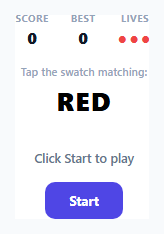
This is a small but fully playable arcade-style reflex game: a color name appears (deliberately rendered in a *different*, mismatched color to add a Stroop-effect twist), and the player has a shrinking time window to tap the swatch that actually matches the named color, not the color the word is printed in.
A genuinely difficulty-scaling round timer
Each round's time limit isn't fixed — Math.max(1200, 2600 - score * 40) starts new players at 2.6 seconds per round and shrinks that window by 40ms per point scored, clamped to a 1.2-second floor. This is what makes the game actually get harder as a player improves, rather than staying at a constant, eventually-trivial difficulty — a genuine progression curve rather than a static challenge.
Lives, misses, and timeouts share one failure path
Whether a player clicks the wrong swatch or simply runs out of time, both routes call the same handleMiss() function, which decrements lives, updates the dot indicator (filled circles for remaining lives, hollow for lost ones), and either starts a new round or ends the game — keeping the failure logic in one place rather than duplicating "lose a life" behavior across two separate code paths that could drift out of sync.
Persisting a real high score across sessions
The best score isn't just held in a JS variable — it's read from and written to localStorage (colorMatchBest), so a player's personal best survives a page reload or returning to the game later, which is what makes "Best" a meaningful stat rather than a number that resets every time the page loads.
Cleaning up stale timers correctly
Every place a round ends — a correct pick, a wrong pick, or a timeout — calls clearTimeout(roundTimer) before doing anything else. Without this, a player who answers correctly right as the old timer is about to fire would trigger a duplicate, stale "miss" for a round that's already been won, silently costing them a life they didn't actually lose — a subtle bug this snippet deliberately avoids by always clearing the previous round's timer before starting the next one.
Build with AI
Build, Understand, Optimize, and Extend It With AI
Ask an AI assistant to explain why sharing one handleMiss() function between wrong-click and timeout failure paths avoids subtle bugs, and to walk through the exact race condition that clearTimeout(roundTimer) is protecting against on a correct answer. It's also worth asking for a version with combo multipliers for consecutive correct answers, or a version that swaps the color-word mechanic for a shape-matching or audio-matching variant using the same round/timer/lives architecture.
Prompt to recreate it
Copy this into your AI assistant of choice to build the effect from scratch, or as a jumping-off point for your own variant:
Build a fast-paced color-matching reflex game in HTML, CSS and vanilla JavaScript — no external libraries.

Requirements:
- Display a color name as text, deliberately rendered in a visually different color than the one it names, alongside a grid of colored swatch buttons including the correct match among several distractors.
- The player must click the swatch matching the color NAME (not the color the text is visually rendered in) before a per-round timer expires.
- Track score (increments on a correct match) and lives (3 total, decrementing on either a wrong click or a round timing out) with both values displayed live in a HUD.
- The per-round time limit must genuinely decrease as the score increases (with a reasonable minimum floor), so the game gets objectively harder as the player improves — not stay at a fixed difficulty.
- Ensure that answering correctly reliably cancels that round's pending timeout, so a last-moment correct click never also triggers a stale "miss" from the same round's expiring timer.
- Persist the player's best score across page reloads using localStorage, and show both the current score and the persisted best score in the HUD.
- Show a game-over state when lives reach zero, with a "Play again" action that fully resets score, lives, and starts a new round.
Want to tighten it up first? Run this prompt through the AI Prompt Studio to score it across 8 quality dimensions, catch anti-patterns, and tune the wording for Claude, ChatGPT, or Gemini before you paste it in.
Source Code
<div class="demo">
  <div class="game" id="game">
    <div class="hud">
      <div class="stat"><span class="stat-label">Score</span><span class="stat-val" id="score">0</span></div>
      <div class="stat"><span class="stat-label">Best</span><span class="stat-val" id="best">0</span></div>
      <div class="stat"><span class="stat-label">Lives</span><span class="stat-val" id="lives">●●●</span></div>
    </div>

    <div class="target-wrap">
      <span class="target-label">Tap the swatch matching:</span>
      <div class="target-word" id="targetWord">RED</div>
    </div>

    <div class="swatches" id="swatches"></div>

    <p class="msg" id="msg">Click Start to play</p>
    <button class="start-btn" id="startBtn">Start</button>
  </div>
</div>
* { box-sizing: border-box; margin: 0; padding: 0; }
body { font-family: system-ui, sans-serif; background: #f8fafc; display: flex; align-items: center; justify-content: center; min-height: 100vh; padding: 24px; }
.game { width: 340px; max-width: 100%; background: #fff; border: 1px solid #e2e8f0; border-radius: 18px; padding: 22px; display: flex; flex-direction: column; align-items: center; gap: 16px; }
.hud { display: flex; gap: 22px; }
.stat { display: flex; flex-direction: column; align-items: center; gap: 2px; }
.stat-label { font-size: 10px; font-weight: 700; text-transform: uppercase; color: #94a3b8; letter-spacing: 0.04em; }
.stat-val { font-size: 16px; font-weight: 800; color: #111827; }
#lives { color: #ef4444; letter-spacing: 2px; }
.target-wrap { display: flex; flex-direction: column; align-items: center; gap: 4px; }
.target-label { font-size: 11px; color: #94a3b8; font-weight: 600; }
.target-word { font-size: 26px; font-weight: 900; letter-spacing: 1px; }
.swatches { display: grid; grid-template-columns: repeat(3, 1fr); gap: 10px; width: 100%; }
.swatch { height: 64px; border-radius: 12px; border: none; cursor: pointer; transition: transform 0.08s; }
.swatch:hover { transform: scale(1.04); }
.swatch:active { transform: scale(0.96); }
.swatch.wrong-flash { animation: shake 0.3s; }
@keyframes shake { 25% { transform: translateX(-4px); } 75% { transform: translateX(4px); } }
.msg { font-size: 12.5px; color: #64748b; font-weight: 600; min-height: 16px; text-align: center; }
.start-btn { background: #4f46e5; color: #fff; border: none; padding: 10px 24px; border-radius: 10px; font-size: 13px; font-weight: 700; cursor: pointer; font-family: inherit; }
.start-btn:hover { background: #4338ca; }const colors = [
{ name: 'RED', hex: '#ef4444' },
{ name: 'BLUE', hex: '#3b82f6' },
{ name: 'GREEN', hex: '#22c55e' },
{ name: 'YELLOW', hex: '#eab308' },
{ name: 'PURPLE', hex: '#a855f7' },
{ name: 'ORANGE', hex: '#f97316' },
];
const targetWord = document.getElementById('targetWord');
const swatchesEl = document.getElementById('swatches');
const scoreEl = document.getElementById('score');
const bestEl = document.getElementById('best');
const livesEl = document.getElementById('lives');
const msgEl = document.getElementById('msg');
const startBtn = document.getElementById('startBtn');
let score = 0;
let lives = 3;
let best = Number(localStorage.getItem('colorMatchBest') || 0);
let roundTimer = null;
let playing = false;
let currentTarget = null;
bestEl.textContent = best;
function pickRound() {
const shuffled = [...colors].sort(() => Math.random() - 0.5).slice(0, 6);
currentTarget = shuffled[Math.floor(Math.random() * shuffled.length)];
targetWord.textContent = currentTarget.name;
targetWord.style.color = colors[Math.floor(Math.random() * colors.length)].hex;
swatchesEl.innerHTML = '';
shuffled.forEach((c) => {
const btn = document.createElement('button');
btn.className = 'swatch';
btn.style.background = c.hex;
btn.setAttribute('aria-label', c.name);
btn.addEventListener('click', () => handlePick(c, btn));
swatchesEl.appendChild(btn);
});
clearTimeout(roundTimer);
const timeLimit = Math.max(1200, 2600 - score * 40);
roundTimer = setTimeout(() => handleMiss(null), timeLimit);
}
function handlePick(color, btn) {
if (!playing) return;
clearTimeout(roundTimer);
if (color.name === currentTarget.name) {
score += 1;
scoreEl.textContent = score;
msgEl.textContent = 'Correct!';
pickRound();
} else {
btn.classList.add('wrong-flash');
handleMiss(btn);
}
}
function handleMiss(btn) {
lives -= 1;
livesEl.textContent = '●'.repeat(Math.max(lives, 0)) + '○'.repeat(3 - Math.max(lives, 0));
msgEl.textContent = lives > 0 ? 'Missed!' : 'Game over';
if (lives <= 0) {
endGame();
} else {
pickRound();
}
}
function endGame() {
playing = false;
clearTimeout(roundTimer);
if (score > best) {
best = score;
localStorage.setItem('colorMatchBest', String(best));
bestEl.textContent = best;
msgEl.textContent = `Game over — new best: ${best}!`;
} else {
msgEl.textContent = `Game over — score: ${score}`;
}
startBtn.textContent = 'Play again';
startBtn.hidden = false;
}
function startGame() {
score = 0;
lives = 3;
playing = true;
scoreEl.textContent = '0';
livesEl.textContent = '●●●';
msgEl.textContent = 'Go!';
startBtn.hidden = true;
pickRound();
}
startBtn.addEventListener('click', startGame);Step by step
How to Use
- 1Click Start to beginA target color name appears; tap the swatch matching that name (not the color the word is printed in) before time runs out.
- 2Adjust the color paletteAdd or remove entries in the colors array in the JS panel — each needs a name and a matching hex value.
- 3Tune the difficulty curveChange the 2600 starting value or the 40-per-point scaling in the timeLimit calculation to make rounds harder or easier over time.
- 4Change the starting lives countUpdate the lives = 3 assignment in startGame() and the matching dot-rendering logic in handleMiss().
- 5Reset the stored high scoreClear the colorMatchBest key from localStorage in your browser devtools to reset the persisted best score during testing.
Real-world uses
Common Use Cases
Got questions?
Frequently Asked Questions
It's a deliberate Stroop-effect twist — reading the word and matching its printed color would be a different, easier task. Forcing the player to read the word's meaning while ignoring its visual color makes the game genuinely test quick color-word association rather than simple color matching.
The per-round time limit shrinks with score via Math.max(1200, 2600 - score * 40) — starting near 2.6 seconds and dropping by 40ms per correct answer, down to a 1.2-second floor, so later rounds genuinely demand faster reflexes.
The click handler calls clearTimeout(roundTimer) immediately, canceling the pending timeout before it can fire — this prevents the classic bug where a just-in-time correct answer would still trigger a stale miss from the expiring timer.
Yes — it's persisted in the browser's localStorage under the key colorMatchBest, so a player's best score survives page reloads and future visits, not just the current session.
Yes — update the lives = 3 assignment in startGame(), and adjust the dot-rendering logic in handleMiss() (which currently assumes a 3-life maximum) to match your new starting value.
Yes — the swatches are plain buttons responding to click events, which fire correctly for both mouse clicks and touch taps with no special touch-event handling required.