Learn Coding Visually
Learn to code with interactive, live-preview playgrounds — HTML, CSS, JavaScript, React & more.
 HTML Playground42 lessons · Click-based · Live preview
 CSS PlaygroundLearn CSS with a live editor
 JavaScript Playground60 lessons · DOM · Async · Canvas
 React PlaygroundLearn React with a live code editor
 GSAP PlaygroundLearn GSAP animation interactively
 SVG Playground44 lessons · shapes · paths · animation
 SCSS Playground45 lessons · Sass modules · tokens
 Tailwind PlaygroundLearn Tailwind CSS with a live editor
 Bootstrap 5 Playground50 lessons · live preview
Binary Bit Flip Game — Free HTML CSS JS Snippet
Binary Bit Flip Game · Games · Plain HTML, CSS & JS · Live preview
What's included
Features
About this UI Snippet
Binary Bit Flip Game — XOR Toggling, Place-Value Sums & Live Binary, Decimal and Hex Readouts
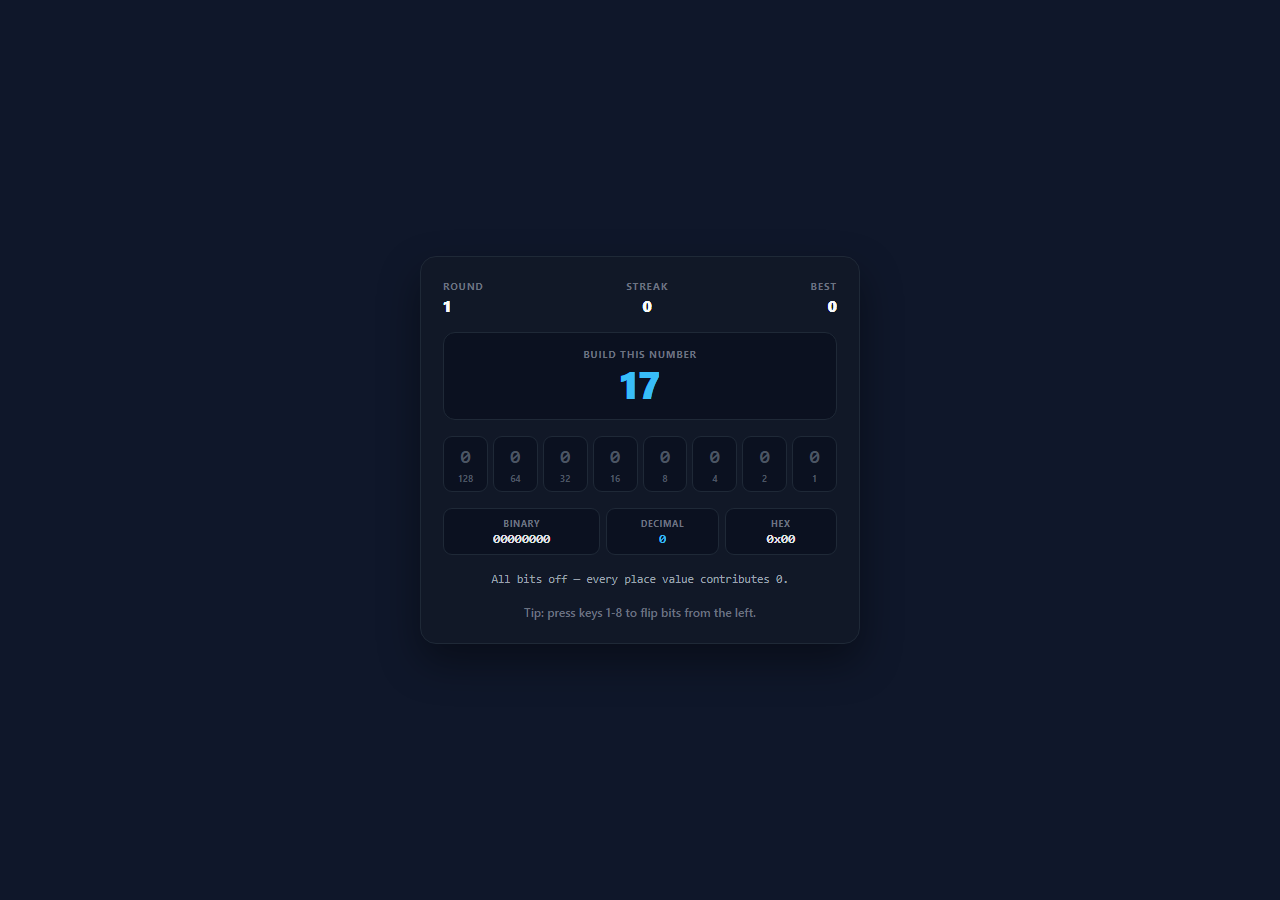
Binary is one of those topics that stays abstract for as long as it is taught on paper and becomes obvious the moment you can flip a bit and watch a number change. This snippet is a small, genuinely playable number-building game: a random target between 1 and 255 appears, eight bit buttons sit below it labelled with their place values, and the player toggles bits until the running total equals the target. Every representation the player might meet in real code — the binary string, the decimal value, the hex byte, and the place-value sum — updates on every flip, so the relationship between them is visible rather than described.
Toggling a single bit with XOR
Flipping bit i is a single expression: value ^= placeValue(i). Exclusive-or with a mask that has exactly one set bit inverts that bit and leaves every other bit untouched, which is precisely what a toggle means at the bit level — and it is meaningfully better than the alternatives a beginner reaches for first. Tracking eight separate boolean variables and recomputing a sum keeps two sources of truth that can drift; adding or subtracting the place value works only if you first check the current state, which is the check XOR makes unnecessary. The whole game state is one integer between 0 and 255.
Deriving the display from the number, never the other way around
render() reads the single value integer and regenerates everything: each button's on/off class and its 0-or-1 digit come from (value & placeValue(i)) !== 0, the binary string from value.toString(2).padStart(8, '0'), the hex byte from value.toString(16) uppercased and padded, and the arithmetic line from collecting the place values of the set bits and joining them with plus signs. Because every visual element is derived from the same integer on every render, the display cannot disagree with the state — the same one-way data flow a framework enforces, done here in a dozen lines.
Place values as first-class UI
Each bit button shows its weight — 128, 64, 32, 16, 8, 4, 2, 1 — under the digit, computed as Math.pow(2, BITS - 1 - i) rather than hardcoded, so changing BITS to 4 or 16 rebuilds the whole board correctly. The running line beneath the readouts spells out the arithmetic in full ("64 + 32 + 8 = 104"), which is the step that converts pattern-matching into actual understanding: the player sees that a binary number is nothing more than a sum of the powers of two whose bits are set.
Keyboard and pointer paths through one function
Number keys 1 through 8 flip the corresponding bit from the left, and clicking a button does the same, because both paths call toggleBit(i) — a delegated click listener on the container resolves the index from a data-index attribute rather than binding eight separate handlers. Win detection lives inside that one function too: after every flip it compares value === target, so there is no separate check step and no way for the two input methods to behave differently.
Streaks that survive a refresh
Consecutive solves build a streak, and the best streak is written to localStorage under a single clearly named key, read back on load, and only rewritten when the record actually breaks. A short lock after a win prevents further flips from registering during the celebration delay before the next target appears, which is the small guard that stops a fast player from accidentally scoring the next round with a stale click.
Build with AI
Build, Understand, Optimize, and Extend It With AI
Paste this snippet into an AI assistant like Claude and ask it to add a bitwise-operator mode where the player is shown two bytes and an operator (AND, OR, XOR, NOT, or a shift) and has to build the result — the natural next lesson once place value is understood. Other extensions worth asking for: a signed two's-complement mode that shows how -1 becomes 11111111, a timed challenge with a par number of flips per target so players learn to work from the largest place value down, a hex-target mode where the goal is given as 0x6C rather than 108, or an RGB mode where three of these byte builders drive a live colour swatch.
Prompt to recreate it
Copy this into your AI assistant of choice to build the effect from scratch, or as a jumping-off point for your own variant:
Build a playable binary bit-flipping game in plain HTML, CSS, and JavaScript — no frameworks or libraries.

Requirements:
- Keep the entire game state in ONE integer between 0 and 255. Flip a bit with XOR against a single-bit mask (value ^= 2 ** (BITS - 1 - i)) rather than tracking separate booleans or adding/subtracting with a conditional.
- Render eight bit buttons, each showing its current digit (0 or 1) and its place value (128 down to 1) computed from the BITS constant, not hardcoded — changing BITS must rebuild the board correctly.
- Read each bit's state for rendering with a bitwise AND against the same mask, so every displayed element is derived from the state integer and cannot drift from it.
- Show live readouts of the binary string (toString(2) zero-padded to BITS), the decimal value, and the hex byte (toString(16) uppercased and padded), plus a plain-arithmetic line listing the place values of the set bits joined with plus signs and equalling the total.
- Generate a random target between 1 and 255 each round, guaranteed different from the previous target, and detect the win inside the toggle function itself so the round ends the instant the value matches.
- Support both clicking a bit and pressing number keys 1-8, routed through the same toggle function, using event delegation with a data-index attribute rather than eight individual listeners.
- Track a streak of consecutive solves and persist the best streak to localStorage under one clearly named key, rewriting it only when the record actually breaks, and lock input briefly after a win so a fast click cannot leak into the next round.
Want to tighten it up first? Run this prompt through the AI Prompt Studio to score it across 8 quality dimensions, catch anti-patterns, and tune the wording for Claude, ChatGPT, or Gemini before you paste it in.
Source Code
<div class="demo-wrap">
  <div class="bb-game">
    <div class="bb-head">
      <div class="bb-meta"><span class="bb-label">Round</span><span class="bb-value" id="bbRound">1</span></div>
      <div class="bb-meta bb-center"><span class="bb-label">Streak</span><span class="bb-value" id="bbStreak">0</span></div>
      <div class="bb-meta bb-right"><span class="bb-label">Best</span><span class="bb-value" id="bbBest">0</span></div>
    </div>

    <div class="bb-target">
      <span class="bb-target-label">Build this number</span>
      <span class="bb-target-value" id="bbTarget">0</span>
    </div>

    <div class="bb-bits" id="bbBits"></div>

    <div class="bb-readout">
      <div class="bb-read"><span class="bb-read-label">binary</span><span class="bb-read-value" id="bbBinary">00000000</span></div>
      <div class="bb-read"><span class="bb-read-label">decimal</span><span class="bb-read-value bb-dec" id="bbDecimal">0</span></div>
      <div class="bb-read"><span class="bb-read-label">hex</span><span class="bb-read-value" id="bbHex">0x00</span></div>
    </div>

    <p class="bb-sum" id="bbSum">Flip bits to add their place values together.</p>
    <p class="bb-status" id="bbStatus">Tip: press keys 1-8 to flip bits from the left.</p>
  </div>
</div>
* { box-sizing: border-box; margin: 0; padding: 0; }
body { font-family: system-ui, -apple-system, sans-serif; background: #0f172a; min-height: 100vh; }
.demo-wrap { display: flex; align-items: center; justify-content: center; min-height: 100vh; padding: 28px 16px; }
.bb-game {
width: 100%; max-width: 440px; padding: 22px;
background: #111827; border: 1px solid #1f2937; border-radius: 16px;
display: flex; flex-direction: column; gap: 16px;
box-shadow: 0 18px 40px rgba(0,0,0,0.4);
}
.bb-head { display: flex; justify-content: space-between; }
.bb-meta { display: flex; flex-direction: column; gap: 2px; }
.bb-center { align-items: center; }
.bb-right { align-items: flex-end; }
.bb-label { font-size: 10px; font-weight: 700; letter-spacing: 0.08em; text-transform: uppercase; color: #6b7280; }
.bb-value { font-size: 16px; font-weight: 800; color: #f9fafb; }
.bb-target {
display: flex; flex-direction: column; align-items: center; gap: 2px;
padding: 14px; border-radius: 12px; background: #0b1120; border: 1px solid #1f2937;
}
.bb-target-label { font-size: 10px; font-weight: 700; letter-spacing: 0.08em; text-transform: uppercase; color: #6b7280; }
.bb-target-value { font-size: 38px; font-weight: 900; color: #38bdf8; line-height: 1.1; font-variant-numeric: tabular-nums; }
.bb-game.won .bb-target-value { color: #4ade80; }
.bb-bits { display: grid; grid-template-columns: repeat(8, 1fr); gap: 5px; }
.bb-bit {
display: flex; flex-direction: column; align-items: center; gap: 4px;
padding: 9px 0 7px; border-radius: 9px; cursor: pointer; font-family: inherit;
background: #0b1120; border: 1.5px solid #1f2937; transition: all 0.14s;
}
.bb-bit:hover { border-color: #38bdf8; }
.bb-bit .digit { font-family: ui-monospace, SFMono-Regular, Menlo, monospace; font-size: 19px; font-weight: 800; color: #4b5563; }
.bb-bit .place { font-size: 9px; font-weight: 700; color: #4b5563; }
.bb-bit.on { background: rgba(56,189,248,0.14); border-color: #38bdf8; }
.bb-bit.on .digit { color: #38bdf8; }
.bb-bit.on .place { color: #7dd3fc; }
.bb-readout { display: grid; grid-template-columns: 1.4fr 1fr 1fr; gap: 6px; }
.bb-read {
display: flex; flex-direction: column; align-items: center; gap: 2px;
padding: 8px 4px; border-radius: 9px; background: #0b1120; border: 1px solid #1f2937;
}
.bb-read-label { font-size: 9px; font-weight: 700; letter-spacing: 0.06em; text-transform: uppercase; color: #6b7280; }
.bb-read-value {
font-family: ui-monospace, SFMono-Regular, Menlo, monospace;
font-size: 13px; font-weight: 700; color: #e5e7eb;
}
.bb-dec { color: #38bdf8; }
.bb-game.won .bb-dec { color: #4ade80; }
.bb-sum {
font-family: ui-monospace, SFMono-Regular, Menlo, monospace; font-size: 11.5px;
color: #9ca3af; text-align: center; min-height: 17px; line-height: 1.5;
}
.bb-status { font-size: 12px; font-weight: 600; color: #6b7280; text-align: center; min-height: 17px; }
.bb-status.ok { color: #4ade80; }var BITS = 8;
var BEST_KEY = 'binary-bit-flip-best';
var game = document.querySelector('.bb-game');
var bitsEl = document.getElementById('bbBits');
var targetEl = document.getElementById('bbTarget');
var binaryEl = document.getElementById('bbBinary');
var decimalEl = document.getElementById('bbDecimal');
var hexEl = document.getElementById('bbHex');
var sumEl = document.getElementById('bbSum');
var statusEl = document.getElementById('bbStatus');
var roundEl = document.getElementById('bbRound');
var streakEl = document.getElementById('bbStreak');
var bestEl = document.getElementById('bbBest');
var value = 0; // the number currently built, 0-255
var target = 0;
var round = 1;
var streak = 0;
// localStorage throws in sandboxed/opaque-origin frames, so both reads and
// writes are guarded — the game still runs, it just cannot remember a record.
function readBest() {
try { return Number(localStorage.getItem(BEST_KEY) || 0); } catch (err) { return 0; }
}
function writeBest(n) {
try { localStorage.setItem(BEST_KEY, String(n)); } catch (err) { /* storage unavailable */ }
}
var best = readBest();
var locked = false;
// Bit i (left to right) is worth 2^(BITS-1-i) — the place value of that column.
function placeValue(i) { return Math.pow(2, BITS - 1 - i); }
function bitOn(i) { return (value & placeValue(i)) !== 0; }
function buildBits() {
bitsEl.innerHTML = '';
for (var i = 0; i < BITS; i++) {
var btn = document.createElement('button');
btn.className = 'bb-bit';
btn.dataset.index = i;
btn.innerHTML = '<span class="digit">0</span><span class="place">' + placeValue(i) + '</span>';
bitsEl.appendChild(btn);
}
}
function toggleBit(i) {
if (locked) return;
value ^= placeValue(i); // XOR flips exactly that one bit, leaving the rest alone
render();
if (value === target) win();
}
function render() {
var children = bitsEl.children;
for (var i = 0; i < BITS; i++) {
var on = bitOn(i);
children[i].classList.toggle('on', on);
children[i].querySelector('.digit').textContent = on ? '1' : '0';
}
binaryEl.textContent = value.toString(2).padStart(BITS, '0');
decimalEl.textContent = value;
hexEl.textContent = '0x' + value.toString(16).toUpperCase().padStart(2, '0');
var parts = [];
for (var j = 0; j < BITS; j++) { if (bitOn(j)) parts.push(placeValue(j)); }
sumEl.textContent = parts.length ? parts.join(' + ') + ' = ' + value : 'All bits off — every place value contributes 0.';
}
function setStatus(msg, kind) {
statusEl.textContent = msg;
statusEl.className = 'bb-status' + (kind ? ' ' + kind : '');
}
function win() {
locked = true;
game.classList.add('won');
streak++;
if (streak > best) {
best = streak;
writeBest(best);
}
streakEl.textContent = streak;
bestEl.textContent = best;
setStatus('Correct! ' + value.toString(2).padStart(BITS, '0') + ' = ' + value, 'ok');
setTimeout(nextRound, 1100);
}
function newTarget() {
var next;
do { next = Math.floor(Math.random() * 255) + 1; } while (next === target);
return next;
}
function nextRound() {
round++;
roundEl.textContent = round;
startRound();
}
function startRound() {
locked = false;
game.classList.remove('won');
value = 0;
target = newTarget();
targetEl.textContent = target;
render();
setStatus('Tip: press keys 1-8 to flip bits from the left.', '');
}
document.addEventListener('keydown', function (e) {
if (e.key >= '1' && e.key <= String(BITS)) toggleBit(Number(e.key) - 1);
});
bitsEl.addEventListener('click', function (e) {
var btn = e.target.closest('.bb-bit');
if (btn) toggleBit(Number(btn.dataset.index));
});
buildBits();
bestEl.textContent = best;
startRound();Step by step
How to Use
- 1Read the target numberA random value between 1 and 255 appears at the top of the card — that is the number you have to build out of place values. A new target is guaranteed to differ from the previous one, so no round repeats back to back.
- 2Flip bits by clicking or with the keyboardClick any of the eight bit buttons, or press keys 1 through 8 to flip bits from the left. Both routes call the same toggleBit() function, which XORs the bit's place value into the running number.
- 3Watch all four representations updateEvery flip re-renders the binary string, the decimal value, the hex byte, and a plain-arithmetic line showing the place values being added — for example "64 + 32 + 8 = 104".
- 4Match the target exactly to scoreThe win check runs inside the toggle itself, so the round ends the instant the running value equals the target. The target and decimal readout both turn green and the binary equation is echoed in the status line.
- 5Build a streakConsecutive correct rounds increase your streak, and the best streak persists in localStorage under the binary-bit-flip-best key so it survives a page reload.
- 6Use the place labels as a crib sheetEach button shows its weight (128, 64, 32, 16, 8, 4, 2, 1) computed from Math.pow(2, BITS - 1 - i). Working from the largest place value down is the standard technique for converting decimal to binary by hand.
Real-world uses
Common Use Cases
Got questions?
Frequently Asked Questions
value ^= placeValue(i) inverts exactly the target bit and leaves the other seven untouched, which is what a toggle means at the bit level. Keeping eight separate booleans plus a derived total creates two sources of truth that can drift out of sync, and add/subtract approaches need a conditional to check the current state first — XOR needs none, and keeps the entire game state in one integer.
With a bitwise AND: (value & placeValue(i)) !== 0. The mask has exactly one set bit, so the AND is non-zero only when that bit is set in the current value. Every rendered element — the digit, the highlight class, the arithmetic line — is derived from the value integer this way, so nothing can display a state the number does not actually have.
Yes. The BITS constant drives the button count, each place value via Math.pow(2, BITS - 1 - i), the zero-padding of the binary string, and the keyboard range. For 16 bits you would also want to widen the hex padding beyond two characters and reduce the target range accordingly, and the eight-column CSS grid needs its column count updated to match.
In localStorage under the key binary-bit-flip-best, written only when the current streak exceeds the stored record. Clear it with localStorage.removeItem('binary-bit-flip-best') from the console, or change the BEST_KEY constant if you embed several instances and want them scored separately.
Yes, and it ports unusually cleanly because the state is a single integer. Hold value, target and streak in component state, derive the bit array, binary string, hex string and sum line during render rather than mutating the DOM, and dispatch toggles with a setValue(v => v ^ mask) style updater. Attach the document keydown listener in useEffect / onMounted / ngAfterViewInit and remove it on cleanup, and clear the post-win setTimeout on unmount so the next round cannot fire after the component is gone.