Learn Coding Visually
Learn to code with interactive, live-preview playgrounds — HTML, CSS, JavaScript, React & more.
 HTML Playground42 lessons · Click-based · Live preview
 CSS PlaygroundLearn CSS with a live editor
 JavaScript Playground60 lessons · DOM · Async · Canvas
 React PlaygroundLearn React with a live code editor
 GSAP PlaygroundLearn GSAP animation interactively
 SVG Playground44 lessons · shapes · paths · animation
 SCSS Playground45 lessons · Sass modules · tokens
 Tailwind PlaygroundLearn Tailwind CSS with a live editor
 Bootstrap 5 Playground50 lessons · live preview
Hash Table Visualizer — Free HTML CSS JS Snippet
Hash Table Visualizer · Visualizers · Plain HTML, CSS & JS · Live preview
What's included
Features
About this UI Snippet
Hash Table Visualizer — Animated Separate Chaining, Live Hash Calculation & Load Factor Readout in Vanilla JS
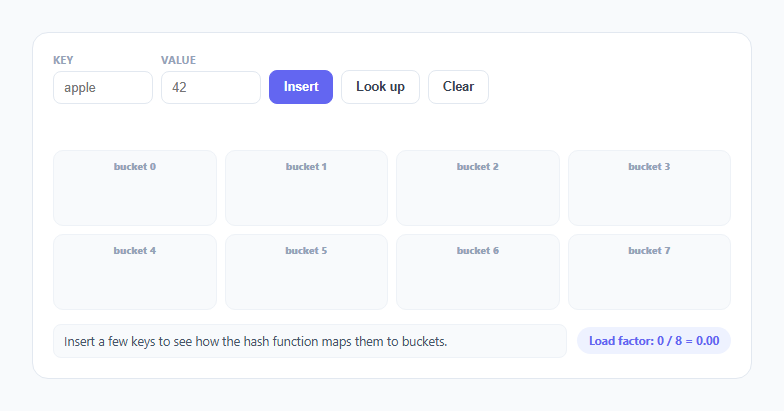
A hash table is usually presented as a magic O(1) box — you put a key in, you get a value out — and that magic is exactly what makes collisions so confusing the first time a learner hits one. This snippet opens the box: eight visible buckets, a hash function whose arithmetic plays out on screen character by character, and a separate-chaining collision strategy that visibly appends rather than silently overwrites, so "why did two different keys end up in the same place" has an obvious, watchable answer.
The hash function: sum of char codes, deliberately simple
hashOf(key) sums every character's charCodeAt() value and takes the result modulo BUCKET_COUNT (8). This is intentionally the simplest possible string hash, not a production-grade one (real hash tables use algorithms like FNV-1a or MurmurHash specifically to avoid the weaknesses described below) — the goal here is that a viewer can compute it by hand for a short key and verify the animation is telling the truth, not asking them to trust a black box. animateHash(key) walks the same character-code sum the real hashOf uses, updating a status strip after each character so the running total — and the final % 8 step that folds it down into a valid bucket index — is visible as a process, not just a final answer.
Separate chaining: why collisions never overwrite
Each of the 8 buckets holds a plain JavaScript array (buckets[i]), not a single slot. When insertKey computes a bucket index and finds the bucket's array already has one or more entries with different keys, it does not touch them — it pushes the new { key, value } pair onto the end of that array, and the DOM chain visualization appends a new .ht-entry element with a small arrow prefix showing it as a link in a chain. This is the "separate chaining" collision resolution strategy by name: instead of finding another empty slot elsewhere in the table (the alternative strategy, "open addressing"), every bucket independently becomes its own small linked list of entries, and two keys landing on the same bucket simply means that bucket's chain has two elements instead of one.
Insert first checks for an existing key, not just a free bucket
Before appending, insertKey runs chain.find(e => e.key === key) on the target bucket's chain. If the exact same key already exists there, its value is updated in place (with a green "match" pulse) rather than appended as a duplicate entry — this mirrors how a real hash map's set() behaves: same key always updates, never duplicates, while a different key that happens to hash to the same bucket always appends alongside it as a genuine collision.
Lookup walks the chain and compares keys one at a time
lookupKey re-runs the identical animateHash step to jump straight to the correct bucket — this is the O(1) part, since no other bucket is ever inspected — and then, critically, does not assume the first entry in that bucket is the answer. It iterates the bucket's array from the front, highlighting each entry amber while comparing entry.key === key, and only stops early on an exact match (turning it green) or reports a full miss after exhausting the whole chain. This walk is the part of a hash table's cost that a single "hash and index" step glosses over: a bucket with a long chain means a lookup that still has to compare several keys one by one, even though it started with an O(1) jump to the right bucket.
Load factor: the number that predicts chain length
The footer's live Load factor: items / buckets readout is not decorative — it is the standard metric real hash table implementations use to decide when to resize. A load factor near or above 1 means, on average, every bucket holds roughly one or more chained entries, so lookups start doing real chain-walking work instead of landing on a single-entry bucket; production hash maps (JavaScript's own Map, Java's HashMap, Python's dict) automatically grow their bucket count and re-hash every existing key once the load factor crosses a threshold (commonly around 0.75) specifically to keep chains short and lookups close to O(1) in practice.
Build with AI
Build, Understand, Optimize, and Extend It With AI
Hand this snippet's JavaScript to an AI assistant like Claude and ask it to compute, by hand, the exact bucket index two specific keys you pick would hash to, and to explain why an anagram pair like "listen" and "silent" is guaranteed to collide under this particular hash function — that concrete trace makes the collision mechanics stick far better than reading the explanation alone. Good extensions to ask for: an automatic resize-and-rehash step once load factor crosses 0.75 (doubling BUCKET_COUNT and re-inserting every existing key), an open-addressing mode to compare against separate chaining on the same key set, or a "worst case" demo button that inserts several keys engineered to all hash to the same bucket.
Prompt to recreate it
Copy this into your AI assistant of choice to build the effect from scratch, or as a jumping-off point for your own variant:
Build an animated hash table visualizer using separate chaining in plain HTML, CSS, and JavaScript, no libraries or frameworks.

Requirements:
- A fixed number of visible buckets (e.g. 8) rendered as a grid, each capable of holding multiple entries as a visible chain, not a single overwritable slot.
- Implement the hash function as a simple, human-verifiable algorithm (e.g. sum of character codes modulo bucket count) and animate its calculation step by step on screen — showing the running sum growing as each character is processed and the final modulo operation that produces the bucket index — before jumping to and highlighting that bucket.
- Insert(key, value): after the hash animation, check whether the target bucket already contains that exact key; if so, update its value in place with a distinct visual cue (not a duplicate entry); if not, animate a new entry appending to the end of that bucket's chain with a visible connector so multiple entries in one bucket read as a linked chain, not stacked or hidden items.
- Look up(key): reuse the same hash animation to jump to the correct bucket, then visibly walk the bucket's chain from the front, highlighting each entry while comparing its key, stopping with a clear "found" indicator on a match or a clear "not found" indicator after checking every entry in that bucket with no match.
- Never let a collision silently overwrite an existing different key in the same bucket — the whole point is making collisions visible via the chain, not hidden.
- A live "load factor" readout (total items divided by bucket count) that updates after every insert, since load factor is the real-world signal production hash maps use to decide when to resize and re-hash.
- Use a light, clean color theme (off-white background, indigo/amber/violet accents, system-ui font) with smooth enter animations for new chain entries and clear, distinct highlight states for "currently hashing," "bucket targeted," "entry being compared," and "entry matched."
Want to tighten it up first? Run this prompt through the AI Prompt Studio to score it across 8 quality dimensions, catch anti-patterns, and tune the wording for Claude, ChatGPT, or Gemini before you paste it in.
Source Code
<div class="ht-wrap">
  <div class="ht-toolbar">
    <div class="ht-field">
      <label class="ht-label">Key</label>
      <input type="text" id="ht-key" maxlength="8" placeholder="apple" />
    </div>
    <div class="ht-field">
      <label class="ht-label">Value</label>
      <input type="text" id="ht-value" maxlength="6" placeholder="42" />
    </div>
    <button class="ht-btn ht-btn-primary" id="ht-insert">Insert</button>
    <button class="ht-btn" id="ht-lookup">Look up</button>
    <button class="ht-btn" id="ht-clear">Clear</button>
  </div>
  <div class="ht-hash-strip" id="ht-hash-strip"></div>
  <div class="ht-buckets" id="ht-buckets"></div>
  <div class="ht-footer">
    <div class="ht-status" id="ht-status">Insert a few keys to see how the hash function maps them to buckets.</div>
    <div class="ht-load" id="ht-load">Load factor: 0 / 8 = 0.00</div>
  </div>
</div>
* { box-sizing: border-box; margin: 0; padding: 0; }
body { font-family: system-ui, -apple-system, sans-serif; background: #f8fafc; min-height: 100vh; display: flex; align-items: center; justify-content: center; padding: 24px; }
.ht-wrap { width: 100%; max-width: 720px; background: #fff; border: 1px solid #e2e8f0; border-radius: 16px; padding: 20px; }
.ht-toolbar { display: flex; align-items: flex-end; gap: 8px; flex-wrap: wrap; margin-bottom: 14px; }
.ht-field { display: flex; flex-direction: column; gap: 4px; }
.ht-label { font-size: 10.5px; font-weight: 700; color: #94a3b8; text-transform: uppercase; letter-spacing: 0.05em; }
.ht-field input { width: 100px; padding: 8px 10px; border: 1.5px solid #e2e8f0; border-radius: 8px; font-size: 13px; }
.ht-field input:focus { outline: none; border-color: #6366f1; }
.ht-btn { font-size: 12.5px; font-weight: 700; padding: 9px 14px; border-radius: 8px; border: 1.5px solid #e2e8f0; background: #fff; color: #374151; cursor: pointer; transition: all 0.15s; }
.ht-btn:hover { border-color: #cbd5e1; background: #f8fafc; }
.ht-btn:disabled { opacity: 0.5; cursor: not-allowed; }
.ht-btn-primary { background: #6366f1; border-color: #6366f1; color: #fff; }
.ht-btn-primary:hover { background: #4f46e5; }
.ht-hash-strip { min-height: 22px; margin-bottom: 10px; font-family: ui-monospace, monospace; font-size: 12px; color: #6366f1; font-weight: 700; text-align: center; }
.ht-buckets { display: grid; grid-template-columns: repeat(4, 1fr); gap: 8px; margin-bottom: 14px; }
.ht-bucket { background: #f8fafc; border: 1.5px solid #eef2f7; border-radius: 10px; padding: 8px; min-height: 76px; transition: border-color 0.2s ease, background-color 0.2s ease; }
.ht-bucket.active { border-color: #f59e0b; background: #fffbeb; }
.ht-bucket-index { font-size: 10px; font-weight: 800; color: #94a3b8; margin-bottom: 6px; text-align: center; }
.ht-bucket-chain { display: flex; flex-direction: column; gap: 4px; }
.ht-entry { display: flex; align-items: center; gap: 5px; background: #6366f1; color: #fff; border-radius: 6px; padding: 4px 6px; font-size: 10.5px; font-weight: 700; font-family: ui-monospace, monospace; transition: background-color 0.2s ease, transform 0.2s ease, opacity 0.2s ease; opacity: 0; transform: scale(0.6); }
.ht-entry.shown { opacity: 1; transform: scale(1); }
.ht-entry.checking { background: #f59e0b; }
.ht-entry.match { background: #10b981; }
.ht-entry .ht-arrow { opacity: 0.6; font-size: 9px; }
.ht-footer { display: flex; align-items: center; justify-content: space-between; gap: 10px; flex-wrap: wrap; }
.ht-status { font-size: 12.5px; color: #475569; background: #f8fafc; border: 1px solid #eef2f7; border-radius: 8px; padding: 8px 10px; flex: 1; min-height: 34px; }
.ht-load { font-size: 11.5px; font-weight: 700; color: #6366f1; background: #eef2ff; border-radius: 999px; padding: 6px 12px; white-space: nowrap; }
@media (max-width: 520px) { .ht-buckets { grid-template-columns: repeat(2, 1fr); } }const BUCKET_COUNT = 8;
const buckets = Array.from({ length: BUCKET_COUNT }, () => []);
let itemCount = 0;
let entrySeq = 0;
function wait(ms) { return new Promise(res => setTimeout(res, ms)); }
function setStatus(text) { document.getElementById('ht-status').textContent = text; }
function hashOf(key) {
let sum = 0;
for (let i = 0; i < key.length; i++) sum += key.charCodeAt(i);
return sum % BUCKET_COUNT;
}
function buildBuckets() {
const wrap = document.getElementById('ht-buckets');
wrap.innerHTML = '';
for (let i = 0; i < BUCKET_COUNT; i++) {
const bucket = document.createElement('div');
bucket.className = 'ht-bucket';
bucket.id = 'ht-bucket-' + i;
bucket.innerHTML = '<div class="ht-bucket-index">bucket ' + i + '</div><div class="ht-bucket-chain" id="ht-chain-' + i + '"></div>';
wrap.appendChild(bucket);
}
}
function updateLoadFactor() {
const lf = (itemCount / BUCKET_COUNT).toFixed(2);
document.getElementById('ht-load').textContent = 'Load factor: ' + itemCount + ' / ' + BUCKET_COUNT + ' = ' + lf;
}
async function animateHash(key) {
const strip = document.getElementById('ht-hash-strip');
const codes = key.split('').map(c => c.charCodeAt(0));
let running = 0;
for (let i = 0; i < codes.length; i++) {
running += codes[i];
strip.textContent = 'hash("' + key + '") = (' + codes.slice(0, i + 1).join(' + ') + ') % ' + BUCKET_COUNT + ' = ' + running + ' % ' + BUCKET_COUNT + ' so far';
await wait(140);
}
const idx = running % BUCKET_COUNT;
strip.textContent = 'hash("' + key + '") = ' + running + ' % ' + BUCKET_COUNT + ' = ' + idx;
await wait(260);
return idx;
}
function highlightBucket(index, on) {
document.getElementById('ht-bucket-' + index).classList.toggle('active', on);
}
async function insertKey(key, value) {
const idx = await animateHash(key);
highlightBucket(idx, true);
const chain = buckets[idx];
const existing = chain.find(e => e.key === key);
if (existing) {
existing.value = value;
const el = document.getElementById('ht-entry-' + existing.id);
if (el) {
el.classList.add('match');
el.querySelector('.ht-val').textContent = value;
await wait(400);
el.classList.remove('match');
}
setStatus('Key "' + key + '" already lived in bucket ' + idx + ' — value updated in place.');
highlightBucket(idx, false);
return;
}
const id = 'e' + (entrySeq++);
chain.push({ id, key, value });
itemCount++;
const chainEl = document.getElementById('ht-chain-' + idx);
const entryEl = document.createElement('div');
entryEl.className = 'ht-entry';
entryEl.id = 'ht-entry-' + id;
entryEl.innerHTML = (chain.length > 1 ? '<span class="ht-arrow">-></span>' : '') + '<span class="ht-key">' + key + '</span>:<span class="ht-val">' + value + '</span>';
chainEl.appendChild(entryEl);
requestAnimationFrame(() => entryEl.classList.add('shown'));
await wait(260);
if (chain.length > 1) {
setStatus('Collision! Bucket ' + idx + ' already had ' + (chain.length - 1) + ' key(s) — "' + key + '" is appended to the chain, nothing is overwritten.');
} else {
setStatus('Key "' + key + '" hashed to bucket ' + idx + ' and inserted directly.');
}
updateLoadFactor();
highlightBucket(idx, false);
}
async function lookupKey(key) {
const idx = await animateHash(key);
highlightBucket(idx, true);
const chain = buckets[idx];
setStatus('Jumped straight to bucket ' + idx + ' — now walking its chain to compare keys.');
await wait(200);
for (const entry of chain) {
const el = document.getElementById('ht-entry-' + entry.id);
el.classList.add('checking');
await wait(320);
if (entry.key === key) {
el.classList.remove('checking');
el.classList.add('match');
setStatus('Found "' + key + '" -> ' + entry.value + ' after checking ' + (chain.indexOf(entry) + 1) + ' item(s) in this bucket\'s chain.');
await wait(500);
el.classList.remove('match');
highlightBucket(idx, false);
return;
}
el.classList.remove('checking');
}
setStatus('"' + key + '" not found — walked all ' + chain.length + ' item(s) in bucket ' + idx + ' without a match.');
await wait(200);
highlightBucket(idx, false);
}
function clearAll() {
buckets.forEach(chain => chain.length = 0);
itemCount = 0;
buildBuckets();
updateLoadFactor();
document.getElementById('ht-hash-strip').textContent = '';
setStatus('Table cleared. Insert a few keys to see how the hash function maps them to buckets.');
}
let busy = false;
document.getElementById('ht-insert').addEventListener('click', async () => {
if (busy) return;
const key = document.getElementById('ht-key').value.trim();
const value = document.getElementById('ht-value').value.trim() || '1';
if (!key) return;
busy = true;
document.getElementById('ht-key').value = '';
document.getElementById('ht-value').value = '';
await insertKey(key, value);
busy = false;
});
document.getElementById('ht-lookup').addEventListener('click', async () => {
if (busy) return;
const key = document.getElementById('ht-key').value.trim();
if (!key) return;
busy = true;
document.getElementById('ht-key').value = '';
await lookupKey(key);
busy = false;
});
document.getElementById('ht-clear').addEventListener('click', () => { if (!busy) clearAll(); });
buildBuckets();
updateLoadFactor();Step by step
How to Use
- 1Type a key and value, then click InsertA status strip plays out the hash calculation character by character — each letter's char code added to a running sum — before landing on a final "% 8" bucket index, which briefly highlights in amber.
- 2Watch the entry slide into its bucketThe key:value pair animates into the highlighted bucket's chain. If the bucket was empty, it becomes the only entry; the load factor readout in the footer ticks up immediately.
- 3Insert a second key that lands in the same bucketThe status line explicitly calls out the collision and explains that the new entry is appended to the existing chain with an arrow connector, not overwriting what was already there.
- 4Click Look up with a key you insertedThe same hash animation jumps straight to the correct bucket, then walks its chain from the front — each entry briefly highlights amber while its key is compared — stopping with a green pulse on the exact match.
- 5Look up a key that was never insertedThe walk still jumps to the correct bucket via the hash function, checks every entry in that bucket's chain, and reports a clean miss once the whole chain has been compared with no match.
- 6Keep inserting and watch the load factor climbAs items / buckets approaches or passes 1.0, notice chains growing longer in some buckets — a live, visual reason production hash maps resize once load factor crosses a threshold.
Real-world uses
Common Use Cases
Got questions?
Frequently Asked Questions
Yes. Move the buckets array and hashOf() into a plain utility module — neither touches the DOM. Keep buckets in a ref (React), a non-reactive plain variable (Vue), or a class field (Angular) since it is mutated imperatively (push onto a chain array) rather than replaced wholesale like typical component state. Trigger insertKey/lookupKey from click handlers wired up in useEffect, onMounted, or ngAfterViewInit. The cleanup concern is the chain of await wait(ms) calls inside animateHash, insertKey, and lookupKey: guard each checkpoint with an "is mounted" flag and set it false in the component's unmount hook, so an in-flight hash animation or chain walk does not keep writing to DOM nodes the framework already removed.
Production hash tables use algorithms like FNV-1a, MurmurHash, or SipHash specifically because a plain character-code sum has a known weakness: any two strings that are anagrams of each other (e.g. "listen" and "silent") produce the exact same sum and therefore the exact same bucket, guaranteeing a collision every time. This snippet keeps the sum-of-char-codes version deliberately because it is simple enough to verify by hand for a short key, which is the whole educational point — swapping in a stronger hash function would make the animation harder to follow without changing anything about how the bucket/chain/load-factor mechanics work.
Separate chaining, used in this snippet, lets each bucket hold multiple entries as a small chain (here, a plain array) — a colliding key is simply appended to its bucket's existing chain. Open addressing, the other common strategy, keeps exactly one entry per slot and instead searches forward through other slots in the table (using a probing sequence) to find a free one when a collision occurs. Separate chaining is generally simpler to reason about and tends to degrade more gracefully as load factor climbs, which is why it is the strategy shown here.
Load factor (items divided by bucket count) predicts the average chain length: a load factor of 2 means buckets hold roughly 2 entries each on average, so a typical lookup has to compare roughly 2 keys instead of 1 even after an O(1) jump to the right bucket. Most production hash map implementations (JavaScript engines' Map, Java's HashMap, Python's dict) automatically double their bucket count and re-hash every existing key once load factor crosses a fixed threshold — commonly around 0.75 — specifically to keep average chain length short and lookups close to O(1) in practice rather than degrading toward O(n).
The hash function only narrows the search down to one bucket in O(1) — it does not tell you which entry within that bucket, if any, matches your exact key, especially once collisions have added multiple entries to the same bucket. That is why lookupKey walks the bucket's chain from the front, comparing entry.key === key one at a time, and only stops early on a match; in the worst case (every inserted key hashing to the same bucket) a lookup degrades to checking every single item in the table, which is exactly the failure mode a healthy load factor and a well-distributed hash function are meant to prevent.