
Learn Coding Visually
Learn to code with interactive, live-preview playgrounds — HTML, CSS, JavaScript, React & more.
 HTML Playground42 lessons · Click-based · Live preview
 CSS PlaygroundLearn CSS with a live editor
 JavaScript Playground60 lessons · DOM · Async · Canvas
 React PlaygroundLearn React with a live code editor
 GSAP PlaygroundLearn GSAP animation interactively
 SVG Playground44 lessons · shapes · paths · animation
 SCSS Playground45 lessons · Sass modules · tokens
 Tailwind PlaygroundLearn Tailwind CSS with a live editor
 Bootstrap 5 Playground50 lessons · live preview
BFS vs DFS Graph Traversal Visualizer — Free Side-by-Side Algorithm Demo
BFS vs DFS Graph Traversal Visualizer · Visualizers · Plain HTML, CSS & JS · Live preview
What's included
Features
About this UI Snippet
BFS vs DFS — The Same Algorithm With a Queue or a Stack
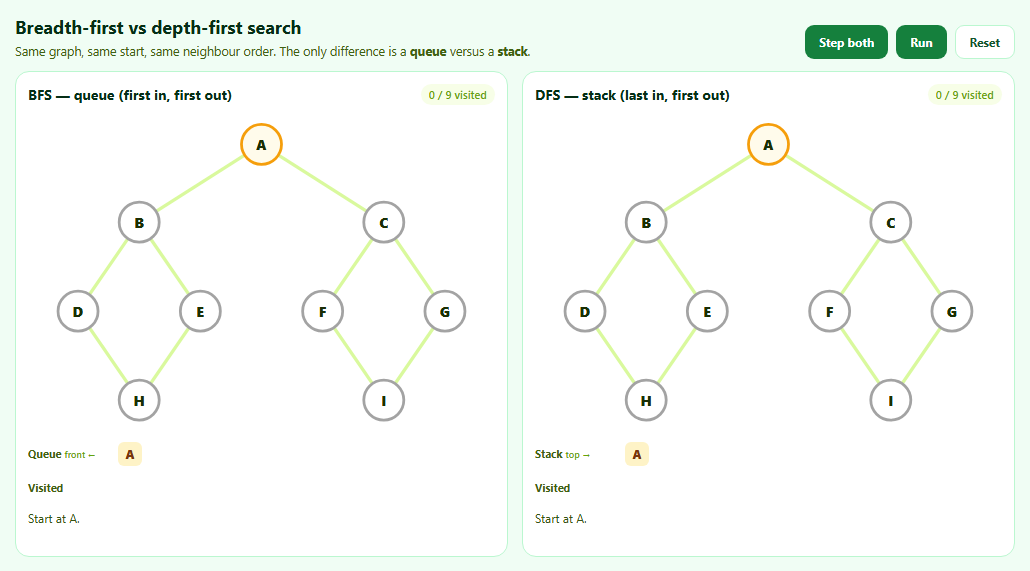
Breadth-first search and depth-first search are usually taught as two separate algorithms. They are really one algorithm — "take a node from the frontier, add its unvisited neighbours" — with a different container for the frontier. BFS uses a queue and spreads out level by level; DFS uses a stack and dives down one branch before backing up. Running both side by side on the same graph makes that single difference visible.
Fair comparison
Both searches start at A and visit neighbours in the same alphabetical order. Any difference in the result comes from the queue versus the stack.
BFS: first in, first out
BFS takes the oldest node from the front of the queue and appends new neighbours to the back. Nodes are marked as seen when they are enqueued, so no node enters the queue twice. The result visits A, then everything one edge away, then everything two edges away. In an unweighted graph, the tree edges it follows give the shortest path (fewest edges) from A to every node.
DFS: last in, first out
DFS pops the newest node from the top of the stack. Neighbours are pushed in reverse order so the first listed neighbour ends up on top and is visited next, matching what a recursive DFS would do. A node can be pushed more than once through different routes; stale entries are skipped when popped. The result follows one path as deep as possible before backtracking.
A subtle DFS bug this avoids
Because a node can sit on the stack several times, the edge that actually reached it is only known when it is *popped*, not when it was first pushed. Each frontier entry therefore stores { n, from }, and the search-tree edge is recorded on visit. Recording it at push time — a common shortcut that is harmless for BFS — draws the wrong DFS tree.
Reading the panes
Numbered badges show the order each node was visited, green edges show the search tree (which edge first reached each node), and the queue and stack are shown as they change.
Where each is used
BFS: shortest paths in unweighted graphs, "degrees of separation", level-order traversal. DFS: cycle detection, topological sorting, maze generation, and exploring every configuration in puzzles.
Build with AI
Build, Understand, Optimize, and Extend It With AI
Paste this visualizer into an AI assistant like Claude and ask it to explain, step by step, why BFS and DFS diverge after the first two visits. Ask it to add a target node with early exit, show the BFS distance levels as rings, add a recursive DFS with a call-stack display, or generate random graphs. It can also build exercises: hide the order badges and ask you to predict them.
Prompt to recreate it
Copy this into your AI assistant of choice to build the effect from scratch, or as a jumping-off point for your own variant:
Build a side-by-side BFS vs DFS traversal visualizer in plain HTML, CSS and JavaScript with SVG graphs.

Requirements:
- One undirected graph of nine nodes with fixed positions and adjacency lists in alphabetical order, drawn identically in two panes.
- Both searches start at A and visit neighbours in the same order.
- BFS uses a queue, marking nodes as seen when enqueued.
- DFS uses an explicit stack, pushing neighbours in reverse order so it matches recursive DFS, and skipping nodes already visited when they are popped.
- A "Step both" button that advances each search by one visit, plus Run/Pause and Reset.
- In each pane show the current node, visited nodes with numbered order badges, frontier nodes, the edges of the search tree, the live queue or stack as chips, the visit order so far and a one-line log of what was visited and added.
- When finished, show the complete visit order.
Want to tighten it up first? Run this prompt through the AI Prompt Studio to score it across 8 quality dimensions, catch anti-patterns, and tune the wording for Claude, ChatGPT, or Gemini before you paste it in.
Source Code
<div class="bd">
  <div class="bd-top">
    <div>
      <h2>Breadth-first vs depth-first search</h2>
      <p>Same graph, same start, same neighbour order. The only difference is a <b>queue</b> versus a <b>stack</b>.</p>
    </div>
    <div class="bd-btns">
      <button type="button" id="bdStep">Step both</button>
      <button type="button" id="bdRun">Run</button>
      <button type="button" id="bdReset" class="ghost">Reset</button>
    </div>
  </div>
  <div class="bd-grid">
    <section class="bd-pane" id="paneBfs" aria-label="Breadth-first search"></section>
    <section class="bd-pane" id="paneDfs" aria-label="Depth-first search"></section>
  </div>
</div>*{box-sizing:border-box;margin:0;padding:0}
body{font-family:system-ui,-apple-system,sans-serif;background:#f0fdf4;color:#052e16;min-height:100vh;display:flex;align-items:center;justify-content:center;padding:20px}
.bd{width:100%;max-width:1000px}
.bd-top{display:flex;justify-content:space-between;align-items:flex-end;gap:14px;flex-wrap:wrap;margin-bottom:12px}
.bd h2{font-size:18px}
.bd-top p{font-size:12.5px;color:#3f6212;margin-top:4px}
.bd-btns{display:flex;gap:8px}
.bd-btns button{border:0;border-radius:9px;padding:8px 14px;font:700 12px system-ui;background:#15803d;color:#fff;cursor:pointer}
.bd-btns button.ghost{background:#fff;color:#14532d;border:1px solid #bbf7d0}
.bd-btns button:disabled{opacity:.4}
.bd-btns button:focus-visible{outline:2px solid #22c55e;outline-offset:2px}
.bd-grid{display:grid;grid-template-columns:1fr 1fr;gap:14px}
@media (max-width:760px){.bd-grid{grid-template-columns:1fr}}
.bd-pane{background:#fff;border:1px solid #bbf7d0;border-radius:14px;padding:12px}
.bd-pane h3{font-size:14px;display:flex;justify-content:space-between;align-items:center}
.bd-pane h3 span{font:600 11px system-ui;color:#65a30d;background:#f7fee7;padding:3px 8px;border-radius:999px}
.bd-pane svg{width:100%;display:block;margin:6px 0}
.bd-pane line{stroke:#d9f99d;stroke-width:3}
.bd-pane line.tree{stroke:#16a34a;stroke-width:4}
.bd-pane circle{fill:#fff;stroke:#a3a3a3;stroke-width:2.5}
.bd-pane .n text{font:800 13px system-ui;text-anchor:middle;dominant-baseline:central;fill:#1a2e05}
.bd-pane .n .ord{font:800 10px system-ui;fill:#fff}
.bd-pane .n.seen circle{stroke:#f59e0b;fill:#fffbeb}
.bd-pane .n.done circle{fill:#16a34a;stroke:#15803d}
.bd-pane .n.done text{fill:#fff}
.bd-pane .n.cur circle{fill:#f59e0b;stroke:#b45309}
.bd-row{display:flex;align-items:center;gap:6px;font-size:11px;color:#3f6212;margin-top:6px;min-height:28px;flex-wrap:wrap}
.bd-row b{width:84px;flex:0 0 auto}
.bd-row b small{font-weight:500;color:#65a30d}
.bd-chip{display:inline-grid;place-items:center;min-width:24px;height:24px;border-radius:6px;background:#fef3c7;color:#78350f;font:800 12px system-ui;padding:0 5px}
.bd-chip.o{background:#dcfce7;color:#14532d}
.bd-chip.stale{background:#f5f5f4;color:#a8a29e;text-decoration:line-through}
.bd-note{font-size:12px;color:#365314;margin-top:8px;min-height:34px}// An undirected graph given as adjacency lists. Neighbours are visited in
// the listed (alphabetical) order in BOTH searches, so any difference in
// the result comes only from the data structure.
var POS = { A: [210, 30], B: [100, 100], C: [320, 100], D: [45, 180], E: [155, 180], F: [265, 180], G: [375, 180], H: [100, 260], I: [320, 260] };
var ADJ = {
A: ['B', 'C'], B: ['A', 'D', 'E'], C: ['A', 'F', 'G'], D: ['B', 'H'], E: ['B', 'H'],
F: ['C', 'I'], G: ['C', 'I'], H: ['D', 'E'], I: ['F', 'G'],
};
var NS = 'http://www.w3.org/2000/svg';
var timer = null;
function Search(kind, pane) {
this.kind = kind;
this.pane = pane;
pane.innerHTML =
'<h3>' + (kind === 'bfs' ? 'BFS — queue (first in, first out)' : 'DFS — stack (last in, first out)') + '<span id="' + kind + 'Count"></span></h3>' +
'<svg viewBox="0 0 420 290"></svg>' +
'<div class="bd-row"><b>' + (kind === 'bfs' ? 'Queue <small>front ←</small>' : 'Stack <small>top →</small>') + '</b><span class="lst"></span></div>' +
'<div class="bd-row"><b>Visited</b><span class="vis"></span></div>' +
'<p class="bd-note" aria-live="polite"></p>';
this.svg = pane.querySelector('svg');
this.reset();
}
Search.prototype.reset = function () {
// BFS marks a node when it is ADDED to the queue (so nothing is queued
// twice). This iterative DFS marks a node when it is POPPED, matching the
// order a recursive DFS would visit.
// Frontier entries are { n, from }: the node and the node that added it.
this.frontier = [{ n: 'A', from: null }];
this.seen = { A: true };
this.order = [];
this.parent = {};
this.cur = null;
this.finished = false;
this.note('Start at A.');
this.draw();
};
Search.prototype.step = function () {
if (this.finished) return;
var item, node, added = [];
if (this.kind === 'bfs') {
item = this.frontier.shift();
node = item.n;
ADJ[node].forEach(function (nb) {
if (!this.seen[nb]) { this.seen[nb] = true; this.frontier.push({ n: nb, from: node }); added.push(nb); }
}, this);
} else {
// A node can be pushed more than once via different routes. Skip
// entries for nodes that were already visited.
do { item = this.frontier.pop(); } while (item && this.order.indexOf(item.n) !== -1);
if (!item) return this.finish();
node = item.n;
// Push neighbours in REVERSE so the first listed neighbour is on top
// of the stack and is visited next, like recursion would.
ADJ[node].slice().reverse().forEach(function (nb) {
if (this.order.indexOf(nb) === -1) { this.frontier.push({ n: nb, from: node }); added.push(nb); }
}, this);
}
// The tree edge is the one the node was actually TAKEN through, which for
// DFS is only known when it is popped, not when it was first pushed.
if (item.from) this.parent[node] = item.from;
this.cur = node;
this.order.push(node);
this.note('Visit <b>' + node + '</b>. ' + (added.length ? (this.kind === 'bfs' ? 'Enqueue ' : 'Push ') + added.join(', ') + '.' : 'Nothing new to add.'));
if (!this.frontier.some(function (f) { return this.order.indexOf(f.n) === -1; }, this)) return this.finish();
this.draw();
};
Search.prototype.finish = function () {
this.finished = true;
this.cur = null;
this.note('Done. Visit order: <b>' + this.order.join(' → ') + '</b>');
this.draw();
};
Search.prototype.note = function (h) { this.pane.querySelector('.bd-note').innerHTML = h; };
Search.prototype.draw = function () {
var svg = this.svg, self = this;
svg.innerHTML = '';
var drawn = {};
Object.keys(ADJ).forEach(function (a) {
ADJ[a].forEach(function (b) {
var k = a < b ? a + b : b + a;
if (drawn[k]) return;
drawn[k] = true;
var isTree = self.order.indexOf(a) !== -1 && self.order.indexOf(b) !== -1 && (self.parent[b] === a || self.parent[a] === b);
var l = document.createElementNS(NS, 'line');
l.setAttribute('x1', POS[a][0]); l.setAttribute('y1', POS[a][1]); l.setAttribute('x2', POS[b][0]); l.setAttribute('y2', POS[b][1]);
if (isTree) l.setAttribute('class', 'tree');
svg.appendChild(l);
});
});
Object.keys(POS).forEach(function (n) {
var g = document.createElementNS(NS, 'g');
var idx = self.order.indexOf(n);
var cls = 'n' + (n === self.cur ? ' cur' : idx !== -1 ? ' done' : (self.seen[n] || self.frontier.some(function (f) { return f.n === n; })) ? ' seen' : '');
g.setAttribute('class', cls);
g.setAttribute('transform', 'translate(' + POS[n][0] + ',' + POS[n][1] + ')');
g.innerHTML = '<circle r="18"></circle><text>' + n + '</text>' +
(idx !== -1 ? '<circle r="9" cx="16" cy="-15" fill="#14532d" stroke="#fff" stroke-width="2"></circle><text class="ord" x="16" y="-15">' + (idx + 1) + '</text>' : '');
svg.appendChild(g);
});
this.pane.querySelector('.lst').innerHTML = this.frontier.map(function (f) {
// Entries for already-visited nodes are stale: DFS will skip them.
var stale = self.order.indexOf(f.n) !== -1;
return '<span class="bd-chip' + (stale ? ' stale' : '') + '"' + (stale ? ' title="Already visited: skipped when popped"' : '') + '>' + f.n + '</span>';
}).join(' ') || '<i>empty</i>';
this.pane.querySelector('.vis').innerHTML = this.order.map(function (n) { return '<span class="bd-chip o">' + n + '</span>'; }).join(' ');
document.getElementById(this.kind + 'Count').textContent = this.order.length + ' / 9 visited';
};
var bfs = new Search('bfs', document.getElementById('paneBfs'));
var dfs = new Search('dfs', document.getElementById('paneDfs'));
function stepBoth() {
bfs.step(); dfs.step();
if (bfs.finished && dfs.finished) stop();
}
function stop() { clearInterval(timer); timer = null; document.getElementById('bdRun').textContent = 'Run'; }
document.getElementById('bdStep').addEventListener('click', function () { stop(); stepBoth(); });
document.getElementById('bdRun').addEventListener('click', function () {
if (timer) return stop();
this.textContent = 'Pause';
timer = setInterval(stepBoth, 850);
});
document.getElementById('bdReset').addEventListener('click', function () { stop(); bfs.reset(); dfs.reset(); });Step by step
How to Use
- 1Step bothEach click visits one node in each search.
- 2Watch the frontierBFS takes from the front of its queue; DFS from the top of its stack.
- 3Compare the orderNumbered badges show when each node was visited.
- 4Compare the treesGreen edges show how each search reached each node.
- 5Run or resetAuto-step with Run, start over with Reset.
- 6Edit the graphChange POS and ADJ to try other shapes.
Real-world uses
Common Use Cases
Got questions?
Frequently Asked Questions
Both repeatedly take a node from a frontier and add its unvisited neighbours. BFS uses a first-in-first-out queue and explores level by level; DFS uses a last-in-first-out stack (or recursion) and follows one branch as deep as possible before backtracking.
BFS finds the path with the fewest edges in an unweighted graph. DFS does not guarantee a shortest path. For weighted graphs, use Dijkstra's algorithm or A*.
A stack returns the last item pushed first. Pushing neighbours in reverse puts the first neighbour on top, so the iterative version visits nodes in the same order as recursive DFS.
If nodes were only marked when dequeued, the same node could be added to the queue several times from different neighbours, wasting time and memory.
Both are O(V + E): every vertex is visited once and every edge is examined a constant number of times.