
Learn Coding Visually
Learn to code with interactive, live-preview playgrounds — HTML, CSS, JavaScript, React & more.
 HTML Playground42 lessons · Click-based · Live preview
 CSS PlaygroundLearn CSS with a live editor
 JavaScript Playground60 lessons · DOM · Async · Canvas
 React PlaygroundLearn React with a live code editor
 GSAP PlaygroundLearn GSAP animation interactively
 SVG Playground44 lessons · shapes · paths · animation
 SCSS Playground45 lessons · Sass modules · tokens
 Tailwind PlaygroundLearn Tailwind CSS with a live editor
 Bootstrap 5 Playground50 lessons · live preview
Dijkstra's Shortest Path Visualizer — Free Interactive Algorithm Demo
Dijkstra's Shortest Path Visualizer · Visualizers · Plain HTML, CSS & JS · Live preview
What's included
Features
About this UI Snippet
Dijkstra's Algorithm, One Settled Node at a Time
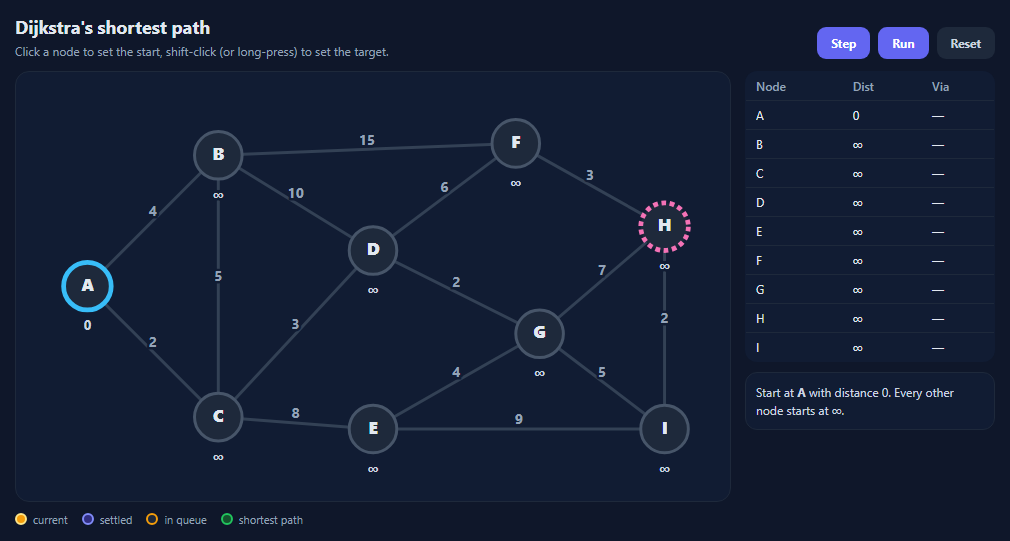
Dijkstra's algorithm finds the shortest path from one node to every other node in a graph with non-negative edge weights. It's behind route planners, network routing and game pathfinding, and it's a staple of technical interviews. It's also easy to memorise without understanding, which is what this visualizer is for: every step shows exactly what changes and why.
The two ideas
Every node carries a *tentative* distance, starting at ∞ except the start node at 0. Repeatedly, the algorithm takes the unsettled node with the smallest tentative distance and *settles* it: that distance is now final. Then it *relaxes* each edge out of that node: if going through it gives a neighbour a shorter distance than the one it has, the neighbour's distance and "via" node are updated.
Why settled means final
When a node is the closest unsettled one, any other route to it would have to pass through another unsettled node that is already at least as far away. With no negative weights, that route can't be shorter. That argument is also why Dijkstra breaks with negative edges — use Bellman–Ford there.
Reading the visual
The yellow node is being settled this step, purple nodes are settled, and orange-ringed nodes are in the queue with a tentative distance. Edges turn amber once they have been relaxed. The table shows each node's current distance and the node it was reached from, flashing when a value improves, and the log explains the step in words.
Stopping early
Because a settled distance never changes, the algorithm can stop as soon as the target is settled, then walk the "via" links backwards to recover the path, highlighted in green.
About the queue
Real implementations use a binary heap priority queue, giving O((V + E) log V). This demo sorts a small array each step to keep the code readable; see the binary heap visualizer for how the heap works.
Build with AI
Build, Understand, Optimize, and Extend It With AI
Paste this visualizer into an AI assistant like Claude and ask it to explain why a settled node's distance can't change, using a specific step from the demo. Ask it to replace the sorted array with a binary heap, add A* with a straight-line heuristic and compare how many nodes each settles, or let users drag nodes and edit weights. It can also generate practice questions: change a weight and ask what the new path will be.
Prompt to recreate it
Copy this into your AI assistant of choice to build the effect from scratch, or as a jumping-off point for your own variant:
Build an interactive Dijkstra's shortest path visualizer in plain HTML, CSS and JavaScript using an SVG graph.

Requirements:
- Nine nodes at fixed positions and about fifteen undirected weighted edges, with weights drawn at edge midpoints.
- Click a node to set the start and shift-click (or long-press on touch) to set the target; nodes are keyboard focusable.
- Step button: settle the unsettled queued node with the smallest tentative distance, then relax its edges to unsettled neighbours, updating distance and predecessor when shorter.
- Run/Pause button that steps automatically, and a Reset button.
- Colour nodes by state (current, settled, in queue), mark start and target, colour relaxed edges, and show each node's distance under it.
- A table of node, distance and predecessor that flashes changed distances, plus a log explaining each step in words.
- Stop when the target is settled, reconstruct the path from predecessors, and highlight it in green with its total cost.
Want to tighten it up first? Run this prompt through the AI Prompt Studio to score it across 8 quality dimensions, catch anti-patterns, and tune the wording for Claude, ChatGPT, or Gemini before you paste it in.
Source Code
<div class="dj">
  <div class="dj-top">
    <div>
      <h2>Dijkstra's shortest path</h2>
      <p>Click a node to set the start, shift-click (or long-press) to set the target.</p>
    </div>
    <div class="dj-btns">
      <button type="button" id="djStep">Step</button>
      <button type="button" id="djRun">Run</button>
      <button type="button" id="djReset" class="ghost">Reset</button>
    </div>
  </div>
  <div class="dj-body">
    <svg id="djSvg" viewBox="0 0 600 360" role="img" aria-label="Weighted graph"></svg>
    <div class="dj-side">
      <table class="dj-table" aria-label="Distance table">
        <thead><tr><th>Node</th><th>Dist</th><th>Via</th></tr></thead>
        <tbody id="djRows"></tbody>
      </table>
      <div class="dj-log" id="djLog" aria-live="polite"></div>
    </div>
  </div>
  <div class="dj-legend"><span class="k cur"></span>current <span class="k done"></span>settled <span class="k front"></span>in queue <span class="k path"></span>shortest path</div>
</div>*{box-sizing:border-box;margin:0;padding:0}
body{font-family:system-ui,-apple-system,sans-serif;background:#0f172a;color:#e2e8f0;min-height:100vh;display:flex;align-items:center;justify-content:center;padding:20px}
.dj{width:100%;max-width:980px}
.dj-top{display:flex;justify-content:space-between;align-items:flex-end;gap:14px;flex-wrap:wrap;margin-bottom:12px}
.dj h2{font-size:18px}
.dj-top p{font-size:12px;color:#94a3b8;margin-top:4px}
.dj-btns{display:flex;gap:8px}
.dj-btns button{border:0;border-radius:9px;padding:8px 14px;font:700 12px system-ui;background:#6366f1;color:#fff;cursor:pointer}
.dj-btns button.ghost{background:#1e293b;color:#cbd5e1}
.dj-btns button:disabled{opacity:.4;cursor:default}
.dj-btns button:focus-visible{outline:2px solid #a5b4fc;outline-offset:2px}
.dj-body{display:grid;grid-template-columns:1fr 250px;gap:14px}
@media (max-width:760px){.dj-body{grid-template-columns:1fr}}
#djSvg{width:100%;background:#111c33;border:1px solid #1e293b;border-radius:14px}
#djSvg .edge{stroke:#334155;stroke-width:2.5}
#djSvg .edge.relaxed{stroke:#f59e0b}
#djSvg .edge.path{stroke:#22c55e;stroke-width:5}
#djSvg .w{fill:#94a3b8;font:700 12px system-ui;paint-order:stroke;stroke:#111c33;stroke-width:4px}
#djSvg .node circle{fill:#1e293b;stroke:#475569;stroke-width:2.5;cursor:pointer}
#djSvg .node text{fill:#e2e8f0;font:800 14px system-ui;text-anchor:middle;dominant-baseline:central;pointer-events:none}
#djSvg .node .d{font:700 11px system-ui;fill:#cbd5e1;paint-order:stroke;stroke:#111c33;stroke-width:5px}
#djSvg .node.front circle{stroke:#f59e0b}
#djSvg .node.done circle{fill:#312e81;stroke:#818cf8}
#djSvg .node.cur circle{fill:#f59e0b;stroke:#fde68a}
#djSvg .node.cur text{fill:#1e293b}
#djSvg .node.path circle{fill:#14532d;stroke:#22c55e}
#djSvg .node.start circle{stroke:#38bdf8;stroke-width:4}
#djSvg .node.target circle{stroke:#f472b6;stroke-width:4;stroke-dasharray:4 3}
.dj-table{width:100%;border-collapse:collapse;font-size:12px;background:#111c33;border:1px solid #1e293b;border-radius:12px;overflow:hidden}
.dj-table th,.dj-table td{padding:6px 10px;text-align:left;border-bottom:1px solid #1e293b}
.dj-table th{color:#94a3b8;font-weight:600}
.dj-table tr.done td{color:#a5b4fc}
.dj-table tr.cur td{background:#422006;color:#fde68a}
.dj-table td.chg{animation:djFlash .8s}
@keyframes djFlash{from{background:#78350f}}
.dj-log{margin-top:10px;font-size:12px;line-height:1.5;color:#cbd5e1;min-height:56px;background:#111c33;border:1px solid #1e293b;border-radius:12px;padding:10px}
.dj-legend{display:flex;flex-wrap:wrap;gap:14px;align-items:center;font-size:11px;color:#94a3b8;margin-top:10px}
.dj-legend .k{display:inline-block;width:12px;height:12px;border-radius:50%;margin-right:-8px;border:2px solid}
.k.cur{background:#f59e0b;border-color:#fde68a}.k.done{background:#312e81;border-color:#818cf8}.k.front{background:#1e293b;border-color:#f59e0b}.k.path{background:#14532d;border-color:#22c55e}var NODES = {
A: [60, 180], B: [170, 70], C: [170, 290], D: [300, 150], E: [300, 300],
F: [420, 60], G: [440, 220], H: [545, 130], I: [545, 300],
};
var EDGES = [
['A','B',4], ['A','C',2], ['B','C',5], ['B','D',10], ['C','D',3], ['C','E',8],
['D','F',6], ['D','G',2], ['E','G',4], ['E','I',9], ['F','H',3], ['G','H',7],
['G','I',5], ['H','I',2], ['B','F',15],
];
var svg = document.getElementById('djSvg');
var NS = 'http://www.w3.org/2000/svg';
var start = 'A', target = 'H';
var state, timer = null;
function el(tag, attrs, parent) {
var e = document.createElementNS(NS, tag);
Object.keys(attrs).forEach(function (k) { e.setAttribute(k, attrs[k]); });
parent.appendChild(e);
return e;
}
function edgeKey(a, b) { return a < b ? a + b : b + a; }
function neighbours(n) {
var out = [];
EDGES.forEach(function (e) {
if (e[0] === n) out.push([e[1], e[2]]);
else if (e[1] === n) out.push([e[0], e[2]]);
});
return out;
}
// Build the static drawing once; state changes only toggle classes/text.
var edgeEls = {}, nodeEls = {};
EDGES.forEach(function (e) {
var a = NODES[e[0]], b = NODES[e[1]];
edgeEls[edgeKey(e[0], e[1])] = el('line', { x1: a[0], y1: a[1], x2: b[0], y2: b[1], class: 'edge' }, svg);
el('text', { x: (a[0] + b[0]) / 2, y: (a[1] + b[1]) / 2 - 4, class: 'w', 'text-anchor': 'middle' }, svg).textContent = e[2];
});
Object.keys(NODES).forEach(function (n) {
var g = el('g', { class: 'node', transform: 'translate(' + NODES[n][0] + ',' + NODES[n][1] + ')', tabindex: 0, role: 'button', 'aria-label': 'Node ' + n }, svg);
el('circle', { r: 20 }, g);
el('text', { y: -2 }, g).textContent = n;
var d = el('text', { y: 32, class: 'd' }, g);
nodeEls[n] = { g: g, d: d };
var press;
g.addEventListener('click', function (ev) { if (ev.shiftKey) setTarget(n); else setStart(n); });
g.addEventListener('keydown', function (ev) { if (ev.key === 'Enter' || ev.key === ' ') { ev.preventDefault(); if (ev.shiftKey) setTarget(n); else setStart(n); } });
g.addEventListener('touchstart', function () { press = setTimeout(function () { press = 'long'; setTarget(n); }, 500); }, { passive: true });
g.addEventListener('touchend', function (ev) { if (press === 'long') ev.preventDefault(); else clearTimeout(press); press = null; });
});
function setStart(n) { if (n !== target) { start = n; reset(); } }
function setTarget(n) { if (n !== start) { target = n; reset(); } }
function reset() {
stop();
state = { dist: {}, prev: {}, done: {}, queue: [], cur: null, relaxed: {}, finished: false, changed: {} };
Object.keys(NODES).forEach(function (n) { state.dist[n] = Infinity; });
state.dist[start] = 0;
state.queue = [start];
log('Start at <b>' + start + '</b> with distance 0. Every other node starts at ∞.');
draw();
}
// One step = settle the closest unsettled node and relax its edges.
function step() {
if (state.finished) return;
state.changed = {};
if (!state.queue.length) return finish('Queue empty: every reachable node is settled.');
// Pick the queued node with the smallest tentative distance. (A real
// implementation uses a binary heap; a linear scan keeps this readable.)
state.queue.sort(function (a, b) { return state.dist[a] - state.dist[b]; });
var u = state.queue.shift();
if (state.done[u]) return step();
state.cur = u;
state.done[u] = true;
var msgs = [];
neighbours(u).forEach(function (nb) {
var v = nb[0], w = nb[1];
if (state.done[v]) return;
var alt = state.dist[u] + w;
state.relaxed[edgeKey(u, v)] = true;
if (alt < state.dist[v]) {
msgs.push(v + ': ' + (state.dist[v] === Infinity ? '∞' : state.dist[v]) + ' → <b>' + alt + '</b>');
state.dist[v] = alt;
state.prev[v] = u;
state.changed[v] = true;
if (state.queue.indexOf(v) === -1) state.queue.push(v);
}
});
log('Settle <b>' + u + '</b> (distance ' + state.dist[u] + '). ' + (msgs.length ? 'Shorter paths: ' + msgs.join(', ') : 'No distances improved.'));
if (u === target) return finish('Reached <b>' + target + '</b>. Its distance can no longer improve, so we can stop early.');
draw();
}
function finish(msg) {
state.finished = true;
state.cur = null;
stop();
var path = [];
if (state.dist[target] !== Infinity) {
for (var n = target; n; n = state.prev[n]) path.unshift(n);
}
state.path = path;
log(msg + (path.length ? ' Shortest path: <b>' + path.join(' → ') + '</b> = ' + state.dist[target] + '.' : ' Target unreachable.'));
draw();
}
function draw() {
var pathSet = {}, pathEdges = {};
(state.path || []).forEach(function (n, i, arr) { pathSet[n] = true; if (i) pathEdges[edgeKey(arr[i - 1], n)] = true; });
Object.keys(edgeEls).forEach(function (k) {
edgeEls[k].setAttribute('class', 'edge' + (pathEdges[k] ? ' path' : state.relaxed[k] ? ' relaxed' : ''));
});
Object.keys(nodeEls).forEach(function (n) {
var cls = 'node';
if (pathSet[n]) cls += ' path';
else if (n === state.cur) cls += ' cur';
else if (state.done[n]) cls += ' done';
else if (state.queue.indexOf(n) !== -1) cls += ' front';
if (n === start) cls += ' start';
if (n === target) cls += ' target';
nodeEls[n].g.setAttribute('class', cls);
nodeEls[n].d.textContent = state.dist[n] === Infinity ? '∞' : state.dist[n];
});
document.getElementById('djRows').innerHTML = Object.keys(NODES).map(function (n) {
var cls = n === state.cur ? 'cur' : state.done[n] ? 'done' : '';
return '<tr class="' + cls + '"><td>' + n + '</td><td' + (state.changed[n] ? ' class="chg"' : '') + '>' +
(state.dist[n] === Infinity ? '∞' : state.dist[n]) + '</td><td>' + (state.prev[n] || '—') + '</td></tr>';
}).join('');
document.getElementById('djStep').disabled = state.finished;
document.getElementById('djRun').disabled = state.finished;
}
function log(html) { document.getElementById('djLog').innerHTML = html; }
function stop() { clearInterval(timer); timer = null; document.getElementById('djRun').textContent = 'Run'; }
document.getElementById('djStep').addEventListener('click', function () { stop(); step(); });
document.getElementById('djReset').addEventListener('click', reset);
document.getElementById('djRun').addEventListener('click', function () {
if (timer) return stop();
this.textContent = 'Pause';
timer = setInterval(step, 900);
});
reset();Step by step
How to Use
- 1Choose endpointsClick a node for the start; shift-click or long-press for the target.
- 2StepEach click settles one node and relaxes its edges.
- 3Watch the tableDistances flash when an edge relaxation improves them.
- 4RunAuto-step every 0.9 s; press again to pause.
- 5Read the resultThe shortest path and its total cost are highlighted and logged.
- 6Edit the graphChange NODES positions and EDGES weights in the JS.
Real-world uses
Common Use Cases
Got questions?
Frequently Asked Questions
It keeps a tentative distance for every node, starting at 0 for the source and infinity elsewhere. It repeatedly settles the unsettled node with the smallest distance and relaxes its edges, lowering neighbours' distances when a shorter route is found. A settled distance is final.
Its correctness relies on the fact that extending a path can never make it shorter. A negative edge breaks that, so a node settled early might later be reachable more cheaply. Use Bellman–Ford for graphs with negative weights.
With a binary heap priority queue it is O((V + E) log V). With a simple array scan, as in this demo, it is O(V²), which is fine for small or dense graphs.
Checking whether reaching a neighbour through the current node is shorter than the neighbour's current distance, and if so, updating the distance and remembering the current node as its predecessor.
Each improved node records the node it was reached from. After the target is settled, follow those predecessor links backwards from the target to the start and reverse the list.