
Learn Coding Visually
Learn to code with interactive, live-preview playgrounds — HTML, CSS, JavaScript, React & more.
 HTML Playground42 lessons · Click-based · Live preview
 CSS PlaygroundLearn CSS with a live editor
 JavaScript Playground60 lessons · DOM · Async · Canvas
 React PlaygroundLearn React with a live code editor
 GSAP PlaygroundLearn GSAP animation interactively
 SVG Playground44 lessons · shapes · paths · animation
 SCSS Playground45 lessons · Sass modules · tokens
 Tailwind PlaygroundLearn Tailwind CSS with a live editor
 Bootstrap 5 Playground50 lessons · live preview
Levenshtein Edit Distance Visualizer — Free Dynamic Programming Table Demo
Levenshtein Edit Distance Dynamic Programming Visualizer · Visualizers · Plain HTML, CSS & JS · Live preview
What's included
Features
About this UI Snippet
Edit Distance — Dynamic Programming You Can Watch
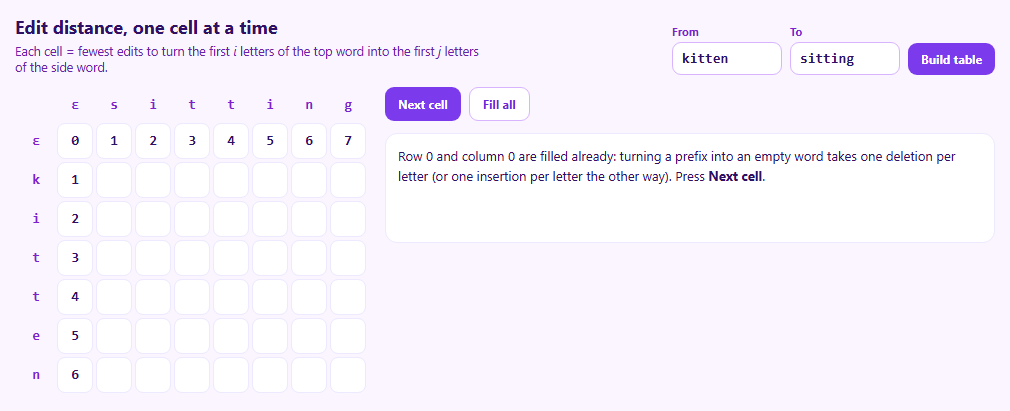
Levenshtein edit distance is the minimum number of single-letter insertions, deletions and substitutions needed to turn one word into another: "kitten" to "sitting" takes three. It powers spell checkers, fuzzy search, DNA sequence comparison and diff tools. It's also the most approachable example of dynamic programming, because the whole computation is a table you can look at.
What a cell means
Cell (i, j) holds the edit distance between the first i letters of the first word and the first j letters of the second. The answer is the bottom-right cell. Row 0 and column 0 are base cases: turning a prefix into the empty string costs one deletion per letter.
The recurrence
Every other cell looks at three neighbours that are already filled:
- above, plus 1 — delete the first word's letter - left, plus 1 — insert the second word's letter - the diagonal, plus 0 if the letters match or 1 if they differ — keep or substitute
and takes the minimum. Stepping through, the three source cells are highlighted and each option's cost is written out, so you can check the arithmetic yourself.
Why this is dynamic programming
A naive recursive solution recomputes the same prefix pairs exponentially many times. The table computes each pair once, in an order where its dependencies already exist, giving O(m × n) time.
Recovering the edits
The number alone doesn't say *which* edits. Walking back from the corner, choosing at each step a neighbour that could have produced the current value, traces a cheapest path. Diagonal moves are keeps or replacements, upward moves are deletions and leftward moves are insertions. There can be several equally cheap paths; this one prefers keeps, then substitutions.
Try your own words
Enter any two words up to ten letters and rebuild the table.
Build with AI
Build, Understand, Optimize, and Extend It With AI
Paste this snippet into an AI assistant like Claude and ask it to walk through one cell of kitten to sitting and explain why each candidate cost makes sense. Ask it to add the Damerau transposition rule, weighted costs (for example cheaper substitutions between keys that are close on a keyboard), a two-row memory-optimised version, or a mode that shows all equally cheap traceback paths. It can also turn this into an LCS (longest common subsequence) visualizer.
Prompt to recreate it
Copy this into your AI assistant of choice to build the effect from scratch, or as a jumping-off point for your own variant:
Build an interactive Levenshtein edit distance visualizer in plain HTML, CSS and JavaScript.

Requirements:
- Two text inputs (up to ten characters each, defaulting to "kitten" and "sitting") and a Build button.
- Render the dynamic programming table with the first word down the side and the second across the top, both prefixed with an empty-string row and column already filled with 0, 1, 2 and so on.
- A "Next cell" button that fills one cell at a time, row by row, highlighting the current cell and its three source cells, and showing the delete, insert and keep/substitute costs and the chosen minimum in words.
- A "Fill all" button that completes the table.
- When the table is complete, trace back from the bottom-right cell to highlight one cheapest path, and list the resulting edits as keep, replace, insert and delete steps, with the total distance.
- Escape user input before inserting it into HTML.
Want to tighten it up first? Run this prompt through the AI Prompt Studio to score it across 8 quality dimensions, catch anti-patterns, and tune the wording for Claude, ChatGPT, or Gemini before you paste it in.
Source Code
<div class="lv">
  <div class="lv-top">
    <div>
      <h2>Edit distance, one cell at a time</h2>
      <p>Each cell = fewest edits to turn the first <i>i</i> letters of the top word into the first <i>j</i> letters of the side word.</p>
    </div>
    <form class="lv-form" id="lvForm">
      <label>From <input id="lvA" value="kitten" maxlength="10" autocomplete="off"></label>
      <label>To <input id="lvB" value="sitting" maxlength="10" autocomplete="off"></label>
      <button type="submit">Build table</button>
    </form>
  </div>
  <div class="lv-main">
    <div class="lv-tablewrap"><table class="lv-table" id="lvTable"></table></div>
    <aside class="lv-side">
      <div class="lv-ctrl">
        <button type="button" id="lvStep">Next cell</button>
        <button type="button" id="lvFill" class="ghost">Fill all</button>
      </div>
      <div class="lv-formula" id="lvFormula" aria-live="polite"></div>
      <ol class="lv-ops" id="lvOps"></ol>
    </aside>
  </div>
</div>*{box-sizing:border-box;margin:0;padding:0}
body{font-family:system-ui,-apple-system,sans-serif;background:#faf5ff;color:#2e1065;min-height:100vh;display:flex;align-items:center;justify-content:center;padding:20px}
.lv{width:100%;max-width:980px}
.lv-top{display:flex;justify-content:space-between;align-items:flex-end;gap:14px;flex-wrap:wrap;margin-bottom:12px}
.lv h2{font-size:18px}
.lv-top p{font-size:12.5px;color:#6b21a8;margin-top:4px;max-width:470px}
.lv-form{display:flex;gap:8px;align-items:flex-end;flex-wrap:wrap}
.lv-form label{font-size:11px;font-weight:700;color:#7e22ce;display:flex;flex-direction:column;gap:3px}
.lv-form input{width:110px;border:1px solid #d8b4fe;border-radius:9px;padding:7px 9px;font:600 14px ui-monospace,monospace;color:#2e1065}
.lv-form button,.lv-ctrl button{border:0;border-radius:9px;padding:8px 13px;font:700 12px system-ui;background:#7c3aed;color:#fff;cursor:pointer}
.lv-ctrl button.ghost{background:#fff;color:#6d28d9;border:1px solid #d8b4fe}
.lv button:disabled{opacity:.4}
.lv :focus-visible{outline:2px solid #a855f7;outline-offset:2px}
.lv-main{display:grid;grid-template-columns:auto 1fr;gap:16px;align-items:start}
@media (max-width:760px){.lv-main{grid-template-columns:1fr}}
.lv-tablewrap{overflow-x:auto}
.lv-table{border-collapse:separate;border-spacing:3px}
.lv-table th{font:800 14px ui-monospace,monospace;color:#7e22ce;width:36px;height:30px}
.lv-table td{width:36px;height:36px;text-align:center;font:700 14px ui-monospace,monospace;background:#fff;border:1px solid #ede9fe;border-radius:8px;color:#2e1065}
.lv-table td.empty{color:transparent}
.lv-table td.src{background:#fef3c7;border-color:#fbbf24}
.lv-table td.cur{background:#7c3aed;color:#fff;border-color:#6d28d9}
.lv-table td.path{background:#dcfce7;border-color:#22c55e;color:#14532d}
.lv-table td.final{outline:3px solid #22c55e}
.lv-side{min-width:0}
.lv-ctrl{display:flex;gap:8px}
.lv-formula{margin-top:12px;background:#fff;border:1px solid #ede9fe;border-radius:12px;padding:12px;font-size:13px;line-height:1.6;min-height:110px}
.lv-formula code{font:600 12px ui-monospace,monospace;background:#f5f3ff;padding:1px 5px;border-radius:4px}
.lv-ops{margin-top:12px;padding-left:20px;font-size:13px;line-height:1.7}
.lv-ops .k{font:700 11px system-ui;padding:1px 6px;border-radius:5px;margin-right:6px}
.k.keep{background:#f1f5f9;color:#475569}.k.sub{background:#fef3c7;color:#92400e}.k.ins{background:#dcfce7;color:#166534}.k.del{background:#fee2e2;color:#991b1b}var A, B, D, order, pos;
var table = document.getElementById('lvTable');
var formula = document.getElementById('lvFormula');
var opsEl = document.getElementById('lvOps');
function esc(s) { return s.replace(/[&<>]/g, function (c) { return { '&': '&', '<': '<', '>': '>' }[c]; }); }
function build() {
A = document.getElementById('lvA').value.trim().slice(0, 10);
B = document.getElementById('lvB').value.trim().slice(0, 10);
// D[i][j] for i in 0..|A|, j in 0..|B|. Row 0 and column 0 are the base
// cases: turning a prefix into the empty string (or back) costs its length.
D = [];
for (var i = 0; i <= A.length; i++) { D.push([]); for (var j = 0; j <= B.length; j++) D[i].push(i === 0 ? j : j === 0 ? i : null); }
order = [];
for (i = 1; i <= A.length; i++) for (j = 1; j <= B.length; j++) order.push([i, j]);
pos = 0;
opsEl.innerHTML = '';
formula.innerHTML = 'Row 0 and column 0 are filled already: turning a prefix into an empty word takes one deletion per letter (or one insertion per letter the other way). Press <b>Next cell</b>.';
draw();
}
function draw(cur, sources, path) {
var h = '<tr><th></th><th>ε</th>' + B.split('').map(function (c) { return '<th>' + esc(c) + '</th>'; }).join('') + '</tr>';
for (var i = 0; i <= A.length; i++) {
h += '<tr><th>' + (i ? esc(A[i - 1]) : 'ε') + '</th>';
for (var j = 0; j <= B.length; j++) {
var cls = [];
if (D[i][j] === null) cls.push('empty');
if (path && path[i + ',' + j]) cls.push('path');
if (sources && sources[i + ',' + j]) cls.push('src');
if (cur && cur[0] === i && cur[1] === j) cls.push('cur');
if (path && i === A.length && j === B.length) cls.push('final');
h += '<td class="' + cls.join(' ') + '">' + (D[i][j] === null ? '·' : D[i][j]) + '</td>';
}
h += '</tr>';
}
table.innerHTML = h;
var done = pos >= order.length;
document.getElementById('lvStep').disabled = done;
document.getElementById('lvFill').disabled = done;
}
// The recurrence: the cheapest of three ways to reach cell (i, j).
function fillCell(i, j) {
var same = A[i - 1] === B[j - 1];
var del = D[i - 1][j] + 1; // drop A's letter
var ins = D[i][j - 1] + 1; // add B's letter
var sub = D[i - 1][j - 1] + (same ? 0 : 1); // keep or replace
D[i][j] = Math.min(del, ins, sub);
return { same: same, del: del, ins: ins, sub: sub };
}
function step() {
if (pos >= order.length) return;
var c = order[pos++];
var i = c[0], j = c[1];
var r = fillCell(i, j);
var src = {};
src[(i - 1) + ',' + j] = 1; src[i + ',' + (j - 1)] = 1; src[(i - 1) + ',' + (j - 1)] = 1;
formula.innerHTML = 'Cell <b>(' + i + ', ' + j + ')</b>: <code>' + esc(A[i - 1]) + '</code> vs <code>' + esc(B[j - 1]) + '</code> — ' +
(r.same ? 'letters match, the diagonal costs +0.' : 'letters differ, the diagonal costs +1.') + '<br>' +
'delete: ' + D[i - 1][j] + ' + 1 = ' + r.del + '<br>' +
'insert: ' + D[i][j - 1] + ' + 1 = ' + r.ins + '<br>' +
(r.same ? 'keep: ' : 'substitute: ') + D[i - 1][j - 1] + ' + ' + (r.same ? 0 : 1) + ' = ' + r.sub + '<br>' +
'Take the minimum → <b>' + D[i][j] + '</b>';
draw(c, src);
if (pos >= order.length) traceback();
}
// Walk back from the bottom-right corner, at each cell choosing a neighbour
// that could have produced its value. That path spells out the edits.
function traceback() {
var i = A.length, j = B.length, path = {}, ops = [];
path[i + ',' + j] = 1;
while (i > 0 || j > 0) {
if (i > 0 && j > 0 && A[i - 1] === B[j - 1] && D[i][j] === D[i - 1][j - 1]) { ops.unshift(['keep', A[i - 1]]); i--; j--; }
else if (i > 0 && j > 0 && D[i][j] === D[i - 1][j - 1] + 1) { ops.unshift(['sub', A[i - 1] + ' → ' + B[j - 1]]); i--; j--; }
else if (i > 0 && D[i][j] === D[i - 1][j] + 1) { ops.unshift(['del', A[i - 1]]); i--; }
else { ops.unshift(['ins', B[j - 1]]); j--; }
path[i + ',' + j] = 1;
}
var labels = { keep: 'keep', sub: 'replace', ins: 'insert', del: 'delete' };
opsEl.innerHTML = ops.map(function (o) { return '<li><span class="k ' + o[0] + '">' + labels[o[0]] + '</span>' + esc(o[1]) + '</li>'; }).join('');
var cost = ops.filter(function (o) { return o[0] !== 'keep'; }).length;
formula.innerHTML = 'Distance from <code>' + esc(A) + '</code> to <code>' + esc(B) + '</code> is <b>' + D[A.length][B.length] + '</b>. The green cells trace one cheapest sequence of ' + cost + ' edit' + (cost === 1 ? '' : 's') + ':';
draw(null, null, path);
}
document.getElementById('lvForm').addEventListener('submit', function (e) { e.preventDefault(); build(); });
document.getElementById('lvStep').addEventListener('click', step);
document.getElementById('lvFill').addEventListener('click', function () { while (pos < order.length) step(); });
build();Step by step
How to Use
- 1Enter two wordsUp to ten letters each; press Build table.
- 2Step throughNext cell fills one cell and explains its three candidate costs.
- 3Watch the sourcesThe cells above, left and diagonal are highlighted.
- 4Fill allComplete the table at once.
- 5Read the editsThe green path and list show one cheapest edit sequence.
Real-world uses
Common Use Cases
Got questions?
Frequently Asked Questions
The minimum number of single-character insertions, deletions and substitutions needed to change one string into another. For example, kitten to sitting has a distance of 3.
Row 0 and column 0 hold 0, 1, 2 and so on. Each other cell is the minimum of the cell above plus 1, the cell to the left plus 1, and the diagonal cell plus 0 if the letters match or 1 if they differ.
O(m × n) time and space for strings of length m and n. If you only need the distance and not the edits, you can keep just two rows, reducing space to O(min(m, n)).
Trace back from the bottom-right cell. At each cell, move to a neighbour whose value could have produced it: diagonal for keep or substitute, up for delete, left for insert. Reverse the moves to get the edit script.
Standard Levenshtein counts a swap of adjacent letters as two edits. The Damerau–Levenshtein variant adds a transposition operation that costs one.