Learn Coding Visually
Learn to code with interactive, live-preview playgrounds — HTML, CSS, JavaScript, React & more.
 HTML Playground42 lessons · Click-based · Live preview
 CSS PlaygroundLearn CSS with a live editor
 JavaScript Playground60 lessons · DOM · Async · Canvas
 React PlaygroundLearn React with a live code editor
 GSAP PlaygroundLearn GSAP animation interactively
 SVG Playground44 lessons · shapes · paths · animation
 SCSS Playground45 lessons · Sass modules · tokens
 Tailwind PlaygroundLearn Tailwind CSS with a live editor
 Bootstrap 5 Playground50 lessons · live preview
Fuse.js Typo-Tolerant Product Search — Free JS Snippet
Fuse.js Typo-Tolerant Product Search with Threshold Tuning · Forms · Plain HTML, CSS & JS · Live preview
What's included
Features
About this UI Snippet
Fuse.js Typo-Tolerant Product Search — HTML, CSS & JavaScript
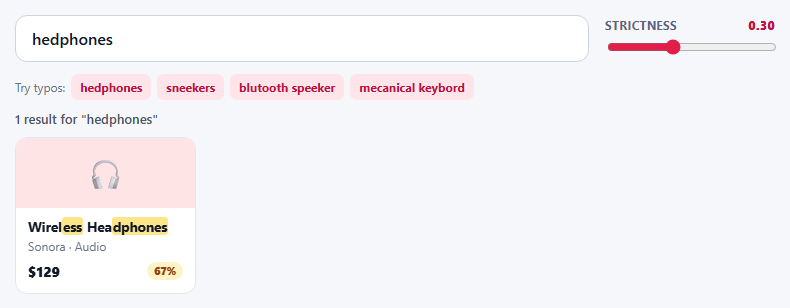
Shoppers misspell things constantly, and an exact-match search punishes them for it: "sneekers" returns nothing, so the customer concludes you do not sell sneakers. A fuzzy search closes that gap. Fuse.js scores every item by how closely it approximates the query, so "hedphones", "blutooth speeker" and "mecanical keybord" all find the right products without any dictionary or server round trip.
The single most useful thing this snippet adds is a strictness slider bound to Fuse's threshold option, because that number is the one everyone has to tune and almost nobody understands until they see it. At 0 the search demands exact matches. Around 0.3 it forgives a couple of wrong or missing letters. Push it towards 0.8 and results turn to noise — unrelated products start matching. Dragging the slider rebuilds the index and re-renders instantly, which makes the trade-off visible in seconds instead of by guesswork.
The fields are weighted to reflect how shoppers search: name carries half the score, tags a quarter, then brand and category. A search for "bluetooth" finds products through their tags even when the word is not in the title. One caveat worth knowing: Fuse combines per-key scores multiplicatively, so a perfect hit in a lightly weighted key (a tag) can still outrank a near-perfect hit in a heavily weighted one (the name) — try "wireless" to see it. Weights nudge ranking rather than dictating it, so always test them against real queries. ignoreLocation is enabled so a hit deep inside a long product name counts the same as one at the start. includeScore returns Fuse's error value, where 0 is a perfect match; the card badge converts that into a relevance percentage and colours it green, amber or red so weak matches are visibly weaker.
Highlighting comes from includeMatches, which returns character ranges for the matching field. The renderer sorts the ranges, skips overlaps and escapes every piece of text before it touches innerHTML, so a product name containing angle brackets cannot break the page. When nothing matches, the empty state does not just say "no results" — it points at the strictness control, which is the right remedy. The search runs entirely in memory, so it is instant for catalogues up to a few thousand items; beyond that, move the index to a server or a dedicated search service.
Build with AI
Build, Understand, Optimize, and Extend It With AI
Ask an AI assistant like Claude to add "did you mean" suggestions from the top result, category filter chips that combine with the search, or debounce and highlight the matches in tags too.
Prompt to recreate it
Copy this into your AI assistant of choice to build the effect from scratch, or as a jumping-off point for your own variant:
Build a typo-tolerant product search with Fuse.js 7 loaded from a CDN.

Requirements:
- Index a product list with weighted keys (name 0.5, tags 0.25, brand 0.15, category 0.1), ignoreLocation: true, includeScore: true and includeMatches: true.
- Add a strictness range slider that sets the threshold and rebuilds the Fuse instance, showing the current value.
- Render product cards with the matched characters highlighted in the name and a relevance badge (green / amber / red) computed from 1 - score.
- Escape all text before inserting it as HTML.
- Provide quick-try buttons that fill in misspelled queries, and an empty state that tells the user to raise the strictness.
Want to tighten it up first? Run this prompt through the AI Prompt Studio to score it across 8 quality dimensions, catch anti-patterns, and tune the wording for Claude, ChatGPT, or Gemini before you paste it in.
Source Code
<div class="fp-wrap">
  <div class="fp-bar">
    <input id="fpQ" type="search" placeholder="Search products..." autocomplete="off" aria-label="Search products">
    <div class="fp-tune">
      <label for="fpThr">Strictness <b id="fpThrVal">0.30</b></label>
      <input id="fpThr" type="range" min="0" max="0.8" step="0.05" value="0.3">
    </div>
  </div>
  <div class="fp-try">Try typos:
    <button type="button">hedphones</button>
    <button type="button">sneekers</button>
    <button type="button">blutooth speeker</button>
    <button type="button">mecanical keybord</button>
  </div>
  <p class="fp-count" id="fpCount" aria-live="polite"></p>
  <ul class="fp-grid" id="fpGrid"></ul>
</div>
body { background: #f6f7fa; padding: 22px; font-family: system-ui, sans-serif; }
.fp-wrap { max-width: 760px; margin: 0 auto; }
.fp-bar { display: flex; gap: 16px; align-items: center; flex-wrap: wrap; }
#fpQ { flex: 1; min-width: 200px; padding: 13px 16px; font: 500 16px/1.2 system-ui, sans-serif; color: #111827; border: 1.5px solid #cdd3df; border-radius: 12px; background: #fff; }
#fpQ:focus { outline: 0; border-color: #e11d48; box-shadow: 0 0 0 3px rgba(225,29,72,.14); }
.fp-tune { min-width: 170px; }
.fp-tune label { display: flex; justify-content: space-between; font-size: 11.5px; font-weight: 700; color: #59627a; text-transform: uppercase; letter-spacing: .05em; margin-bottom: 4px; }
.fp-tune b { color: #be123c; font-variant-numeric: tabular-nums; }
.fp-tune input { width: 100%; accent-color: #e11d48; }
.fp-try { margin: 12px 0 4px; font-size: 12px; color: #6b7388; display: flex; flex-wrap: wrap; gap: 6px; align-items: center; }
.fp-try button { font: inherit; font-size: 12px; font-weight: 700; color: #be123c; background: #ffe4ea; border: 0; border-radius: 7px; padding: 5px 9px; cursor: pointer; }
.fp-try button:hover { background: #ffd0da; }
.fp-count { margin: 10px 0; font-size: 13px; font-weight: 600; color: #4b5563; }
.fp-grid { list-style: none; margin: 0; padding: 0; display: grid; grid-template-columns: repeat(auto-fill, minmax(170px, 1fr)); gap: 12px; }
.fp-card { background: #fff; border: 1px solid #e3e6ee; border-radius: 12px; overflow: hidden; animation: fpIn .25s ease both; }
@keyframes fpIn { from { opacity: 0; transform: translateY(6px); } to { opacity: 1; transform: none; } }
.fp-img { height: 70px; display: grid; place-items: center; font-size: 30px; }
.fp-body { padding: 10px 12px 12px; }
.fp-name { font-size: 13.5px; font-weight: 700; color: #111827; line-height: 1.3; }
.fp-name mark { background: #fde68a; color: inherit; border-radius: 3px; padding: 0 1px; }
.fp-meta { font-size: 12px; color: #6b7388; margin-top: 2px; }
.fp-row { display: flex; justify-content: space-between; align-items: center; margin-top: 8px; }
.fp-price { font-weight: 800; font-size: 14px; color: #111827; }
.fp-rel { font-size: 10.5px; font-weight: 800; padding: 2px 7px; border-radius: 999px; background: #dcfce7; color: #166534; font-variant-numeric: tabular-nums; }
.fp-rel.mid { background: #fef3c7; color: #92400e; }
.fp-rel.low { background: #fee2e2; color: #991b1b; }
.fp-none { grid-column: 1 / -1; padding: 30px 10px; text-align: center; color: #6b7388; font-size: 14px; background: #fff; border: 1px dashed #cdd3df; border-radius: 12px; }const PRODUCTS = [
{ name: 'Wireless Headphones', brand: 'Sonora', category: 'Audio', tags: ['bluetooth', 'over-ear', 'noise cancelling'], price: 129, icon: '🎧', bg: '#ffe4e6' },
{ name: 'Running Sneakers', brand: 'Stride', category: 'Footwear', tags: ['shoes', 'trainers', 'sport'], price: 89, icon: '👟', bg: '#dbeafe' },
{ name: 'Bluetooth Speaker', brand: 'Sonora', category: 'Audio', tags: ['portable', 'wireless', 'waterproof'], price: 59, icon: '🔊', bg: '#fef3c7' },
{ name: 'Mechanical Keyboard', brand: 'Keycraft', category: 'Computing', tags: ['typing', 'rgb', 'switches'], price: 149, icon: '⌨️', bg: '#e0e7ff' },
{ name: 'Ergonomic Mouse', brand: 'Keycraft', category: 'Computing', tags: ['wireless', 'vertical', 'office'], price: 49, icon: '🖱️', bg: '#dcfce7' },
{ name: 'Leather Backpack', brand: 'Northway', category: 'Bags', tags: ['travel', 'laptop', 'commuter'], price: 139, icon: '🎒', bg: '#fde2c8' },
{ name: 'Stainless Water Bottle', brand: 'Northway', category: 'Outdoors', tags: ['insulated', 'hydration', 'hiking'], price: 32, icon: '🥤', bg: '#cffafe' },
{ name: 'Smart Watch', brand: 'Pulse', category: 'Wearables', tags: ['fitness', 'heart rate', 'gps'], price: 199, icon: '⌚', bg: '#ede9fe' },
{ name: 'Yoga Mat', brand: 'Stride', category: 'Fitness', tags: ['exercise', 'non-slip', 'studio'], price: 35, icon: '🧘', bg: '#fce7f3' },
{ name: 'Espresso Machine', brand: 'Brewline', category: 'Kitchen', tags: ['coffee', 'barista', 'steam'], price: 249, icon: '☕', bg: '#f5e9dc' },
{ name: 'Desk Lamp', brand: 'Lumen', category: 'Home', tags: ['led', 'dimmable', 'office'], price: 45, icon: '💡', bg: '#fef9c3' },
{ name: 'Noise-Cancelling Earbuds', brand: 'Sonora', category: 'Audio', tags: ['bluetooth', 'in-ear', 'wireless'], price: 99, icon: '🎵', bg: '#ffedd5' },
];
const q = document.getElementById('fpQ');
const thr = document.getElementById('fpThr');
const grid = document.getElementById('fpGrid');
const count = document.getElementById('fpCount');
let fuse;
function build() {
fuse = new Fuse(PRODUCTS, {
keys: [
{ name: 'name', weight: 0.5 },
{ name: 'tags', weight: 0.25 },
{ name: 'brand', weight: 0.15 },
{ name: 'category', weight: 0.1 },
],
threshold: Number(thr.value), // lower = stricter; raise it to forgive more typos (and allow more noise)
ignoreLocation: true,
includeScore: true, // 0 = perfect match, 1 = worst
includeMatches: true,
ignoreFieldNorm: true, // rank by field weights, not by how short the matching field is
minMatchCharLength: 3, // drop 1-2 character highlight fragments
});
}
function esc(s) { return s.replace(/[&<>"]/g, function (c) { return { '&': '&', '<': '<', '>': '>', '"': '"' }[c]; }); }
function mark(text, indices) {
if (!indices || !indices.length) return esc(text);
let out = '', pos = 0;
indices.slice().sort(function (a, b) { return a[0] - b[0]; }).forEach(function (r) {
if (r[0] < pos) return; // skip ranges already covered by a previous one
out += esc(text.slice(pos, r[0])) + '<mark>' + esc(text.slice(r[0], r[1] + 1)) + '</mark>';
pos = r[1] + 1;
});
return out + esc(text.slice(pos));
}
function render() {
const term = q.value.trim();
document.getElementById('fpThrVal').textContent = Number(thr.value).toFixed(2);
const rows = term
? fuse.search(term)
: PRODUCTS.map(function (p) { return { item: p, score: 0, matches: [] }; });
count.textContent = term
? rows.length + ' result' + (rows.length === 1 ? '' : 's') + ' for "' + term + '"'
: 'All ' + PRODUCTS.length + ' products';
if (!rows.length) {
grid.innerHTML = '<li class="fp-none">Nothing found. Try raising the strictness slider - a higher value forgives more typos.</li>';
return;
}
grid.innerHTML = rows.map(function (r) {
const p = r.item;
const m = (r.matches || []).filter(function (x) { return x.key === 'name'; })[0];
const rel = Math.round((1 - (r.score || 0)) * 100); // turn Fuse's error score into "relevance"
const cls = rel >= 80 ? '' : rel >= 55 ? ' mid' : ' low';
return '<li class="fp-card"><div class="fp-img" style="background:' + p.bg + '">' + p.icon + '</div><div class="fp-body">' +
'<div class="fp-name">' + mark(p.name, m && m.indices) + '</div><div class="fp-meta">' + esc(p.brand) + ' · ' + esc(p.category) + '</div>' +
'<div class="fp-row"><span class="fp-price">$' + p.price + '</span>' + (term ? '<span class="fp-rel' + cls + '" title="Match relevance">' + rel + '%</span>' : '') + '</div></div></li>';
}).join('');
}
q.addEventListener('input', render);
thr.addEventListener('input', function () { build(); render(); });
document.querySelectorAll('.fp-try button').forEach(function (b) {
b.addEventListener('click', function () { q.value = b.textContent; render(); q.focus(); });
});
build();
q.value = 'hedphones';
render();Step by step
How to Use
- 1Load a typo exampleThe field starts with "hedphones". Wireless Headphones still appears at the top with a high relevance score.
- 2Try the other typosClick "sneekers", "blutooth speeker" or "mecanical keybord" and watch the correct product surface.
- 3Tighten the strictnessDrag the slider to 0. Typo queries now return nothing, and the empty state suggests loosening it.
- 4Loosen it too farDrag to the right end. Unrelated products creep in with low, red relevance badges.
- 5Search by tagType "waterproof" or "gps" — products match through their tags even though the word is not in the name.
Real-world uses
Common Use Cases
Got questions?
Frequently Asked Questions
Start around 0.3. Lower is stricter and returns fewer results; higher forgives more typos but adds unrelated matches. Tune it against real queries.
includeScore returns an error value where 0 is a perfect match and 1 is a complete mismatch. This snippet converts it to a relevance percentage.
Each key can have a weight; matches in higher-weighted fields contribute more to the final score, so title hits outrank tag hits.
Without it Fuse prefers matches near the start of a field, which unfairly penalises words later in long product names.
It is fast for a few thousand items in memory. For tens of thousands, index server-side with a search engine.
Escape every string before inserting it as HTML, as the highlight function does, or build DOM nodes with textContent.
Yes. Use the JSX, Vue, Angular or Tailwind export buttons on this page to convert the markup and styles. The behaviour comes from Fuse.js, so in a framework project install it with npm install fuse.js instead of the CDN tag, build the index with useMemo / computed / a service, keyed on the data, and release it with nothing (it holds no DOM listeners) when the component unmounts.