Learn Coding Visually
Learn to code with interactive, live-preview playgrounds — HTML, CSS, JavaScript, React & more.
 HTML Playground42 lessons · Click-based · Live preview
 CSS PlaygroundLearn CSS with a live editor
 JavaScript Playground60 lessons · DOM · Async · Canvas
 React PlaygroundLearn React with a live code editor
 GSAP PlaygroundLearn GSAP animation interactively
 SVG Playground44 lessons · shapes · paths · animation
 SCSS Playground45 lessons · Sass modules · tokens
 Tailwind PlaygroundLearn Tailwind CSS with a live editor
 Bootstrap 5 Playground50 lessons · live preview
Marked + DOMPurify Live Markdown Preview — Free JS Snippet
Marked + DOMPurify Live Markdown Preview · Forms · Plain HTML, CSS & JS · Live preview
What's included
Features
About this UI Snippet
Marked + DOMPurify Live Markdown Preview — HTML, CSS & JavaScript
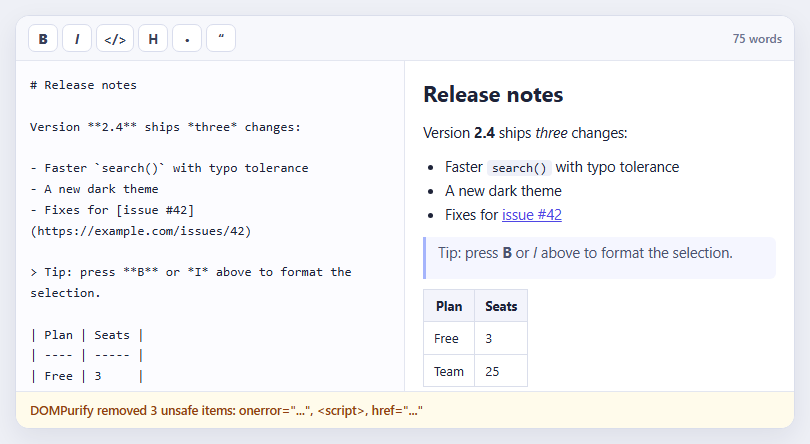
Markdown to HTML looks like a one-line job: marked.parse(text) and assign the result to innerHTML. It is also one of the most common ways to introduce cross-site scripting into an application, because Markdown allows raw HTML, and marked deliberately does not sanitise it. A user who can type <img src=x onerror=...> into a comment box can run script in every other reader's browser. The fix is a second library. DOMPurify parses the generated HTML, removes anything dangerous — script elements, event-handler attributes, javascript: URLs — and returns a clean string that is safe to insert.
This snippet is built around making that protection visible. The sample document ends with a deliberately hostile section: an image with an onerror handler, a script tag and a link whose href is javascript:. The preview renders the safe content beautifully and drops the attack, and the bar underneath reports what DOMPurify removed, read from its DOMPurify.removed array after each sanitise call. Seeing "removed <script>, onerror" is far more convincing than being told sanitising works, and the list updates as you edit.
The pipeline order matters. marked.parse produces an HTML string, DOMPurify.sanitize cleans it, and only then is the result assigned to innerHTML. Never sanitise the Markdown source itself, and never sanitise before conversion; the dangerous output only exists after Markdown becomes HTML. GitHub-flavoured extensions such as tables come from marked's gfm option, which is why the sample table renders.
A DOMPurify hook handles a related detail. afterSanitizeAttributes runs on every element after its attributes are cleaned, and the snippet uses it to add target="_blank" and rel="noopener noreferrer" to every link, so external links open in a new tab without giving the destination access to window.opener. Since DOMPurify strips target by default, adding it in the hook — after sanitising — is the correct place. The formatting toolbar wraps the current selection or prefixes the current line, using selectionStart and selectionEnd, and re-renders. In production you would render this preview on the server side too, and sanitise on output rather than trusting stored HTML.
Build with AI
Build, Understand, Optimize, and Extend It With AI
Ask an AI assistant like Claude to add syntax highlighting for fenced code blocks with Prism, a synchronized-scroll option, or export to a standalone HTML file.
Prompt to recreate it
Copy this into your AI assistant of choice to build the effect from scratch, or as a jumping-off point for your own variant:
Build a live Markdown editor with marked 12 and DOMPurify 3 loaded from a CDN.

Requirements:
- A textarea and a preview pane; on every input run marked.parse(text), then DOMPurify.sanitize(html), then assign the result to innerHTML.
- Pre-fill the textarea with sample Markdown that includes a table plus a hostile section (an img onerror, a script tag and a javascript: link).
- After sanitising, read DOMPurify.removed and show a status bar listing the removed elements and attributes.
- Add a DOMPurify afterSanitizeAttributes hook that sets target="_blank" and rel="noopener noreferrer" on links.
- Add toolbar buttons that wrap the selection (bold, italic, code) or prefix the line (heading, list, quote) using selectionStart/selectionEnd, and show a live word count.
Want to tighten it up first? Run this prompt through the AI Prompt Studio to score it across 8 quality dimensions, catch anti-patterns, and tune the wording for Claude, ChatGPT, or Gemini before you paste it in.
Source Code
<div class="md-app">
<div class="md-bar">
<div class="md-fmt" role="toolbar" aria-label="Formatting">
<button type="button" data-w="**" title="Bold"><b>B</b></button>
<button type="button" data-w="*" title="Italic"><i>I</i></button>
<button type="button" data-w="`" title="Inline code"></></button>
<button type="button" data-l="# " title="Heading">H</button>
<button type="button" data-l="- " title="List">•</button>
<button type="button" data-l="> " title="Quote">“</button>
</div>
<span class="md-meta" id="mdMeta">0 words</span>
</div>
<div class="md-split">
<textarea id="mdIn" spellcheck="false" aria-label="Markdown source"></textarea>
<div class="md-out" id="mdOut" aria-label="Preview" aria-live="polite"></div>
</div>
<div class="md-safety" id="mdSafety" role="status"></div>
</div>body { background: #eef0f6; padding: 18px; font-family: system-ui, sans-serif; }
.md-app { max-width: 780px; margin: 0 auto; background: #fff; border: 1px solid #dadeeb; border-radius: 14px; overflow: hidden; box-shadow: 0 10px 28px rgba(20,25,60,.08); }
.md-bar { display: flex; align-items: center; justify-content: space-between; padding: 8px 12px; background: #f7f8fc; border-bottom: 1px solid #e3e6f0; }
.md-fmt { display: flex; gap: 4px; }
.md-fmt button { min-width: 30px; height: 28px; font: 700 13px/1 system-ui, sans-serif; color: #384057; background: #fff; border: 1px solid #d9dded; border-radius: 7px; cursor: pointer; }
.md-fmt button:hover { background: #eef0ff; border-color: #a5b4fc; }
.md-meta { font: 600 12px/1 system-ui, sans-serif; color: #6b7290; }
.md-split { display: grid; grid-template-columns: 1fr 1fr; height: 330px; }
@media (max-width: 560px) { .md-split { grid-template-columns: 1fr; height: 460px; grid-template-rows: 1fr 1fr; } }
#mdIn { border: 0; border-right: 1px solid #e3e6f0; padding: 14px; resize: none; outline: 0; font: 13px/1.6 ui-monospace, Menlo, Consolas, monospace; color: #1e2338; background: #fcfcff; }
#mdIn:focus { background: #fff; box-shadow: inset 0 0 0 2px rgba(99,102,241,.25); }
.md-out { padding: 14px 18px; overflow: auto; font-size: 14.5px; line-height: 1.65; color: #1e2338; }
.md-out h1 { font-size: 22px; margin: 0 0 10px; } .md-out h2 { font-size: 18px; margin: 16px 0 8px; } .md-out h3 { font-size: 15px; margin: 14px 0 6px; }
.md-out p { margin: 0 0 10px; } .md-out ul, .md-out ol { margin: 0 0 10px; padding-left: 22px; }
.md-out blockquote { margin: 0 0 10px; padding: 4px 12px; border-left: 3px solid #a5b4fc; color: #4b5270; background: #f5f6ff; border-radius: 0 6px 6px 0; }
.md-out code { font: 12.5px ui-monospace, Menlo, monospace; background: #eef0f8; padding: 1px 5px; border-radius: 4px; }
.md-out pre { background: #1e2136; color: #dfe4ff; padding: 12px; border-radius: 8px; overflow: auto; }
.md-out pre code { background: none; padding: 0; color: inherit; }
.md-out a { color: #4f46e5; } .md-out table { border-collapse: collapse; margin: 0 0 10px; } .md-out th, .md-out td { border: 1px solid #dadeeb; padding: 5px 10px; font-size: 13px; }
.md-out th { background: #f3f4fb; }
.md-safety { padding: 9px 14px; border-top: 1px solid #e3e6f0; background: #f0fdf4; color: #166534; font: 600 12.5px/1.45 system-ui, sans-serif; }
.md-safety.stripped { background: #fffbeb; color: #92400e; }const BT = String.fromCharCode(96); // a backtick, spelled out so this source stays template-literal safe
const SAMPLE = [
'# Release notes',
'',
'Version **2.4** ships *three* changes:',
'',
'- Faster ' + BT + 'search()' + BT + ' with typo tolerance',
'- A new dark theme',
'- Fixes for [issue #42](https://example.com/issues/42)',
'',
'> Tip: press **B** or *I* above to format the selection.',
'',
'| Plan | Seats |',
'| ---- | ----- |',
'| Free | 3 |',
'| Team | 25 |',
'',
'## Try an attack',
'',
'The lines below are hostile. DOMPurify removes them before rendering:',
'',
// A literal closing script tag inside inline JS would end the element early, so it is split up.
'<img src="x" onerror="alert(1)"> <scr' + 'ipt>alert(2)</scr' + 'ipt>',
'',
'[Click me](javascript:alert(3))',
].join('\n');
const input = document.getElementById('mdIn');
const out = document.getElementById('mdOut');
const safety = document.getElementById('mdSafety');
input.value = SAMPLE;
// Open every link in a new tab, safely. Hooks run after DOMPurify sanitises each element's attributes.
DOMPurify.addHook('afterSanitizeAttributes', function (node) {
if (node.tagName === 'A' && node.hasAttribute('href')) {
node.setAttribute('target', '_blank');
node.setAttribute('rel', 'noopener noreferrer');
}
});
marked.setOptions({ gfm: true, breaks: false });
function render() {
const raw = marked.parse(input.value); // Markdown -> HTML string. NOT safe to insert yet.
const clean = DOMPurify.sanitize(raw); // strip scripts, event handlers and javascript: URLs
out.innerHTML = clean;
// DOMPurify records what it removed - surface it so the protection is visible, not magic.
const removed = DOMPurify.removed.map(function (r) {
if (r.element) return '<' + r.element.nodeName.toLowerCase() + '>';
if (r.attribute) return r.attribute.name + '=' + '"..."';
return '';
}).filter(Boolean);
if (removed.length) {
safety.className = 'md-safety stripped';
safety.textContent = 'DOMPurify removed ' + removed.length + ' unsafe item' + (removed.length > 1 ? 's' : '') + ': ' + removed.join(', ');
} else {
safety.className = 'md-safety';
safety.textContent = 'Sanitised: nothing unsafe found in this document.';
}
const words = input.value.trim() ? input.value.trim().split(/\s+/).length : 0;
document.getElementById('mdMeta').textContent = words + ' words';
}
input.addEventListener('input', render);
// Toolbar: wrap the selection (inline) or prefix the line (block).
document.querySelector('.md-fmt').addEventListener('click', function (e) {
const b = e.target.closest('button');
if (!b) return;
const s = input.selectionStart, en = input.selectionEnd, v = input.value;
if (b.dataset.w) {
const w = b.dataset.w;
input.value = v.slice(0, s) + w + (v.slice(s, en) || 'text') + w + v.slice(en);
input.setSelectionRange(s + w.length, en + w.length + (s === en ? 4 : 0));
} else {
const ls = v.lastIndexOf('\n', s - 1) + 1;
input.value = v.slice(0, ls) + b.dataset.l + v.slice(ls);
input.setSelectionRange(s + b.dataset.l.length, en + b.dataset.l.length);
}
input.focus();
render();
});
render();Step by step
How to Use
- 1Read the rendered previewThe right pane shows headings, a list, a quote, a table and inline code rendered from the Markdown on the left.
- 2Check the safety barUnderneath, DOMPurify reports the unsafe items it removed from the hostile sample: an onerror handler, a script and a javascript: link.
- 3Edit the MarkdownType in the left pane. The preview and word count update on every keystroke.
- 4Use the toolbarSelect text and press B or I to wrap it, or use the heading, list and quote buttons to prefix the line.
- 5Add your own attackType <svg onload=alert(1)> and watch the safety bar list what was stripped.
Real-world uses
Common Use Cases
Got questions?
Frequently Asked Questions
No. marked passes raw HTML through by design. You must sanitise its output with a library such as DOMPurify before inserting it into the page.
After converting Markdown to HTML and just before assigning to innerHTML. Sanitising the Markdown source itself does not protect against the generated markup.
Read DOMPurify.removed after calling sanitize. It lists removed elements and attributes.
Use an afterSanitizeAttributes hook to set target="_blank" and rel="noopener noreferrer" after DOMPurify has cleaned the attributes.
It protects the viewer in this page, but you should also sanitise wherever stored content is rendered, ideally on output on the server.
Keep marked's gfm option on, which is the default in current versions.
Yes. Use the JSX, Vue, Angular or Tailwind export buttons on this page to convert the markup and styles. The behaviour comes from marked and DOMPurify, so in a framework project install it with npm install marked dompurify instead of the CDN tag, run marked.parse and DOMPurify.sanitize in a memo / computed / pipe, and set the result as trusted HTML, and release it with nothing (both are stateless) when the component unmounts.