Learn Coding Visually
Learn to code with interactive, live-preview playgrounds — HTML, CSS, JavaScript, React & more.
 HTML Playground42 lessons · Click-based · Live preview
 CSS PlaygroundLearn CSS with a live editor
 JavaScript Playground60 lessons · DOM · Async · Canvas
 React PlaygroundLearn React with a live code editor
 GSAP PlaygroundLearn GSAP animation interactively
 SVG Playground44 lessons · shapes · paths · animation
 SCSS Playground45 lessons · Sass modules · tokens
 Tailwind PlaygroundLearn Tailwind CSS with a live editor
 Bootstrap 5 Playground50 lessons · live preview
Cleave.js Phone Number Input by Country — Free JS Snippet
Cleave.js Phone Number Input by Country · Forms · Plain HTML, CSS & JS · Live preview
What's included
Features
About this UI Snippet
Cleave.js Phone Number Input by Country — HTML, CSS & JavaScript
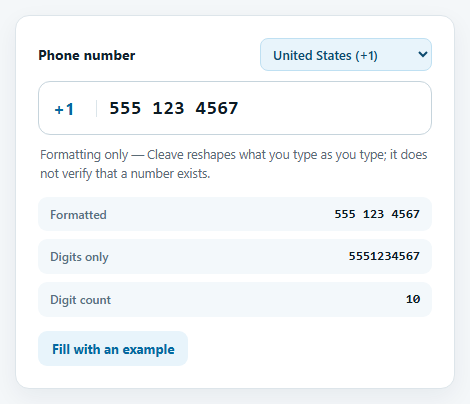
Phone numbers do not share a shape. A US number groups as 555 123 4567, a French mobile as 06 12 34 56 78, a Brazilian one as 11 98765 4321. A single hard-coded mask cannot serve users in more than one country, and a form that guesses wrong shows people a pattern that does not match how they write their own number. Cleave.js takes a different approach: with its phone add-on it runs the number through an as-you-type formatter derived from Google's libphonenumber, so the grouping follows the selected region's actual rules.
Cleave is an older library — it predates the current generation of input-mask tools and has been in maintenance mode for some time — but it is still an excellent, tiny example of how formatting-only input libraries work, and it is still widely deployed. The setup is minimal: load cleave.min.js and the cleave-phone.i18n.js add-on, then create an instance with phone: true and a phoneRegionCode. The i18n add-on is the one to load when you need many regions; the per-country add-ons are smaller if you only need one.
Switching country calls setPhoneRegionCode(), which re-runs the formatter under the new region, and this snippet also clears the value. That is deliberate: digits typed under one numbering plan generally do not make sense under another, and silently reformatting them into a different country's shape produces numbers that look plausible but are wrong. The readout shows the formatted text, the raw digits from getRawValue() — what you would normally store — and a digit count.
One detail worth knowing: the formatter expects the national form of the number, so for the UK, Germany, France, Australia and Japan you type the leading trunk-prefix zero (07911 123456), exactly as people write their own number. Type the digits without it and the formatter cannot recognise the pattern and leaves them ungrouped. The formatting is also deliberately minimal — groups are separated by spaces, with no brackets or dashes.
The most important line in the snippet is the note under the field: this is formatting, not validation. Cleave will happily format any sequence of digits into something phone-shaped. Whether a number is actually possible or valid for a country needs a real metadata library, such as libphonenumber-js or intl-tel-input, which is the natural next snippet if you need that. Store the raw digits plus the country code — not the formatted string — so the number can be re-rendered or validated later.
Build with AI
Build, Understand, Optimize, and Extend It With AI
Ask an AI assistant like Claude to add libphonenumber-js validation with an inline error message, detect the user's country from the browser locale, or output an E.164 string for an API.
Prompt to recreate it
Copy this into your AI assistant of choice to build the effect from scratch, or as a jumping-off point for your own variant:
Build a phone number input with Cleave.js 1.6 and its cleave-phone.i18n.js add-on, loaded from a CDN.

Requirements:
- Create a Cleave instance with phone: true and a phoneRegionCode, and a country <select> that calls setPhoneRegionCode() on change.
- Show the dial code beside the input and update the placeholder for each country.
- Clear the field when the region changes, and provide a button that fills a valid example for the current region with setRawValue().
- Display the formatted value, the raw digits from getRawValue() and a digit count.
- State clearly in the UI that Cleave formats but does not validate.
Want to tighten it up first? Run this prompt through the AI Prompt Studio to score it across 8 quality dimensions, catch anti-patterns, and tune the wording for Claude, ChatGPT, or Gemini before you paste it in.
Source Code
<div class="cp-card">
  <div class="cp-head">
    <label class="cp-label" for="cpPhone">Phone number</label>
    <select id="cpRegion" aria-label="Country">
      <option value="US">United States (+1)</option>
      <option value="GB">United Kingdom (+44)</option>
      <option value="IN">India (+91)</option>
      <option value="DE">Germany (+49)</option>
      <option value="FR">France (+33)</option>
      <option value="AU">Australia (+61)</option>
      <option value="BR">Brazil (+55)</option>
      <option value="JP">Japan (+81)</option>
    </select>
  </div>
  <div class="cp-field">
    <span class="cp-dial" id="cpDial">+1</span>
    <input id="cpPhone" type="tel" inputmode="tel" autocomplete="tel-national" placeholder="555 123 4567">
  </div>
  <p class="cp-note">Formatting only — Cleave reshapes what you type as you type; it does not verify that a number exists.</p>
  <dl class="cp-read">
    <div><dt>Formatted</dt><dd id="cpFmt">-</dd></div>
    <div><dt>Digits only</dt><dd id="cpRaw">-</dd></div>
    <div><dt>Digit count</dt><dd id="cpLen">0</dd></div>
  </dl>
  <button type="button" class="cp-fill" id="cpFill">Fill with an example</button>
</div>
body { background: #f4f7f9; padding: 24px; font-family: system-ui, sans-serif; }
.cp-card { max-width: 440px; margin: 0 auto; background: #fff; border: 1px solid #dde5ea; border-radius: 14px; padding: 22px; box-shadow: 0 8px 24px rgba(15,40,60,.06); }
.cp-head { display: flex; justify-content: space-between; align-items: center; gap: 10px; margin-bottom: 10px; flex-wrap: wrap; }
.cp-label { font-weight: 700; font-size: 14px; color: #12222e; }
.cp-head select { font: inherit; font-size: 13px; font-weight: 600; color: #0c4a6e; background: #e8f4fb; border: 1px solid #bfe0f2; border-radius: 8px; padding: 6px 8px; cursor: pointer; }
.cp-field { display: flex; align-items: center; border: 1.5px solid #c6d4dc; border-radius: 12px; padding: 0 14px; transition: border-color .15s, box-shadow .15s; }
.cp-field:focus-within { border-color: #0284c7; box-shadow: 0 0 0 3px rgba(2,132,199,.16); }
.cp-dial { font: 700 17px/1 system-ui, sans-serif; color: #0369a1; padding-right: 12px; margin-right: 12px; border-right: 1.5px solid #dbe5ea; min-width: 44px; }
.cp-field input { flex: 1; min-width: 0; border: 0; outline: 0; padding: 15px 0; font: 600 19px/1 ui-monospace, Menlo, monospace; color: #0d1b24; letter-spacing: .02em; background: none; }
.cp-note { margin: 10px 2px 0; font-size: 12.5px; line-height: 1.5; color: #5a6b76; }
.cp-read { margin: 14px 0 0; display: grid; gap: 8px; }
.cp-read div { display: flex; justify-content: space-between; gap: 12px; background: #f3f8fb; border-radius: 9px; padding: 9px 12px; }
.cp-read dt { font-size: 12px; color: #55707f; font-weight: 600; }
.cp-read dd { margin: 0; font: 700 13px/1.3 ui-monospace, Menlo, monospace; color: #0d1b24; text-align: right; }
.cp-fill { margin-top: 14px; font: inherit; font-size: 13px; font-weight: 700; color: #0369a1; background: #e8f4fb; border: 0; border-radius: 9px; padding: 9px 14px; cursor: pointer; }
.cp-fill:hover { background: #d7ecf8; }// Example national numbers per region, used for the placeholder and the fill button.
const REGIONS = {
US: { dial: '+1', example: '5551234567', ph: '555 123 4567' },
GB: { dial: '+44', example: '07911123456', ph: '07911 123456' },
IN: { dial: '+91', example: '9876543210', ph: '98765 43210' },
DE: { dial: '+49', example: '015123456789', ph: '01512 3456789' },
FR: { dial: '+33', example: '0612345678', ph: '06 12 34 56 78' },
AU: { dial: '+61', example: '0412345678', ph: '0412 345 678' },
BR: { dial: '+55', example: '11987654321', ph: '11 98765 4321' },
JP: { dial: '+81', example: '09012345678', ph: '090 1234 5678' },
};
// Note the leading 0 on GB, DE, FR, AU and JP: the formatter expects the national
// (domestic) form, trunk prefix included. Drop it and it leaves the digits ungrouped.
const input = document.getElementById('cpPhone');
const region = document.getElementById('cpRegion');
const dial = document.getElementById('cpDial');
// The i18n add-on bundles a phone-number formatter for every region. Cleave
// only formats — pair it with libphonenumber or intl-tel-input to validate.
const cleave = new Cleave(input, {
phone: true,
phoneRegionCode: 'US',
});
function render() {
const digits = cleave.getRawValue().replace(/\D/g, '');
document.getElementById('cpFmt').textContent = input.value || '-';
document.getElementById('cpRaw').textContent = digits || '-';
document.getElementById('cpLen').textContent = String(digits.length);
}
input.addEventListener('input', render);
region.addEventListener('change', function () {
const r = REGIONS[region.value];
dial.textContent = r.dial;
input.placeholder = r.ph;
cleave.setPhoneRegionCode(region.value); // re-runs the formatter under the new region's rules
cleave.setRawValue(''); // start clean: old digits do not belong to the new plan
render();
input.focus();
});
document.getElementById('cpFill').addEventListener('click', function () {
cleave.setRawValue(REGIONS[region.value].example);
render();
});
input.placeholder = REGIONS.US.ph;
cleave.setRawValue(REGIONS.US.example);
render();Step by step
How to Use
- 1Type a numberType digits into the field. Spaces appear automatically in the right places for the selected country.
- 2Switch the countryChoose France or Brazil. The dial code, placeholder and grouping change, and the field clears.
- 3Compare the outputsThe formatted text and the raw digits are shown side by side — store the digits.
- 4Use the example buttonFill with a sample number for the current region to see its native grouping.
- 5Delete in the middleBackspace inside the number. The formatting re-flows around your cursor without breaking.
Real-world uses
Common Use Cases
Got questions?
Frequently Asked Questions
No. It only formats. Use libphonenumber-js or intl-tel-input when you need to know whether a number is possible or valid.
Use cleave-phone.i18n.js for many countries, or a single cleave-phone.{country}.js file when only one region is needed to save bytes.
Store the raw digits (getRawValue) with the country code or an E.164 string, not the formatted display text.
Digits entered under one numbering plan do not carry over safely to another; clearing avoids plausible-looking wrong numbers.
It is in maintenance mode. It works well and is small, but for new projects also consider IMask or a libphonenumber-based library.
Call cleave.setPhoneRegionCode("GB"), then set a value with setRawValue().
Yes. Use the JSX, Vue, Angular or Tailwind export buttons on this page to convert the markup and styles. The behaviour comes from Cleave.js, so in a framework project install it with npm install cleave.js (cleave.js/dist/addons/cleave-phone.i18n.js for phone) instead of the CDN tag, create it in useEffect / onMounted / ngAfterViewInit, and release it with destroy() when the component unmounts.