Learn Coding Visually
Learn to code with interactive, live-preview playgrounds — HTML, CSS, JavaScript, React & more.
 HTML Playground42 lessons · Click-based · Live preview
 CSS PlaygroundLearn CSS with a live editor
 JavaScript Playground60 lessons · DOM · Async · Canvas
 React PlaygroundLearn React with a live code editor
 GSAP PlaygroundLearn GSAP animation interactively
 SVG Playground44 lessons · shapes · paths · animation
 SCSS Playground45 lessons · Sass modules · tokens
 Tailwind PlaygroundLearn Tailwind CSS with a live editor
 Bootstrap 5 Playground50 lessons · live preview
noUiSlider Dual-Handle Price Range Filter — Free JS Snippet
noUiSlider Dual-Handle Price Range Filter · Forms · Plain HTML, CSS & JS · Live preview
What's included
Features
About this UI Snippet
noUiSlider Dual-Handle Price Range Filter — HTML, CSS & JavaScript
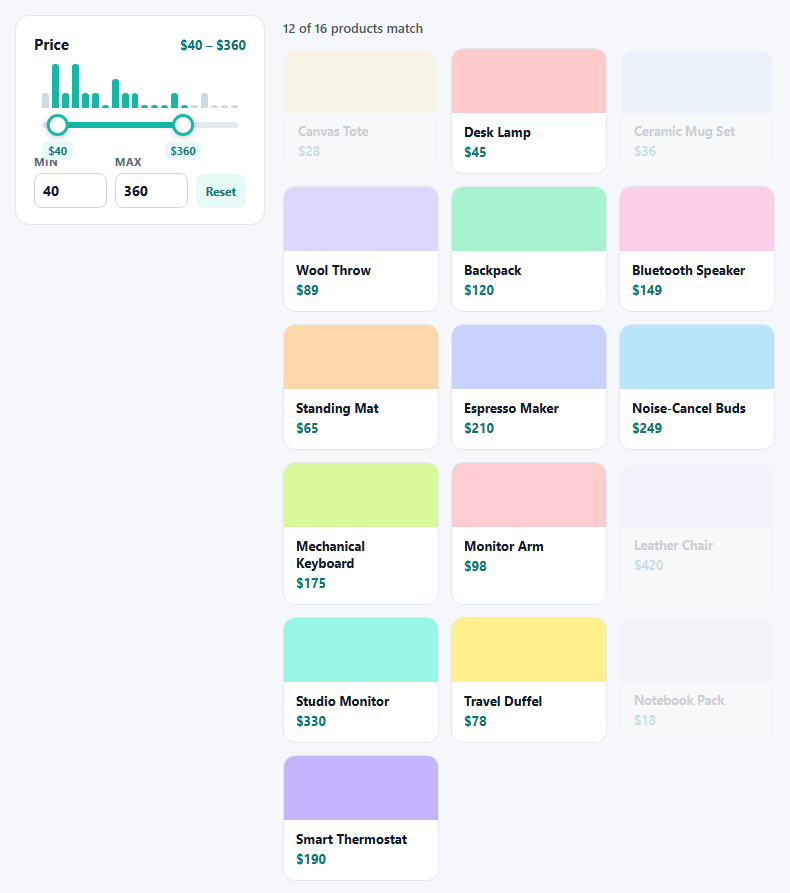
Two handles on one track is the standard interface for filtering by price, but two native range inputs overlapped on top of each other is one of the most fragile hacks in front-end work — the handles cross, the fill needs manual maths and keyboard focus goes to whichever input is on top. noUiSlider was designed for exactly this problem: one slider, two handles, a connecting bar between them, with the crossing rules and step snapping handled inside the library.
This snippet builds a complete filter around it. The slider runs from 0 to 500 in steps of 5, with margin: 10 guaranteeing the handles can never sit closer than ten dollars apart. Tooltips show each handle's value, and the format option controls how they render — a to() function that adds the dollar sign and a from() function that strips it back off, so the library can parse typed input. ariaFormat does the same job for screen readers, announcing "40 dollars" instead of a bare number.
The important detail is which value the update listener uses. The first argument to update is an array of already formatted strings like "$40", which are for display. The third argument, unencoded, holds the raw numbers. The filter reads those, so there is no string parsing in the hot path. update fires continuously while dragging, so the product cards are built once and only a class is toggled on each tick; rebuilding the grid on every event would flicker and drop frames.
A price histogram sits behind the handles. Products are bucketed into twenty bins, and bars whose range overlaps the selection light up, which tells users at a glance where the products actually are — a range filter without that feedback invites selecting a range that matches nothing. The two number inputs are synced both ways: dragging updates them, and typing calls slider.noUiSlider.set([value, null]), where null leaves the other handle untouched.
Build with AI
Build, Understand, Optimize, and Extend It With AI
Ask an AI assistant like Claude to add a non-linear range so cheaper products get more track space, persist the selected range in the URL query string, or add an "on sale only" checkbox that combines with the price filter.
Prompt to recreate it
Copy this into your AI assistant of choice to build the effect from scratch, or as a jumping-off point for your own variant:
Build a dual-handle price range filter with noUiSlider 15 loaded from a CDN.

Requirements:
- Create a slider from 0 to 500 with step 5, start at [40, 360], connect: true, margin: 10 and tooltips on both handles.
- Use a format object with to()/from() that adds and removes a "$" prefix, plus a separate ariaFormat announcing "dollars".
- In the update listener use the third argument (unencoded) as the numbers for filtering, not the formatted strings.
- Render a product grid once and toggle a class on cards outside the range, and show "x of y products match".
- Add a price histogram behind the slider that highlights bins inside the range, plus two number inputs synced with slider.noUiSlider.set([value, null]).
Want to tighten it up first? Run this prompt through the AI Prompt Studio to score it across 8 quality dimensions, catch anti-patterns, and tune the wording for Claude, ChatGPT, or Gemini before you paste it in.
Source Code
<div class="pr-wrap">
  <div class="pr-panel">
    <div class="pr-head"><h3>Price</h3><span id="prSummary">$40 – $360</span></div>
    <div class="pr-hist" id="prHist" aria-hidden="true"></div>
    <div id="prSlider"></div>
    <div class="pr-inputs">
      <label>Min <input type="number" id="prMin" min="0" max="500" step="5"></label>
      <label>Max <input type="number" id="prMax" min="0" max="500" step="5"></label>
      <button type="button" id="prReset">Reset</button>
    </div>
  </div>
  <div class="pr-results">
    <p class="pr-count" id="prCount" aria-live="polite"></p>
    <ul class="pr-grid" id="prGrid"></ul>
  </div>
</div>
body { background: #f5f7fa; padding: 22px; font-family: system-ui, sans-serif; }
.pr-wrap { max-width: 760px; margin: 0 auto; display: grid; grid-template-columns: 250px 1fr; gap: 18px; align-items: start; }
@media (max-width: 620px) { .pr-wrap { grid-template-columns: 1fr; } }
.pr-panel { background: #fff; border: 1px solid #e3e8ef; border-radius: 14px; padding: 18px 18px 16px; }
.pr-head { display: flex; justify-content: space-between; align-items: baseline; margin-bottom: 10px; }
.pr-head h3 { margin: 0; font-size: 15px; color: #111827; }
.pr-head span { font-size: 13px; font-weight: 700; color: #0f766e; font-variant-numeric: tabular-nums; }
.pr-hist { display: flex; align-items: flex-end; gap: 3px; height: 44px; margin: 0 8px 14px; }
.pr-hist i { flex: 1; background: #d1d9e3; border-radius: 3px 3px 0 0; min-height: 3px; transition: background .15s; }
.pr-hist i.on { background: #14b8a6; }
#prSlider { margin: 0 8px 26px; height: 6px; border: 0; background: #e5e9ef; box-shadow: none; }
#prSlider .noUi-connect { background: #14b8a6; }
#prSlider .noUi-handle { width: 22px; height: 22px; right: -11px; top: -8px; border-radius: 50%; border: 3px solid #14b8a6; background: #fff; box-shadow: 0 2px 6px rgba(0,0,0,.18); cursor: grab; }
#prSlider .noUi-handle::before, #prSlider .noUi-handle::after { display: none; }
#prSlider .noUi-handle:focus-visible { outline: 3px solid rgba(20,184,166,.35); outline-offset: 2px; }
#prSlider .noUi-horizontal .noUi-tooltip, #prSlider.noUi-horizontal .noUi-tooltip { bottom: auto; top: 150%; }
#prSlider .noUi-tooltip { font-size: 11px; font-weight: 700; color: #0f766e; border: 0; background: #e6fbf8; padding: 2px 6px; border-radius: 6px; }
.pr-inputs { display: flex; gap: 8px; align-items: flex-end; }
.pr-inputs label { flex: 1; font-size: 11px; font-weight: 700; color: #5b6579; text-transform: uppercase; letter-spacing: .04em; }
.pr-inputs input { width: 100%; margin-top: 4px; padding: 7px 8px; border: 1px solid #cfd6e2; border-radius: 8px; font: inherit; font-size: 14px; color: #111827; }
.pr-inputs input:focus { outline: 2px solid #14b8a6; outline-offset: 0; border-color: #14b8a6; }
.pr-inputs button { font: inherit; font-size: 12px; font-weight: 700; color: #0f766e; background: #e6fbf8; border: 0; border-radius: 8px; padding: 9px 10px; cursor: pointer; }
.pr-count { margin: 4px 0 12px; font-size: 13px; font-weight: 600; color: #4b5563; }
.pr-grid { list-style: none; margin: 0; padding: 0; display: grid; grid-template-columns: repeat(auto-fill, minmax(150px, 1fr)); gap: 12px; }
.pr-item { background: #fff; border: 1px solid #e3e8ef; border-radius: 12px; overflow: hidden; transition: opacity .2s, transform .2s; }
.pr-item.out { opacity: .18; transform: scale(.97); }
.pr-swatch { height: 64px; }
.pr-item div { padding: 10px 12px 12px; }
.pr-item b { display: block; font-size: 13px; color: #111827; }
.pr-item span { font-size: 13px; color: #0f766e; font-weight: 700; font-variant-numeric: tabular-nums; }const PRODUCTS = [
['Canvas Tote', 28, '#fde68a'], ['Desk Lamp', 45, '#fecaca'], ['Ceramic Mug Set', 36, '#bfdbfe'],
['Wool Throw', 89, '#ddd6fe'], ['Backpack', 120, '#a7f3d0'], ['Bluetooth Speaker', 149, '#fbcfe8'],
['Standing Mat', 65, '#fed7aa'], ['Espresso Maker', 210, '#c7d2fe'], ['Noise-Cancel Buds', 249, '#bae6fd'],
['Mechanical Keyboard', 175, '#d9f99d'], ['Monitor Arm', 98, '#fecdd3'], ['Leather Chair', 420, '#e9d5ff'],
['Studio Monitor', 330, '#99f6e4'], ['Travel Duffel', 78, '#fef08a'], ['Notebook Pack', 18, '#e5e7eb'],
['Smart Thermostat', 190, '#c4b5fd'],
];
const MIN = 0, MAX = 500, BINS = 20;
const slider = document.getElementById('prSlider');
const minIn = document.getElementById('prMin');
const maxIn = document.getElementById('prMax');
const summary = document.getElementById('prSummary');
const countEl = document.getElementById('prCount');
const grid = document.getElementById('prGrid');
const hist = document.getElementById('prHist');
// Build the cards once and toggle a class — re-creating the DOM on every drag tick would flicker.
grid.innerHTML = PRODUCTS.map(function (p) {
return '<li class="pr-item" data-price="' + p[1] + '"><div class="pr-swatch" style="background:' + p[2] + '"></div><div><b>' + p[0] + '</b><span>$' + p[1] + '</span></div></li>';
}).join('');
const cards = Array.prototype.slice.call(grid.children);
// Price histogram behind the handles.
const binSize = (MAX - MIN) / BINS;
const bins = new Array(BINS).fill(0);
PRODUCTS.forEach(function (p) { bins[Math.min(BINS - 1, Math.floor((p[1] - MIN) / binSize))]++; });
const peak = Math.max.apply(null, bins);
hist.innerHTML = bins.map(function (n) { return '<i style="height:' + Math.max(6, (n / peak) * 100) + '%"></i>'; }).join('');
const bars = Array.prototype.slice.call(hist.children);
noUiSlider.create(slider, {
start: [40, 360],
connect: true,
step: 5,
margin: 10, // handles can never be closer than $10
range: { min: MIN, max: MAX },
tooltips: [true, true],
format: { to: function (v) { return '$' + Math.round(v); }, from: function (v) { return Number(String(v).replace('$', '')); } },
ariaFormat: { to: function (v) { return Math.round(v) + ' dollars'; }, from: Number },
});
function apply(lo, hi) {
summary.textContent = '$' + lo + ' – $' + hi;
minIn.value = lo; maxIn.value = hi;
let shown = 0;
cards.forEach(function (c) {
const price = Number(c.dataset.price);
const inRange = price >= lo && price <= hi;
c.classList.toggle('out', !inRange);
if (inRange) shown++;
});
bars.forEach(function (b, i) {
const start = MIN + i * binSize;
b.classList.toggle('on', start + binSize > lo && start < hi);
});
countEl.textContent = shown + ' of ' + PRODUCTS.length + ' products match';
}
// 'update' fires on every move; unencoded gives real numbers, not the formatted "$40" strings.
slider.noUiSlider.on('update', function (values, handle, unencoded) {
apply(Math.round(unencoded[0]), Math.round(unencoded[1]));
});
// Typed values drive the slider through set(); null leaves the other handle alone.
minIn.addEventListener('change', function () { slider.noUiSlider.set([minIn.value, null]); });
maxIn.addEventListener('change', function () { slider.noUiSlider.set([null, maxIn.value]); });
document.getElementById('prReset').addEventListener('click', function () { slider.noUiSlider.set([MIN, MAX]); });Step by step
How to Use
- 1Drag a handleDrag either handle. The bar, the tooltip, the histogram and the product grid all update together.
- 2Watch the histogramBars inside your range turn teal, showing how many products live at each price point.
- 3Type exact valuesEnter a number in Min or Max. The slider moves to match and the other handle stays where it was.
- 4Try to cross the handlesDrag one handle towards the other — the ten-dollar margin stops them colliding.
- 5ResetPress Reset to restore the full 0 – 500 range and show every product.
Real-world uses
Common Use Cases
Got questions?
Frequently Asked Questions
Overlapping range inputs cannot cross safely and need manual fill maths. noUiSlider gives one component with connected handles, margins, snapping and keyboard support built in.
values are strings run through your format.to() function for display. unencoded are the raw numbers, which are what filtering logic should use.
Set the margin option. Here margin: 10 keeps them at least ten dollars apart.
Call slider.noUiSlider.set([min, null]) or set([null, max]). null leaves that handle unchanged.
noUiSlider handles are focusable and respond to arrow keys. Add an ariaFormat so spoken values include the unit.
Yes. Provide extra keys in range, such as "50%": [100, 10], to give the lower prices more track length.
Yes. Use the JSX, Vue, Angular or Tailwind export buttons on this page to convert the markup and styles. The behaviour comes from noUiSlider, so in a framework project install it with npm install nouislider instead of the CDN tag, create it in useEffect / onMounted / ngAfterViewInit on the element, and release it with noUiSlider destroy() when the component unmounts.