Learn Coding Visually
Learn to code with interactive, live-preview playgrounds — HTML, CSS, JavaScript, React & more.
 HTML Playground42 lessons · Click-based · Live preview
 CSS PlaygroundLearn CSS with a live editor
 JavaScript Playground60 lessons · DOM · Async · Canvas
 React PlaygroundLearn React with a live code editor
 GSAP PlaygroundLearn GSAP animation interactively
 SVG Playground44 lessons · shapes · paths · animation
 SCSS Playground45 lessons · Sass modules · tokens
 Tailwind PlaygroundLearn Tailwind CSS with a live editor
 Bootstrap 5 Playground50 lessons · live preview
IMask Currency Input with Live Formatting — Free JS Snippet
IMask Currency Input with Live Formatting · Forms · Plain HTML, CSS & JS · Live preview
What's included
Features
About this UI Snippet
IMask Currency Input with Live Formatting — HTML, CSS & JavaScript
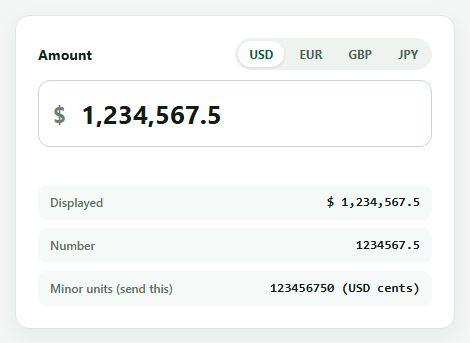
Formatting money while someone types is harder than formatting it afterwards. A naive onInput handler that inserts commas fights the caret — the cursor jumps to the end, deleting a comma does nothing, and pasting "1,234.5" breaks. IMask solves the caret problem properly: it tracks where the cursor should sit after each edit, so the number reformats live without disturbing what the user is doing. This snippet wraps that in a complete currency field.
The important design decision is separating what the user sees from what your code uses. The input shows "1,234,567.5". mask.typedValue is the same amount as a genuine JavaScript Number, with none of the formatting to strip. And the value you should actually send to a server or payment API is neither of those: it is integer minor units — 123456750 cents — computed with Math.round(n * 10^scale). Floating-point numbers cannot represent most decimal fractions exactly, so storing 0.1 + 0.2 style values is how money bugs happen. All three are shown side by side so the difference is unmissable.
Currency rules live in one table: symbol, decimal places, thousands separator and radix character. Euro amounts group with dots and use a comma as the decimal mark, so switching currency calls mask.updateOptions() with the new settings and reassigns typedValue so the same amount re-renders correctly. Yen has zero decimal places and rounds accordingly. mapToRadix lets a German-style field accept a typed dot as a decimal comma, which is what people with US keyboards will actually press.
Two small choices affect feel. padFractionalZeros is off, so typing "12" does not become "12.00" mid-entry and steal the caret; format on blur if you want the trailing zeros. And the max option clamps entry at a ceiling with a visible message when reached, rather than silently ignoring keystrokes.
Build with AI
Build, Understand, Optimize, and Extend It With AI
Ask an AI assistant like Claude to format the field with Intl.NumberFormat on blur, add lakh/crore grouping for INR with a custom mask, or make the maximum configurable per currency.
Prompt to recreate it
Copy this into your AI assistant of choice to build the effect from scratch, or as a jumping-off point for your own variant:
Build a currency input with IMask 7 loaded from a CDN.

Requirements:
- Use a Number mask with scale, signed: false, thousandsSeparator, radix, mapToRadix, min and max, and padFractionalZeros: false.
- Provide a currency switcher (USD, EUR, GBP, JPY) driven by one config table; switching calls mask.updateOptions() and re-assigns typedValue so the amount carries over.
- Display three values: the formatted text, mask.typedValue as a Number, and integer minor units from Math.round(n * 10^scale).
- Show a visible message when the maximum is reached.
- Use inputmode="decimal" so mobile keyboards show a numeric pad.
Want to tighten it up first? Run this prompt through the AI Prompt Studio to score it across 8 quality dimensions, catch anti-patterns, and tune the wording for Claude, ChatGPT, or Gemini before you paste it in.
Source Code
<div class="cu-card">
  <div class="cu-top">
    <label class="cu-label" for="cuAmount">Amount</label>
    <div class="cu-cur" role="group" aria-label="Currency">
      <button type="button" data-c="USD" class="on">USD</button>
      <button type="button" data-c="EUR">EUR</button>
      <button type="button" data-c="GBP">GBP</button>
      <button type="button" data-c="JPY">JPY</button>
    </div>
  </div>
  <div class="cu-field">
    <span class="cu-sym" id="cuSym">$</span>
    <input id="cuAmount" type="text" inputmode="decimal" autocomplete="off" placeholder="0.00" value="1234567.5">
  </div>
  <p class="cu-hint" id="cuHint"></p>
  <dl class="cu-read">
    <div><dt>Displayed</dt><dd id="cuShown">-</dd></div>
    <div><dt>Number</dt><dd id="cuNum">-</dd></div>
    <div><dt>Minor units (send this)</dt><dd id="cuMinor">-</dd></div>
  </dl>
</div>
body { background: #f3f6f4; padding: 24px; font-family: system-ui, sans-serif; }
.cu-card { max-width: 440px; margin: 0 auto; background: #fff; border: 1px solid #dfe7e2; border-radius: 14px; padding: 22px; box-shadow: 0 8px 24px rgba(20,50,35,.06); }
.cu-top { display: flex; justify-content: space-between; align-items: center; margin-bottom: 10px; gap: 8px; flex-wrap: wrap; }
.cu-label { font-weight: 700; font-size: 14px; color: #14231b; }
.cu-cur { display: flex; gap: 4px; background: #eef3f0; padding: 3px; border-radius: 999px; }
.cu-cur button { font: inherit; font-size: 12px; font-weight: 700; color: #4b5f54; background: none; border: 0; border-radius: 999px; padding: 5px 11px; cursor: pointer; }
.cu-cur button.on { background: #fff; color: #065f46; box-shadow: 0 1px 3px rgba(0,0,0,.12); }
.cu-field { display: flex; align-items: center; border: 1.5px solid #c9d6ce; border-radius: 12px; background: #fff; padding: 0 14px; transition: border-color .15s, box-shadow .15s; }
.cu-field:focus-within { border-color: #059669; box-shadow: 0 0 0 3px rgba(5,150,105,.16); }
.cu-field.bad { border-color: #dc2626; box-shadow: 0 0 0 3px rgba(220,38,38,.12); }
.cu-sym { font-size: 22px; font-weight: 700; color: #6b7f74; margin-right: 8px; min-width: 20px; }
.cu-field input { flex: 1; min-width: 0; border: 0; outline: 0; background: none; padding: 15px 0; font: 700 26px/1 system-ui, sans-serif; color: #0f1d15; font-variant-numeric: tabular-nums; }
.cu-hint { min-height: 18px; margin: 8px 2px 0; font-size: 12.5px; color: #b45309; }
.cu-read { margin: 12px 0 0; display: grid; gap: 8px; }
.cu-read div { display: flex; justify-content: space-between; gap: 12px; background: #f5f9f7; border-radius: 9px; padding: 9px 12px; }
.cu-read dt { font-size: 12px; color: #5b6f63; font-weight: 600; }
.cu-read dd { margin: 0; font: 700 13px/1.3 ui-monospace, Menlo, monospace; color: #0f1d15; text-align: right; word-break: break-all; }// scale = decimal places; thousands / radix follow each currency's convention.
const CURRENCIES = {
USD: { sym: '$', scale: 2, thousands: ',', radix: '.', locale: 'en-US' },
EUR: { sym: '€', scale: 2, thousands: '.', radix: ',', locale: 'de-DE' },
GBP: { sym: '£', scale: 2, thousands: ',', radix: '.', locale: 'en-GB' },
JPY: { sym: '¥', scale: 0, thousands: ',', radix: '.', locale: 'ja-JP' },
};
const MAX = 1000000000; // 1 billion in major units
const input = document.getElementById('cuAmount');
const field = input.parentNode;
const symEl = document.getElementById('cuSym');
const hint = document.getElementById('cuHint');
const shown = document.getElementById('cuShown');
const num = document.getElementById('cuNum');
const minor = document.getElementById('cuMinor');
let code = 'USD';
function opts(c) {
return {
mask: Number,
scale: c.scale, // digits after the radix point
signed: false,
thousandsSeparator: c.thousands,
padFractionalZeros: false, // don't force "12.00" while the user is still typing
normalizeZeros: true,
radix: c.radix,
mapToRadix: c.radix === ',' ? [',', '.'] : ['.'], // let people type either separator
min: 0,
max: MAX,
};
}
let mask = IMask(input, opts(CURRENCIES[code]));
function refresh() {
const c = CURRENCIES[code];
// typedValue is a real JS Number no matter how the text is formatted.
const n = mask.typedValue || 0;
const cents = Math.round(n * Math.pow(10, c.scale)); // integer minor units avoid float drift
shown.textContent = c.sym + ' ' + mask.value;
num.textContent = String(n);
minor.textContent = String(cents) + (c.scale ? ' (' + code + ' cents)' : ' (' + code + ')');
const over = n >= MAX;
field.classList.toggle('bad', over);
hint.textContent = over ? 'Maximum amount reached.' : '';
}
mask.on('accept', refresh);
document.querySelectorAll('.cu-cur button').forEach(function (btn) {
btn.addEventListener('click', function () {
// Carry the numeric value across currencies, then re-render it under the new rules.
const keep = mask.typedValue || 0;
code = btn.dataset.c;
const c = CURRENCIES[code];
mask.updateOptions(opts(c));
mask.typedValue = c.scale === 0 ? Math.round(keep) : keep;
symEl.textContent = c.sym;
document.querySelectorAll('.cu-cur button').forEach(function (b) { b.classList.toggle('on', b === btn); });
refresh();
input.focus();
});
});
refresh();Step by step
How to Use
- 1Type an amountType digits into the field. Thousands separators appear as you go, and the caret stays where you expect.
- 2Read the three valuesCompare the displayed text, the parsed number and the integer minor units underneath.
- 3Switch currencyClick EUR. Grouping flips to dots, the decimal mark becomes a comma, and the amount carries across.
- 4Try JPYYen has no decimals, so the fractional part is rounded away and minor units equal the amount.
- 5Paste a valuePaste "9,999.99" and watch the field normalise it under the active currency rules.
Real-world uses
Common Use Cases
Got questions?
Frequently Asked Questions
Floating-point numbers cannot exactly represent many decimals. Integer cents (or the smallest unit) add and compare exactly, which is why payment APIs use them.
For a Number mask it returns a real JavaScript number, so you do not have to strip separators from the displayed string.
IMask recomputes the cursor position after every formatting change, unlike a naive input handler that resets it to the end.
Padding zeros while typing rewrites the text under the caret. Apply zero padding on blur if you want it.
Add an entry to the CURRENCIES table with its symbol, scale, thousands separator and radix character.
Yes, with a pattern mask and blocks, but keeping the symbol outside makes the value trivial to read and avoids editing the prefix by accident.
Yes. Use the JSX, Vue, Angular or Tailwind export buttons on this page to convert the markup and styles. The behaviour comes from IMask, so in a framework project install it with npm install imask (or react-imask / vue-imask / angular-imask) instead of the CDN tag, create it in useEffect / onMounted / ngAfterViewInit, and release it with destroy() when the component unmounts.