Learn Coding Visually
Learn to code with interactive, live-preview playgrounds — HTML, CSS, JavaScript, React & more.
 HTML Playground42 lessons · Click-based · Live preview
 CSS PlaygroundLearn CSS with a live editor
 JavaScript Playground60 lessons · DOM · Async · Canvas
 React PlaygroundLearn React with a live code editor
 GSAP PlaygroundLearn GSAP animation interactively
 SVG Playground44 lessons · shapes · paths · animation
 SCSS Playground45 lessons · Sass modules · tokens
 Tailwind PlaygroundLearn Tailwind CSS with a live editor
 Bootstrap 5 Playground50 lessons · live preview
Choices.js Remote-Loaded Options — Free JS Snippet
Choices.js Remote-Loaded Options with Stale-Response Guard · Forms · Plain HTML, CSS & JS · Live preview
What's included
Features
About this UI Snippet
Choices.js Remote-Loaded Options — HTML, CSS & JavaScript
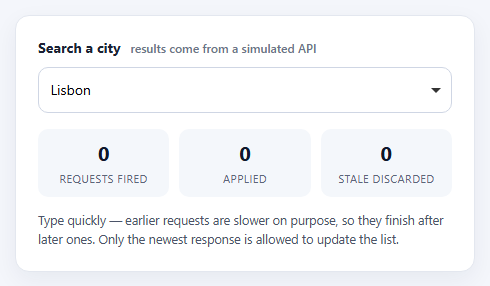
Loading dropdown options from a server is easy to get almost right. You listen for input, call the API, and put the results in the list. It works in testing because the network is fast and predictable. On a real connection it breaks in a quiet, maddening way: you type "lon", then "lond", and the response for "lon" arrives after the response for "lond" and replaces the better results with the worse ones. The user sees a list that does not match what is in the box.
This snippet exists to show that failure and fix it. The simulated API deliberately makes shorter queries slower, so responses arrive out of order the moment you type quickly. Every request takes an incrementing id, and a global latest counter holds the id of the newest one. When a response comes back, it is applied only if its id still equals latest; otherwise it is dropped and counted as stale. The three counters under the field make this visible — you will see "stale discarded" climb as you type, and the list will still always show results for the current text.
On the Choices.js side, searchChoices is set to false. By default Choices filters its own list locally as you type, which is exactly wrong when the server is the source of truth. With it off, the widget only raises a search event carrying the current text, and the code decides what to load. Results are swapped in with setChoices(items, 'value', 'label', true) — the final true replaces the existing list instead of appending — after clearChoices() has emptied it.
Keystrokes are debounced by 140ms so typing "berlin" does not fire six requests, and inputs shorter than two characters skip the network entirely. A disabled placeholder choice doubles as the loading and empty state, so the dropdown never shows a confusing blank panel. Swap fakeApi for a real fetch call and pass an AbortController signal if you also want to cancel the in-flight request rather than just ignoring it.
Build with AI
Build, Understand, Optimize, and Extend It With AI
Ask an AI assistant like Claude to swap the mock for a real fetch with AbortController cancellation, add keyboard-friendly result highlighting of the matched text, or cache recent queries.
Prompt to recreate it
Copy this into your AI assistant of choice to build the effect from scratch, or as a jumping-off point for your own variant:
Build a Choices.js 10 single-select whose options are loaded from an async API as the user types.

Requirements:
- Set searchChoices: false so Choices does not filter locally, and listen for the 'search' event on the select.
- Debounce input by about 150ms and skip requests for queries shorter than two characters.
- Give every request an incrementing id; when a response arrives, apply it only if its id equals the latest id, otherwise discard it.
- Render results with setChoices(items, 'value', 'label', true) after clearChoices(), and use a disabled placeholder choice for loading, empty and prompt states.
- Show live counters for requests fired, applied and stale-discarded, and make the mock API slower for shorter queries so the race is reproducible.
Want to tighten it up first? Run this prompt through the AI Prompt Studio to score it across 8 quality dimensions, catch anti-patterns, and tune the wording for Claude, ChatGPT, or Gemini before you paste it in.
Source Code
<div class="cr-card">
  <label class="cr-label" for="crCity">Search a city <span class="cr-hint">results come from a simulated API</span></label>
  <select id="crCity">
    <option value="Lisbon" selected>Lisbon</option>
  </select>
  <div class="cr-stats" aria-live="polite">
    <div><b id="crFired">0</b><span>requests fired</span></div>
    <div><b id="crApplied">0</b><span>applied</span></div>
    <div><b id="crStale">0</b><span>stale discarded</span></div>
  </div>
  <p class="cr-note">Type quickly — earlier requests are slower on purpose, so they finish after later ones. Only the newest response is allowed to update the list.</p>
</div>
body { background: #f4f6fb; padding: 24px; font-family: system-ui, sans-serif; }
.cr-card { max-width: 460px; margin: 0 auto; background: #fff; border: 1px solid #e3e7ef; border-radius: 14px; padding: 22px; box-shadow: 0 8px 24px rgba(20,30,60,.06); }
.cr-label { display: block; font-weight: 700; font-size: 14px; color: #1b2233; margin-bottom: 10px; }
.cr-hint { font-weight: 500; color: #6b7488; font-size: 12px; margin-left: 6px; }
.cr-card .choices { margin-bottom: 0; }
.cr-card .choices__inner { border-radius: 10px; border-color: #cfd6e4; min-height: 46px; background: #fff; }
.cr-card .is-focused .choices__inner, .cr-card .is-open .choices__inner { border-color: #0d9488; box-shadow: 0 0 0 3px rgba(13,148,136,.16); }
.cr-card .choices__list--dropdown .choices__item--selectable.is-highlighted { background: #e6f7f5; color: #0f5f57; }
.cr-card .choices__list--dropdown { z-index: 5; border-color: #cfd6e4; border-radius: 0 0 10px 10px; }
.cr-stats { display: grid; grid-template-columns: repeat(3, 1fr); gap: 10px; margin-top: 16px; }
.cr-stats div { background: #f4f7fb; border-radius: 10px; padding: 10px; text-align: center; }
.cr-stats b { display: block; font-size: 20px; color: #0f172a; font-variant-numeric: tabular-nums; }
.cr-stats span { font-size: 11px; color: #5b6579; text-transform: uppercase; letter-spacing: .04em; }
.cr-note { font-size: 12.5px; line-height: 1.5; color: #4b5468; margin: 14px 0 0; }const CITIES = ['Amsterdam','Athens','Auckland','Austin','Bangkok','Barcelona','Beijing','Berlin','Bogota','Boston','Brisbane','Brussels','Budapest','Buenos Aires','Cairo','Cape Town','Chicago','Copenhagen','Dallas','Delhi','Dubai','Dublin','Edinburgh','Helsinki','Hong Kong','Istanbul','Jakarta','Johannesburg','Kyoto','Lagos','Lima','Lisbon','London','Los Angeles','Madrid','Manila','Melbourne','Mexico City','Miami','Milan','Montreal','Mumbai','Munich','Nairobi','New York','Oslo','Paris','Prague','Reykjavik','Rome','San Francisco','Santiago','Sao Paulo','Seoul','Singapore','Stockholm','Sydney','Tokyo','Toronto','Vancouver','Vienna','Warsaw','Zurich'];
// Stand-in for fetch('/api/cities?q=...'). Earlier (shorter) queries are made
// slower so responses arrive out of order — the failure a real network causes.
function fakeApi(query) {
const delay = Math.max(120, 900 - query.length * 220);
return new Promise(function (resolve) {
setTimeout(function () {
const q = query.toLowerCase();
resolve(CITIES.filter(function (c) { return c.toLowerCase().indexOf(q) !== -1; }).slice(0, 8));
}, delay);
});
}
const el = document.getElementById('crCity');
const choices = new Choices(el, {
searchChoices: false, // the server does the filtering, not Choices
shouldSort: false,
placeholderValue: 'Type at least 2 letters...',
searchPlaceholderValue: 'Search cities',
itemSelectText: '',
noResultsText: 'No cities found',
noChoicesText: 'Start typing to search',
});
const fired = document.getElementById('crFired');
const applied = document.getElementById('crApplied');
const stale = document.getElementById('crStale');
let nFired = 0, nApplied = 0, nStale = 0;
let latest = 0; // id of the newest request; anything older is stale
let timer = null;
function setStatus(label) {
choices.clearChoices();
choices.setChoices([{ value: '', label: label, disabled: true }], 'value', 'label', true);
}
el.addEventListener('search', function (e) {
const q = e.detail.value.trim();
clearTimeout(timer);
if (q.length < 2) { setStatus('Type at least 2 letters...'); return; }
timer = setTimeout(function () { // debounce keystrokes
const id = ++latest;
fired.textContent = ++nFired;
setStatus('Searching...');
fakeApi(q).then(function (rows) {
if (id !== latest) { stale.textContent = ++nStale; return; } // a newer request exists
applied.textContent = ++nApplied;
choices.clearChoices();
choices.setChoices(
rows.length ? rows.map(function (c) { return { value: c, label: c }; })
: [{ value: '', label: 'No cities found', disabled: true }],
'value', 'label', true
);
});
}, 140);
});
setStatus('Type at least 2 letters...');Step by step
How to Use
- 1Open the dropdownClick the field. It prompts you to type at least two letters before anything is requested.
- 2Type slowlyType "par". After a short debounce a request fires, a "Searching..." row appears, and matching cities load.
- 3Type quicklyType "lon" then keep going to "london" in one burst. Watch "stale discarded" count up while the list stays correct.
- 4Read the countersFired minus applied equals discarded plus in-flight — proof that old responses were never allowed to win.
- 5Pick a citySelect a result to set it as the field value; Choices closes the list and shows your choice.
Real-world uses
Common Use Cases
Got questions?
Frequently Asked Questions
Choices would otherwise filter the currently loaded options locally, hiding server results that do not contain the typed text. Turning it off leaves filtering to your API.
A response to a request that has since been superseded by a newer one. Applying it would replace fresher results with older ones, so it is ignored.
No. Debouncing reduces requests but responses can still return out of order. The id check is what guarantees correctness.
Replace fakeApi with fetch(url).then(r => r.json()). Use an AbortController if you also want to cancel the older in-flight request.
Store the chosen value and label, then call setChoices with that single item marked selected before the user types anything.
Yes. Use the JSX, Vue, Angular or Tailwind export buttons on this page to convert the markup and styles. The behaviour comes from Choices.js, so in a framework project install it with npm install choices.js instead of the CDN tag, create it in useEffect / onMounted / ngAfterViewInit on the select element, and release it with destroy() when the component unmounts.