Learn Coding Visually
Learn to code with interactive, live-preview playgrounds — HTML, CSS, JavaScript, React & more.
 HTML Playground42 lessons · Click-based · Live preview
 CSS PlaygroundLearn CSS with a live editor
 JavaScript Playground60 lessons · DOM · Async · Canvas
 React PlaygroundLearn React with a live code editor
 GSAP PlaygroundLearn GSAP animation interactively
 SVG Playground44 lessons · shapes · paths · animation
 SCSS Playground45 lessons · Sass modules · tokens
 Tailwind PlaygroundLearn Tailwind CSS with a live editor
 Bootstrap 5 Playground50 lessons · live preview
noUiSlider Vertical EQ Sliders — Free JS Snippet
noUiSlider Vertical EQ Sliders with Live Curve · Forms · Plain HTML, CSS & JS · Live preview
What's included
Features
About this UI Snippet
noUiSlider Vertical EQ Sliders — HTML, CSS & JavaScript
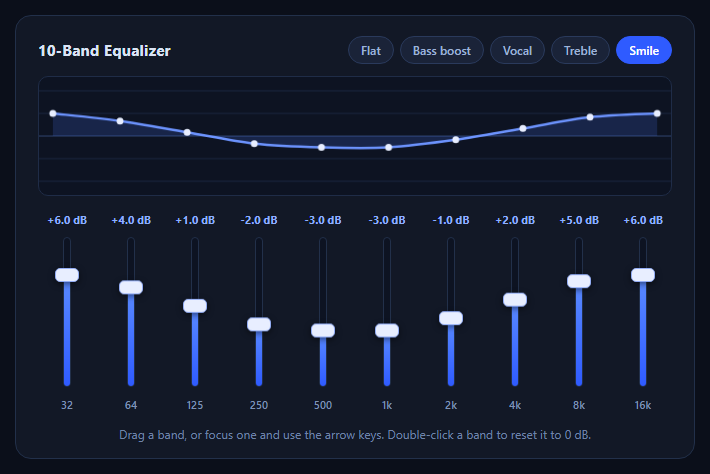
Vertical sliders are where most range-input code falls apart. Native range inputs can be rotated with a CSS transform, but the rotated box still occupies its old layout, keyboard direction is inconsistent across browsers and the styling hooks are a mess of vendor pseudo-elements. noUiSlider has real vertical support built in through orientation: 'vertical', which is why an equalizer — ten identical vertical controls that have to look and behave the same — is a good showcase for it.
Two options matter and one trap is worth naming. orientation: 'vertical' switches the track to run top to bottom, and direction: 'rtl' flips it so the highest value is at the top, which is what everyone expects from a fader. The trap is that a vertical noUiSlider has no intrinsic height — the library styles the track but takes its size from CSS, so a slider with no height rule renders as a zero-pixel line and looks like the component failed to initialise. Here the height comes from the .eq-slider rule.
Each band is its own noUiSlider instance with a range of -12 to +12 dB in half-decibel steps. A single draw() function reads every instance's current value and paints the frequency response on a canvas. The ten gains become points, and a Catmull-Rom spline converted to cubic Bézier segments joins them into a smooth curve, with a filled area to the zero line — the same visual language real audio plug-ins use. Because update fires continuously while dragging, the curve follows the fader in real time.
The presets call set() on every slider, and the active preset button is cleared the moment a drag starts, since the curve no longer matches it. Double-clicking a band resets it to 0 dB, a small convention that audio-software users expect. Nothing here produces sound — the same gain array can be applied to a chain of Web Audio BiquadFilterNode peaking filters if you want to wire it to real audio.
Build with AI
Build, Understand, Optimize, and Extend It With AI
Ask an AI assistant like Claude to wire the sliders to Web Audio BiquadFilterNodes with a looping audio source, add a bypass toggle, or save custom presets to local storage.
Prompt to recreate it
Copy this into your AI assistant of choice to build the effect from scratch, or as a jumping-off point for your own variant:
Build a ten-band vertical equalizer with noUiSlider 15 loaded from a CDN.

Requirements:
- Create ten sliders with orientation: 'vertical', direction: 'rtl', range -12 to +12, step 0.5 and an explicit CSS height on each track.
- Show a signed dB readout above each slider and the band frequency below it.
- Draw the combined response on a canvas by joining the ten gains with a Catmull-Rom spline converted to cubic Bezier segments, plus a filled area to the zero line.
- Add preset buttons (Flat, Bass boost, Vocal, Treble, Smile) that call set() on every slider, and clear the active preset as soon as the user starts dragging.
- Double-clicking a slider resets it to 0 dB.
Want to tighten it up first? Run this prompt through the AI Prompt Studio to score it across 8 quality dimensions, catch anti-patterns, and tune the wording for Claude, ChatGPT, or Gemini before you paste it in.
Source Code
<div class="eq-wrap">
  <div class="eq-top">
    <h3>10-Band Equalizer</h3>
    <div class="eq-presets" role="group" aria-label="Presets">
      <button type="button" data-p="flat">Flat</button>
      <button type="button" data-p="bass">Bass boost</button>
      <button type="button" data-p="vocal">Vocal</button>
      <button type="button" data-p="treble">Treble</button>
      <button type="button" data-p="smile" class="on">Smile</button>
    </div>
  </div>
  <canvas id="eqCurve" width="640" height="120" aria-label="Frequency response curve"></canvas>
  <div class="eq-bands" id="eqBands"></div>
  <p class="eq-foot">Drag a band, or focus one and use the arrow keys. Double-click a band to reset it to 0 dB.</p>
</div>
body { background: #0b0f1a; padding: 22px; font-family: system-ui, sans-serif; }
.eq-wrap { max-width: 680px; margin: 0 auto; background: #121826; border: 1px solid #22304a; border-radius: 16px; padding: 20px 22px 16px; color: #dbe4f5; }
.eq-top { display: flex; flex-wrap: wrap; gap: 10px; justify-content: space-between; align-items: center; margin-bottom: 12px; }
.eq-top h3 { margin: 0; font-size: 15px; letter-spacing: .02em; }
.eq-presets { display: flex; flex-wrap: wrap; gap: 6px; }
.eq-presets button { font: inherit; font-size: 12px; font-weight: 600; color: #9fb3d6; background: #1a2338; border: 1px solid #2a3a5c; border-radius: 999px; padding: 5px 12px; cursor: pointer; transition: all .15s; }
.eq-presets button:hover { color: #fff; border-color: #4f7cff; }
.eq-presets button.on { color: #fff; background: #2f5bff; border-color: #2f5bff; }
#eqCurve { width: 100%; height: 120px; display: block; background: #0d1322; border: 1px solid #1f2c47; border-radius: 10px; }
.eq-bands { display: flex; justify-content: space-between; gap: 6px; margin-top: 16px; }
.eq-band { flex: 1; display: flex; flex-direction: column; align-items: center; gap: 10px; }
.eq-db { font-size: 11px; font-weight: 700; color: #8fb0ff; font-variant-numeric: tabular-nums; min-width: 40px; text-align: center; }
.eq-slider { height: 150px; }
.eq-hz { font-size: 11px; color: #7f92b5; font-weight: 600; }
.eq-slider.noUi-target { background: #0d1322; border: 1px solid #22304a; box-shadow: none; width: 8px; border-radius: 6px; }
.eq-slider .noUi-connect { background: linear-gradient(#5b8bff, #2f5bff); }
.eq-slider .noUi-handle { width: 24px; height: 14px; right: -9px; top: auto; bottom: -7px; border-radius: 5px; border: 1px solid #93adf5; background: #e8eeff; box-shadow: 0 2px 6px rgba(0,0,0,.5); cursor: grab; }
.eq-slider .noUi-handle::before, .eq-slider .noUi-handle::after { display: none; }
.eq-slider .noUi-handle:focus-visible { outline: 2px solid #7fa2ff; outline-offset: 2px; }
.eq-slider .noUi-active { cursor: grabbing; }
.eq-foot { margin: 14px 0 0; font-size: 12px; color: #6f83a8; text-align: center; }
@media (max-width: 520px) { .eq-hz { font-size: 9px; } .eq-db { font-size: 9px; min-width: 0; } }const BANDS = [['32', 32], ['64', 64], ['125', 125], ['250', 250], ['500', 500], ['1k', 1000], ['2k', 2000], ['4k', 4000], ['8k', 8000], ['16k', 16000]];
const PRESETS = {
flat: [0, 0, 0, 0, 0, 0, 0, 0, 0, 0],
bass: [7, 6, 4, 2, 0, 0, 0, 0, 0, 0],
vocal: [-3, -2, -1, 1, 3, 4, 3, 1, -1, -2],
treble: [0, 0, 0, 0, 0, 1, 3, 5, 6, 7],
smile: [6, 4, 1, -2, -3, -3, -1, 2, 5, 6],
};
const RANGE = 12; // +/- dB
const wrap = document.getElementById('eqBands');
const canvas = document.getElementById('eqCurve');
const ctx = canvas.getContext('2d');
const sliders = [];
BANDS.forEach(function (b, i) {
const col = document.createElement('div');
col.className = 'eq-band';
col.innerHTML = '<span class="eq-db">0 dB</span><div class="eq-slider"></div><span class="eq-hz">' + b[0] + '</span>';
wrap.appendChild(col);
const el = col.querySelector('.eq-slider');
noUiSlider.create(el, {
start: PRESETS.smile[i], // open on a preset so the curve has a shape
orientation: 'vertical',
direction: 'rtl', // for a vertical slider, rtl puts the LOW value at the bottom
range: { min: -RANGE, max: RANGE },
step: 0.5,
connect: [true, false],
pips: null,
});
// A vertical slider has no height of its own — the CSS height above is what sizes the track. Vertical handles are anchored with bottom, not top, so overrides must set bottom.
el.noUiSlider.on('update', function (values) {
col.querySelector('.eq-db').textContent = fmt(Number(values[0]));
draw();
});
el.addEventListener('dblclick', function () { el.noUiSlider.set(0); });
sliders.push(el.noUiSlider);
});
function fmt(v) { return (v > 0 ? '+' : '') + v.toFixed(1) + ' dB'; }
function gains() { return sliders.map(function (s) { return Number(s.get()); }); }
// Smooth the 10 gains into a curve with a Catmull-Rom spline through evenly spaced points.
function draw() {
// update fires as each slider is created, before all ten exist.
if (sliders.length < BANDS.length) return;
const g = gains();
const W = canvas.width, H = canvas.height, pad = 14;
ctx.clearRect(0, 0, W, H);
const y = function (db) { return H / 2 - (db / RANGE) * (H / 2 - pad); };
const x = function (i) { return pad + (i / (g.length - 1)) * (W - pad * 2); };
ctx.strokeStyle = '#1c2942'; ctx.lineWidth = 1;
[-RANGE, -RANGE / 2, 0, RANGE / 2, RANGE].forEach(function (d) {
ctx.beginPath(); ctx.moveTo(0, y(d)); ctx.lineTo(W, y(d)); ctx.stroke();
});
ctx.strokeStyle = '#2a3d63';
ctx.beginPath(); ctx.moveTo(0, y(0)); ctx.lineTo(W, y(0)); ctx.stroke();
const pts = g.map(function (v, i) { return [x(i), y(v)]; });
const path = new Path2D();
path.moveTo(pts[0][0], pts[0][1]);
for (let i = 0; i < pts.length - 1; i++) {
const p0 = pts[Math.max(0, i - 1)], p1 = pts[i], p2 = pts[i + 1], p3 = pts[Math.min(pts.length - 1, i + 2)];
path.bezierCurveTo(
p1[0] + (p2[0] - p0[0]) / 6, p1[1] + (p2[1] - p0[1]) / 6,
p2[0] - (p3[0] - p1[0]) / 6, p2[1] - (p3[1] - p1[1]) / 6,
p2[0], p2[1]
);
}
const fill = new Path2D(path);
fill.lineTo(pts[pts.length - 1][0], y(0)); fill.lineTo(pts[0][0], y(0)); fill.closePath();
ctx.fillStyle = 'rgba(79,124,255,.18)'; ctx.fill(fill);
ctx.strokeStyle = '#6d94ff'; ctx.lineWidth = 2.5; ctx.stroke(path);
ctx.fillStyle = '#e8eeff';
pts.forEach(function (p) { ctx.beginPath(); ctx.arc(p[0], p[1], 3.5, 0, Math.PI * 2); ctx.fill(); });
}
const presetBtns = document.querySelectorAll('.eq-presets button');
presetBtns.forEach(function (btn) {
btn.addEventListener('click', function () {
PRESETS[btn.dataset.p].forEach(function (v, i) { sliders[i].set(v); });
presetBtns.forEach(function (b) { b.classList.toggle('on', b === btn); });
});
});
// Dragging away from a preset means it no longer describes the curve.
sliders.forEach(function (s) {
s.on('start', function () { presetBtns.forEach(function (b) { b.classList.remove('on'); }); });
});
draw();Step by step
How to Use
- 1Drag a faderDrag any band up or down. Its dB readout changes and the curve reshapes instantly.
- 2Load a presetClick Bass boost, Vocal, Treble or Smile to move every fader at once and highlight the preset.
- 3Fine-tune with the keyboardTab to a band and use the arrow keys to nudge it in half-decibel steps.
- 4Reset a bandDouble-click a fader to return that one band to 0 dB.
- 5Watch the preset clearStart dragging after choosing a preset — the highlight drops because the curve is now custom.
Real-world uses
Common Use Cases
Got questions?
Frequently Asked Questions
The library does not size vertical sliders itself. Give the element an explicit height in CSS, as the .eq-slider rule does here.
For a vertical slider rtl puts the maximum at the top and the minimum at the bottom, which matches how faders work.
The ten gains are treated as points and joined with a Catmull-Rom spline, converted into cubic Bézier segments that canvas can draw.
No. It only produces gain values. Map each to a Web Audio BiquadFilterNode of type peaking at the band frequency to hear the effect.
Call get() on each slider instance. This snippet collects them in gains() every time the curve is redrawn.
Add entries to BANDS and PRESETS. The layout, curve and reset behaviour are all driven by those arrays.
Yes. Use the JSX, Vue, Angular or Tailwind export buttons on this page to convert the markup and styles. The behaviour comes from noUiSlider, so in a framework project install it with npm install nouislider instead of the CDN tag, create it in useEffect / onMounted / ngAfterViewInit on the element, and release it with noUiSlider destroy() when the component unmounts.