Learn Coding Visually
Learn to code with interactive, live-preview playgrounds — HTML, CSS, JavaScript, React & more.
 HTML Playground42 lessons · Click-based · Live preview
 CSS PlaygroundLearn CSS with a live editor
 JavaScript Playground60 lessons · DOM · Async · Canvas
 React PlaygroundLearn React with a live code editor
 GSAP PlaygroundLearn GSAP animation interactively
 SVG Playground44 lessons · shapes · paths · animation
 SCSS Playground45 lessons · Sass modules · tokens
 Tailwind PlaygroundLearn Tailwind CSS with a live editor
 Bootstrap 5 Playground50 lessons · live preview
intl-tel-input Phone Field with Validation — Free JS Snippet
intl-tel-input International Phone Field with Validation · Forms · Plain HTML, CSS & JS · Live preview
What's included
Features
About this UI Snippet
intl-tel-input International Phone Field — HTML, CSS & JavaScript
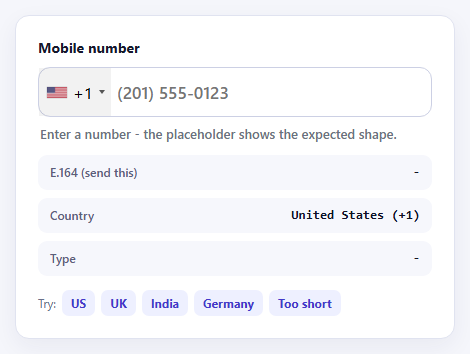
Where a formatting mask makes a phone number look right, intl-tel-input makes it be right. It adds a searchable country dropdown with flags, keeps the dial code separate from the national number, and — the important part — validates against real numbering-plan metadata, the same data behind Google's libphonenumber. A number is not just "long enough": it has to be possible and valid for the selected country, and this field can tell the difference.
The heavy lifting lives in a second file. The main script is small; validation, formatting and per-country example placeholders come from utils.js, which is loaded lazily via the utilsScript option. Until it has loaded, isValidNumber() cannot give a meaningful answer, which is a classic source of "valid numbers rejected" bugs on slow connections. This snippet waits for iti.promise, shows a loading message in the meantime, and falls back gracefully if the script cannot be fetched — the field still works as a country picker even without validation.
The output that matters is E.164, returned by getNumber(): a plus sign, the country code and the national digits with no spaces or punctuation, such as +16502530000. That is the canonical form SMS providers, identity checks and databases expect, so it is the value to send. The field also reports the number type — mobile, landline, toll-free and so on — using the utility library, which is useful for deciding whether an SMS verification is even possible.
Error handling uses getValidationError() codes rather than a generic "invalid" message, so the user hears "Too short" or "Wrong length for this country" and can fix the problem. autoPlaceholder: 'aggressive' shows a real example number for the chosen country, which prevents many mistakes before they happen. separateDialCode keeps the +44 in the flag button, so users type only their national number and never wonder whether to include the leading zero.
Build with AI
Build, Understand, Optimize, and Extend It With AI
Ask an AI assistant like Claude to add a server-side validation example with libphonenumber-js, restrict the field to mobile numbers only, or send a verification code after a valid number is entered.
Prompt to recreate it
Copy this into your AI assistant of choice to build the effect from scratch, or as a jumping-off point for your own variant:
Build an international phone field with intl-tel-input 18 loaded from a CDN, including its CSS.

Requirements:
- Initialise with initialCountry, preferredCountries, separateDialCode: true, nationalMode: true, autoPlaceholder: 'aggressive' and a utilsScript URL for lazy validation.
- Wait for iti.promise before validating; show a loading state and a graceful message if utils.js fails to load.
- On input and countrychange, use isValidNumber(); when invalid show a specific message from getValidationError(), when valid show getNumber() as E.164.
- Show the detected country and, when valid, the number type (mobile, landline, etc.).
- Add buttons that call setNumber() with sample numbers, including a deliberately too-short one.
Want to tighten it up first? Run this prompt through the AI Prompt Studio to score it across 8 quality dimensions, catch anti-patterns, and tune the wording for Claude, ChatGPT, or Gemini before you paste it in.
Source Code
<div class="it-card">
  <label class="it-label" for="itPhone">Mobile number</label>
  <input id="itPhone" type="tel" autocomplete="tel">
  <p class="it-status" id="itStatus" role="status" aria-live="polite">Loading validation data...</p>
  <dl class="it-read">
    <div><dt>E.164 (send this)</dt><dd id="itE164">-</dd></div>
    <div><dt>Country</dt><dd id="itCountry">-</dd></div>
    <div><dt>Type</dt><dd id="itType">-</dd></div>
  </dl>
  <div class="it-try">Try:
    <button type="button" data-n="+1 650 253 0000">US</button>
    <button type="button" data-n="+44 7911 123456">UK</button>
    <button type="button" data-n="+91 98765 43210">India</button>
    <button type="button" data-n="+49 1512 3456789">Germany</button>
    <button type="button" data-n="+1 555">Too short</button>
  </div>
</div>
body { background: #f5f6fb; padding: 24px; font-family: system-ui, sans-serif; }
.it-card { max-width: 440px; margin: 0 auto; background: #fff; border: 1px solid #e0e3f0; border-radius: 14px; padding: 22px; box-shadow: 0 8px 24px rgba(30,30,80,.06); }
.it-label { display: block; font-weight: 700; font-size: 14px; color: #16182b; margin-bottom: 10px; }
.it-card .iti { width: 100%; }
.it-card .iti input { width: 100%; padding: 14px 14px 14px 92px; font: 600 17px/1.2 system-ui, sans-serif; color: #0f1226; border: 1.5px solid #ccd0e4; border-radius: 12px; }
.it-card .iti input:focus { outline: 0; border-color: #4f46e5; box-shadow: 0 0 0 3px rgba(79,70,229,.16); }
.it-card .iti input.ok { border-color: #16a34a; }
.it-card .iti input.bad { border-color: #dc2626; }
.it-card .iti__country-list { border-radius: 10px; border-color: #ccd0e4; box-shadow: 0 12px 28px rgba(30,30,80,.16); font-size: 14px; }
.it-status { min-height: 20px; margin: 8px 2px 0; font-size: 13px; font-weight: 600; color: #6b7280; }
.it-status.ok { color: #15803d; }
.it-status.bad { color: #b91c1c; }
.it-read { margin: 10px 0 0; display: grid; gap: 8px; }
.it-read div { display: flex; justify-content: space-between; gap: 12px; background: #f6f7fc; border-radius: 9px; padding: 9px 12px; }
.it-read dt { font-size: 12px; color: #5b607a; font-weight: 600; }
.it-read dd { margin: 0; font: 700 13px/1.3 ui-monospace, Menlo, monospace; color: #0f1226; text-align: right; }
.it-try { margin-top: 14px; font-size: 12px; color: #6b7089; display: flex; flex-wrap: wrap; gap: 6px; align-items: center; }
.it-try button { font: inherit; font-size: 12px; font-weight: 700; color: #4338ca; background: #eef0ff; border: 0; border-radius: 7px; padding: 5px 9px; cursor: pointer; }
.it-try button:hover { background: #e0e4ff; }const UTILS = 'https://cdn.jsdelivr.net/npm/intl-tel-input@18.5.3/build/js/utils.js';
const input = document.getElementById('itPhone');
const status = document.getElementById('itStatus');
const iti = window.intlTelInput(input, {
initialCountry: 'us',
preferredCountries: ['us', 'gb', 'in', 'de', 'au'],
separateDialCode: true, // dial code sits in the flag button, the input holds the national number
nationalMode: true,
autoPlaceholder: 'aggressive', // show a real example number for the selected country
utilsScript: UTILS, // lazy-loaded: powers validation, formatting and placeholders
});
const ERRORS = { 1: 'That country code is not valid', 2: 'Too short', 3: 'Too long', 4: 'Only valid as a local number', 5: 'Wrong length for this country' };
const TYPES = { 0: 'Landline', 1: 'Mobile', 2: 'Landline or mobile', 3: 'Toll-free', 4: 'Premium rate', 5: 'Shared cost', 6: 'VoIP', 7: 'Personal', 8: 'Pager', 9: 'UAN', 10: 'Voicemail' };
let ready = false;
function check() {
const val = input.value.trim();
const c = iti.getSelectedCountryData();
document.getElementById('itCountry').textContent = c.name ? c.name + ' (+' + c.dialCode + ')' : '-';
input.classList.remove('ok', 'bad');
status.className = 'it-status';
if (!ready) return; // validation needs utils.js first
if (!val) {
status.textContent = 'Enter a number - the placeholder shows the expected shape.';
document.getElementById('itE164').textContent = '-';
document.getElementById('itType').textContent = '-';
return;
}
if (iti.isValidNumber()) {
input.classList.add('ok'); status.classList.add('ok');
status.textContent = 'Valid number';
document.getElementById('itE164').textContent = iti.getNumber(); // +16502530000 style
document.getElementById('itType').textContent = TYPES[iti.getNumberType()] || 'Unknown';
} else {
input.classList.add('bad'); status.classList.add('bad');
status.textContent = ERRORS[iti.getValidationError()] || 'Not a valid number for this country';
document.getElementById('itE164').textContent = '-';
document.getElementById('itType').textContent = '-';
}
}
// iti.promise resolves once utils.js has loaded (or rejects offline).
iti.promise.then(function () { ready = true; check(); }).catch(function () {
status.textContent = 'Validation data could not be loaded - the field still formats and picks countries.';
});
input.addEventListener('input', check);
input.addEventListener('countrychange', check);
document.querySelectorAll('.it-try button').forEach(function (b) {
b.addEventListener('click', function () { iti.setNumber(b.dataset.n); check(); });
});Step by step
How to Use
- 1Pick a countryClick the flag to open the searchable list. The dial code and placeholder example update.
- 2Type a numberType a national number. The border and message show whether it is valid for that country.
- 3Read the E.164 valueA valid number produces a compact +country-digits string — the value to send to your server.
- 4Try the shortcutsUse the buttons to load a US, UK, Indian or German number, or a deliberately too-short one.
- 5Change the countrySwitch country with digits still typed and the number is re-validated against the new plan.
Real-world uses
Common Use Cases
Got questions?
Frequently Asked Questions
E.164 is the international phone format: a plus sign, country code and digits with no spaces, up to 15 digits. It is unambiguous, so SMS and calling APIs expect it.
The metadata for each country's numbering plan lives in utils.js. Without it the field can pick countries but cannot say whether a number is valid.
Use the instance's promise property, iti.promise, which resolves once the script is ready or rejects if it fails.
No. Treat it as a usability aid and re-validate the E.164 number on the server before sending messages.
Use a geoIpLookup callback with initialCountry: "auto", or read the browser locale, and pin common countries with preferredCountries.
Yes. Use onlyCountries to allow a fixed list, or excludeCountries to remove specific ones.
Yes. Use the JSX, Vue, Angular or Tailwind export buttons on this page to convert the markup and styles. The behaviour comes from intl-tel-input, so in a framework project install it with npm install intl-tel-input (official React, Vue and Angular wrappers exist) instead of the CDN tag, create it in useEffect / onMounted / ngAfterViewInit and load utils.js, and release it with destroy() when the component unmounts.