Learn Coding Visually
Learn to code with interactive, live-preview playgrounds — HTML, CSS, JavaScript, React & more.
 HTML Playground42 lessons · Click-based · Live preview
 CSS PlaygroundLearn CSS with a live editor
 JavaScript Playground60 lessons · DOM · Async · Canvas
 React PlaygroundLearn React with a live code editor
 GSAP PlaygroundLearn GSAP animation interactively
 SVG Playground44 lessons · shapes · paths · animation
 SCSS Playground45 lessons · Sass modules · tokens
 Tailwind PlaygroundLearn Tailwind CSS with a live editor
 Bootstrap 5 Playground50 lessons · live preview
IMask Credit Card Input with Brand Detection — Free JS Snippet
IMask Credit Card Input with Brand Detection · Forms · Plain HTML, CSS & JS · Live preview
What's included
Features
About this UI Snippet
IMask Credit Card Input with Brand Detection — HTML, CSS & JavaScript
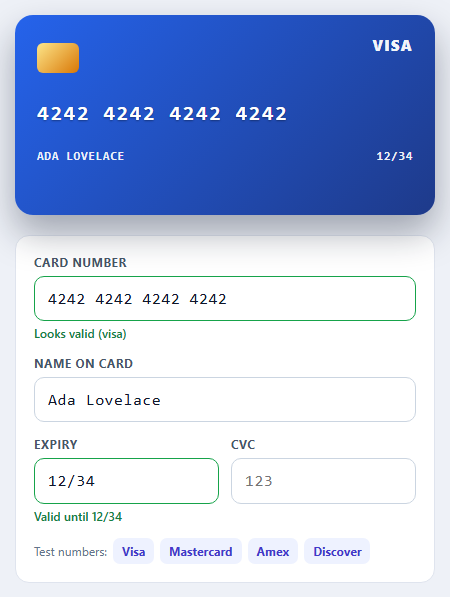
A card number field looks like a solved problem until you try to format it. Visa and Mastercard group digits as 4-4-4-4. American Express is 4-6-5. Diners Club is 4-6-4. A single fixed mask is wrong for at least one of them, and you cannot know which applies until the user has typed the first digits. IMask's dynamic masks are built for this: you supply an array of masks and a dispatch function that picks one every time the value changes.
The dispatch function here strips the current text and the newly typed characters down to digits, then tests them against each brand's leading-digit pattern — 4 for Visa, 51-55 and 2221-2720 for Mastercard, 34 and 37 for Amex, and so on. The first match wins, with a generic 16-digit mask as the fallback. Because it runs on every keystroke, the grouping reshapes itself mid-typing: start a number with 3 and 7 and the field reflows into the Amex layout. The detected brand also drives the card preview colour and the security-code length, since Amex uses a four-digit CID while everything else uses three.
Format is not validity. The 16 digits of a random number will fill the mask happily, so the field also runs the Luhn checksum — double every second digit from the right, subtract 9 from any result above 9, and require the sum to be divisible by 10. It catches almost all single-digit typos and adjacent transpositions before a request ever reaches a payment provider. The message only appears once the mask is complete, so people are not told their half-typed number is wrong.
Expiry uses a pattern mask with a MaskedRange block for the month, restricting it to 01-12 as you type so "15/28" is impossible to enter, and a comparison against today's date flags an expired card. The four test-number buttons load well-known example numbers that pass the checksum, so you can watch every brand without inventing digits. None of this transmits or stores anything; in a real checkout use your payment provider's hosted fields so raw card numbers never touch your own servers.
Build with AI
Build, Understand, Optimize, and Extend It With AI
Ask an AI assistant like Claude to add a card-flip animation that shows the CVC on the back, support UnionPay and JCB ranges, or connect the form to a payment provider's hosted fields.
Prompt to recreate it
Copy this into your AI assistant of choice to build the effect from scratch, or as a jumping-off point for your own variant:
Build a credit card entry form with IMask 7 loaded from a CDN.

Requirements:
- Use a dynamic mask array with a dispatch function that detects Visa, Mastercard, Amex, Discover and Diners from leading digits and switches between 4-4-4-4, 4-6-5 and 4-6-4 layouts.
- Validate the completed number with the Luhn checksum and show a message only when the mask is complete.
- Add an MM/YY expiry mask using MaskedRange blocks (month 1-12) and flag expired dates.
- Change the security-code mask between 3 and 4 digits depending on the detected brand.
- Show a live card preview whose colour follows the brand and mirrors the number, name and expiry, plus buttons that load valid test numbers.
Want to tighten it up first? Run this prompt through the AI Prompt Studio to score it across 8 quality dimensions, catch anti-patterns, and tune the wording for Claude, ChatGPT, or Gemini before you paste it in.
Source Code
<div class="cc-wrap">
  <div class="cc-card" id="ccCard" data-brand="unknown" aria-hidden="true">
    <div class="cc-brand" id="ccBrand">CARD</div>
    <div class="cc-chip"></div>
    <div class="cc-num" id="ccPreviewNum">#### #### #### ####</div>
    <div class="cc-row"><span id="ccPreviewName">FULL NAME</span><span id="ccPreviewExp">MM/YY</span></div>
  </div>

  <form class="cc-form" id="ccForm" novalidate>
    <label>Card number
      <input id="ccNumber" inputmode="numeric" autocomplete="cc-number" placeholder="1234 5678 9012 3456">
      <small id="ccNumMsg"></small>
    </label>
    <label>Name on card
      <input id="ccName" autocomplete="cc-name" placeholder="Ada Lovelace">
    </label>
    <div class="cc-two">
      <label>Expiry
        <input id="ccExp" inputmode="numeric" autocomplete="cc-exp" placeholder="MM/YY">
        <small id="ccExpMsg"></small>
      </label>
      <label><span id="ccCvcLabel">CVC</span>
        <input id="ccCvc" inputmode="numeric" autocomplete="cc-csc" placeholder="123">
      </label>
    </div>
    <div class="cc-test">Test numbers:
      <button type="button" data-n="4242 4242 4242 4242">Visa</button>
      <button type="button" data-n="5555 5555 5555 4444">Mastercard</button>
      <button type="button" data-n="3782 822463 10005">Amex</button>
      <button type="button" data-n="6011 1111 1111 1117">Discover</button>
    </div>
  </form>
</div>
body { background: #eef1f7; padding: 22px; font-family: system-ui, sans-serif; }
.cc-wrap { max-width: 420px; margin: 0 auto; }
.cc-card { position: relative; height: 200px; border-radius: 18px; padding: 22px; color: #fff; background: linear-gradient(135deg, #475569, #1e293b); box-shadow: 0 18px 36px rgba(15,23,42,.35); margin-bottom: 20px; overflow: hidden; transition: background .35s; }
.cc-card[data-brand="visa"] { background: linear-gradient(135deg, #2563eb, #1e3a8a); }
.cc-card[data-brand="mastercard"] { background: linear-gradient(135deg, #f97316, #7f1d1d); }
.cc-card[data-brand="amex"] { background: linear-gradient(135deg, #0891b2, #134e4a); }
.cc-card[data-brand="discover"] { background: linear-gradient(135deg, #f59e0b, #78350f); }
.cc-card[data-brand="diners"] { background: linear-gradient(135deg, #64748b, #0f172a); }
.cc-brand { position: absolute; top: 20px; right: 22px; font-weight: 800; font-size: 15px; letter-spacing: .08em; text-transform: uppercase; opacity: .95; }
.cc-chip { width: 42px; height: 30px; border-radius: 6px; background: linear-gradient(135deg, #fde68a, #d97706); margin-top: 6px; }
.cc-num { margin-top: 30px; font: 600 21px/1 ui-monospace, Menlo, monospace; letter-spacing: .08em; text-shadow: 0 1px 2px rgba(0,0,0,.35); white-space: nowrap; }
.cc-row { display: flex; justify-content: space-between; margin-top: 26px; font: 600 12px/1 ui-monospace, Menlo, monospace; letter-spacing: .06em; text-transform: uppercase; opacity: .92; }
.cc-form { background: #fff; border: 1px solid #dfe4ee; border-radius: 14px; padding: 18px; display: grid; gap: 14px; }
.cc-form label { display: block; font-size: 12px; font-weight: 700; color: #475569; text-transform: uppercase; letter-spacing: .04em; }
.cc-form input { display: block; width: 100%; margin-top: 6px; padding: 12px 13px; font: 500 16px/1.2 ui-monospace, Menlo, monospace; letter-spacing: .04em; color: #0f172a; border: 1.5px solid #cbd5e1; border-radius: 10px; text-transform: none; }
.cc-form input:focus { outline: 0; border-color: #4f46e5; box-shadow: 0 0 0 3px rgba(79,70,229,.16); }
.cc-form input.ok { border-color: #16a34a; }
.cc-form input.err { border-color: #dc2626; }
.cc-form small { display: block; min-height: 15px; margin-top: 4px; font-size: 12px; text-transform: none; letter-spacing: 0; font-weight: 600; color: #dc2626; }
.cc-form small.ok { color: #15803d; }
.cc-two { display: grid; grid-template-columns: 1fr 1fr; gap: 12px; }
.cc-test { font-size: 12px; color: #64748b; display: flex; flex-wrap: wrap; align-items: center; gap: 6px; }
.cc-test button { font: inherit; font-size: 12px; font-weight: 700; color: #4338ca; background: #eef2ff; border: 0; border-radius: 7px; padding: 5px 9px; cursor: pointer; }
.cc-test button:hover { background: #e0e7ff; }const BRANDS = [
{ type: 'amex', label: 'AMEX', mask: '0000 000000 00000', cvc: 4, re: /^3[47]\d{0,13}/ },
{ type: 'discover', label: 'DISCOVER', mask: '0000 0000 0000 0000', cvc: 3, re: /^(?:6011|65\d{0,2}|64[4-9]\d?)\d{0,12}/ },
{ type: 'diners', label: 'DINERS', mask: '0000 000000 0000', cvc: 3, re: /^3(?:0[0-5]|09|[689]\d?)\d{0,11}/ },
{ type: 'visa', label: 'VISA', mask: '0000 0000 0000 0000', cvc: 3, re: /^4\d{0,15}/ },
{ type: 'mastercard', label: 'MASTERCARD', mask: '0000 0000 0000 0000', cvc: 3, re: /^(?:5[1-5]\d{0,2}|22[2-9]\d|2[3-7]\d{0,2})\d{0,12}/ },
{ type: 'unknown', label: 'CARD', mask: '0000 0000 0000 0000', cvc: 3, re: null },
];
const $ = function (id) { return document.getElementById(id); };
const card = $('ccCard'), numIn = $('ccNumber'), nameIn = $('ccName'), expIn = $('ccExp'), cvcIn = $('ccCvc');
let brand = BRANDS[BRANDS.length - 1];
// Luhn checksum: double every second digit from the right; the total must be divisible by 10.
function luhn(digits) {
let sum = 0, dbl = false;
for (let i = digits.length - 1; i >= 0; i--) {
let d = digits.charCodeAt(i) - 48;
if (dbl) { d *= 2; if (d > 9) d -= 9; }
sum += d; dbl = !dbl;
}
return digits.length > 0 && sum % 10 === 0;
}
const numMask = IMask(numIn, {
mask: BRANDS.map(function (b) { return { mask: b.mask, brand: b }; }),
// dispatch picks which mask applies as digits arrive, based on the number so far.
dispatch: function (appended, dynamic) {
const digits = (dynamic.value + appended).replace(/\D/g, '');
for (let i = 0; i < BRANDS.length; i++) {
if (BRANDS[i].re && BRANDS[i].re.test(digits)) return dynamic.compiledMasks[i];
}
return dynamic.compiledMasks[dynamic.compiledMasks.length - 1];
},
});
const cvcMask = IMask(cvcIn, { mask: '0000' });
const expMask = IMask(expIn, {
mask: 'MM/YY',
blocks: {
MM: { mask: IMask.MaskedRange, from: 1, to: 12 },
YY: { mask: IMask.MaskedRange, from: 0, to: 99 },
},
});
function setMsg(el, input, text, ok) {
el.textContent = text;
el.className = ok ? 'ok' : '';
input.classList.toggle('ok', !!ok);
input.classList.toggle('err', !ok && !!text);
}
function updateNumber() {
const cm = numMask.masked.currentMask;
brand = (cm && cm.brand) || BRANDS[BRANDS.length - 1];
card.dataset.brand = brand.type;
$('ccBrand').textContent = brand.label;
$('ccCvcLabel').textContent = brand.type === 'amex' ? 'CID (4 digits)' : 'CVC';
cvcIn.placeholder = brand.cvc === 4 ? '1234' : '123';
cvcMask.updateOptions({ mask: brand.cvc === 4 ? '0000' : '000' });
const digits = numMask.unmaskedValue;
const full = numMask.masked.isComplete;
const shown = numMask.value || '#### #### #### ####';
$('ccPreviewNum').textContent = shown;
if (!digits) setMsg($('ccNumMsg'), numIn, '', false);
else if (full && luhn(digits)) setMsg($('ccNumMsg'), numIn, 'Looks valid (' + brand.label.toLowerCase() + ')', true);
else if (full) setMsg($('ccNumMsg'), numIn, 'Number fails the checksum - check for a typo', false);
else setMsg($('ccNumMsg'), numIn, '', false);
}
function updateExpiry() {
$('ccPreviewExp').textContent = expMask.value || 'MM/YY';
if (!expMask.masked.isComplete) { setMsg($('ccExpMsg'), expIn, '', false); return; }
const mm = Number(expMask.value.slice(0, 2)), yy = 2000 + Number(expMask.value.slice(3, 5));
const now = new Date();
const expired = yy < now.getFullYear() || (yy === now.getFullYear() && mm < now.getMonth() + 1);
setMsg($('ccExpMsg'), expIn, expired ? 'This card has expired' : 'Valid until ' + expMask.value, !expired);
}
numMask.on('accept', updateNumber);
expMask.on('accept', updateExpiry);
nameIn.addEventListener('input', function () { $('ccPreviewName').textContent = nameIn.value || 'FULL NAME'; });
document.querySelectorAll('.cc-test button').forEach(function (b) {
b.addEventListener('click', function () { numMask.value = b.dataset.n; updateNumber(); cvcIn.focus(); });
});
// Open with a filled-in example so the card preview shows something real.
numMask.value = '4242 4242 4242 4242';
nameIn.value = 'Ada Lovelace';
$('ccPreviewName').textContent = nameIn.value;
expMask.value = '12/34';
updateNumber();
updateExpiry();Step by step
How to Use
- 1Type a card numberStart with a 4 for Visa, 5 for Mastercard, or 3 then 7 for American Express. The grouping and card colour change as you type.
- 2Load a test numberClick a brand button to fill a well-known example number that passes the checksum.
- 3Break the checksumChange the last digit of a full number. The field flags that the number fails validation.
- 4Enter an expiryType "1" then "5". The month is capped at 12. An expired date shows a warning.
- 5Check the security codeSwitch to an Amex number and the code field asks for four digits instead of three.
Real-world uses
Common Use Cases
Got questions?
Frequently Asked Questions
A dispatch function tests the digits typed so far against each brand's leading-digit regular expression and returns the matching mask, falling back to a generic one.
A checksum used by card numbers: double every second digit from the right, subtract 9 from results over 9, sum everything and check divisibility by 10. It catches most typing mistakes.
No. It only means the number is well-formed. Only your payment provider can confirm the card exists and has funds.
Use this pattern for the interface only. In production, collect card data with your payment provider's hosted fields so it never reaches your servers.
American Express cards use a four-digit code on the front, while other brands use three digits on the back.
Add an entry to BRANDS with its mask, security-code length and leading-digit regular expression; the dispatch function picks it up automatically.
Yes. Use the JSX, Vue, Angular or Tailwind export buttons on this page to convert the markup and styles. The behaviour comes from IMask, so in a framework project install it with npm install imask (or react-imask / vue-imask / angular-imask) instead of the CDN tag, create it in useEffect / onMounted / ngAfterViewInit, and release it with destroy() when the component unmounts.