You Might Also Like
Learn Coding Visually
Learn to code with interactive, live-preview playgrounds — HTML, CSS, JavaScript, React & more.
 HTML Playground42 lessons · Click-based · Live preview
 CSS PlaygroundLearn CSS with a live editor
 JavaScript Playground60 lessons · DOM · Async · Canvas
 React PlaygroundLearn React with a live code editor
 GSAP PlaygroundLearn GSAP animation interactively
 SVG Playground44 lessons · shapes · paths · animation
 SCSS Playground45 lessons · Sass modules · tokens
 Tailwind PlaygroundLearn Tailwind CSS with a live editor
 Bootstrap 5 Playground50 lessons · live preview
CSS if() Conditional Demo — Free HTML CSS JS Snippet
CSS if() Conditional Demo · Layouts · Plain HTML, CSS & JS · Live preview
What's included
Features
About this UI Snippet
CSS if() Conditional Demo — Native Conditional Styling With a Real Fallback
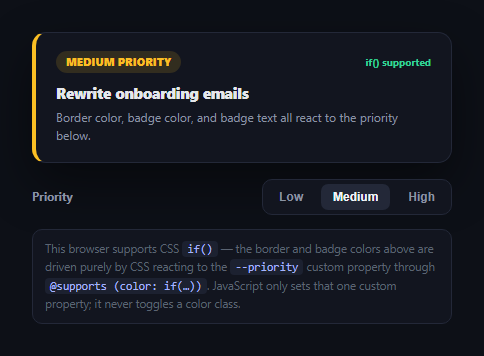
CSS has always needed JavaScript to change a style based on a value stored in a custom property — you'd read the property, decide, and toggle a class. The proposed if() function (part of the CSS Values and Units Level 5 draft) lets a property value branch directly in CSS using style() queries against a custom property, with no JavaScript decision-making at all. This snippet is a small, honest demo of that feature: a priority card whose border and badge colors react to a --priority custom property purely through CSS, with a real @supports feature query and a fully working fallback for the (currently large) majority of browsers that don't support it yet. See also css has selector playground and css container query units demo for other emerging-CSS demos.
Being honest about support
As of 2026, if() is genuinely new and experimental — it is not broadly supported the way :has() or container queries now are. This demo does not assume you're on a browser that supports it: it feature-detects with CSS.supports() at load time and clearly labels which path is active, right in the UI, so you can see for yourself whether your current browser is running the modern CSS-only path or the fallback.
The modern path: if() with style() queries
Inside an @supports block, border-left-color and the badge's background/color are set with expressions like if(style(--priority: high): #f87171; style(--priority: medium): #fbbf24; else: #34d399). Each style() query checks the *computed value* of the --priority custom property on that element, and the whole expression evaluates to whichever branch matches — functioning like an inline ternary chain, but written entirely in CSS with no JavaScript reading or branching on the value.
JavaScript's only job: setting one property
In a supporting browser, applyPriority() does exactly one color-relevant thing: card.style.setProperty('--priority', value). It does not add or remove a color class, does not set any inline color, and does not otherwise touch the DOM's presentation — every color you see is a direct consequence of that single custom-property write flowing through the if() expressions in CSS.
A real, working fallback
The @supports (color: if(style(--cif-test: 1): red; else: blue)) feature query is the mechanism that keeps this safe: it evaluates to false in any browser that doesn't understand if(), so those rules are simply never applied — there's no broken, half-parsed CSS left behind. Underneath, a completely ordinary set of data-priority attribute-selector rules (.cif-card[data-priority="high"] { border-left-color: #f87171 }) provides the exact same visual result, so the demo degrades gracefully rather than breaking.
When to reach for this yourself
Treat if() today as something to watch, not something to ship without a fallback — exactly the pattern this snippet demonstrates. If you use it in production ahead of broad support, always pair it with a genuine @supports-gated (or attribute/class-based) fallback path like this one, and re-test browser support periodically since this is one of the fastest-moving corners of the CSS spec.
Build with AI
Build, Understand, Optimize, and Extend It With AI
You don't have to puzzle out the feature-detection and fallback strategy by hand. Paste this snippet's HTML, CSS, and JS into an AI coding assistant like Claude and ask it to explain exactly what the @supports (color: if(style(--cif-test: 1): red; else: blue)) feature query is testing for and why that specific construction (rather than a simpler string check) correctly gates the if()-based rules without breaking unsupported browsers. The same assistant can help you verify current browser support for if() and style() queries, since this is one of the fastest-moving parts of the CSS spec and any claim about support can go stale quickly — always double check against an up to date source. It's also useful for extending the demo: ask it to add a third state that reacts to a container query alongside the style() query, explain how if() differs from the older env()/var() fallback chain pattern, or show what the equivalent JavaScript-only version of this component would look like for comparison. Treat the code less like a finished artifact and more like a starting point for a conversation.
Prompt to recreate it
Copy this into your AI assistant of choice to build the effect from scratch, or as a jumping-off point for your own variant:
Build a small demo of the experimental native CSS if() function (with style() queries against a custom property) in plain HTML, CSS, and JavaScript, with an honest, working fallback for browsers that don't support it — no frameworks or libraries.

Requirements:
- Create a simple card component (e.g. a priority-labeled task card) whose border color and a status badge's background/text color are meant to react to a "priority" state of low/medium/high, without any JavaScript directly setting or toggling a color-specific CSS class.
- Write the modern styling path using the proposed CSS if() function with style() queries — e.g. a value like if(style(--priority: high): red; style(--priority: medium): orange; else: green) — so that setting one CSS custom property from JavaScript is the only thing that needs to happen for every dependent color to update, with the branching logic itself living in the CSS, not the script.
- Wrap all if()-based rules inside a real @supports feature query that actually tests for if()/style() support (not a hard-coded true/false or a comment), so browsers that don't understand the syntax never receive those rules and cannot end up in a partially-applied or broken state.
- Provide a complete, independent fallback styling path using ordinary, broadly-supported CSS (e.g. attribute selectors or classes reacting to the priority value) that produces the same visual result as the if()-based path, so the component looks correct and complete in both supporting and non-supporting browsers.
- In JavaScript, feature-detect actual if()/style() support using CSS.supports() (not user-agent sniffing) and visibly display, right in the UI, which code path is currently active — do not silently assume support or claim broad browser compatibility, since if() is genuinely new and experimental as of 2026.
- Provide clickable controls to switch between the low/medium/high priority states and confirm both the modern and fallback styling paths update correctly in response.
Want to tighten it up first? Run this prompt through the AI Prompt Studio to score it across 8 quality dimensions, catch anti-patterns, and tune the wording for Claude, ChatGPT, or Gemini before you paste it in.
Step by step
How to Use
- 1Paste HTML, CSS, and JSA priority card renders with Medium selected and a support indicator in its top-right corner.
- 2Check the support labelIt reads "if() supported" in green or "if() not supported — using fallback" in amber, based on your actual browser.
- 3Click Low, Medium, or HighThe border color, badge background, and badge text all update to match.
- 4Read the note belowIt explains exactly which code path (CSS if() or the class/attribute fallback) is producing what you're seeing.
- 5Inspect the CSSThe @supports block clearly separates the experimental if() rules from the always-on fallback rules.
- 6Test in different browsersSupport for if() is expected to vary significantly — that variance is exactly what this demo is built to show honestly.
Real-world uses
Common Use Cases
Got questions?
Frequently Asked Questions
As of 2026, if() with style() queries is a genuinely new, experimental part of the CSS Values and Units Level 5 draft. Support is limited and inconsistent across browsers and versions — this demo does not assume it works, which is exactly why it feature-detects with CSS.supports() and shows you, live, which code path your browser is actually using rather than claiming universal support.
@supports (color: if(style(--cif-test: 1): red; else: blue)) asks the browser "do you know how to parse and apply an if()/style() expression as a color value?" If the browser doesn't recognize the syntax, the feature query evaluates to false and every rule inside that block is skipped entirely — the browser never attempts to apply malformed or partially-understood CSS, which is what keeps the fallback path completely clean.
A custom property plus var() can only be swapped to a different fixed value from JavaScript — the branching logic ("if high, red; if medium, amber; else green") has traditionally lived in JavaScript, which then sets or toggles the appropriate value or class. if() moves that branching decision itself into CSS: the same custom property write now flows through conditional logic that lives entirely in the stylesheet, not in a script.
Yes by design — the fallback uses plain data-priority attribute-selector rules (.cif-card[data-priority="high"] { border-left-color: #f87171 }) that produce the exact same colors as the if() expressions for each priority level. The point of a graceful fallback is that a viewer on an unsupported browser should see a fully correct result, not a degraded or broken one.
Only ahead of broad support if you pair it with a real, tested fallback exactly like this one — never ship if()-only styling with no @supports gate, since unsupported browsers would simply not receive any of those styles. Treat it as an enhancement layered on top of solid, working CSS, and re-check browser support periodically since experimental CSS features like this can gain support quickly.