Learn Coding Visually
Learn to code with interactive, live-preview playgrounds — HTML, CSS, JavaScript, React & more.
 HTML Playground42 lessons · Click-based · Live preview
 CSS PlaygroundLearn CSS with a live editor
 JavaScript Playground60 lessons · DOM · Async · Canvas
 React PlaygroundLearn React with a live code editor
 GSAP PlaygroundLearn GSAP animation interactively
 SVG Playground44 lessons · shapes · paths · animation
 SCSS Playground45 lessons · Sass modules · tokens
 Tailwind PlaygroundLearn Tailwind CSS with a live editor
 Bootstrap 5 Playground50 lessons · live preview
Matter.js Collision Filter Categories Visualizer — Free Interactive Snippet
Matter.js Collision Filter Categories Visualizer · Visualizers · Plain HTML, CSS & JS · Live preview
What's included
Features
About this UI Snippet
Matter.js collisionFilter Explained — Category, Mask and Group
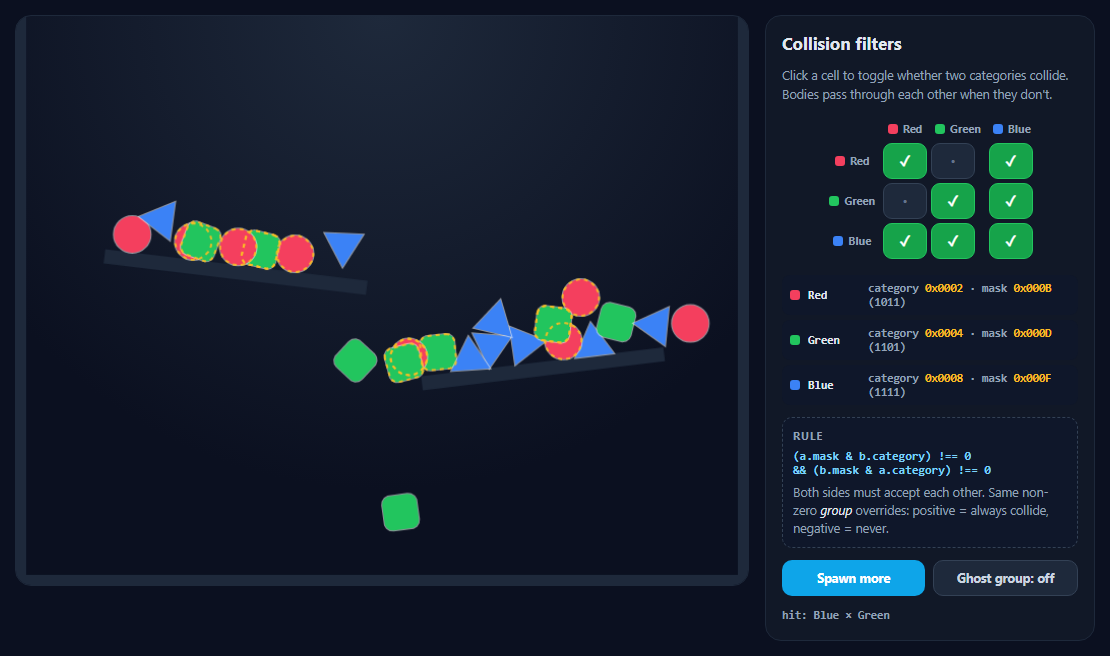
Every Matter.js body has a collisionFilter with three fields: category, mask and group. They decide which pairs of bodies are even considered for collision — the tool behind one-way platforms, ghosts, bullets that ignore their shooter and ragdolls that don't tangle. This visualizer makes the bits visible.
Category: what am I?
A category is a single bit — 0x0002, 0x0004, 0x0008... up to 32 categories. Matter's default is 0x0001, which the walls use here. Each body belongs to exactly one category.
Mask: what will I touch?
A mask is the bitwise OR of every category a body is willing to collide with. The panel shows each colour's mask in hex and binary; toggling a matrix cell adds or removes that bit. Every mask here includes the wall bit, so nothing falls through the floor.
The rule
Two bodies collide only if each one's mask contains the other's category:
(a.mask & b.category) !== 0 && (b.mask & a.category) !== 0.
Because both sides must agree, the matrix is kept symmetric — a one-way yes still means "no".
Group: the override
If two bodies share the same non-zero group, category and mask are ignored: a positive group means they always collide, a negative group means they never do. Turn on Ghost group and every blue body gets group -1; blue still hits red and green, but blue bodies now fall straight through each other even though the matrix says blue-blue collides. That's exactly how Matter's own Body.nextGroup(true) keeps a ragdoll's limbs or a car's wheels from colliding with each other.
Seeing pass-throughs
Each frame, pairs that are overlapping but filtered out (checked with Detector.canCollide and Collision.collides) get a dashed amber outline, so you can see the ghosting as it happens. Filters are plain objects on each body, so changes apply on the very next step — no rebuild needed.
Build with AI
Build, Understand, Optimize, and Extend It With AI
Paste this snippet into an AI assistant like Claude and ask it to explain the category/mask rule using the binary shown in the panel. Ask it to add a fourth category, one-way platforms, bullets that ignore their shooter, or an export of the matrix as ready-to-paste JavaScript constants. It can also help you plan collision layers for your own game.
Prompt to recreate it
Copy this into your AI assistant of choice to build the effect from scratch, or as a jumping-off point for your own variant:
Build an interactive Matter.js 0.20 (from a CDN) collision filter visualizer in plain HTML, CSS and JavaScript.

Requirements:
- A canvas with walls and two tilted shelves in the default category 0x0001, and red circles, green squares and blue triangles in categories 0x0002, 0x0004 and 0x0008.
- A side panel with a symmetric 3x3 toggle matrix of which colours collide (start: same colours collide, red passes through green, blue hits all). Each body's mask = wall bit OR allowed category bits, updated live on its collisionFilter.
- Show each colour's category and mask in hex and binary, and the rule (a.mask & b.category) && (b.mask & a.category) plus the group override.
- A "Ghost group" toggle that gives all blue bodies group -1 so they pass through each other, marked in the matrix.
- Draw dashed amber outlines on overlapping pairs that are filtered out (Detector.canCollide + Collision.collides).
- An aria-live log of the latest hit pair, a Spawn button, drag with a mouse constraint (wheel listeners removed), and a cap on body count.
Want to tighten it up first? Run this prompt through the AI Prompt Studio to score it across 8 quality dimensions, catch anti-patterns, and tune the wording for Claude, ChatGPT, or Gemini before you paste it in.
Source Code
<div class="cf">
<div class="cf-stage" id="cfStage"></div>
<aside class="cf-side">
<h2>Collision filters</h2>
<p class="cf-lead">Click a cell to toggle whether two categories collide. Bodies pass through each other when they don't.</p>
<table class="cf-matrix" id="cfMatrix" aria-label="Collision matrix"></table>
<div class="cf-bits" id="cfBits"></div>
<div class="cf-rule">
<b>Rule</b>
<code>(a.mask & b.category) !== 0<br>&& (b.mask & a.category) !== 0</code>
<span>Both sides must accept each other. Same non-zero <em>group</em> overrides: positive = always collide, negative = never.</span>
</div>
<div class="cf-actions">
<button type="button" id="cfSpawn">Spawn more</button>
<button type="button" id="cfGhost" class="ghost">Ghost group: off</button>
</div>
<div class="cf-log" id="cfLog" aria-live="polite"></div>
</aside>
</div>*{box-sizing:border-box;margin:0;padding:0}
body{font-family:system-ui,-apple-system,sans-serif;background:#0b1020;color:#e2e8f0;min-height:100vh;display:flex;align-items:center;justify-content:center;padding:18px}
.cf{display:grid;grid-template-columns:minmax(0,1fr) 330px;gap:16px;width:100%;max-width:1080px;align-items:start}
.cf-stage{border-radius:16px;overflow:hidden;border:1px solid #1e293b;background:radial-gradient(circle at 50% 0,#1e293b,#0b1020 70%)}
.cf-stage canvas{display:block;width:100%;height:auto;cursor:grab;touch-action:none}
.cf-side{background:#111827;border:1px solid #1e293b;border-radius:16px;padding:16px;display:flex;flex-direction:column;gap:12px;font-size:12.5px}
.cf h2{font-size:17px}
.cf-lead{color:#94a3b8;line-height:1.5}
.cf-matrix{border-collapse:separate;border-spacing:4px;margin:0 auto}
.cf-matrix th{font:700 11px system-ui;color:#94a3b8;padding:2px 4px}
.cf-matrix th span{display:inline-flex;align-items:center;gap:5px}
.cf-matrix th i{width:10px;height:10px;border-radius:3px;display:inline-block}
.cf-matrix button{width:44px;height:36px;border-radius:9px;border:1px solid #334155;background:#1e293b;color:#64748b;font:800 14px system-ui;cursor:pointer;transition:background .15s,color .15s}
.cf-matrix button.on{background:#16a34a;border-color:#22c55e;color:#fff}
.cf-matrix button:focus-visible,.cf button:focus-visible{outline:2px solid #38bdf8;outline-offset:2px}
.cf-bits{display:grid;gap:5px;font:600 11.5px ui-monospace,monospace}
.cf-bits div{display:flex;align-items:center;gap:8px;background:#0f172a;border-radius:8px;padding:6px 8px}
.cf-bits i{width:10px;height:10px;border-radius:3px;flex:none}
.cf-bits b{color:#e2e8f0;min-width:52px}
.cf-bits span{color:#94a3b8}
.cf-bits em{font-style:normal;color:#fbbf24}
.cf-rule{background:#0f172a;border:1px dashed #334155;border-radius:10px;padding:10px;display:grid;gap:6px}
.cf-rule b{font-size:11px;text-transform:uppercase;letter-spacing:.08em;color:#94a3b8}
.cf-rule code{font:600 12px ui-monospace,monospace;color:#7dd3fc}
.cf-rule span{color:#94a3b8;line-height:1.45}
.cf-rule em{color:#e2e8f0}
.cf-actions{display:flex;gap:8px}
.cf-actions button{flex:1;border:0;border-radius:10px;background:#0ea5e9;color:#fff;font:700 12.5px system-ui;padding:9px 10px;cursor:pointer}
.cf-actions button.ghost{background:#1e293b;color:#cbd5e1;border:1px solid #334155}
.cf-actions button.ghost.on{background:#7c3aed;color:#fff;border-color:#8b5cf6}
.cf-log{font:600 11.5px ui-monospace,monospace;color:#94a3b8;min-height:16px}
@media (max-width:820px){.cf{grid-template-columns:1fr}}var M = Matter, Engine = M.Engine, Render = M.Render, Runner = M.Runner, Bodies = M.Bodies, Body = M.Body,
Composite = M.Composite, Mouse = M.Mouse, MouseConstraint = M.MouseConstraint, Events = M.Events;
var W = 720, H = 560;
// Three categories, each a single bit. Bit 0x0001 is Matter's default
// category, so walls use it and every custom category also collides with it.
var WALL = 0x0001;
var CATS = [
{ name: 'Red', bit: 0x0002, color: '#f43f5e', shape: 'circle' },
{ name: 'Green', bit: 0x0004, color: '#22c55e', shape: 'square' },
{ name: 'Blue', bit: 0x0008, color: '#3b82f6', shape: 'triangle' },
];
// Symmetric matrix of which pairs collide. Start: same colours collide,
// red passes through green, blue hits everything.
var allow = [
[true, false, true],
[false, true, true],
[true, true, true],
];
var engine = Engine.create();
var render = Render.create({
element: document.getElementById('cfStage'),
engine: engine,
options: { width: W, height: H, wireframes: false, background: 'transparent', pixelRatio: window.devicePixelRatio || 1 },
});
var wallOpts = { isStatic: true, collisionFilter: { category: WALL }, render: { fillStyle: '#1e293b' } };
Composite.add(engine.world, [
Bodies.rectangle(W / 2, H + 20, W + 80, 60, wallOpts),
Bodies.rectangle(-20, H / 2, 60, H * 2, wallOpts),
Bodies.rectangle(W + 20, H / 2, 60, H * 2, wallOpts),
// Two shelves so bodies land on, and fall through, each other.
Bodies.rectangle(W * 0.3, H * 0.45, 260, 14, Object.assign({ angle: 0.12 }, wallOpts)),
Bodies.rectangle(W * 0.72, H * 0.62, 240, 14, Object.assign({ angle: -0.12 }, wallOpts)),
]);
// A body's mask is the OR of every category it may touch: the wall bit,
// plus each category the matrix row allows.
function maskFor(i) {
var m = WALL;
for (var j = 0; j < CATS.length; j++) if (allow[i][j]) m |= CATS[j].bit;
return m;
}
var ghost = false;
var shapes = [];
function spawn(n) {
for (var k = 0; k < n; k++) {
var i = k % 3, c = CATS[i];
var x = 60 + Math.random() * (W - 120), y = -30 - Math.random() * 200;
var o = { restitution: 0.25, friction: 0.05, render: { fillStyle: c.color, strokeStyle: 'rgba(255,255,255,.55)', lineWidth: 2 } };
var b = c.shape === 'circle' ? Bodies.circle(x, y, 18, o)
: c.shape === 'square' ? Bodies.rectangle(x, y, 34, 34, Object.assign({ chamfer: 5 }, o))
: Bodies.polygon(x, y, 3, 22, o);
b.cat = i;
shapes.push(b);
Composite.add(engine.world, b);
}
applyFilters();
}
// Filters are plain objects on each body, so updating category/mask/group
// takes effect on the very next collision check — no rebuild needed.
function applyFilters() {
shapes.forEach(function (b) {
b.collisionFilter.category = CATS[b.cat].bit;
b.collisionFilter.mask = maskFor(b.cat);
// Ghost mode: all blue shapes share group -1, so they never touch EACH
// OTHER even though the matrix says blue-blue collides. Group wins.
b.collisionFilter.group = ghost && b.cat === 2 ? -1 : 0;
// Wake sleepers so they notice a filter change right away.
M.Sleeping.set(b, false);
});
drawMatrix();
drawBits();
}
var hex = function (n) { return '0x' + n.toString(16).padStart(4, '0').toUpperCase(); };
var bin = function (n) { return n.toString(2).padStart(4, '0'); };
function drawBits() {
document.getElementById('cfBits').innerHTML = CATS.map(function (c, i) {
return '<div><i style="background:' + c.color + '"></i><b>' + c.name + '</b><span>category <em>' + hex(c.bit) + '</em> · mask <em>' + hex(maskFor(i)) + '</em> (' + bin(maskFor(i)) + ')' + (ghost && i === 2 ? ' · group <em>-1</em>' : '') + '</span></div>';
}).join('');
}
function drawMatrix() {
var t = document.getElementById('cfMatrix');
var head = '<tr><th></th>' + CATS.map(function (c) { return '<th><span><i style="background:' + c.color + '"></i>' + c.name + '</span></th>'; }).join('') + '</tr>';
var rows = CATS.map(function (c, i) {
return '<tr><th><span><i style="background:' + c.color + '"></i>' + c.name + '</span></th>' + CATS.map(function (d, j) {
var on = allow[i][j];
var ghosted = ghost && i === 2 && j === 2;
return '<td><button type="button" data-i="' + i + '" data-j="' + j + '" class="' + (on && !ghosted ? 'on' : '') + '" aria-pressed="' + on + '" aria-label="' + c.name + ' and ' + d.name + (on ? ' collide' : ' pass through') + '">' + (ghosted ? 'G' : on ? '✓' : '·') + '</button></td>';
}).join('') + '</tr>';
}).join('');
t.innerHTML = head + rows;
}
document.getElementById('cfMatrix').addEventListener('click', function (e) {
var btn = e.target.closest('button');
if (!btn) return;
var i = +btn.dataset.i, j = +btn.dataset.j;
// Keep it symmetric: a one-sided mask never collides anyway.
allow[i][j] = allow[j][i] = !allow[i][j];
applyFilters();
document.getElementById('cfLog').textContent = CATS[i].name + ' ↔ ' + CATS[j].name + ': ' + (allow[i][j] ? 'collide' : 'pass through');
var sel = 'button[data-i="' + i + '"][data-j="' + j + '"]';
var again = document.querySelector(sel); if (again) again.focus();
});
// Count collisions per pair for a live feed.
Events.on(engine, 'collisionStart', function (e) {
var p = e.pairs.find(function (p) { return p.bodyA.cat !== undefined && p.bodyB.cat !== undefined; });
if (p) document.getElementById('cfLog').textContent = 'hit: ' + CATS[p.bodyA.cat].name + ' × ' + CATS[p.bodyB.cat].name;
});
// Outline bodies that currently overlap a body they pass through, so the
// "ghosting" is easy to see.
Events.on(render, 'afterRender', function () {
var ctx = render.context, pr = render.options.pixelRatio;
ctx.save(); ctx.scale(pr, pr);
ctx.setLineDash([4, 4]); ctx.lineWidth = 2; ctx.strokeStyle = 'rgba(251,191,36,.9)';
for (var a = 0; a < shapes.length; a++) for (var b = a + 1; b < shapes.length; b++) {
var A = shapes[a], B = shapes[b];
if (M.Detector.canCollide(A.collisionFilter, B.collisionFilter)) continue;
if (!M.Bounds.overlaps(A.bounds, B.bounds) || !M.Collision.collides(A, B)) continue;
[A, B].forEach(function (s) {
ctx.beginPath();
s.vertices.forEach(function (v, k) { ctx[k ? 'lineTo' : 'moveTo'](v.x, v.y); });
ctx.closePath(); ctx.stroke();
});
}
ctx.restore();
});
var mouse = Mouse.create(render.canvas);
var mc = MouseConstraint.create(engine, { mouse: mouse, constraint: { stiffness: 0.2, render: { visible: false } } });
['mousewheel', 'DOMMouseScroll', 'wheel'].forEach(function (t) { mouse.element.removeEventListener(t, mouse.mousewheel); });
Composite.add(engine.world, mc);
render.mouse = mouse;
document.getElementById('cfSpawn').addEventListener('click', function () { spawn(9); });
document.getElementById('cfGhost').addEventListener('click', function (e) {
ghost = !ghost;
e.currentTarget.classList.toggle('on', ghost);
e.currentTarget.textContent = 'Ghost group: ' + (ghost ? 'on' : 'off');
applyFilters();
});
// Keep the scene from overflowing.
Events.on(engine, 'afterUpdate', function () {
if (shapes.length > 90) { Composite.remove(engine.world, shapes.shift()); }
});
spawn(24);
Render.run(render);
Runner.run(Runner.create(), engine);Step by step
How to Use
- 1Watch the default rulesRed and green pass through each other; blue hits everything.
- 2Toggle a cellSwitch any pair between collide and pass through.
- 3Read the bitsCategory and mask update in hex and binary.
- 4Try the ghost groupBlue bodies stop colliding with each other.
- 5Drag and spawnPush bodies into each other or add more.
Real-world uses
Common Use Cases
Got questions?
Frequently Asked Questions
Each body has collisionFilter.category (one bit), mask (bits of categories it may hit) and group. Two bodies collide when each mask contains the other's category, unless they share a non-zero group, which overrides: positive always collides, negative never does.
The ground uses the default category 0x0001. If a body's mask doesn't include 0x0001, it ignores the ground. Include the ground's category bit in every mask that should land on it.
It returns a new unique negative group number. Give it to all parts of a composite (a car, a ragdoll, a soft body) so those parts never collide with each other while still colliding with everything else.
Yes. Assign new values to body.collisionFilter.category, mask or group; the next collision check uses them. Waking sleeping bodies makes the change visible immediately.
32, because categories are bits in a 32-bit integer.