You Might Also Like
Learn Coding Visually
Learn to code with interactive, live-preview playgrounds — HTML, CSS, JavaScript, React & more.
 HTML Playground42 lessons · Click-based · Live preview
 CSS PlaygroundLearn CSS with a live editor
 JavaScript Playground60 lessons · DOM · Async · Canvas
 React PlaygroundLearn React with a live code editor
 GSAP PlaygroundLearn GSAP animation interactively
 SVG Playground44 lessons · shapes · paths · animation
 SCSS Playground45 lessons · Sass modules · tokens
 Tailwind PlaygroundLearn Tailwind CSS with a live editor
 Bootstrap 5 Playground50 lessons · live preview
CompressionStream API Demo — Free Real Gzip-in-Browser Tool
CompressionStream API Demo · Dashboards · Plain HTML, CSS & JS · Live preview
What's included
Features
About this UI Snippet
CompressionStream API Demo — Real Gzip Bytes, Not a Guessed Ratio
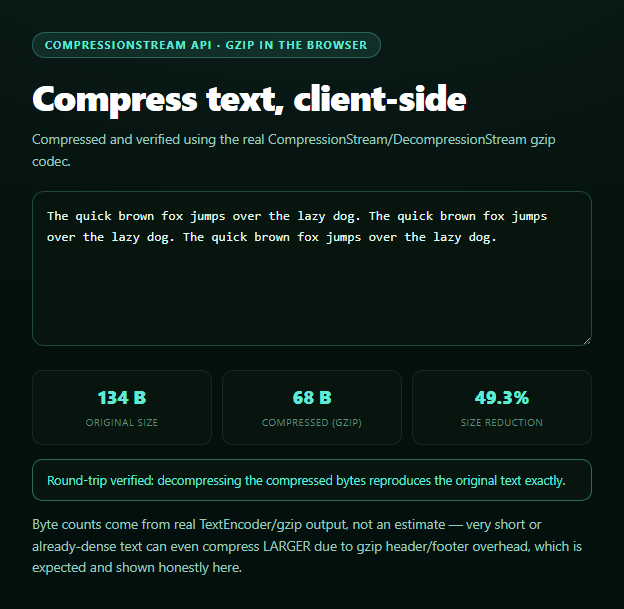
This snippet compresses whatever text you type using the browser's built-in CompressionStream, the same gzip/deflate codec the browser already uses under the hood for network responses — now exposed as a streams-based API you can run entirely client-side, with no server round-trip and no bundled compression library.
The real compression pipeline
Text is encoded to bytes with TextEncoder, wrapped in a Blob, turned into a ReadableStream via .stream(), and piped through new CompressionStream('gzip') with .pipeThrough(). The output is another stream, which a small streamToBytes() helper drains chunk by chunk into a single Uint8Array — that array's .length is the actual compressed byte count. Nothing here is estimated: both the "before" and "after" numbers are real TextEncoder/stream output lengths.
A genuine ratio, computed, not chosen
The displayed reduction percentage is literally (1 - compressedBytes.length / originalBytes.length) * 100. Because it's derived from measured byte lengths on both sides, it behaves the way real gzip actually does — highly repetitive text (like the default sample sentence repeated three times) compresses dramatically, while short or already information-dense text can compress *poorly*, sometimes even growing slightly larger once gzip's header and footer overhead is counted. The snippet states this honestly rather than hiding the case where compression "fails" to help.
Proving it round-trips
Compressing bytes proves nothing about correctness on its own, so this demo immediately decompresses its own output with new DecompressionStream('gzip'), decodes the result back to text with TextDecoder, and does a strict string-equality check against the original input. That comparison — not just a "success" message — is the actual proof that the compression is lossless and the byte counts above are trustworthy.
Handling the unsupported case honestly
CompressionStream/DecompressionStream are missing in some older browsers. There's no honest way to fabricate a real gzip byte count without actually running gzip, so rather than fake a plausible-looking ratio, the fallback here plainly states compression cannot run, shows only the real original size, and suggests a JS polyfill library as the real-world workaround. Pair this with a storage quota meter for a broader "what this browser's storage/data APIs can do" dashboard.
Build with AI
Build, Understand, Optimize, and Extend It With AI
Paste this snippet's HTML, CSS, and JS into an AI coding assistant like Claude and ask it to explain the full pipeline from typed text to compressed bytes — TextEncoder to Blob to stream to pipeThrough(CompressionStream) to a drained Uint8Array — and why draining the resulting ReadableStream chunk by chunk is necessary to get a final byte length. It's also useful for reasoning about the round-trip verification step — ask why decompressing and comparing to the original string is meaningfully stronger proof of correctness than just displaying a ratio number. For extensions, ask it to add a 'deflate-raw' format comparison alongside gzip, or to support compressing an uploaded file instead of typed text using the same stream pipeline. Treat the code less like a finished artifact and more like a starting point for a conversation.
Prompt to recreate it
Copy this into your AI assistant of choice to build the effect from scratch, or as a jumping-off point for your own variant:
Build a "CompressionStream API demo" in plain HTML, CSS, and JavaScript using the real browser CompressionStream and DecompressionStream APIs — no libraries.

Requirements:
- A textarea for user-typed text. On input (debounced ~250ms), encode the text with TextEncoder, wrap it in a Blob, get a stream via blob.stream(), and pipe it through new CompressionStream('gzip') using pipeThrough(). Drain the resulting ReadableStream chunk-by-chunk into a single Uint8Array to get the real compressed byte length.
- Display three real, computed stats: original byte length (from TextEncoder), compressed byte length (from the drained stream), and a reduction percentage computed as (1 - compressed/original) * 100 — do not estimate or hardcode any of these three numbers.
- CRITICAL round-trip step: immediately decompress the compressed bytes using new DecompressionStream('gzip') through the same Blob-stream-pipeThrough-drain pattern, decode the result back to text with TextDecoder, and do a strict string equality check against the original input text. Show a clear pass/fail verification message based on that real comparison, not a hardcoded "success" message.
- Handle and clearly show the case where very short or low-redundancy text compresses WORSE (larger) than the original due to gzip header/footer overhead — do not clamp or hide a negative/poor reduction percentage.
- CRITICAL fallback: feature-detect typeof CompressionStream !== 'undefined' (and DecompressionStream). If unsupported, do NOT fabricate a compressed size or ratio — show a clear message stating compression cannot run in this browser, and only display the real original byte size computed from TextEncoder.
Want to tighten it up first? Run this prompt through the AI Prompt Studio to score it across 8 quality dimensions, catch anti-patterns, and tune the wording for Claude, ChatGPT, or Gemini before you paste it in.
Step by step
How to Use
- 1Paste HTML, CSS, and JSSample text compresses immediately on load.
- 2Edit the textCompression re-runs (debounced) as you type.
- 3Read the three statsOriginal size, compressed size, and reduction %.
- 4Check the verify lineConfirms a real decompress round-trip matches the input.
- 5Try very short textWatch the ratio go poor or even negative — gzip overhead.
- 6Try unsupported browsersA clear "cannot run here" message appears instead of fake numbers.
Real-world uses
Common Use Cases
Got questions?
Frequently Asked Questions
It's real. new CompressionStream('gzip') is the same codec implementation the browser already uses to decode gzip-encoded network responses, now exposed for you to run in the other direction on arbitrary bytes. Both the original and compressed byte counts come from actually encoding and streaming the data, not from an estimate or lookup table.
Gzip adds a fixed amount of header and footer overhead (roughly 18-20 bytes) to every compressed payload. For very short or already low-redundancy text, that overhead can outweigh whatever gzip manages to save, so the "compressed" size ends up larger than the original — a real, well-known gzip behavior this demo shows honestly rather than hiding.
After compressing, the demo immediately runs the compressed bytes back through DecompressionStream, decodes the result to text, and does a strict equality check against your original input. If compression were faked or lossy, that check would fail — so a passing "round-trip verified" message is direct proof the compressed byte count is both real and correct.
The API is feature-detected up front. If it's missing, the demo does not invent a plausible-looking compressed size or ratio — since there is no honest number to show without actually running gzip — and instead states clearly that compression cannot run in this browser, showing only the real, measurable original byte size.
Move the compression/decompression logic into an async function triggered from your input's onChange (debounced), store the resulting byte counts and verification result in component state, and render them from there. The CompressionStream/DecompressionStream/TextEncoder APIs themselves are framework-agnostic and need no adaptation.