You Might Also Like
Learn Coding Visually
Learn to code with interactive, live-preview playgrounds — HTML, CSS, JavaScript, React & more.
 HTML Playground42 lessons · Click-based · Live preview
 CSS PlaygroundLearn CSS with a live editor
 JavaScript Playground60 lessons · DOM · Async · Canvas
 React PlaygroundLearn React with a live code editor
 GSAP PlaygroundLearn GSAP animation interactively
 SVG Playground44 lessons · shapes · paths · animation
 SCSS Playground45 lessons · Sass modules · tokens
 Tailwind PlaygroundLearn Tailwind CSS with a live editor
 Bootstrap 5 Playground50 lessons · live preview
Storage Quota Meter — Free navigator.storage.estimate() Demo
Storage Quota Meter · Dashboards · Plain HTML, CSS & JS · Live preview
What's included
Features
About this UI Snippet
Storage Quota Meter — Real Usage, Real Quota, No Guessing
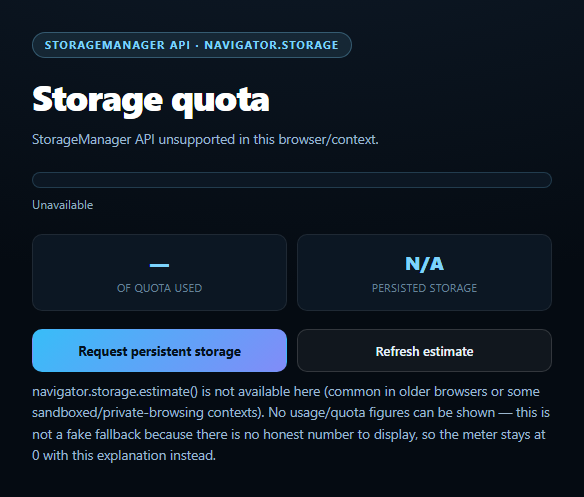
This snippet reads the browser's actual StorageManager API to show how much storage the current origin is using and how much it's allowed, instead of a hardcoded or simulated bar. It's the same API browsers themselves use to power storage-usage pages in their settings UI.
Real numbers from navigator.storage.estimate()
navigator.storage.estimate() returns a promise resolving to { usage, quota } in bytes — usage is the origin's combined footprint across IndexedDB, Cache Storage, Service Worker registrations, and other storage APIs, and quota is roughly how much it's currently allowed (a share of overall device storage that varies by browser policy and available disk space). This snippet formats both into human-readable KB/MB/GB and drives the meter's fill width from the real usage / quota ratio — never a placeholder percentage.
Why the numbers aren't exact to the byte
Browsers intentionally add some imprecision to estimate() — rounding or slight randomization — specifically to reduce its usefulness as a device/storage fingerprinting signal. The snippet's note is upfront about this: treat the figures as a close, honest estimate rather than an exact byte count, which is exactly what the spec itself promises.
Requesting persistence
By default, a browser is allowed to evict an origin's storage under pressure (e.g. the device running low on disk space), starting with the least-recently-used origins. navigator.storage.persist() requests an upgrade to "persistent" storage that's exempt from that automatic eviction. The browser decides whether to grant it — often based on signals like whether the site is bookmarked, installed as a PWA, or has high engagement — and the snippet shows the real boolean result via navigator.storage.persisted(), including the honest "not granted" case with an explanation of why that's common.
The unsupported case, handled honestly
Where the StorageManager API doesn't exist — some older browsers, certain restricted embedding contexts — there is no real number to fall back to, so rather than fabricate one, the meter clearly states the API is unavailable, disables the action buttons, and stays at zero with an explanation. That's the honest fallback for an API where simulating plausible-looking bytes would actively mislead. Pair this with a network information badge or background sync status for a fuller "what can this browser do right now" dashboard.
Build with AI
Build, Understand, Optimize, and Extend It With AI
Paste this snippet's HTML, CSS, and JS into an AI coding assistant like Claude and ask it to explain what navigator.storage.estimate()'s usage and quota fields actually represent, which storage APIs count toward usage, and why the browser is allowed to return an intentionally imprecise number rather than an exact byte count. It's also useful for reasoning about persistence — ask what factors typically influence whether a browser grants a persist() request, and why an origin's storage can be evicted under pressure by default without it. For extensions, ask it to add a breakdown of usage by storage type using the (less broadly supported) estimate().usageDetails field where available, or to visualize historical usage over time by sampling estimate() periodically. Treat the code less like a finished artifact and more like a starting point for a conversation.
Prompt to recreate it
Copy this into your AI assistant of choice to build the effect from scratch, or as a jumping-off point for your own variant:
Build a "storage quota meter" in plain HTML, CSS, and JavaScript using the real browser StorageManager API (navigator.storage) — no libraries.

Requirements:
- On load, call navigator.storage.estimate() and use the real usage and quota byte values (not placeholders) to fill a progress bar to usage/quota as a percentage, and display both figures formatted into human-readable KB/MB/GB.
- Also call navigator.storage.persisted() to show whether persistent storage is currently granted for this origin, and provide a "Request persistent storage" button that calls navigator.storage.persist() and displays the real boolean result it resolves to (explaining in the UI that the browser may deny this and that's an expected, not an error, outcome).
- A "Refresh estimate" button that re-runs estimate() and persisted() on demand.
- CRITICAL: feature-detect navigator.storage && navigator.storage.estimate before using it. If unsupported, do NOT fabricate or guess any usage/quota numbers — instead show a clearly labeled "storage API unavailable" state (bar at 0, disabled action buttons, explanatory note) since there is no honest number to display in that case.
- Include a visible note explaining that estimate() values are intentionally approximate (browsers may round or slightly randomize them to reduce fingerprinting risk), so the demo doesn't imply false precision.
Want to tighten it up first? Run this prompt through the AI Prompt Studio to score it across 8 quality dimensions, catch anti-patterns, and tune the wording for Claude, ChatGPT, or Gemini before you paste it in.
Step by step
How to Use
- 1Paste HTML, CSS, and JSThe meter reads real storage usage on load.
- 2Check the bar and percentageBoth come directly from navigator.storage.estimate().
- 3Click "Request persistent storage"The browser decides whether to grant it.
- 4Check the persisted statShows the real navigator.storage.persisted() result.
- 5Click "Refresh estimate"Re-reads current usage after adding/removing data.
- 6Try it where unsupportedA clear "unavailable" state appears instead of fake numbers.
Real-world uses
Common Use Cases
Got questions?
Frequently Asked Questions
No, and it's not supposed to be. The spec allows browsers to return a slightly imprecise estimate — often rounded or lightly randomized — specifically to reduce the API's value as a fingerprinting signal. The figures are close and genuinely reflect real usage, but should be treated as an estimate rather than an exact accounting.
Typically the combined footprint of IndexedDB databases, the Cache Storage API (often used by service workers), Service Worker registrations themselves, and other origin-scoped storage mechanisms. It does not include things like browser-level HTTP cache shared across origins.
Browsers weigh signals like whether the user has bookmarked the site, installed it as a PWA/home-screen app, granted notification permissions, or shown a high level of engagement with the origin over time. A brand-new or rarely-visited site is commonly denied automatically, which is the expected, honest outcome shown by this snippet rather than treated as an error.
The snippet checks for navigator.storage.estimate before doing anything. If it's missing, there is no real number to show, so rather than fabricate a plausible-looking bar, it clearly labels the meter as unavailable, disables the action buttons, and explains why — the same honesty principle used for other browser-capability snippets in this library.
Call navigator.storage.estimate() and persisted() inside a mount effect (or on demand from a button handler) and store the results in component state, re-rendering the bar's width and labels from that state exactly as the vanilla version updates the DOM directly. The persist() request stays a simple async call inside your button's click handler.