You Might Also Like
Learn Coding Visually
Learn to code with interactive, live-preview playgrounds — HTML, CSS, JavaScript, React & more.
 HTML Playground42 lessons · Click-based · Live preview
 CSS PlaygroundLearn CSS with a live editor
 JavaScript Playground60 lessons · DOM · Async · Canvas
 React PlaygroundLearn React with a live code editor
 GSAP PlaygroundLearn GSAP animation interactively
 SVG Playground44 lessons · shapes · paths · animation
 SCSS Playground45 lessons · Sass modules · tokens
 Tailwind PlaygroundLearn Tailwind CSS with a live editor
 Bootstrap 5 Playground50 lessons · live preview
Live Auction Bid Ticker — Free Increment-Validated Bidding UI
Live Auction Bid Ticker · Dashboards · Plain HTML, CSS & JS · Live preview
What's included
Features
About this UI Snippet
Live Auction Bid Ticker — Increment Rules Enforced, Not Just Displayed
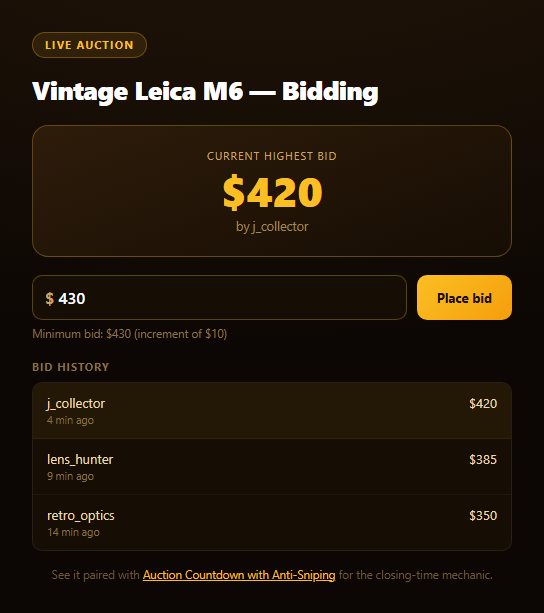
This snippet builds the core interaction of any live auction UI: a running bid history, a prominent current-highest amount, and a bid box that won't let you submit an amount that isn't actually a valid raise. The validation isn't cosmetic — it's the same logic real auction platforms run before ever accepting a bid.
The minimum-increment rule
Every auction defines an increment — the smallest amount a new bid must exceed the current highest by (here, a flat $10, though real platforms often scale the increment with price tier). minNextBid() computes highestBid().amount + INCREMENT fresh every time the bid list changes, and the input is pre-filled with that exact value so a bidder rarely has to think about the math. Typing anything below it disables the "Place bid" button and turns the hint text into a visible error explaining exactly why.
Highest bid, always current
Bids are kept sorted with the newest/highest at bids[0] (new bids are unshift'd in, and since every accepted bid must exceed the prior highest, the array stays correctly ordered without a separate sort step). The prominent amount at the top of the card always reads directly from highestBid(), so it can never drift out of sync with the log beneath it.
A believable, honest simulated feed
A live auction ticker without any competing activity feels dead, so this demo periodically injects a simulated rival bid — clearly using distinct placeholder bidder names, at a valid increment above the current price, through the exact same bids.unshift + render() path a real bid takes. It's presentational, and openly so, not a fake "AI-powered demand" trick.
A hook for related demos
Every accepted bid — yours or simulated — dispatches a custom auction:bid DOM event carrying the bidder, amount, and timestamp. That's the same event shape the companion Auction Countdown with Anti-Sniping snippet listens for to trigger its closing-time extension, so the two snippets are built to compose into one auction page.
Build with AI
Build, Understand, Optimize, and Extend It With AI
Paste this snippet's HTML, CSS, and JS into an AI coding assistant like Claude and ask it to explain why the bid list is kept sorted by always unshifting a new highest bid rather than re-sorting the whole array on every change, and what would break if a bid below the current highest were ever allowed through. It's also useful for reasoning about the validation flow — ask why the button is disabled proactively based on live input rather than only rejecting on click, and why the click handler still re-validates instead of trusting the disabled state alone. For extensions, ask it to add a "you've been outbid" notification when a rival bid surpasses the user's last bid, or a percentage-based increment instead of a flat dollar amount for higher price tiers. Treat the code less like a finished artifact and more like a starting point for a conversation.
Prompt to recreate it
Copy this into your AI assistant of choice to build the effect from scratch, or as a jumping-off point for your own variant:
Build a "live auction bid ticker" in plain HTML, CSS, and JavaScript — no libraries.

Requirements:
- A prominent "current highest bid" display (amount + bidder name) always reflecting the top of a bids array, plus a scrollable bid history log below it (newest first) with relative "X min ago" timestamps.
- A bid input pre-filled with the exact minimum valid next bid (current highest + a fixed increment, e.g. $10) and a "Place bid" button.
- CRITICAL validation: as the user types, disable the "Place bid" button whenever the entered amount is not a number or is below the current minimum (current highest + increment), and show a visible error hint explaining the rule. Re-validate defensively in the click handler too, and only accept/append the bid if it's actually valid.
- New valid bids should be added to the top of the bids array (kept in descending order) and the UI (highest display, log, and pre-filled minimum) should update immediately.
- Include a periodic (e.g. every ~8 seconds, with some randomness) SIMULATED competing bid from a small pool of clearly fictional placeholder bidder names, injected at a valid increment above the current price through the same code path as a real bid, so the ticker feels alive — make sure this is honest/obviously simulated, not misrepresented as real user activity.
- Dispatch a window-level CustomEvent named "auction:bid" with { bidder, amount, ts } in its detail whenever any bid (user or simulated) is accepted, so the ticker can compose with a separate countdown-timer component that listens for the same event.
Want to tighten it up first? Run this prompt through the AI Prompt Studio to score it across 8 quality dimensions, catch anti-patterns, and tune the wording for Claude, ChatGPT, or Gemini before you paste it in.
Step by step
How to Use
- 1Paste HTML, CSS, and JSA bid list and highest-bid card render with sample data.
- 2Check the pre-filled amountThe input defaults to the exact minimum valid bid.
- 3Type a low amountThe button disables and an error explains the increment rule.
- 4Click "Place bid"Your bid appears at the top of the log instantly.
- 5Watch for rival bidsA simulated competing bid arrives periodically.
- 6Pair with the countdownBoth snippets share the auction:bid custom event.
Real-world uses
Common Use Cases
Got questions?
Frequently Asked Questions
minNextBid() takes the current highest bid amount (the first item in the sorted bids array) and adds a fixed increment (here $10). That value is recomputed every time the bid list changes and is used both to pre-fill the input field and to validate whatever the user types before enabling the submit button.
The input's value is checked on every keystroke via an input event listener. If the typed amount is not a valid number or is below the current minimum, the "Place bid" button is disabled via the disabled attribute and the hint text switches to a visible error state — the click handler also re-validates defensively before accepting any bid.
No, and the demo doesn't claim otherwise — a periodic timer occasionally injects a simulated competing bid from one of a few clearly fictional placeholder names, at a valid increment above the current price, purely so the ticker feels like a live auction rather than a static list. It goes through the exact same code path a real bid would.
Every accepted bid — from the user or the simulated feed — dispatches a window-level auction:bid CustomEvent carrying the bidder, amount, and timestamp. The companion Auction Countdown with Anti-Sniping snippet listens for that same event to trigger its closing-time extension logic, so the two are designed to be dropped onto the same page together.
Keep the bids array in component state (sorted with the newest highest bid first), derive the highest bid and minimum next bid from it with simple selectors, and validate the input against that derived minimum on each change. Dispatch or replace the custom event with your framework's own event bus or state store if you need cross-component communication instead of a raw DOM CustomEvent.