You Might Also Like
Learn Coding Visually
Learn to code with interactive, live-preview playgrounds — HTML, CSS, JavaScript, React & more.
 HTML Playground42 lessons · Click-based · Live preview
 CSS PlaygroundLearn CSS with a live editor
 JavaScript Playground60 lessons · DOM · Async · Canvas
 React PlaygroundLearn React with a live code editor
 GSAP PlaygroundLearn GSAP animation interactively
 SVG Playground44 lessons · shapes · paths · animation
 SCSS Playground45 lessons · Sass modules · tokens
 Tailwind PlaygroundLearn Tailwind CSS with a live editor
 Bootstrap 5 Playground50 lessons · live preview
Auction Countdown with Anti-Sniping — Free Auto-Extend Timer
Auction Countdown with Anti-Sniping · Dashboards · Plain HTML, CSS & JS · Live preview
What's included
Features
About this UI Snippet
Auction Countdown with Anti-Sniping — The Real eBay-Style Extension Rule
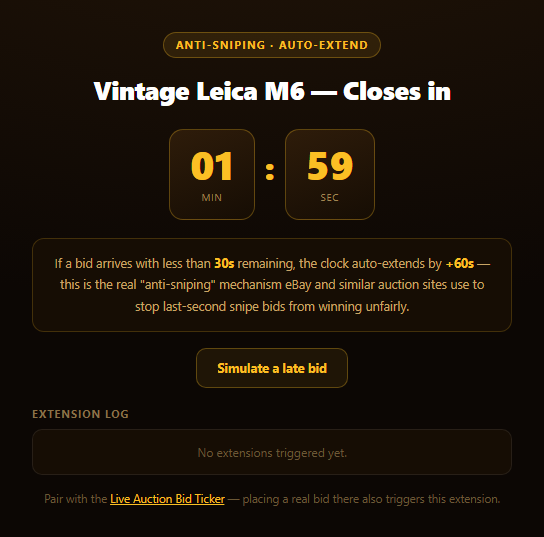
This countdown does more than tick down to zero — it implements anti-sniping, the real mechanism major auction platforms use to stop last-second "snipe" bids from unfairly winning an item with no time left for anyone else to respond.
Why auction sites need this at all
Without any protection, a bidder can wait until the literal last second of an auction to place a winning bid — by the time anyone else sees it, the clock has already hit zero and there's no way to respond. This "sniping" strategy exploits the fixed deadline itself. eBay's real solution (and the one this snippet recreates) is simple: if a bid arrives within a defined window before close, push the close time back by a fixed amount, so every bid — however late — guarantees everyone else a genuine chance to react.
The actual rule, implemented literally
Two constants drive it: SNIPE_WINDOW_MS (30 seconds here) and EXTEND_MS (60 seconds). maybeExtend() computes the real remaining time as closesAt - Date.now() and, if that's positive but under the snipe window, adds EXTEND_MS directly onto closesAt. Because the extension is applied to the actual close timestamp rather than to a countdown display value, it composes correctly no matter how many times it fires — a flurry of last-second bids each pushes the deadline further out, exactly like a real platform.
Composable with a real bidding UI
Rather than simulate bids internally as its primary path, this snippet listens for a window-level auction:bid CustomEvent — the exact event the companion Live Auction Bid Ticker snippet dispatches every time a bid (real or simulated) is accepted. Drop both snippets on the same page and placing a bid there during the last 30 seconds here will genuinely extend this clock — no wiring required beyond the shared event name.
Seeing it without waiting
Waiting a real two minutes to see the mechanic fire isn't a great demo, so a "Simulate a late bid" button fast-forwards the clock into the snipe window and fires the same maybeExtend() path a real late bid would — with a visible pulse animation and a logged entry, so the extension is never subtle or missable.
Build with AI
Build, Understand, Optimize, and Extend It With AI
Paste this snippet's HTML, CSS, and JS into an AI coding assistant like Claude and ask it to explain why the anti-sniping extension is applied to the closesAt timestamp rather than to the displayed remaining-time value, and why that distinction matters when multiple late bids arrive in quick succession. It's also useful for reasoning about the event-based design — ask why listening for a shared auction:bid CustomEvent is a better composition strategy here than having the countdown and the bid ticker directly call each other's functions. For extensions, ask it to make the snipe window and extend duration configurable per-auction, or to add a maximum total extension cap so the auction can't be extended indefinitely by a bidding war. Treat the code less like a finished artifact and more like a starting point for a conversation.
Prompt to recreate it
Copy this into your AI assistant of choice to build the effect from scratch, or as a jumping-off point for your own variant:
Build an "auction countdown with anti-sniping" timer in plain HTML, CSS, and JavaScript — no libraries.

Requirements:
- A countdown display (minutes:seconds) counting down to a closesAt timestamp, updated on an interval, with tabular-nums styling so digits don't jitter.
- CRITICAL anti-sniping logic: define a SNIPE_WINDOW_MS (e.g. 30000) and an EXTEND_MS (e.g. 60000). Whenever a "bid" event occurs (see below) while the real remaining time (closesAt - Date.now()) is positive but less than SNIPE_WINDOW_MS, add EXTEND_MS directly onto the closesAt timestamp itself (not just the displayed value), so the extension is durable and multiple late bids each extend the deadline further, matching how real auction platforms like eBay implement this.
- Listen for a window-level CustomEvent named "auction:bid" (with bidder/amount/ts in its detail) as the primary trigger for the anti-sniping check, so this countdown can compose with a separate bid-list component that dispatches that same event.
- A "simulate a late bid" button that forces the internal clock to just inside the snipe window (if it isn't already) and then runs the exact same extension check, so the anti-sniping mechanic is visibly demonstrable without waiting out a real countdown.
- Visible feedback when an extension fires (e.g. a brief pulse animation on the clock) and a timestamped log listing each extension event and what triggered it.
- Explain in on-page copy, in plain terms, what anti-sniping is and why real auction sites implement it.
- When the countdown reaches zero, stop the interval, disable further bidding/extension, and show a clear "closed" state.
Want to tighten it up first? Run this prompt through the AI Prompt Studio to score it across 8 quality dimensions, catch anti-patterns, and tune the wording for Claude, ChatGPT, or Gemini before you paste it in.
Step by step
How to Use
- 1Paste HTML, CSS, and JSA 2-minute countdown starts immediately.
- 2Click "Simulate a late bid"The clock jumps into the snipe window and extends.
- 3Watch the pulse and logA visible extension event is recorded with a timestamp.
- 4Click it againMultiple late bids can each extend the deadline further.
- 5Pair with the bid ticker snippetA real bid there fires the same extension here.
- 6Let it reach zeroThe countdown locks and further bids can't extend it.
Real-world uses
Common Use Cases
Got questions?
Frequently Asked Questions
Sniping is placing a winning bid in the final seconds of an auction, timed so no other bidder has any realistic chance to respond before the clock hits zero. Anti-sniping counters this by automatically extending the close time whenever a bid arrives within a defined window before close, guaranteeing every bidder — even the very last one — leaves time for others to react. eBay is a well-known real-world example of a platform that does exactly this.
The code adds a fixed number of milliseconds (EXTEND_MS) directly onto the closesAt timestamp itself, not to whatever the countdown display currently shows. Because it modifies the actual deadline, the logic composes correctly if several late bids arrive in a row — each one pushes the true close time further out, matching how real auction platforms behave under a flurry of last-second bids.
This countdown listens for a window-level auction:bid CustomEvent and runs its snipe-window check against whatever bid triggered it. The companion Live Auction Bid Ticker snippet dispatches that exact same event every time a bid is accepted, so placing both snippets on one page means a real bid there can genuinely extend the deadline here with no additional wiring.
Waiting out a real countdown to see the extension trigger naturally would make for a poor demo, so the button fast-forwards the internal clock to just inside the snipe window and then runs the exact same extension check a genuine late bid would trigger — including the same visible pulse animation and log entry — so you can see the real mechanic on demand.
Keep closesAt in a ref (so it isn't reset by re-renders) and drive the displayed minutes/seconds from component state updated by a setInterval or requestAnimationFrame loop. Handle the auction:bid event the same way — either as a raw window listener in a mount effect, or by replacing it with your framework's own event bus if you're avoiding native CustomEvents.