You Might Also Like
Learn Coding Visually
Learn to code with interactive, live-preview playgrounds — HTML, CSS, JavaScript, React & more.
 HTML Playground42 lessons · Click-based · Live preview
 CSS PlaygroundLearn CSS with a live editor
 JavaScript Playground60 lessons · DOM · Async · Canvas
 React PlaygroundLearn React with a live code editor
 GSAP PlaygroundLearn GSAP animation interactively
 SVG Playground44 lessons · shapes · paths · animation
 SCSS Playground45 lessons · Sass modules · tokens
 Tailwind PlaygroundLearn Tailwind CSS with a live editor
 Bootstrap 5 Playground50 lessons · live preview
Fundraising Campaign Leaderboard — Free Ranked Donor Table HTML CSS JS
Fundraising Campaign Leaderboard · Dashboards · Plain HTML, CSS & JS · Live preview
What's included
Features
About this UI Snippet
Fundraising Campaign Leaderboard — Ranked Rows With Relative Progress Bars
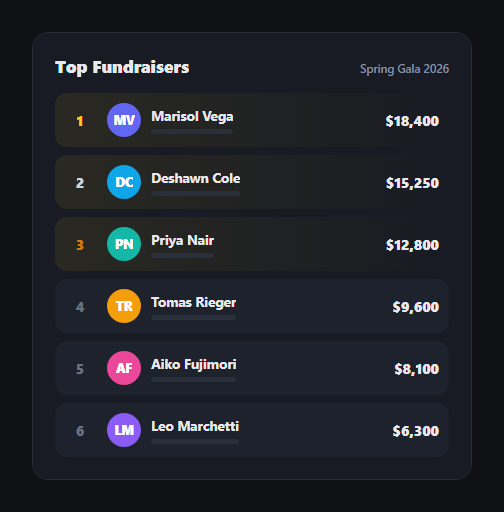
A fundraising campaign leaderboard does two jobs at once: it ranks people, and it shows *how much* separates them, not just the order. This snippet builds that as a ranked list where every row carries a small progress bar scaled relative to the top fundraiser, plus subtle medal-color treatment for the top three — in plain HTML, CSS, and vanilla JavaScript.
Sort once, derive everything from it
The raw DATA array is unsorted; a single .sort() by amount descending produces sorted, and every row's rank is just its index + 1. This keeps the source data easy to edit — add a fundraiser anywhere in the array — without ever having to manually recompute rank numbers.
Progress bars relative to the leader, not to a fixed goal
Each row's bar width is amount / top × 100, where top is the highest fundraiser's total — not a percentage of some external campaign goal. That's a deliberate choice: it makes the visual comparison read as "how close is this person to first place," which is the competitive framing a leaderboard is for for, distinct from a donation thermometer's goal-relative fill.
Medal color without medal icons
Rather than trophy emoji, rank 1–3 get a data-driven data-rank attribute that CSS attribute selectors key off of — gold, silver, and bronze tints applied to the rank number and that row's own progress-bar gradient, plus a faint background wash on .cl-top rows. It's a restrained way to signal "these three matter most" that still reads correctly in a dense list.
Initials avatars, no image dependency
Each row gets a colored circular avatar built from the fundraiser's initials and a color cycled from a fixed palette — so the component works with zero image assets or network requests, useful for a demo, a placeholder state, or any fundraiser without a photo on file.
Overflow-safe names
Names use white-space: nowrap with text-overflow: ellipsis inside a min-width: 0 flex child, so a long name truncates cleanly instead of breaking the row's grid layout — a detail that matters once the list holds real, unpredictable names.
Customizing it
Swap DATA for your live campaign totals, add avatar photos in place of the initials circles, or extend rows with a "view profile" link. Pair it with a leaderboard table for a denser variant or leaderboard podium to spotlight just the top three.
Build with AI
Build, Understand, Optimize, and Extend It With AI
Rather than tracing the rank-and-progress math by hand, paste this snippet's HTML, CSS, and JS into an AI coding assistant like Claude and ask it to explain exactly how sorting DATA once produces every row's rank without a stored rank field, and why the progress bars divide by the top fundraiser's amount instead of a fixed campaign goal. The same assistant can help optimize it — for example asking whether re-sorting on every data update is cheap enough for a large fundraiser list, or whether ties in amount should share a rank. It's also useful for extending the leaderboard: ask it to add a filter for team versus individual fundraisers, a "you" row that stays pinned even when scrolled out of the visible top ranks, or a subtle rank-change indicator (up/down arrow) between refreshes. Treat the code less like a finished artifact and more like a starting point for a conversation.
Prompt to recreate it
Copy this into your AI assistant of choice to build the effect from scratch, or as a jumping-off point for your own variant:
Build a "fundraising campaign leaderboard" ranked list in plain HTML, CSS, and JavaScript with no library.

Requirements:
- A plain array of fundraiser objects with a name and a raised amount, sorted descending by amount in JavaScript (not pre-sorted in the data), with each row's rank derived purely from its position in the sorted array — no manually assigned rank numbers.
- Each row rendered as a list item showing the rank number, a colored circular avatar built from the person's initials (no image files), the name, a thin progress bar, and the formatted dollar amount.
- Every row's progress bar width calculated as that person's amount divided by the single highest amount in the list (not a fixed external goal), so the bars visually communicate proximity to first place.
- The top three ranks visually distinguished from the rest — for example gold, silver, and bronze accent colors applied to the rank number and that row's progress-bar gradient — driven by a data attribute holding the numeric rank so the styling can be done in CSS via attribute selectors rather than inline JavaScript styling per rank.
- Long names must truncate with an ellipsis instead of wrapping or breaking the row's layout, which requires setting min-width: 0 on the relevant flex child in addition to white-space: nowrap and text-overflow: ellipsis on the name element.
- Dollar amounts formatted with thousands separators using toLocaleString, and the whole ranked list built on a semantic ordered list element.
Want to tighten it up first? Run this prompt through the AI Prompt Studio to score it across 8 quality dimensions, catch anti-patterns, and tune the wording for Claude, ChatGPT, or Gemini before you paste it in.
Step by step
How to Use
- 1Paste HTML, CSS, and JSA ranked leaderboard renders, sorted by amount raised, high to low.
- 2Check the top threeRanks 1–3 get gold, silver, and bronze accents on the number and bar.
- 3Compare the barsEach bar's width shows that person's total relative to the leader, not a fixed goal.
- 4Edit DATAAdd, remove, or update fundraiser names and amounts — rank recalculates automatically.
- 5Swap avatar colorsAdjust AVATAR_COLORS or replace initials circles with real photos.
- 6Connect live totalsRe-run the render whenever fundraising data updates from your backend.
Real-world uses
Common Use Cases
Got questions?
Frequently Asked Questions
A single Array.sort() call on the raw DATA array, comparing amount descending, produces the sorted list once; each row's rank is simply its position in that sorted array plus one. There is no separate rank field to keep in sync — add or edit a fundraiser in DATA and the ranking recalculates correctly on the next render.
A leaderboard's purpose is competitive comparison — how close is each person to first place — which is different from a campaign thermometer showing progress toward an external dollar goal. Dividing every amount by the top fundraiser's total keeps the bars meaningful as a head-to-head comparison regardless of what the campaign's overall goal is.
Each row carries a data-rank attribute set to its numeric rank, and CSS attribute selectors like .cl-row[data-rank="1"] apply gold, silver, or bronze tints to that row\'s rank number and progress-bar gradient. Ranks below three simply do not match those selectors and fall back to the default indigo styling.
The name sits in a flex child with min-width: 0, and the name element itself uses white-space: nowrap with text-overflow: ellipsis, so a long name truncates with an ellipsis rather than wrapping or pushing the amount out of the row. The min-width: 0 is essential — without it, flex children refuse to shrink below their content's natural width and the truncation would not take effect.
Keep the sort-then-map logic as a derived/computed value from your data source — useMemo in React, a computed() in Vue, or a getter in Angular — so the sorted list and each row\'s relative-progress percentage recalculate automatically whenever the underlying fundraiser data changes. The row markup and CSS port unchanged.