You Might Also Like
Learn Coding Visually
Learn to code with interactive, live-preview playgrounds — HTML, CSS, JavaScript, React & more.
 HTML Playground42 lessons · Click-based · Live preview
 CSS PlaygroundLearn CSS with a live editor
 JavaScript Playground60 lessons · DOM · Async · Canvas
 React PlaygroundLearn React with a live code editor
 GSAP PlaygroundLearn GSAP animation interactively
 SVG Playground44 lessons · shapes · paths · animation
 SCSS Playground45 lessons · Sass modules · tokens
 Tailwind PlaygroundLearn Tailwind CSS with a live editor
 Bootstrap 5 Playground50 lessons · live preview
Leaderboard Podium — Top 3 Podium HTML CSS JS
Leaderboard Podium · Dashboards · Plain HTML, CSS & JS · Live preview
What's included
Features
About this UI Snippet
Leaderboard Podium — Gold-Silver-Bronze Winners Stand with a Ranked List
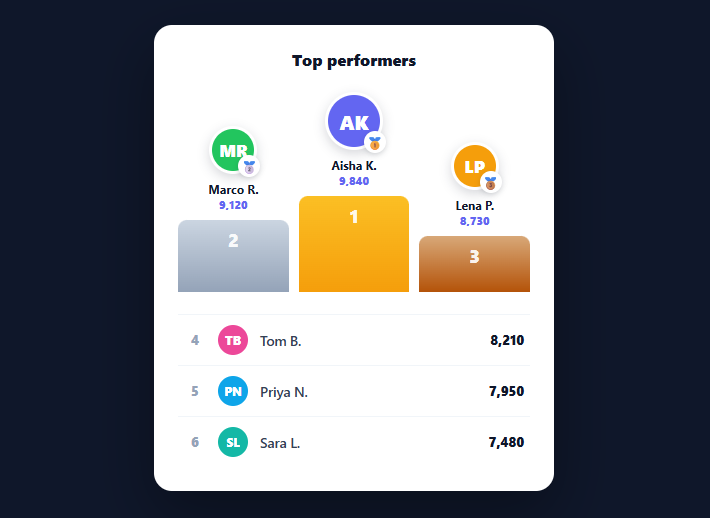
A leaderboard podium celebrates the top three with a winners' stand — gold in the centre and tallest, silver and bronze flanking — then lists the rest in rank order. It's the high-impact way to show standings in games, sales contests, fitness challenges, and competitions, far more motivating than a plain list. This snippet builds it in plain HTML, CSS, and vanilla JavaScript, with an animated podium and a ranked remainder — no library.
Podium order vs. rank order
The clever bit is the *display order*. The winner ranks first but is rendered in the *middle*, with second on the left and third on the right — the real-Olympic-podium arrangement. The snippet sorts players by score to get true ranks, then renders the top three in a deliberate [2nd, 1st, 3rd] order so the centre column is the winner. Separating logical rank from visual position is the detail that makes a podium read correctly; rendering them left-to-right by rank would look wrong.
Heights and medals encode placement
The three podium bars have descending heights (gold tallest, bronze shortest) and gold/silver/bronze gradients, and each avatar carries a 🥇🥈🥉 medal badge. The winner also gets a larger avatar. These redundant cues — position, height, colour, and medal — make first/second/third unmistakable at a glance, which is the whole point of a podium over a list.
Animated rise
The bars animate up with a scaleY transform from a bottom origin, triggered on the next animation frame so the CSS transition runs — the standard requestAnimationFrame technique. The bars growing from the floor mimics a podium rising, giving the reveal a celebratory feel appropriate to a winners' stand.
Ranked list for everyone else
Below the podium, ranks four onward render as a clean numbered list with avatars, names, and scores in a tabular-figure column. Combining a podium (for the celebrated top) with a list (for the long tail) is the standard leaderboard structure — the podium draws the eye and provides aspiration, while the list gives complete standings without wasting space on more podium columns.
Data-driven and drop-in
Everything comes from a PLAYERS array; the component sorts it, splits the top three onto the podium, and lists the rest, with avatar initials generated from names. Swap in your scores — points, sales, steps, reputation — and it renders the standings. It's a clear reference for podium ordering, placement encoding, and combining a hero podium with a ranked list. One edge case worth handling explicitly: ties. Sorting by score alone leaves the order of equal scores up to the sort's stability, so for a leaderboard where ties are likely, add a deterministic tiebreaker — alphabetical name, or whoever reached the score first by timestamp — otherwise the same dataset can render players in a different podium order on each reload. The same care applies to live, frequently-updating leaderboards: re-rendering the podium from scratch on every score update would re-trigger the rise animation and steal focus from whatever the user was looking at, so for a live feed you'd diff the new ranking against the current one and only re-run the entrance animation for players whose position actually changed.
Build with AI
Build, Understand, Optimize, and Extend It With AI
You do not need to untangle the podium's rank-versus-position logic by hand. Paste this snippet's HTML, CSS, and JS into an AI coding assistant like Claude and ask it to walk through exactly why the order array is [1, 0, 2] instead of [0, 1, 2], and how that produces the centered, tallest winner column while sorted still reflects true rank. The same assistant can help optimize it, for example asking how to avoid re-triggering the scaleY rise animation on every score refresh in a live leaderboard, or how to add a deterministic tiebreaker when two players share a score. It is also useful for extending the effect, such as adding a confetti burst behind first place, animating rank changes between refreshes with a FLIP transition, or supporting ties by rendering shared medal badges. Treat the code less like a finished artifact and more like a starting point for a conversation.
Prompt to recreate it
Copy this into your AI assistant of choice to build the effect from scratch, or as a jumping-off point for your own variant:
Build a "leaderboard podium" in plain HTML, CSS, and JavaScript with no libraries.

Requirements:
- Accept an array of player objects with at least a name, a numeric score, and a color, and sort them by score descending to compute true rank.
- Render only the top three on a podium, but display them in the order [second place, first place, third place] left to right, so the winner is visually centered — while an internal order array separate from the sorted rank array drives this display order.
- Give the podium columns three different fixed heights (tallest for first, medium for second, shortest for third), each with a distinct gold, silver, or bronze CSS gradient background, and attach a medal emoji badge positioned on the corner of each avatar.
- Give the first-place avatar a visibly larger size than second and third to add a fourth redundant cue on top of position, height, color, and medal.
- Generate each avatar's visible content as initials derived from the player's name (not an image), with a background color pulled from that player's data.
- Animate the three podium bars rising from zero height using a CSS transform: scaleY with transform-origin: bottom, triggered by adding a class inside a requestAnimationFrame callback so the transition actually plays instead of being skipped.
- Below the podium, render everyone ranked fourth and lower as a plain numbered list with rank number, avatar initials, name, and score, reusing the same sorted data array without re-deriving it.
Want to tighten it up first? Run this prompt through the AI Prompt Studio to score it across 8 quality dimensions, catch anti-patterns, and tune the wording for Claude, ChatGPT, or Gemini before you paste it in.
Step by step
How to Use
- 1Paste HTML, CSS, and JSA leaderboard renders with a gold/silver/bronze podium and a ranked list beneath.
- 2See the podium orderThe winner is centred and tallest, with second left and third right.
- 3Watch the riseThe podium bars animate up from the floor on load.
- 4Swap in your dataReplace the PLAYERS array with your own { name, score, color } entries.
- 5Use any score typePoints, sales, steps, or reputation — it sorts and ranks automatically.
- 6Restyle itChange the medal emojis, podium colours, or bar heights to fit your theme.
Real-world uses
Common Use Cases
Got questions?
Frequently Asked Questions
Because a real podium puts first place centre and tallest, with second to the left and third to the right. The snippet computes true ranks by sorting on score, then renders the top three in a deliberate [2nd, 1st, 3rd] order so the centre column is the winner. Separating logical rank from visual position is what makes the podium look correct — rendering left-to-right by rank would misplace everyone.
Through redundant cues: centre/left/right position, descending bar heights, gold/silver/bronze gradients, 🥇🥈🥉 medal badges, and a larger avatar for first. Encoding rank multiple ways means a glance is enough to read first, second, and third — which is the advantage a podium has over a plain ranked list.
The podium celebrates and draws attention to the top three, providing aspiration; the list gives complete standings for everyone else without the visual weight of more podium columns. This podium-plus-list structure is the standard leaderboard layout because it balances impact (the hero podium) with completeness (the full ranking) efficiently.
Each bar has transform-origin: bottom and starts at scaleY(0). On the next animation frame a class is added that sets scaleY(1), and a CSS transition animates the growth — so the bars rise from the floor like a podium being raised. The requestAnimationFrame defer is needed so the browser paints the collapsed state first, letting the transition run.
Hold the players in state, sort and slice into top-3 and the rest, and render the podium (in 2-1-3 order) and list from those. Add the rise animation class in a useEffect (React), onMounted (Vue), or ngAfterViewInit (Angular). The ordering and initials logic is framework-agnostic — only the state and the deferred animation trigger move into the framework.