Learn Coding Visually
Learn to code with interactive, live-preview playgrounds — HTML, CSS, JavaScript, React & more.
 HTML Playground42 lessons · Click-based · Live preview
 CSS PlaygroundLearn CSS with a live editor
 JavaScript Playground60 lessons · DOM · Async · Canvas
 React PlaygroundLearn React with a live code editor
 GSAP PlaygroundLearn GSAP animation interactively
 SVG Playground44 lessons · shapes · paths · animation
 SCSS Playground45 lessons · Sass modules · tokens
 Tailwind PlaygroundLearn Tailwind CSS with a live editor
 Bootstrap 5 Playground50 lessons · live preview
Unit Converter — Length, Weight, Temp Converter JS
Unit Converter · Dashboards · Plain HTML, CSS & JS · Live preview
What's included
Features
About this UI Snippet
Unit Converter — Base-Factor Engine Across Length, Weight, Temperature & Volume
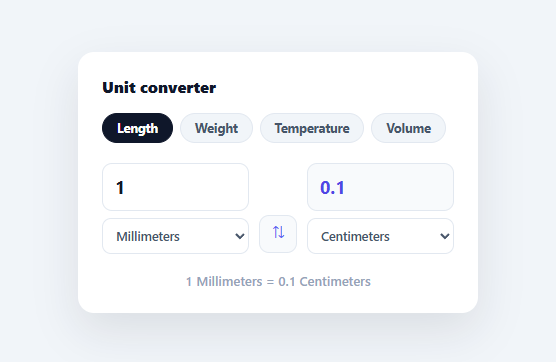
A unit converter looks simple but hides a real design question: how do you convert any unit to any other without writing a formula for every pair? This snippet builds a multi-category converter — length, weight, temperature, and volume — on a clean base-unit engine that needs only one factor per unit, in plain HTML, CSS, and vanilla JavaScript, with no library.
Convert through a base unit, not pair-by-pair
The key idea: instead of defining a conversion for every pair of units (which grows quadratically), each unit is defined by a single factor relative to one base unit per category — metres for length, grams for weight, litres for volume. To convert, you go to the base (value × factor) and back out (base ÷ targetFactor). So any-to-any conversion needs just N factors, not N² formulas, and adding a new unit is one number. This base-unit approach is how every real conversion library is structured.
Temperature is the exception — and it's handled
Temperature can't use a simple multiplier because the scales have different zero points (0°C isn't 0°F). The engine handles this by letting a unit be either a plain factor *or* an object with to/from functions that convert to and from the base (Celsius). Celsius is identity, Fahrenheit uses (°F−32)×5/9, Kelvin subtracts 273.15. Because toBase/fromBase check the unit's type, formula-based and factor-based units coexist in the same engine — the detail that makes a single converter handle both linear and affine units correctly.
Live, two-way, with a swap
Typing a value converts instantly, and changing either dropdown re-converts. A swap button exchanges the from/to units (with a little rotate animation) so you can flip the direction without retyping — and it re-runs the conversion immediately. The result field is read-only so it always reflects a real conversion rather than stray input, and an equation line ("1 Meters = 3.28084 Feet") spells out the conversion in words.
Sensible rounding
Floating-point conversions produce noise like 3.2808398950131235. The output is rounded to six significant decimals and re-parsed to drop trailing zeros, so you get 3.28084 rather than a long tail or a rigid fixed-decimal that shows 5.000000. This "round then trim" gives clean numbers across both tiny (millimetres) and huge (miles) values.
Data-driven and extensible
Categories and their units live in one CATS object, and the UI (category chips, dropdowns) is generated from it — so adding a category (area, speed, data) or a unit is a data change, not new logic. It's a complete, dependency-free reference for the base-factor conversion pattern and for mixing linear and formula-based units in one engine. Note that fillUnits() defaults the "to" dropdown to the second unit in the category (Math.min(1, …)) rather than the first, specifically so picking a category never starts with identical from/to units showing a trivial "1 Meters = 1 Meters" — a small touch that makes the very first conversion shown for any category actually demonstrate the converter doing something.
Build with AI
Build, Understand, Optimize, and Extend It With AI
Instead of tracing the conversion math by hand, paste this snippet's HTML, CSS, and JS into an AI coding assistant like Claude and ask it to explain exactly why toBase and fromBase check typeof u === 'object' before deciding whether to call a function or multiply by a factor, and what would break if Temperature used the same plain-factor scheme as Length. It's also worth asking about robustness — the round() function uses toFixed(6) then reparses with parseFloat, so ask what happens with extremely large or extremely small values, and whether that's still safe. For extending it, have it add an area or speed category following the existing base-factor pattern, a "favorite conversions" list that persists to localStorage, or a mode where typing in either field converts in both directions instead of one field always being read-only. Treat the code less like a finished artifact and more like a starting point for a conversation.
Prompt to recreate it
Copy this into your AI assistant of choice to build the effect from scratch, or as a jumping-off point for your own variant:
Build a multi-category unit converter (length, weight, temperature, volume) in plain HTML, CSS, and vanilla JavaScript with no libraries, using a base-unit conversion engine rather than a formula per unit pair.

Requirements:
- Define a data object where each category has a base unit name and a map of units to either a plain numeric factor relative to that base (for linear units like meters, grams, liters) or an object with "to" and "from" functions that convert a value to and from the base unit (for temperature, since Celsius/Fahrenheit/Kelvin have different zero points and cannot use a simple multiplier).
- Write a toBase(category, unit, value) function and a fromBase(category, unit, baseValue) function that each check whether the unit entry is a factor number or a to/from function object, and branch accordingly, so linear and formula-based units share the same conversion pipeline.
- Converting from any unit to any other unit in the same category must go through exactly two calls: toBase to get the base-unit amount, then fromBase to reach the target unit — never a direct pairwise formula.
- Render category chips generated from the data object's keys; clicking one repopulates both from/to dropdowns from that category's units and re-runs the conversion.
- Typing a new value or changing either dropdown must recompute and display the result immediately, plus a plain-English equation line like "1 Meters = 3.28084 Feet".
- A swap button must exchange the selected from/to units and re-convert immediately.
- Round the displayed result to avoid floating-point noise (e.g. round to a fixed number of decimals) but strip trailing zeros so short results display cleanly.
Want to tighten it up first? Run this prompt through the AI Prompt Studio to score it across 8 quality dimensions, catch anti-patterns, and tune the wording for Claude, ChatGPT, or Gemini before you paste it in.
Step by step
How to Use
- 1Paste HTML, CSS, and JSA unit converter renders with category chips (Length, Weight, Temperature, Volume).
- 2Pick a categoryClick a chip to load that category's units into both dropdowns.
- 3Type a valueEnter a number and choose from/to units — the result converts live.
- 4Swap directionClick ⇅ to exchange the from and to units and re-convert instantly.
- 5Add units or categoriesEdit the CATS object — add a factor for a unit or a new category; the UI regenerates.
- 6Read the equationThe line below spells out the conversion (e.g. 1 Meters = 3.28084 Feet).
Real-world uses
Common Use Cases
Got questions?
Frequently Asked Questions
Each unit is defined by a single factor relative to one base unit per category (metres, grams, litres). Conversion goes through the base: value × fromFactor gives the base amount, then ÷ toFactor gives the target. So N units need only N factors, and adding a unit is one number — versus N² formulas if you converted each pair directly. This base-unit design is how conversion libraries are built.
Temperature scales are affine, not linear — they have different zero points (0°C = 32°F), so a single multiplier can't convert them. The engine lets a unit be either a plain factor or an object with to/from functions that map to and from the base (Celsius). toBase/fromBase check the unit's type, so formula-based units like Fahrenheit and Kelvin work in the same engine as factor-based ones like metres.
Raw conversions produce values like 3.2808398950131235. The output is rounded to six decimals with toFixed(6), then parseFloat re-parses it to strip trailing zeros — so you get 3.28084, not a long tail and not a rigid 5.000000. This round-then-trim approach gives clean numbers across both very small and very large magnitudes.
Edit the CATS object. To add a unit, add a key with its factor relative to that category's base (e.g. Yards: 0.9144 under Length). To add a category, add an entry with a base and a units map (use to/from functions if it's an affine scale). The category chips and dropdowns are generated from CATS, so the UI updates automatically — no new conversion logic needed.
Keep the CATS data as a constant and hold the current category, value, and units in state. Derive the result with a computed/useMemo from those, and render chips and options from CATS. In React use useState; in Vue, refs and computed; in Angular, component properties and a getter. The base-factor conversion functions are framework-agnostic and port unchanged.