More Dashboards Snippets
Front-End Coding Playgrounds
Learn to code with interactive, live-preview playgrounds — HTML, CSS, JavaScript, React & more.
 HTML Playground42 lessons · Click-based · Live preview
 CSS PlaygroundLearn CSS with a live editor
 JavaScript Playground60 lessons · DOM · Async · Canvas
 React PlaygroundLearn React with a live code editor
 GSAP PlaygroundLearn GSAP animation interactively
 SVG Playground44 lessons · shapes · paths · animation
 SCSS Playground45 lessons · Sass modules · tokens
 Tailwind PlaygroundLearn Tailwind CSS with a live editor
 Bootstrap 5 Playground50 lessons · live preview
Timezone Converter — Meeting Planner HTML CSS JS
Timezone Converter · Dashboards · Plain HTML, CSS & JS · Live preview
What's included
Features
About this UI Snippet
Timezone Converter — World Clock Meeting Planner with Working-Hours Highlights
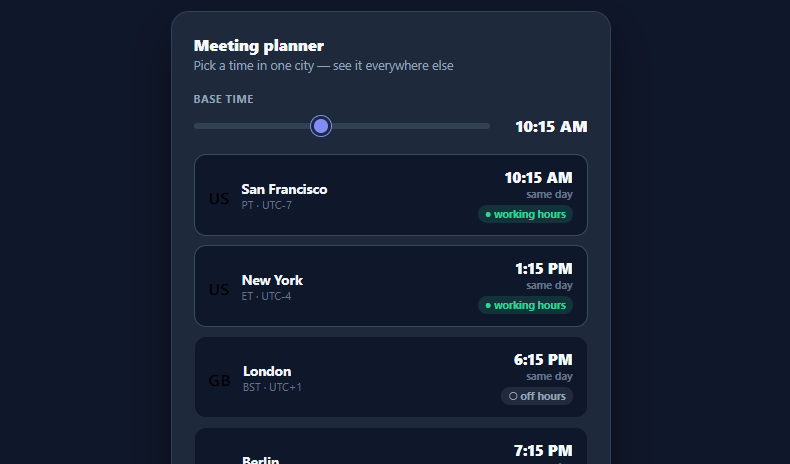
"What time is the 9am San Francisco call in Tokyo?" is a question remote teams answer dozens of times a week, and getting it wrong means someone joins a meeting at 2am. This snippet builds an interactive timezone meeting planner in plain HTML, CSS, and vanilla JavaScript: drag a single slider to set a base time, and every city in the list updates instantly with its local time, whether it's the same/next/previous day, and whether that lands inside working hours.
One slider drives every zone
A single range input (stepping in 15-minute increments across a full day) sets the base time in the first city. Every other row is computed from its UTC offset relative to that base: diff = (zone.offset - BASE_OFFSET) * 60 minutes, added to the base minutes. There's no per-city input to keep in sync — moving the one slider re-renders the whole list through a single render() call, the cleanest way to express "the same moment, shown everywhere."
Day-shift labels are the detail that prevents 2am mistakes
The hardest part of cross-timezone scheduling isn't the hour, it's the *date*. When it's 9am Monday in San Francisco it's already 2am Tuesday in Tokyo — so each row computes whether the converted time rolls into the next day, stays the same day, or falls back to the previous day, and labels it explicitly ("+1 day" in amber, "−1 day" in blue, "same day" in gray). The minute math wraps cleanly with ((mins % 1440) + 1440) % 1440 so a time that crosses midnight in either direction still displays the correct clock time alongside the right day label.
Working-hours highlighting finds the overlap
Picking a meeting time is really about finding the window where the fewest people are asleep. Each row flags whether its local time falls in 9am–6pm ("● working hours" in green, with a subtly brighter card border) or outside it ("○ off hours" in gray) — so as you drag the slider, you can watch for the moment the most cities light up green at once. That visual scan is far faster than mentally converting nine offsets.
Honest about DST (and how to make it real)
The offsets here are fixed numbers, which is deliberately simple for a self-contained demo — but real timezones shift with daylight saving, and the offset between two cities can change several times a year. A production version should drop the hardcoded offsets and use the browser's built-in Intl.DateTimeFormat with an IANA timezone name ('America/Los_Angeles', 'Asia/Tokyo') and a real Date object, which handles DST automatically. The rendering, day-shift, and working-hours logic stay identical; only the offset source changes.
Built for quick customization
Add or remove cities by editing the ZONES array ({ city, flag, zone, offset }), change the base city by reordering it to the front, or adjust the working-hours window to match your team's actual availability — every visual recalculates from those values.
Build with AI
Build, Understand, Optimize, and Extend It With AI
Ask an AI coding assistant like Claude to trace through the ((mins % 1440) + 1440) % 1440 wrapping expression with a couple of negative-minute examples — it's the small piece of modular arithmetic that keeps the clock correct when a converted time crosses midnight in either direction, and it's worth understanding before you reuse it elsewhere. It's also a good prompt for a scaling/correctness conversation: this demo uses fixed numeric UTC offsets, so ask specifically how you'd swap those for Intl.DateTimeFormat with real IANA timezone names so daylight saving transitions are handled automatically instead of silently going wrong twice a year. For extending it, ask for a searchable "add your own city" control backed by a full IANA timezone list, a heatmap-style visualization of overlapping working hours across all cities at once, or a shareable link that encodes the chosen base time. Treat the code less like a finished artifact and more like a starting point for a conversation.
Prompt to recreate it
Copy this into your AI assistant of choice to build the effect from scratch, or as a jumping-off point for your own variant:
Build a timezone meeting-planner in plain HTML, CSS, and JavaScript where dragging a single slider updates every city's local time at once — no date library, no server calls.

Requirements:
- A single range input representing minutes since midnight (0 to 1439, stepping by 15) that sets the "base time" in the first city of a data array; every other city in that array must be computed relative to this base, never edited independently.
- Each city entry stores a fixed UTC offset (including fractional-hour offsets like 5.5 for India); on every slider input, compute each city's local minutes as the base minutes plus the difference between that city's offset and the base city's offset, in minutes.
- Format minutes into a 12-hour clock string with AM/PM, and make the minute-wrapping arithmetic correct in both directions across midnight using a double-modulo expression (not a simple if-statement) so negative or overflowing minute values still resolve to a valid 0–1439 range.
- For every city, explicitly compute and label whether its converted local time falls on the same day, the next day, or the previous day relative to the base, and style each of the three states with a distinct color so a user scanning the list never misreads the date.
- Flag each city with a "working hours" versus "off hours" badge based on whether its local hour falls within a configurable daytime window (such as 9am to 6pm), and give working-hours rows a visibly different card border so the best overlap window is scannable at a glance while dragging the slider.
- Re-render the entire city list from one function on every slider input event, so the whole UI is a pure function of the single base-minutes value.
Step by step
How to Use
- 1Paste HTML, CSS, and JSA dark "Meeting planner" card renders with a time slider and a list of nine world cities showing their local times.
- 2Drag the base-time sliderSet a time in the base city (San Francisco) — every other city's local time updates instantly as you drag.
- 3Read the day-shift labelsEach row shows "+1 day", "same day", or "−1 day" so you never miscount the date when a time crosses midnight.
- 4Find the working-hours overlapRows inside 9am–6pm local show a green "working hours" badge — drag until the most cities light up green at once.
- 5Edit the city listAdd or remove entries in the ZONES array; reorder a city to the front to make it the base the slider controls.
- 6Make DST accurateReplace the fixed offsets with Intl.DateTimeFormat and IANA zone names (America/Los_Angeles) so daylight saving is handled automatically.
Real-world uses
Common Use Cases
Got questions?
Frequently Asked Questions
Fixed numeric offsets break twice a year when regions shift for DST. The robust fix is to drop the offsets entirely and use the browser's Intl.DateTimeFormat with an IANA timezone name — new Intl.DateTimeFormat('en-US', { timeZone: 'Asia/Tokyo', hour: 'numeric', minute: '2-digit' }).format(date) — which applies the correct offset for any given date automatically. Keep the same render/day-shift/working-hours logic; only the time source changes.
Render a searchable add-city control (similar to the language switcher) backed by a list of IANA timezone names, push the chosen one into the ZONES array, and re-render. With Intl you only need the timezone name, not a hardcoded offset.
Edit the condition in render() — currently f.hour24 >= 9 && f.hour24 < 18 (9am–6pm). Change those bounds to match your team's actual hours, or make them configurable per city if teammates keep different schedules.
Yes — initialize the slider value from the current time (new Date().getHours() * 60 + getMinutes()) on load, and optionally add a "Now" button that resets it. The slider stays useful for exploring other meeting times around the present moment.
In React, hold the base minutes in useState and derive each city's converted time with useMemo (ideally via Intl.DateTimeFormat); in Vue, use ref()/computed(); in Angular, use a component field with a getter or pipe. The offset/day-shift math is plain JavaScript and ports without changes.