More Dashboards Snippets
Front-End Coding Playgrounds
Learn to code with interactive, live-preview playgrounds — HTML, CSS, JavaScript, React & more.
 HTML Playground42 lessons · Click-based · Live preview
 CSS PlaygroundLearn CSS with a live editor
 JavaScript Playground60 lessons · DOM · Async · Canvas
 React PlaygroundLearn React with a live code editor
 GSAP PlaygroundLearn GSAP animation interactively
 SVG Playground44 lessons · shapes · paths · animation
 SCSS Playground45 lessons · Sass modules · tokens
 Tailwind PlaygroundLearn Tailwind CSS with a live editor
 Bootstrap 5 Playground50 lessons · live preview
World Clock Widget — Free HTML CSS JS Snippet
World Clock · Dashboards · Plain HTML, CSS & JS · Live preview
What's included
Features
About this UI Snippet
World Clock — Live Multi-Timezone Grid with Day/Night Indicators
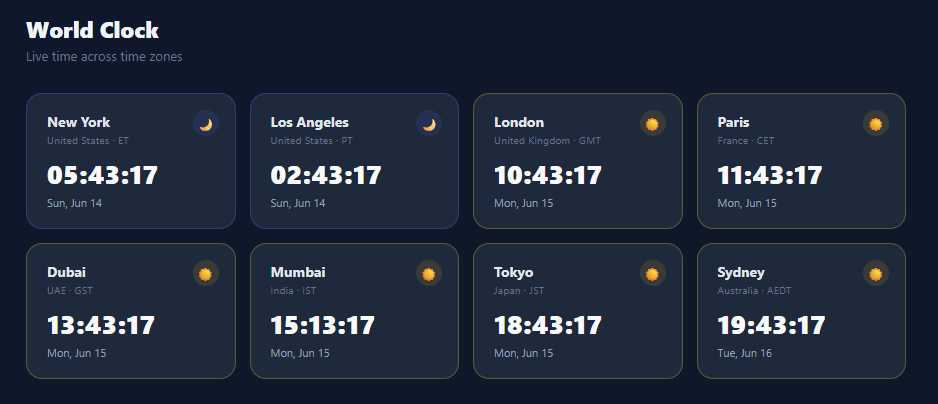
A world clock widget displays the current local time across multiple time zones simultaneously, letting users coordinate meetings and track business hours globally. This snippet renders 8 city clocks in a responsive CSS Grid, each ticking every second via setInterval. The day/night indicator switches between sun and moon with a tinted background based on whether the local hour is between 6am and 8pm.
Timezone conversion with the Intl API
The native Intl.DateTimeFormat API (via toLocaleString with a timeZone option) converts the current UTC timestamp to any IANA timezone. new Date(now.toLocaleString('en-US', { timeZone: tz })) creates a Date object set to the local time in that zone — getHours(), getMinutes(), and getSeconds() then return values in the target timezone, not the browser's local time. This works in all modern browsers without any external library.
Tabular digit rendering
font-variant-numeric: tabular-nums makes digits mono-width, preventing the time display from jumping left and right as narrow digits like 1 swap with wide digits like 8. This is standard practice for all live clock UIs and numeric counters.
Day/night detection
isDaytime(h) returns true when the local hour is between 6 and 20. The sun or moon emoji appears in a circle with an rgba tinted background — yellow for day, indigo for night. The card border also switches color via .is-day and .is-night classes, giving a quick visual scan of which cities are awake.
DST handling
The IANA timezone database (used internally by the browser Intl API) knows all DST transition rules. When a region switches to/from DST, the Intl API applies the correct offset automatically — no manual offset arithmetic needed.
setInterval accuracy and drift
setInterval(tick, 1000) fires approximately every second, but browsers allow slight drift — the actual interval can be 1001ms or 999ms. For a wall-clock display this is acceptable since the seconds value is derived from a fresh new Date() on every tick rather than incrementing a counter. If the tab is in the background, browsers throttle timers; the clock may pause for a second and then catch up on focus. For a critical timing use case, pair setInterval with a visibility change listener: document.addEventListener("visibilitychange", () => { if (!document.hidden) tick(); }) to force an immediate update when the user returns to the tab.
Accessibility of live clock regions
For screen readers, live-updating time displays should use aria-live="off" (the default) because announcing every second would be disruptive. Instead, give each card an aria-label="Tokyo time" so users can navigate to it on demand. For a summary-level accessible clock, expose only the hours and minutes with aria-live="polite" and update the region only when minutes change.
Build with AI
Build, Understand, Optimize, and Extend It With AI
Ask an AI coding assistant like Claude to explain exactly what new Date(now.toLocaleString('en-US', { timeZone: zone })) does under the hood — it's a double-conversion trick (format to a string in the target zone, then re-parse it) that's worth understanding versus the more explicit Intl.DateTimeFormat().format() approach, including where each can subtly differ. It's also worth asking about tick()'s per-second cost: with eight timezones being reformatted every single second via toLocaleString, ask whether that's meaningfully expensive and what a cheaper alternative would look like at, say, fifty cities. For extending it, ask for a way to highlight the viewer's own detected timezone automatically using Intl.DateTimeFormat().resolvedOptions().timeZone, a drag-to-reorder city grid, or a compact "meeting time finder" that overlays all eight local times against a single chosen UTC hour. Treat the code less like a finished artifact and more like a starting point for a conversation.
Prompt to recreate it
Copy this into your AI assistant of choice to build the effect from scratch, or as a jumping-off point for your own variant:
Build a live multi-timezone world clock grid in plain HTML, CSS, and JavaScript using only the native Intl API — no timezone library, no manual UTC-offset arithmetic.

Requirements:
- A responsive CSS grid of city cards, each tagged with a real IANA timezone identifier (such as "Asia/Tokyo" or "America/New_York") rather than a numeric UTC offset, since offsets alone cannot account for daylight saving time.
- A single ticking function that runs once per second (via setInterval) and, for every configured timezone, derives that zone's current local hour, minute, second, and weekday/date purely through the Intl API applied to one shared Date.now() timestamp — never manually add or subtract hours.
- Display each city's time with zero-padded two-digit hours, minutes, and seconds, using a tabular-figures font so the digits don't visually shift width as they change every second.
- Classify each city as daytime or nighttime based on its computed local hour falling within a defined window (such as 6am to 8pm), and reflect that with both a sun/moon icon and a distinctly colored card border, updating live as real time passes and a city crosses the day/night boundary.
- Confirm that daylight saving transitions are handled correctly with zero special-case code, purely because the Intl API's timezone conversion is DST-aware.
- Make the city list config-driven from a single array of timezone identifiers, so adding a new city is one array entry plus one matching card in the markup, with no changes to the ticking or day/night logic.
Step by step
How to Use
- 1Watch the clocks tick in real timeAll 8 city clocks update every second. The sun icon shows daytime (6am–8pm local), the moon shows nighttime.
- 2Add or change a cityDuplicate a .clock-card block and update data-tz to any IANA timezone string (e.g., "Asia/Singapore"). Add that same string to the zones array at the same index. Update city name, country, and abbreviation.
- 3Switch to 12-hour formatIn the tick function replace the hh+mm+ss build with: var ampm = t.getHours() >= 12 ? "PM" : "AM"; var h12 = ((t.getHours() % 12) || 12); then display h12 + ":" + mm + ":" + ss + " " + ampm.
- 4Highlight the local timezoneGet the local timezone with Intl.DateTimeFormat().resolvedOptions().timeZone. Compare it to the zones array; add a .local class to the matching card to highlight it with a border or background accent.
- 5Export for your frameworkClick "JSX" for a React version using useEffect and setInterval with cleanup. Click "Vue" for a Vue 3 SFC with onMounted ticker and onUnmounted clearInterval.
Real-world uses
Common Use Cases
Got questions?
Frequently Asked Questions
The Intl.DateTimeFormat API is built into all modern browsers. now.toLocaleString("en-US", { timeZone: tz }) formats the UTC timestamp in the target timezone. Wrapping it in new Date() parses it back to a Date object — so getHours()/getMinutes()/getSeconds() return values in the target zone, not local time. An alternative approach uses Intl.DateTimeFormat directly: new Intl.DateTimeFormat("en-US", { timeZone: tz, hour: "2-digit", minute: "2-digit", second: "2-digit", hour12: false }).format(now). This avoids the double-parse step and is slightly more explicit. Both approaches produce identical results in all modern browsers. The key requirement is passing an IANA timezone string (e.g., "America/New_York") not a UTC offset ("+05:30") — offsets do not account for DST transitions.
Yes. Browsers use the IANA timezone database internally for Intl API calls. When a region transitions to or from DST, the Intl API applies the correct offset automatically. No manual offset arithmetic or external library is needed. This means that on the night of a DST transition (e.g., clocks spring forward at 2am), the displayed time for that timezone will jump correctly at the right local moment. The IANA database is bundled in every modern browser and receives updates through browser updates, so DST rule changes for countries like Brazil, Russia, or Morocco are handled without any code changes on your part.
Use useEffect with setInterval cleanup: useEffect(() => { const id = setInterval(tick, 1000); return () => clearInterval(id); }, []). Store times as an array in useState. Inside tick(), compute zone times for all zones — create a new Date(), format each zone with toLocaleString, and call setTimes(computed) to trigger a re-render. Keep the zones config in a constant array outside the component so it is not recreated on each render. For optimal performance, consider updating state only when the formatted time string changes, avoiding re-renders in the seconds between minute changes.
Two parallel edits: add the IANA timezone id (e.g. "Europe/Berlin") to the zones array in the JS, and add a matching .clock-card in the HTML with data-tz set to the same id and the indexed element ids the updater writes to — tz-N for the time, date-N for the date, and dn-N for the day/night dot, where N is the card's position. tick() loops the zones array by index, so the array order must match the card order. To remove a city, delete both its array entry and its card, then renumber the ids that follow.
tick() converts the current moment into each zone's local wall-clock time using new Date(now.toLocaleString("en-US", { timeZone: zone })), then isDaytime(h) classifies 06:00–19:59 as day. The result toggles the small dot element's class between day and night variants, which the CSS colours amber or indigo. If you want real sunrise/sunset accuracy instead of fixed hours, swap isDaytime() for a solar calculation library or an API lookup — the class toggle stays identical.