Learn Coding Visually
Learn to code with interactive, live-preview playgrounds — HTML, CSS, JavaScript, React & more.
 HTML Playground42 lessons · Click-based · Live preview
 CSS PlaygroundLearn CSS with a live editor
 JavaScript Playground60 lessons · DOM · Async · Canvas
 React PlaygroundLearn React with a live code editor
 GSAP PlaygroundLearn GSAP animation interactively
 SVG Playground44 lessons · shapes · paths · animation
 SCSS Playground45 lessons · Sass modules · tokens
 Tailwind PlaygroundLearn Tailwind CSS with a live editor
 Bootstrap 5 Playground50 lessons · live preview
Binary Search Tree Visualizer — Free HTML CSS JS Snippet
Binary Search Tree Visualizer · Visualizers · Plain HTML, CSS & JS · Live preview
What's included
Features
About this UI Snippet
Binary Search Tree Visualizer — Animated Insert, Search & In-Order Traversal With Live Comparison Highlighting
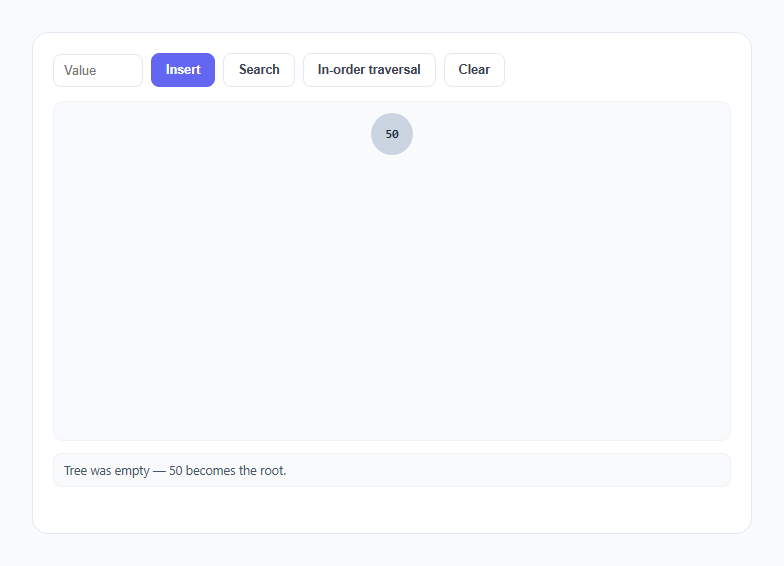
A binary search tree diagram in a textbook is always shown fully built, which hides the one insight that actually explains the structure: every node's position is the result of a chain of less-than/greater-than comparisons made one at a time, starting from the root. This snippet makes that chain visible — insert and search both animate a descent through the tree, pausing at each node to show the comparison being made, before finally landing on an empty slot or a matching node.
The tree is a real object graph, not an array
root is a plain JavaScript object with left/right pointers to child node objects, built with makeNode(value, x, y, depth, parentId). There is no array-based heap-style indexing here — the structure is exactly what a computer science textbook means by "binary search tree," a graph of nodes linked by real object references, the same representation used for the linked list visualizer elsewhere in this library. insertValue and searchValue both walk this graph with a plain while (true) loop, reading cur.left/cur.right and reassigning cur to descend, exactly like a real BST implementation would.
Why insertion never has to reposition existing nodes
Every node's horizontal position is computed once, at creation, from spreadForDepth(cur.depth) — a function that returns a smaller spread the deeper a node sits (Math.max(2.6, 26 - depth * 5.2)), so a new child's x-coordinate is simply its parent's x-coordinate shifted left or right by that shrinking amount. Because this value only depends on the parent's fixed depth and fixed x, not on how many other nodes exist elsewhere in the tree, inserting a new node never requires recalculating or animating the position of any existing node — this is the same "layout narrows per subtree by depth" arithmetic used in the recursion tree visualizer, adapted here to a binary (not fan-out) tree. The practical benefit: insert() can just append one new DOM element and one new SVG edge without ever touching the rest of the tree.
showCompare(): the mechanism that makes the algorithm legible
Both insertValue and searchValue call the same showCompare(node, value) helper at every step of the descent. It highlights the current node amber, attaches a small floating badge showing the literal comparison result — <, >, or = — computed with value === node.value ? '=' : (value < node.value ? '<' : '>'), waits long enough for a human to read it, then removes the badge and highlight. This single function is what turns "the algorithm compares and branches" from a claim into something you watch happen, one node at a time, in the exact order the real comparisons occur.
Search failure renders the counterfactual insertion point
When searchValue walks off the tree (next is null) without finding a match, it does not just report failure — it computes the exact x/y position a real insert of that value would use (via the identical spreadForDepth math insertValue uses) and renders a dashed, red, question-marked "ghost" node there with a brief shake animation before removing it. This answers the natural follow-up question a "not found" result raises — *where would it have gone?* — instead of leaving it abstract.
In-order traversal: why left, node, right always yields sorted order
inorderList(node, out) is the textbook three-line recursive definition: recurse left, push the current node, recurse right. Because every left subtree in a valid BST contains only smaller values and every right subtree contains only larger ones, visiting in that exact order necessarily visits every node from smallest to largest — this is not a coincidence of implementation, it is the defining property of the BST invariant itself. runInorder() computes the full traversal order first, then animates a small red marker dot flying (via a CSS transition on left/top) to each node's position in that order, briefly enlarging the node and appending its value to a running sequence readout — so the printed output is a live, checkable proof that the tree really is sorted.
Comparison badges and the ghost node share one visual vocabulary
Every transient piece of feedback in this snippet — the amber active highlight during a comparison, the green pulse on a search hit, the red shake on a duplicate insert or a failed search — uses the same small set of CSS classes toggled temporarily and removed after a fixed await wait(ms), mirroring the pacing pattern used throughout this library's other algorithm visualizers rather than relying on a general-purpose animation library.
Build with AI
Build, Understand, Optimize, and Extend It With AI
Give this snippet's JavaScript to an AI assistant like Claude and ask it to trace, for a specific value you pick, the exact sequence of </>/= comparisons insertValue would make before reaching an empty slot — predicting the path yourself first and then checking it is the fastest way to internalize how BST descent works. Worthwhile extensions to ask for: a delete(value) operation (the trickiest of the three, especially the two-children case), a balance factor readout that flags when the tree is degenerating toward a linked list, or pre-order and post-order traversal modes alongside the existing in-order one.
Prompt to recreate it
Copy this into your AI assistant of choice to build the effect from scratch, or as a jumping-off point for your own variant:
Build an animated binary search tree visualizer in plain HTML, CSS, and JavaScript, no libraries or frameworks.

Requirements:
- Represent the tree as a real linked object graph (plain JS objects with left/right pointers to child nodes), not an array-backed heap index.
- Insert(value): animate a descent starting at the root, comparing the new value against each visited node (briefly highlighting that node and showing a </>/= indicator for the comparison result) and stepping left or right accordingly, until an empty child slot is found; then fade/scale a new node into that slot and draw a connecting edge to its parent. Reject and visually flag (e.g. a shake animation) an attempt to insert a value that already exists.
- Search(value): use the identical descend-and-highlight animation as insert, ending in either a clear "found" result (e.g. a green pulse on the matching node) or a clear "not found" result that also shows, at the exact empty slot the value would have occupied, a distinct placeholder/ghost node before removing it.
- Compute each node's horizontal position with plain arithmetic based on its parent's position and tree depth, so that a node's x-coordinate narrows (gets closer to its parent) at deeper levels and, critically, so that inserting a new node never requires recalculating or animating the position of any already-placed node.
- Include at least an in-order traversal button that visits nodes in the correct left-subtree, node, right-subtree recursive order, animating a visible marker moving between nodes with a brief pause on each, and prints the resulting value sequence — which must always come out sorted for a valid BST.
- Provide a numeric input plus Insert, Search, and Clear controls, and pre-populate the tree with a handful of values on load so the visualizer is not empty on first view.
Want to tighten it up first? Run this prompt through the AI Prompt Studio to score it across 8 quality dimensions, catch anti-patterns, and tune the wording for Claude, ChatGPT, or Gemini before you paste it in.
Source Code
<div class="bst-wrap">
  <div class="bst-toolbar">
    <input type="number" id="bst-value" placeholder="Value" />
    <button class="bst-btn bst-btn-primary" id="bst-insert">Insert</button>
    <button class="bst-btn" id="bst-search">Search</button>
    <button class="bst-btn" id="bst-inorder">In-order traversal</button>
    <button class="bst-btn" id="bst-clear">Clear</button>
  </div>
  <div class="bst-canvas-wrap">
    <svg id="bst-svg"></svg>
    <div class="bst-nodes" id="bst-nodes"></div>
  </div>
  <div class="bst-status" id="bst-status">Insert a few values (try 50, 30, 70, 20, 40, 65, 90) to build a tree.</div>
  <div class="bst-sequence-title" id="bst-seq-title" style="display:none;">In-order sequence</div>
  <div class="bst-sequence" id="bst-sequence"></div>
</div>
* { box-sizing: border-box; margin: 0; padding: 0; }
body { font-family: system-ui, -apple-system, sans-serif; background: #f8fafc; min-height: 100vh; display: flex; align-items: center; justify-content: center; padding: 24px; }
.bst-wrap { width: 100%; max-width: 720px; background: #fff; border: 1px solid #e2e8f0; border-radius: 16px; padding: 20px; }
.bst-toolbar { display: flex; align-items: center; gap: 8px; flex-wrap: wrap; margin-bottom: 14px; }
.bst-toolbar input { width: 90px; padding: 8px 10px; border: 1.5px solid #e2e8f0; border-radius: 8px; font-size: 13px; }
.bst-toolbar input:focus { outline: none; border-color: #6366f1; }
.bst-btn { font-size: 12.5px; font-weight: 700; padding: 9px 14px; border-radius: 8px; border: 1.5px solid #e2e8f0; background: #fff; color: #374151; cursor: pointer; transition: all 0.15s; }
.bst-btn:hover { border-color: #cbd5e1; background: #f8fafc; }
.bst-btn:disabled { opacity: 0.5; cursor: not-allowed; }
.bst-btn-primary { background: #6366f1; border-color: #6366f1; color: #fff; }
.bst-btn-primary:hover { background: #4f46e5; }
.bst-canvas-wrap { position: relative; height: 340px; background: #f8fafc; border: 1px solid #eef2f7; border-radius: 10px; overflow: auto; margin-bottom: 12px; }
#bst-svg { position: absolute; top: 0; left: 0; width: 100%; height: 100%; overflow: visible; pointer-events: none; }
.bst-nodes { position: relative; width: 100%; height: 100%; }
.bst-node { position: absolute; width: 42px; height: 42px; margin-left: -21px; margin-top: -21px; border-radius: 50%; background: #cbd5e1; color: #1e293b; display: flex; align-items: center; justify-content: center; font-size: 12px; font-weight: 800; font-family: ui-monospace, monospace; transition: background-color 0.25s ease, transform 0.2s ease, opacity 0.25s ease, border-color 0.25s ease; opacity: 0; transform: scale(0.4); border: 2px solid transparent; z-index: 2; }
.bst-node.shown { opacity: 1; transform: scale(1); }
.bst-node.active { background: #f59e0b; color: #fff; }
.bst-node.found { background: #10b981; color: #fff; }
.bst-node.notfound { animation: bstShake 0.4s ease; border-color: #ef4444; }
.bst-node.visit { background: #6366f1; color: #fff; transform: scale(1.14); }
.bst-node.ghost { background: transparent; border: 2px dashed #ef4444; color: #ef4444; opacity: 0.9; }
.bst-cmp-badge { position: absolute; top: -20px; left: 50%; transform: translateX(-50%); font-size: 12px; font-weight: 900; color: #f59e0b; background: #fff; border-radius: 4px; padding: 0 3px; }
.bst-edge { stroke: #cbd5e1; stroke-width: 1.6; transition: stroke 0.25s ease; }
.bst-edge.active { stroke: #f59e0b; }
.bst-marker { position: absolute; width: 10px; height: 10px; margin-left: -5px; margin-top: -5px; border-radius: 50%; background: #ef4444; box-shadow: 0 0 0 3px rgba(239,68,68,0.25); transition: left 0.4s ease, top 0.4s ease; opacity: 0; z-index: 3; }
.bst-marker.on { opacity: 1; }
.bst-status { font-size: 12.5px; color: #475569; background: #f8fafc; border: 1px solid #eef2f7; border-radius: 8px; padding: 8px 10px; min-height: 34px; margin-bottom: 8px; }
.bst-sequence-title { font-size: 10.5px; font-weight: 700; color: #94a3b8; text-transform: uppercase; letter-spacing: 0.05em; margin-bottom: 6px; }
.bst-sequence { font-family: ui-monospace, monospace; font-size: 13px; color: #0f172a; font-weight: 700; min-height: 18px; }
@keyframes bstShake { 0%,100% { transform: scale(1) translateX(0); } 25% { transform: scale(1) translateX(-4px); } 75% { transform: scale(1) translateX(4px); } }let root = null;
let nodeSeq = 0;
let running = false;
function wait(ms) { return new Promise(res => setTimeout(res, ms)); }
function setStatus(text) { document.getElementById('bst-status').textContent = text; }
function makeNode(value, x, y, depth, parentId) {
return { id: 'n' + (nodeSeq++), value, x, y, depth, parentId, left: null, right: null };
}
function spreadForDepth(depth) {
return Math.max(2.6, 26 - depth * 5.2);
}
function nodeEl(id) {
return document.getElementById('bst-nodes').querySelector('[data-id="' + id + '"]');
}
function drawEdge(parent, node) {
const svg = document.getElementById('bst-svg');
const line = document.createElementNS('http://www.w3.org/2000/svg', 'line');
line.setAttribute('x1', parent.x + '%');
line.setAttribute('y1', parent.y);
line.setAttribute('x2', node.x + '%');
line.setAttribute('y2', node.y);
line.setAttribute('class', 'bst-edge');
line.dataset.id = node.id;
svg.appendChild(line);
}
async function createNodeEl(node) {
const container = document.getElementById('bst-nodes');
const el = document.createElement('div');
el.className = 'bst-node';
el.textContent = node.value;
el.style.left = node.x + '%';
el.style.top = node.y + 'px';
el.dataset.id = node.id;
container.appendChild(el);
requestAnimationFrame(() => el.classList.add('shown'));
await wait(260);
}
async function showCompare(node, value) {
const el = nodeEl(node.id);
if (!el) return;
el.classList.add('active');
const badge = document.createElement('div');
badge.className = 'bst-cmp-badge';
badge.textContent = value === node.value ? '=' : (value < node.value ? '<' : '>');
el.appendChild(badge);
await wait(420);
badge.remove();
el.classList.remove('active');
}
async function insertValue(value) {
if (running) return;
running = true;
disableButtons(true);
if (!root) {
root = makeNode(value, 50, 32, 0, null);
setStatus('Tree was empty — ' + value + ' becomes the root.');
await createNodeEl(root);
disableButtons(false);
running = false;
return;
}
let cur = root;
while (true) {
await showCompare(cur, value);
if (value === cur.value) {
setStatus(value + ' already exists in the tree — no duplicate inserted.');
const el = nodeEl(cur.id);
el.classList.add('notfound');
await wait(420);
el.classList.remove('notfound');
disableButtons(false);
running = false;
return;
}
const goLeft = value < cur.value;
setStatus(value + (goLeft ? ' < ' : ' > ') + cur.value + ', going ' + (goLeft ? 'left' : 'right') + '...');
const next = goLeft ? cur.left : cur.right;
if (!next) {
const spread = spreadForDepth(cur.depth);
const x = cur.x + (goLeft ? -spread : spread);
const y = cur.y + 58;
const node = makeNode(value, x, y, cur.depth + 1, cur.id);
if (goLeft) cur.left = node; else cur.right = node;
setStatus('Found an empty spot below ' + cur.value + ' — inserting ' + value + '.');
drawEdge(cur, node);
await createNodeEl(node);
disableButtons(false);
running = false;
return;
}
cur = next;
}
}
async function searchValue(value) {
if (running) return;
running = true;
disableButtons(true);
if (!root) {
setStatus('Tree is empty — nothing to search.');
disableButtons(false);
running = false;
return;
}
let cur = root;
while (cur) {
await showCompare(cur, value);
if (value === cur.value) {
setStatus(value + ' found!');
const el = nodeEl(cur.id);
el.classList.add('found');
await wait(500);
el.classList.remove('found');
disableButtons(false);
running = false;
return;
}
const goLeft = value < cur.value;
setStatus(value + (goLeft ? ' < ' : ' > ') + cur.value + ', going ' + (goLeft ? 'left' : 'right') + '...');
const next = goLeft ? cur.left : cur.right;
if (!next) {
setStatus(value + ' not found. This is where it would be inserted, below ' + cur.value + '.');
const spread = spreadForDepth(cur.depth);
const x = cur.x + (goLeft ? -spread : spread);
const y = cur.y + 58;
const ghost = document.createElement('div');
ghost.className = 'bst-node ghost notfound';
ghost.textContent = '?';
ghost.style.left = x + '%';
ghost.style.top = y + 'px';
document.getElementById('bst-nodes').appendChild(ghost);
requestAnimationFrame(() => ghost.classList.add('shown'));
await wait(1000);
ghost.remove();
disableButtons(false);
running = false;
return;
}
cur = next;
}
}
function inorderList(node, out) {
if (!node) return out;
inorderList(node.left, out);
out.push(node);
inorderList(node.right, out);
return out;
}
async function runInorder() {
if (running || !root) { if (!root) setStatus('Tree is empty — insert some values first.'); return; }
running = true;
disableButtons(true);
document.getElementById('bst-seq-title').style.display = 'block';
const seqEl = document.getElementById('bst-sequence');
seqEl.textContent = '';
setStatus('In-order traversal visits left subtree, then node, then right subtree — always produces sorted order for a BST.');
const list = inorderList(root, []);
const marker = document.getElementById('bst-marker') || (() => {
const m = document.createElement('div');
m.id = 'bst-marker';
m.className = 'bst-marker';
document.getElementById('bst-nodes').appendChild(m);
return m;
})();
for (const node of list) {
marker.style.left = node.x + '%';
marker.style.top = node.y + 'px';
marker.classList.add('on');
const el = nodeEl(node.id);
el.classList.add('visit');
await wait(420);
el.classList.remove('visit');
seqEl.textContent = seqEl.textContent ? seqEl.textContent + ', ' + node.value : String(node.value);
await wait(120);
}
marker.classList.remove('on');
setStatus('Traversal complete — the printed sequence is the tree\'s contents in sorted order.');
disableButtons(false);
running = false;
}
function clearTree() {
if (running) return;
root = null;
document.getElementById('bst-nodes').innerHTML = '';
document.getElementById('bst-svg').innerHTML = '';
document.getElementById('bst-sequence').textContent = '';
document.getElementById('bst-seq-title').style.display = 'none';
setStatus('Tree cleared. Insert a few values (try 50, 30, 70, 20, 40, 65, 90) to build a tree.');
}
function disableButtons(state) {
['bst-insert', 'bst-search', 'bst-inorder', 'bst-clear'].forEach(id => {
document.getElementById(id).disabled = state;
});
}
function readValue() {
const input = document.getElementById('bst-value');
const v = Number(input.value);
if (input.value.trim() === '' || Number.isNaN(v)) return null;
input.value = '';
return Math.round(v);
}
document.getElementById('bst-insert').addEventListener('click', () => {
const v = readValue();
if (v !== null) insertValue(v);
});
document.getElementById('bst-search').addEventListener('click', () => {
const v = readValue();
if (v !== null) searchValue(v);
});
document.getElementById('bst-inorder').addEventListener('click', runInorder);
document.getElementById('bst-clear').addEventListener('click', clearTree);
[50, 30, 70, 20, 40].forEach((v, i) => {
setTimeout(() => insertValue(v), i * 1);
});Step by step
How to Use
- 1Watch the pre-loaded tree build itselfThe tree starts with 50, 30, 70, 20, and 40 already inserted in sequence so you have something to search and traverse immediately.
- 2Type a value and click InsertThe descent highlights each node in amber with a floating </>/= badge showing the exact comparison, before the new node fades in at its correct empty slot with an edge drawn to its parent.
- 3Insert a value that already existsThe descent finds the matching node, gives it a brief red shake, and the status line explains that duplicates are not inserted — the tree structure does not change.
- 4Type a value and click SearchThe same node-by-node descent plays out. A match pulses green; a miss shows a dashed red ghost node at the exact empty slot the value would have occupied if it had been inserted.
- 5Click In-order traversalA small marker dot glides from node to node in left-subtree, node, right-subtree order, briefly enlarging each one, while the sequence readout below fills in with values left to right.
- 6Confirm the printed sequence is sortedRead the final in-order sequence and check it against the values you inserted — it will always come out in ascending order, which is the BST invariant made visible rather than asserted.
Real-world uses
Common Use Cases
Got questions?
Frequently Asked Questions
Yes. Keep the root node graph in a ref (React), a non-reactive plain variable (Vue, mutated outside reactivity), or a class field (Angular), since it is a linked object structure manipulated imperatively rather than plain component state. Trigger insertValue/searchValue/runInorder from click handlers set up in useEffect, onMounted, or ngAfterViewInit. The cleanup concern is the chain of await wait(ms) calls inside every animated function: guard each checkpoint with an "is mounted" flag and set it false in the component unmount hook, so an in-progress descent, ghost-node display, or traversal marker flight does not keep writing to DOM nodes the framework has already removed.
Every node's x-position is derived only from its own parent's fixed x-position and its own fixed depth, via spreadForDepth(depth) — it never depends on how many sibling or cousin nodes exist elsewhere in the tree. Because that value is computed once, at the moment a node is created, and never recalculated afterward, adding a new leaf anywhere in the tree cannot change where any previously placed node sits — the layout is inherently stable under insertion.
It follows directly from the binary search tree invariant: at every node, everything in its left subtree is smaller and everything in its right subtree is larger. Visiting left-subtree, then the node itself, then right-subtree, recursively, therefore visits every value from smallest to largest by construction — it is not a special property of this implementation, it is the defining guarantee of a valid BST, which is exactly why this traversal order is the standard way to read a BST's contents back out as a sorted list.
The descent proceeds exactly as normal until it reaches the node whose value matches exactly (the "=" comparison badge appears), at which point insertValue stops, briefly shakes that node in red, and reports that the value already exists. No new node is created and no existing pointers are changed — this snippet's BST does not allow duplicate values, matching the most common textbook definition of a binary search tree.
spreadForDepth(depth) returns Math.max(2.6, 26 - depth * 5.2), a value that shrinks as depth increases and is clamped to a small minimum so nodes never fully overlap even very deep in the tree. This is purely a layout choice: since a full binary tree has exponentially more nodes competing for horizontal space at each deeper level, giving each level a smaller spread keeps the whole tree visually readable instead of children overlapping their neighbors.