
Learn Coding Visually
Learn to code with interactive, live-preview playgrounds — HTML, CSS, JavaScript, React & more.
 HTML Playground42 lessons · Click-based · Live preview
 CSS PlaygroundLearn CSS with a live editor
 JavaScript Playground60 lessons · DOM · Async · Canvas
 React PlaygroundLearn React with a live code editor
 GSAP PlaygroundLearn GSAP animation interactively
 SVG Playground44 lessons · shapes · paths · animation
 SCSS Playground45 lessons · Sass modules · tokens
 Tailwind PlaygroundLearn Tailwind CSS with a live editor
 Bootstrap 5 Playground50 lessons · live preview
Linked List Visualizer — Free HTML CSS JS Snippet
Linked List Visualizer · Visualizers · Plain HTML, CSS & JS · Live preview
What's included
Features
About this UI Snippet
Linked List Visualizer — Animated Singly Linked List with Pointer-Rewiring Arrows, Traversal & Insert/Delete at Any Index in Vanilla JS
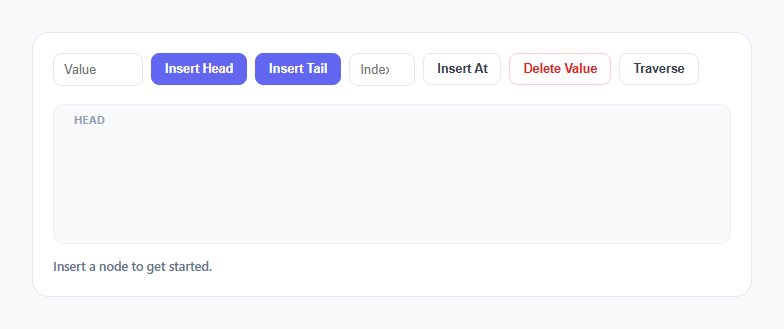
Most linked-list diagrams are static images because animating a real linked list is genuinely fiddly: nodes need to visually connect to whichever node comes next, and that "next" relationship changes shape on every insert and delete. This snippet renders a singly linked list as connected node boxes with CSS arrows between them, and provides insert-at-head, insert-at-tail, insert-at-index, delete-by-value, and a step-by-step traversal that highlights the walk from node to node exactly the way .next pointer-following works in a real implementation.
Data model: an array standing in for pointer-linked nodes
Under the hood, list is a plain JavaScript array of {id, value} objects — deliberately not a class-based Node with a literal .next reference, because array order already encodes the same sequential relationship a linked list's pointers encode, and it makes rendering dramatically simpler. Each node also gets a stable, monotonically increasing id from genId() so the DOM element for a given logical node can be tracked across re-renders even as its position in the array shifts. This id is the detail that makes the removal animation possible: without a stable identity, there would be no way to say "fade out *this specific* node" as opposed to "redraw everything and one fewer box happens to appear."
Why this is fundamentally different from re-rendering the whole list
The naive way to "animate" a list change is to clear the container and rebuild every node from scratch on every operation — which is what most simple to-do-list or table UIs do, and it works fine when nothing needs to visually connect to anything else. A linked list is different: the meaningful visual event isn't "a box appeared," it's "the arrow that used to point from node 2 to node 3 now points from node 2 to node 4, because node 3 was removed." This snippet's deleteValue() function demonstrates the distinction directly: before touching the underlying array, it finds the specific .node-wrap DOM element matching the node being removed, adds a .removing class that triggers a CSS opacity/scale transition, *waits* for that transition via await wait(220), and only then splices the array and calls render(). The old arrow fades with its node; the new, shorter arrow chain fades back in during the next render's entrance animation. That sequencing — animate out, then mutate state, then animate in — is the "animated pointer-rewiring" this component is built around, and it's the same principle you'd apply with FLIP animations or React's AnimatePresence in a framework context.
Insert-at-head is O(1); an array's unshift() is O(n)
Clicking Insert Head calls list.unshift({id, value}). In a *real* linked list backed by actual node objects with .next pointers, prepending a node is O(1): you allocate one new node, point its .next at the current head, and repoint the list's head reference at the new node — no other node is touched or moved. This snippet's underlying representation is a JS array for rendering convenience, and Array.prototype.unshift is actually O(n) internally (every existing element's index shifts up by one) — worth calling out explicitly as the one place this visualization's implementation convenience diverges from true linked-list performance. The about text and this snippet's insert-head status message intentionally teach the *real* linked-list complexity characteristic (O(1) head insertion because only one pointer changes) even though the underlying render array pays a different, JS-engine-specific cost; if you were building a production linked-list data structure rather than a teaching visualization, you'd use actual {value, next} node objects to get the true O(1) behavior.
Insert-at-index and the pointer-rewiring narrative
insertAt() clamps the requested index into range and calls list.splice(idx, 0, node). Conceptually, in pointer terms, this is: walk from the head idx steps to find the node right before the insertion point, create the new node with its .next set to what used to be "the node after," then repoint the previous node's .next at the new node. Only two pointers change no matter how long the list is — everything after the insertion point keeps pointing at whatever it already pointed at. The status message after every insert/delete spells out which pointer conceptually changed, reinforcing that a linked list mutation is a small, local, constant-size edit to the chain rather than a bulk rewrite.
Traversal: highlighting the walk one .next hop at a time
traverse() walks the rendered .node-wrap elements in order, applying an .active class to each node box (scaling it up and coloring it indigo) for 420ms, then downgrading it to a .found green state and lighting up the arrow leading to the next node in amber, before moving on. This sequence — highlight current node, light the outgoing arrow, move to next node — is a literal animation of the traversal loop while (node !== null) { visit(node); node = node.next; }, making the O(n) nature of searching a linked list (you must walk from the head; there's no random-access jump to index 5) visible rather than assumed.
Build with AI
Build, Understand, Optimize, and Extend It With AI
Hand this snippet's JavaScript to an AI assistant like Claude and ask it to explain exactly why deleteValue() awaits the removal transition before mutating the array, and why that ordering matters for the animation to look correct. Good extensions to ask for: a reverse() button that visibly flips every arrow's direction, a doubly linked list variant with both next and prev arrows, or a "search" mode that traverses and stops highlighting as soon as a target value is found instead of always walking the full list.
Prompt to recreate it
Copy this into your AI assistant of choice to build the effect from scratch, or as a jumping-off point for your own variant:
Build an animated singly linked list visualizer in plain HTML, CSS, and JavaScript, no libraries or frameworks.

Requirements:
- Represent the list as an ordered collection of nodes, each with a stable unique id that persists across re-renders so a specific logical node's DOM element can be targeted individually.
- Render each node as a box connected to the next node by a directional arrow (CSS-drawn or SVG), with a "null" terminator shown after the final node.
- Support insert at head, insert at tail, and insert at a user-specified index, each triggering an entrance animation (fade/scale in) for the new node and its connecting arrow.
- Support delete by value: before removing the node from the underlying data, animate that specific node's exit (fade/scale out) and await that animation's completion, then update the data and re-render so the surrounding nodes' arrow reconnects cleanly rather than instantly snapping.
- Add a Traverse action that walks the list from the head, sequentially highlighting each node and its outgoing arrow with a short delay between steps, visually replaying a while-node-is-not-null pointer-following loop.
- In the status text or comments, explain why inserting at the head of a true pointer-based linked list is O(1) while the same operation on a plain JavaScript array (unshift) is O(n), even if the demo itself uses an array internally for rendering convenience.
- Keep all animation timing based on CSS transitions plus small async/await delays — no animation library, no canvas.
Want to tighten it up first? Run this prompt through the AI Prompt Studio to score it across 8 quality dimensions, catch anti-patterns, and tune the wording for Claude, ChatGPT, or Gemini before you paste it in.
Source Code
<div class="wrap">
  <div class="toolbar">
    <input type="text" id="value-input" placeholder="Value" />
    <button class="btn btn-primary" id="btn-head">Insert Head</button>
    <button class="btn btn-primary" id="btn-tail">Insert Tail</button>
    <input type="number" id="index-input" placeholder="Index" class="idx-input" />
    <button class="btn" id="btn-index">Insert At</button>
    <button class="btn btn-danger" id="btn-delete">Delete Value</button>
    <button class="btn" id="btn-traverse">Traverse</button>
  </div>
  <div class="list-stage" id="list-stage">
    <div class="head-label" id="head-label">head</div>
    <div class="track" id="track"></div>
  </div>
  <div class="status-row" id="status-row">Insert a node to get started.</div>
</div>
* { box-sizing: border-box; margin: 0; padding: 0; }
body { font-family: system-ui, -apple-system, sans-serif; background: #f8fafc; min-height: 100vh; display: flex; align-items: center; justify-content: center; padding: 24px; }
.wrap { width: 100%; max-width: 720px; background: #fff; border: 1px solid #e2e8f0; border-radius: 16px; padding: 20px; }
.toolbar { display: flex; flex-wrap: wrap; gap: 8px; margin-bottom: 18px; align-items: center; }
.toolbar input[type="text"], .idx-input { padding: 8px 10px; border: 1.5px solid #e2e8f0; border-radius: 8px; font-size: 13px; width: 90px; }
.idx-input { width: 66px; }
.toolbar input:focus { outline: none; border-color: #6366f1; }
.btn { font-size: 12.5px; font-weight: 600; padding: 8px 13px; border-radius: 8px; border: 1.5px solid #e2e8f0; background: #fff; color: #374151; cursor: pointer; transition: all 0.15s; white-space: nowrap; }
.btn:hover { border-color: #cbd5e1; background: #f8fafc; }
.btn-primary { background: #6366f1; border-color: #6366f1; color: #fff; }
.btn-primary:hover { background: #4f46e5; border-color: #4f46e5; }
.btn-danger { color: #dc2626; border-color: #fecaca; }
.btn-danger:hover { background: #fef2f2; border-color: #fca5a5; }
.btn:disabled { opacity: 0.5; cursor: not-allowed; }
.list-stage { position: relative; min-height: 140px; background: #f8fafc; border: 1px solid #eef2f7; border-radius: 10px; padding: 30px 20px 20px; overflow-x: auto; }
.head-label { position: absolute; top: 8px; left: 20px; font-size: 10.5px; font-weight: 700; color: #94a3b8; text-transform: uppercase; letter-spacing: 0.05em; }
.track { position: relative; display: flex; align-items: center; min-height: 70px; min-width: max-content; }
.node-wrap { position: relative; display: flex; align-items: center; opacity: 0; transform: scale(0.6); transition: opacity 0.25s ease, transform 0.25s ease; }
.node-wrap.shown { opacity: 1; transform: scale(1); }
.node-wrap.removing { opacity: 0; transform: scale(0.5); }
.node { width: 64px; height: 46px; background: #fff; border: 2px solid #6366f1; border-radius: 9px; display: flex; align-items: center; justify-content: center; font-size: 13px; font-weight: 700; color: #1e293b; z-index: 2; transition: border-color 0.2s ease, background-color 0.2s ease, transform 0.2s ease; }
.node.active { background: #6366f1; color: #fff; transform: scale(1.1); box-shadow: 0 4px 14px rgba(99,102,241,0.35); }
.node.found { background: #22c55e; border-color: #22c55e; color: #fff; }
.arrow { width: 34px; height: 2px; background: #cbd5e1; position: relative; flex-shrink: 0; opacity: 0; transition: opacity 0.2s ease, background-color 0.2s ease; }
.arrow.shown { opacity: 1; }
.arrow.active { background: #f59e0b; }
.arrow::after { content: ''; position: absolute; right: -1px; top: 50%; transform: translateY(-50%); border-style: solid; border-width: 4px 0 4px 6px; border-color: transparent transparent transparent #cbd5e1; }
.arrow.active::after { border-left-color: #f59e0b; }
.null-tag { font-size: 11px; font-weight: 700; color: #cbd5e1; margin-left: 6px; }
.status-row { margin-top: 14px; font-size: 12.5px; color: #64748b; font-weight: 500; min-height: 18px; }let list = [];
let idCounter = 0;
let busy = false;
function genId() { return 'n' + (idCounter++); }
function render(animateNewId) {
const track = document.getElementById('track');
track.innerHTML = '';
list.forEach((node, i) => {
const wrap = document.createElement('div');
wrap.className = 'node-wrap';
wrap.dataset.id = node.id;
const box = document.createElement('div');
box.className = 'node';
box.textContent = node.value;
wrap.appendChild(box);
const arrow = document.createElement('div');
arrow.className = 'arrow';
wrap.appendChild(arrow);
track.appendChild(wrap);
requestAnimationFrame(() => {
wrap.classList.add('shown');
requestAnimationFrame(() => arrow.classList.add('shown'));
});
});
const tag = document.createElement('div');
tag.className = 'null-tag';
tag.textContent = list.length ? 'null' : '(empty list) null';
track.appendChild(tag);
}
function setStatus(text) {
document.getElementById('status-row').textContent = text;
}
function wait(ms) { return new Promise(res => setTimeout(res, ms)); }
async function insertHead() {
if (busy) return;
const value = readValue();
if (value === null) return;
busy = true;
list.unshift({ id: genId(), value });
render();
setStatus('Inserted "' + value + '" at head — O(1), only the head pointer changes.');
busy = false;
}
async function insertTail() {
if (busy) return;
const value = readValue();
if (value === null) return;
busy = true;
list.push({ id: genId(), value });
render();
setStatus('Inserted "' + value + '" at tail — O(n), traversed to the last node first.');
busy = false;
}
async function insertAt() {
if (busy) return;
const value = readValue();
if (value === null) return;
const idxRaw = document.getElementById('index-input').value;
let idx = Number(idxRaw);
if (Number.isNaN(idx)) idx = list.length;
idx = Math.max(0, Math.min(list.length, idx));
busy = true;
list.splice(idx, 0, { id: genId(), value });
render();
setStatus('Inserted "' + value + '" at index ' + idx + ' by rewiring the previous node\'s pointer.');
busy = false;
}
async function deleteValue() {
if (busy) return;
const value = document.getElementById('value-input').value.trim();
if (!value) { setStatus('Type a value in the field, then click Delete Value.'); return; }
const idx = list.findIndex(n => String(n.value) === value);
if (idx === -1) { setStatus('Value "' + value + '" was not found in the list.'); return; }
busy = true;
const wraps = document.querySelectorAll('.node-wrap');
const target = wraps[idx];
if (target) {
target.classList.add('removing');
await wait(220);
}
list.splice(idx, 1);
render();
setStatus('Deleted "' + value + '" — the previous node\'s pointer now skips directly to the next node.');
busy = false;
}
function readValue() {
const input = document.getElementById('value-input');
const value = input.value.trim();
if (!value) { setStatus('Type a value in the field first.'); return null; }
input.value = '';
return value;
}
async function traverse() {
if (busy || !list.length) { if (!list.length) setStatus('List is empty — nothing to traverse.'); return; }
busy = true;
document.getElementById('btn-traverse').disabled = true;
setStatus('Traversing from head via .next pointers...');
const wraps = document.querySelectorAll('.node-wrap');
for (let i = 0; i < wraps.length; i++) {
const box = wraps[i].querySelector('.node');
const arrow = wraps[i].querySelector('.arrow');
box.classList.add('active');
await wait(420);
box.classList.remove('active');
box.classList.add('found');
if (arrow) arrow.classList.add('active');
await wait(120);
}
setStatus('Traversal complete — reached the end of the list (next === null).');
document.querySelectorAll('.node.found').forEach(n => setTimeout(() => n.classList.remove('found'), 900));
document.querySelectorAll('.arrow.active').forEach(a => setTimeout(() => a.classList.remove('active'), 900));
document.getElementById('btn-traverse').disabled = false;
busy = false;
}
document.getElementById('btn-head').addEventListener('click', insertHead);
document.getElementById('btn-tail').addEventListener('click', insertTail);
document.getElementById('btn-index').addEventListener('click', insertAt);
document.getElementById('btn-delete').addEventListener('click', deleteValue);
document.getElementById('btn-traverse').addEventListener('click', traverse);
list = [{ id: genId(), value: 'A' }, { id: genId(), value: 'B' }, { id: genId(), value: 'C' }];
render();Step by step
How to Use
- 1Type a value and click Insert Head or Insert TailA new node box fades and scales into view at the front or back of the chain, and the arrow connecting it to its neighbor fades in immediately after.
- 2Type a value and an index, then click Insert AtThe node is spliced into the exact position requested (clamped to the list's current bounds), and the whole chain re-renders showing the new node wired between its new neighbors.
- 3Type an existing value and click Delete ValueThe matching node box fades out and shrinks in place first — only after that removal animation finishes does the rest of the list re-render with the gap closed and a fresh arrow connecting the surrounding nodes.
- 4Click Traverse to walk the list step by stepStarting from the head, each node highlights indigo, then settles to green as the arrow leading to the next node lights up amber, visually replaying the .next pointer-following loop.
- 5Watch the null tag at the end of the chainThe final tag reading "null" represents the last node's .next pointer, reinforcing that a singly linked list always terminates in a null reference rather than looping back.
- 6Try deleting the head or tail specificallyDelete the first or last value shown and observe that only the arrow touching the deleted node changes — the rest of the chain's arrows and positions are undisturbed, matching how a real linked-list deletion only touches one neighboring pointer.
Real-world uses
Common Use Cases
Got questions?
Frequently Asked Questions
Yes. In React, hold the list array in useState and let React's reconciliation handle entrance/exit — for exit animations specifically, either use a small animation library's AnimatePresence-style pattern or replicate this snippet's approach by delaying the state update with a setTimeout inside an async handler and clearing that timeout in a useEffect cleanup if the component unmounts mid-animation. In Vue, use Vue's built-in <TransitionGroup> for automatic enter/leave animations on list changes instead of manually orchestrating awaits. In Angular, use the Animations API's :enter/:leave triggers on an *ngFor, or replicate the manual await-before-splice pattern inside a component method, clearing any pending timers in ngOnDestroy.
A true linked list stores each node with an explicit reference to the next node; prepending only requires creating one new node and updating two references (the new node's next, and the list's head pointer) — no other node is touched, so it's O(1) regardless of list length. This snippet represents the list as a JavaScript array for rendering simplicity, and Array.prototype.unshift is actually O(n) under the hood because every existing element's index shifts. The status message still teaches the real linked-list complexity characteristic; if you need actual O(1) head insertion in production code, use real {value, next} node objects rather than an array.
Every node carries a stable id assigned once at creation time (genId()), stored both in the data array and as a data-id attribute on its rendered .node-wrap element. deleteValue() looks up the matching array index, then queries the DOM for the .node-wrap at that same position, adds a .removing class to trigger its exit transition, and only mutates the underlying array (via splice) after awaiting that transition's duration — which is what makes the fade-then-reflow sequence possible instead of an instant, jarring layout jump.
findIndex() returns the first matching index only, so the first occurrence (closest to the head) is deleted. To remove all occurrences, you would loop findIndex() and repeat the delete-and-await sequence until no match remains, or change the lookup to build a list of all matching indices up front and animate them out together.
Add a second arrow per node pointing in the reverse direction (back toward the previous node), style it distinctly, and update insert/delete operations to also acknowledge a conceptual "previous" pointer changing alongside the "next" pointer in the status messages. The rendering and animation approach — stable ids, await-before-splice deletes, entrance transitions on insert — carries over unchanged; only the number of arrows per node and the narration text need to change.