
Learn Coding Visually
Learn to code with interactive, live-preview playgrounds — HTML, CSS, JavaScript, React & more.
 HTML Playground42 lessons · Click-based · Live preview
 CSS PlaygroundLearn CSS with a live editor
 JavaScript Playground60 lessons · DOM · Async · Canvas
 React PlaygroundLearn React with a live code editor
 GSAP PlaygroundLearn GSAP animation interactively
 SVG Playground44 lessons · shapes · paths · animation
 SCSS Playground45 lessons · Sass modules · tokens
 Tailwind PlaygroundLearn Tailwind CSS with a live editor
 Bootstrap 5 Playground50 lessons · live preview
Event Loop Visualizer — Free HTML CSS JS Snippet
Event Loop Visualizer · Visualizers · Plain HTML, CSS & JS · Live preview
What's included
Features
About this UI Snippet
Event Loop Visualizer — Animated Call Stack, Macrotask Queue & Microtask Queue Showing the Real JavaScript Execution Order
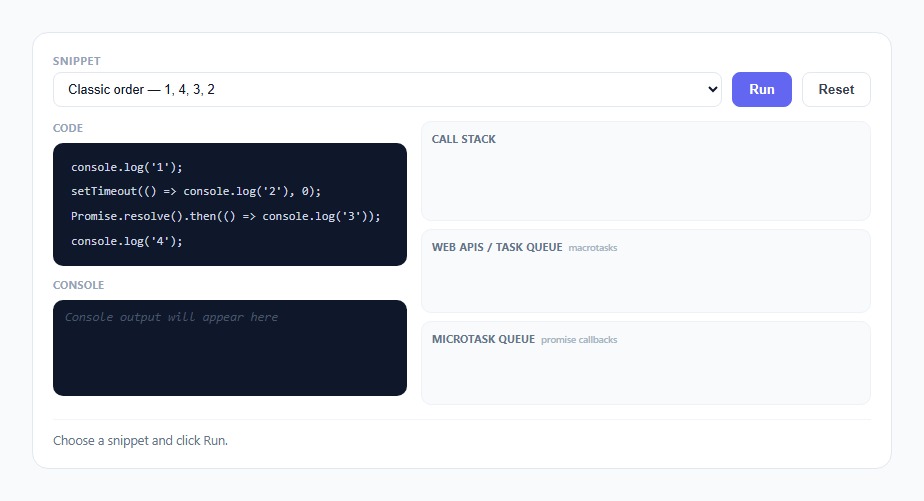
"Why does the order come out 1, 4, 3, 2?" is the single most-asked JavaScript interview question, and almost every answer to it is memorized rather than understood. This snippet exists to make the answer visible instead of memorized: three animated lanes — Call Stack, Web APIs / Task Queue, and Microtask Queue — plus a code panel and a console panel, all wired to a small event-driven playback engine that steps through real execution semantics in the right order, one DOM update at a time.
Why the algorithm is data, not a real interpreter
This snippet does not parse or execute JavaScript. Each of the three presets is authored as a plain array of step objects ({ kind: 'log' | 'macro' | 'micro', line, text, task }) that describes, in order, exactly what the real V8 engine would do for that snippet. That is a deliberate simplification: building an actual JS interpreter in a demo widget would bury the concept it's trying to teach under parser code. Instead the "truth" of the ordering is encoded once, correctly, by a human who understands the event loop, and the animation engine's only job is to play that truth back convincingly — the same event-precomputation pattern used by the recursion tree visualizer and sorting algorithm visualizer elsewhere in this library.
Two queues, one algorithm: drain-microtasks-first
The entire event loop is two functions. drainMicrotasks() is a while (microQueue.length) loop that keeps shifting tasks off the front of microQueue and running them until the queue is completely empty — not just once, but until nothing is left, including microtasks that get scheduled *during* the drain (see the nested example below). runEventLoop() calls drainMicrotasks() first, then enters a while (macroQueue.length) loop that shifts exactly one macrotask, runs it, and immediately calls drainMicrotasks() again before considering a second macrotask. That ordering — drain microtasks completely, then take one macrotask, then drain microtasks completely again — is not a simplification for this demo; it is the literal specification of how the HTML event loop processes its job queues, and it is the exact mechanism that explains why Promise.resolve().then() always wins a race against setTimeout(fn, 0) no matter which one was written first in the source.
Scheduling versus running are visually two different moments
A common misreading of the phrase "setTimeout schedules a macrotask" is to think the callback runs immediately when setTimeout() is *called*. This snippet keeps those two moments visually distinct: calling setTimeout(fn, 0) is itself a synchronous operation, so it pushes a real elv-chip-stack entry onto the Call Stack lane, sits there briefly, and pops off — that's the runSchedule() function doing exactly what a real synchronous function call does. Only *after* that stack frame pops does the scheduled callback exist purely as an amber chip sitting in the Task Queue lane, waiting. The callback itself does not run, and does not get its own stack frame, until the event loop specifically pulls it off that queue later. The same distinction applies to .then(): calling .then() is synchronous and pushes/pops the stack immediately, while the *callback passed to* .then() only runs later, during a microtask drain.
The nested-microtask preset proves the queue is live, not a snapshot
The third preset (Nested microtask escapes just in time) is the one that actually separates "I memorized 1-4-3-2" from "I understand the drain loop." Its microtask callback logs 'promise 1' and then, inside that same callback, calls Promise.resolve().then() again — scheduling a *second* microtask while the first one is still executing. In runTaskFromQueue(), this is modeled with an optional task.spawnsMicro field: after logging the task's own message, if spawnsMicro is set, a new task object is pushed onto the live microQueue array and a new chip animates into the Microtask Queue lane, mid-drain. Because drainMicrotasks()'s while loop re-checks microQueue.length on every iteration rather than iterating over a fixed-length snapshot taken at the start, that freshly-spawned nested microtask still gets drained *before* the pending setTimeout macrotask runs — visually proving that microtasks can keep cutting in line indefinitely, which is also the real-world mechanism behind infamous "microtask starvation" bugs where a chain of self-scheduling promises can delay setTimeout and rendering indefinitely.
Chip lifecycle: shared DOM primitives across all three lanes
All three lanes reuse the same small set of primitives: pushStack()/popStack() for the Call Stack (a column-reverse flex list so the newest entry visually sits on top, exactly like the linked list visualizer's node styling conventions), and addQueueChip()/removeQueueChip() for the two queue lanes (a wrapping flex row, oldest chip first, since queues are FIFO). Every chip animates in with a scale pop-in keyframe and animates out with a fade-and-shrink before being removed from the DOM, so nothing ever just snaps into or out of existence — every state change the algorithm makes has a matching, readable animation frame the user can actually watch happen.
The status line narrates the algorithm's own reasoning
Rather than leaving the viewer to infer why a chip is moving, setStatus() is called at every phase transition with the actual rule being applied in plain language — "Call stack is empty, draining the microtask queue completely before anything else runs," then later "Microtask queue is empty, the event loop pulls exactly one macrotask now." This turns the animation into a running commentary on the specification itself, so a viewer walks away able to state the drain-microtasks-first rule in their own words, not just recognize the final printed order.
Build with AI
Build, Understand, Optimize, and Extend It With AI
Paste this snippet's JavaScript into an AI assistant like Claude and ask it to trace, step by step, exactly why the nested-microtask preset's second promise callback still beats the pending setTimeout — that one trace usually cements the drain-microtasks-first rule better than reading about it. Good extensions to ask for: a fourth preset covering async/await desugared into the same step format, a speed slider so the drain phase can be slowed down further, or a "predict the output" quiz mode that hides the console panel until the user submits their guess.
Prompt to recreate it
Copy this into your AI assistant of choice to build the effect from scratch, or as a jumping-off point for your own variant:
Build an animated JavaScript event loop visualizer in plain HTML, CSS, and JavaScript, no libraries or frameworks.

Requirements:
- Three visually distinct lanes: a Call Stack (vertical, newest on top), a Web APIs / Task Queue lane for macrotasks like setTimeout, and a Microtask Queue lane for Promise .then callbacks, plus a code display panel and a console output panel.
- Represent each demo snippet as a precomputed ordered list of steps (not a real JS parser/interpreter) so the "what happens when" logic is data, separate from the DOM animation code, and include at least 2-3 selectable preset snippets with different call orderings, selectable via a dropdown.
- Synchronous console.log lines must immediately push and pop a Call Stack entry and print to the console panel right away; calling setTimeout or .then() must itself be a quick synchronous stack push/pop that ends with a waiting chip appearing in the correct queue lane — the scheduled callback itself must NOT run at that point.
- Once the call stack is empty after the synchronous pass, animate a strict two-phase event loop: first fully drain the microtask queue (moving each microtask into the stack, running it, logging its output, and popping it) including any new microtasks scheduled during that same drain, and only once the microtask queue is completely empty, move exactly one macrotask into the stack and run it, then re-check the microtask queue again before considering a second macrotask.
- Include at least one preset where a microtask callback itself schedules another microtask while executing, to prove the drain loop picks up newly-queued microtasks before touching a pending macrotask.
- Highlight the currently executing source line in the code panel in sync with each stack push, and show a running status line describing which event-loop rule is currently being applied (e.g. "draining microtasks" vs "running one macrotask").
- Use a light, clean color theme (off-white background, indigo/violet/amber accents, system-ui font) with smooth pop-in/fade-out animations for chips entering and leaving each lane, using either CSS keyframes or a paced async/await loop with small delays — no external animation library.
Want to tighten it up first? Run this prompt through the AI Prompt Studio to score it across 8 quality dimensions, catch anti-patterns, and tune the wording for Claude, ChatGPT, or Gemini before you paste it in.
Source Code
<div class="elv-wrap">
  <div class="elv-header">
    <div class="elv-field">
      <label class="elv-label">Snippet</label>
      <select id="elv-preset"></select>
    </div>
    <button class="elv-btn elv-btn-primary" id="elv-run">Run</button>
    <button class="elv-btn" id="elv-reset-btn">Reset</button>
  </div>
  <div class="elv-main">
    <div class="elv-col elv-code-col">
      <div class="elv-panel-title">Code</div>
      <div class="elv-code" id="elv-code"></div>
      <div class="elv-panel-title elv-console-title">Console</div>
      <div class="elv-console" id="elv-console"></div>
    </div>
    <div class="elv-col elv-lanes-col">
      <div class="elv-lane" id="elv-lane-stack">
        <div class="elv-lane-title">Call Stack</div>
        <div class="elv-lane-body elv-stack-body" id="elv-stack-body"></div>
      </div>
      <div class="elv-lane">
        <div class="elv-lane-title">Web APIs / Task Queue <span class="elv-lane-sub">macrotasks</span></div>
        <div class="elv-lane-body elv-queue-body" id="elv-macro-body"></div>
      </div>
      <div class="elv-lane">
        <div class="elv-lane-title">Microtask Queue <span class="elv-lane-sub">promise callbacks</span></div>
        <div class="elv-lane-body elv-queue-body" id="elv-micro-body"></div>
      </div>
    </div>
  </div>
  <div class="elv-status" id="elv-status">Choose a snippet and click Run.</div>
</div>
* { box-sizing: border-box; margin: 0; padding: 0; }
body { font-family: system-ui, -apple-system, sans-serif; background: #f8fafc; min-height: 100vh; display: flex; align-items: center; justify-content: center; padding: 24px; }
.elv-wrap { width: 100%; max-width: 860px; background: #fff; border: 1px solid #e2e8f0; border-radius: 16px; padding: 20px; }
.elv-header { display: flex; align-items: flex-end; gap: 10px; margin-bottom: 14px; flex-wrap: wrap; }
.elv-field { display: flex; flex-direction: column; gap: 4px; flex: 1; min-width: 200px; }
.elv-label { font-size: 11px; font-weight: 700; color: #94a3b8; text-transform: uppercase; letter-spacing: 0.05em; }
.elv-field select { padding: 8px 10px; border: 1.5px solid #e2e8f0; border-radius: 8px; font-size: 13px; color: #0f172a; background: #fff; }
.elv-field select:focus { outline: none; border-color: #6366f1; }
.elv-btn { font-size: 13px; font-weight: 600; padding: 9px 16px; border-radius: 8px; border: 1.5px solid #e2e8f0; background: #fff; color: #374151; cursor: pointer; transition: all 0.15s; }
.elv-btn:hover { border-color: #cbd5e1; background: #f8fafc; }
.elv-btn:disabled { opacity: 0.5; cursor: not-allowed; }
.elv-btn-primary { background: #6366f1; border-color: #6366f1; color: #fff; }
.elv-btn-primary:hover { background: #4f46e5; border-color: #4f46e5; }
.elv-main { display: grid; grid-template-columns: 1.1fr 1.4fr; gap: 14px; }
.elv-col { display: flex; flex-direction: column; gap: 8px; }
.elv-panel-title { font-size: 10.5px; font-weight: 700; color: #94a3b8; text-transform: uppercase; letter-spacing: 0.05em; }
.elv-console-title { margin-top: 4px; }
.elv-code { background: #0f172a; border-radius: 10px; padding: 12px; font-family: ui-monospace, SFMono-Regular, monospace; font-size: 12px; line-height: 1.9; color: #cbd5e1; overflow-x: auto; }
.elv-code-line { white-space: pre; padding: 1px 6px; border-radius: 4px; transition: background-color 0.2s ease, color 0.2s ease; }
.elv-code-line.active { background: #f59e0b; color: #1e1b0f; font-weight: 700; }
.elv-console { background: #0f172a; border-radius: 10px; padding: 10px 12px; font-family: ui-monospace, SFMono-Regular, monospace; font-size: 12.5px; color: #86efac; min-height: 96px; display: flex; flex-direction: column; gap: 4px; }
.elv-console-line { animation: elvFadeIn 0.2s ease; }
.elv-console-empty { color: #475569; font-style: italic; }
.elv-lane { background: #f8fafc; border: 1px solid #eef2f7; border-radius: 10px; padding: 10px; }
.elv-lane-title { font-size: 10.5px; font-weight: 700; color: #64748b; text-transform: uppercase; letter-spacing: 0.04em; margin-bottom: 8px; display: flex; align-items: baseline; gap: 6px; }
.elv-lane-sub { font-size: 9.5px; font-weight: 600; color: #a5b4c3; text-transform: none; letter-spacing: 0; }
.elv-stack-body { display: flex; flex-direction: column-reverse; gap: 5px; min-height: 56px; }
.elv-queue-body { display: flex; gap: 6px; flex-wrap: wrap; min-height: 40px; align-items: center; }
.elv-chip { font-size: 11.5px; font-weight: 700; font-family: ui-monospace, monospace; padding: 6px 9px; border-radius: 6px; animation: elvPop 0.22s ease; }
.elv-chip-stack { background: #6366f1; color: #fff; }
.elv-chip-macro { background: #fde68a; color: #78350f; border: 1px solid #f59e0b; }
.elv-chip-micro { background: #ddd6fe; color: #4c1d95; border: 1px solid #8b5cf6; }
.elv-chip.leaving { animation: elvFadeOut 0.18s ease forwards; }
@keyframes elvPop { from { transform: scale(0.6); opacity: 0; } to { transform: scale(1); opacity: 1; } }
@keyframes elvFadeIn { from { opacity: 0; transform: translateY(-3px); } to { opacity: 1; transform: translateY(0); } }
@keyframes elvFadeOut { from { opacity: 1; transform: scale(1); } to { opacity: 0; transform: scale(0.7); } }
.elv-status { margin-top: 14px; padding-top: 12px; border-top: 1px solid #f1f5f9; font-size: 12.5px; color: #64748b; min-height: 18px; }
@media (max-width: 620px) { .elv-main { grid-template-columns: 1fr; } }const PRESETS = [
{
name: 'Classic order — 1, 4, 3, 2',
code: [
"console.log('1');",
"setTimeout(() => console.log('2'), 0);",
"Promise.resolve().then(() => console.log('3'));",
"console.log('4');",
],
sync: [
{ kind: 'log', line: 0, text: "log('1')", log: '1' },
{ kind: 'macro', line: 1, text: 'setTimeout(fn, 0)', task: { label: '() => log(2)', log: '2' } },
{ kind: 'micro', line: 2, text: '.then(fn)', task: { label: '() => log(3)', log: '3' } },
{ kind: 'log', line: 3, text: "log('4')", log: '4' },
],
},
{
name: 'Two microtasks beat one macrotask',
code: [
"setTimeout(() => console.log('timeout'), 0);",
"Promise.resolve().then(() => console.log('promise 1'));",
"Promise.resolve().then(() => console.log('promise 2'));",
"console.log('sync');",
],
sync: [
{ kind: 'macro', line: 0, text: 'setTimeout(fn, 0)', task: { label: "() => log('timeout')", log: 'timeout' } },
{ kind: 'micro', line: 1, text: '.then(fn)', task: { label: "() => log('promise 1')", log: 'promise 1' } },
{ kind: 'micro', line: 2, text: '.then(fn)', task: { label: "() => log('promise 2')", log: 'promise 2' } },
{ kind: 'log', line: 3, text: "log('sync')", log: 'sync' },
],
},
{
name: 'Nested microtask escapes just in time',
code: [
"console.log('start');",
"setTimeout(() => console.log('timeout'), 0);",
"Promise.resolve().then(() => {",
" console.log('promise 1');",
" Promise.resolve().then(() => console.log('promise 2 (nested)'));",
"});",
"console.log('end');",
],
sync: [
{ kind: 'log', line: 0, text: "log('start')", log: 'start' },
{ kind: 'macro', line: 1, text: 'setTimeout(fn, 0)', task: { label: "() => log('timeout')", log: 'timeout' } },
{
kind: 'micro', line: 2, text: '.then(fn)',
task: {
label: "() => { log('promise 1'); ... }", log: 'promise 1',
spawnsMicro: { label: "() => log('promise 2 (nested)')", log: 'promise 2 (nested)' },
},
},
{ kind: 'log', line: 6, text: "log('end')", log: 'end' },
],
},
];
let running = false;
let chipCounter = 0;
const macroQueue = [];
const microQueue = [];
function wait(ms) { return new Promise(res => setTimeout(res, ms)); }
function delay() { return 480; }
function el(tag, cls, text) {
const node = document.createElement('div');
if (cls) node.className = cls;
if (text !== undefined) node.textContent = text;
return node;
}
function setStatus(msg) { document.getElementById('elv-status').textContent = msg; }
function renderCode(preset) {
const box = document.getElementById('elv-code');
box.innerHTML = '';
preset.code.forEach((lineText, i) => {
const line = el('div', 'elv-code-line', lineText);
line.dataset.line = String(i);
box.appendChild(line);
});
}
function highlightLine(n) {
document.querySelectorAll('.elv-code-line').forEach(l => {
l.classList.toggle('active', Number(l.dataset.line) === n);
});
}
function clearHighlight() {
document.querySelectorAll('.elv-code-line').forEach(l => l.classList.remove('active'));
}
function logToConsole(text) {
const box = document.getElementById('elv-console');
const empty = box.querySelector('.elv-console-empty');
if (empty) empty.remove();
const line = el('div', 'elv-console-line', '> ' + text);
box.appendChild(line);
box.scrollTop = box.scrollHeight;
}
async function pushStack(label) {
const stack = document.getElementById('elv-stack-body');
const chip = el('div', 'elv-chip elv-chip-stack', label);
const id = 'stack-' + (chipCounter++);
chip.dataset.id = id;
stack.appendChild(chip);
await wait(delay());
return id;
}
async function popStack(id) {
const stack = document.getElementById('elv-stack-body');
const chip = stack.querySelector('[data-id="' + id + '"]');
if (chip) {
chip.classList.add('leaving');
await wait(160);
chip.remove();
}
}
function addQueueChip(laneId, label, taskId) {
const lane = document.getElementById(laneId);
const cls = laneId === 'elv-macro-body' ? 'elv-chip-macro' : 'elv-chip-micro';
const chip = el('div', 'elv-chip ' + cls, label);
chip.dataset.id = taskId;
lane.appendChild(chip);
}
async function removeQueueChip(laneId, taskId) {
const lane = document.getElementById(laneId);
const chip = lane.querySelector('[data-id="' + taskId + '"]');
if (chip) {
chip.classList.add('leaving');
await wait(160);
chip.remove();
}
}
async function runSyncLog(step) {
highlightLine(step.line);
const id = await pushStack(step.text);
logToConsole(step.log);
await popStack(id);
clearHighlight();
}
async function runSchedule(step) {
highlightLine(step.line);
const id = await pushStack(step.text);
const taskId = 'task-' + (chipCounter++);
const task = Object.assign({ id: taskId }, step.task);
if (step.kind === 'macro') {
macroQueue.push(task);
addQueueChip('elv-macro-body', task.label, taskId);
} else {
microQueue.push(task);
addQueueChip('elv-micro-body', task.label, taskId);
}
await wait(180);
await popStack(id);
clearHighlight();
}
async function runTaskFromQueue(task, laneId, badge) {
await removeQueueChip(laneId, task.id);
setStatus(badge + ' running: ' + task.label);
const id = await pushStack(task.label);
logToConsole(task.log);
if (task.spawnsMicro) {
const nestedId = 'task-' + (chipCounter++);
const nested = Object.assign({ id: nestedId }, task.spawnsMicro);
await wait(240);
microQueue.push(nested);
addQueueChip('elv-micro-body', nested.label, nestedId);
}
await popStack(id);
}
async function drainMicrotasks() {
while (microQueue.length) {
setStatus('Call stack is empty — draining the microtask queue completely before anything else runs.');
const task = microQueue.shift();
await runTaskFromQueue(task, 'elv-micro-body', 'Microtask');
await wait(120);
}
}
async function runEventLoop() {
await drainMicrotasks();
while (macroQueue.length) {
setStatus('Microtask queue is empty — the event loop pulls exactly one macrotask now.');
const task = macroQueue.shift();
await runTaskFromQueue(task, 'elv-macro-body', 'Macrotask');
await wait(120);
await drainMicrotasks();
}
}
function resetAll() {
macroQueue.length = 0;
microQueue.length = 0;
document.getElementById('elv-stack-body').innerHTML = '';
document.getElementById('elv-macro-body').innerHTML = '';
document.getElementById('elv-micro-body').innerHTML = '';
const consoleBox = document.getElementById('elv-console');
consoleBox.innerHTML = '';
consoleBox.appendChild(el('div', 'elv-console-empty', 'Console output will appear here'));
clearHighlight();
setStatus('Choose a snippet and click Run.');
}
async function run() {
if (running) return;
running = true;
document.getElementById('elv-run').disabled = true;
document.getElementById('elv-preset').disabled = true;
resetAll();
const preset = PRESETS[Number(document.getElementById('elv-preset').value)];
setStatus('Running synchronous code top to bottom...');
for (const step of preset.sync) {
if (step.kind === 'log') await runSyncLog(step);
else await runSchedule(step);
await wait(80);
}
setStatus('Synchronous code finished, call stack is empty. Starting the event loop...');
await wait(200);
await runEventLoop();
setStatus('Done. Note the order: all synchronous logs, then every microtask, then macrotasks one at a time.');
document.getElementById('elv-run').disabled = false;
document.getElementById('elv-preset').disabled = false;
running = false;
}
function populatePresets() {
const select = document.getElementById('elv-preset');
select.innerHTML = '';
PRESETS.forEach((p, i) => {
const opt = document.createElement('option');
opt.value = String(i);
opt.textContent = p.name;
select.appendChild(opt);
});
renderCode(PRESETS[0]);
}
document.getElementById('elv-preset').addEventListener('change', (e) => {
renderCode(PRESETS[Number(e.target.value)]);
resetAll();
});
document.getElementById('elv-run').addEventListener('click', run);
document.getElementById('elv-reset-btn').addEventListener('click', () => {
const preset = PRESETS[Number(document.getElementById('elv-preset').value)];
renderCode(preset);
resetAll();
});
populatePresets();
resetAll();Step by step
How to Use
- 1Pick a code snippet from the dropdownThree presets are available: the classic 1/4/3/2 example, a two-microtasks-versus-one-timeout race, and a nested microtask that reschedules itself mid-drain. The code panel updates immediately to show the chosen snippet.
- 2Click Run and watch the synchronous pass firstEach line highlights in amber as it executes. Plain console.log calls push and pop the Call Stack instantly and print to the console panel right away.
- 3Watch setTimeout and .then() calls schedule, not runCalling setTimeout or .then() is itself a quick stack push/pop, after which a chip appears waiting in the Task Queue (amber) or Microtask Queue (violet) lane — the callback inside has not run yet.
- 4Once the stack is empty, watch the microtask drainThe status line announces the drain phase. Violet chips move from the Microtask Queue into the Call Stack one at a time, log their message, and pop — and the queue keeps draining until it is completely empty before anything else happens.
- 5Watch exactly one macrotask run after the drainOnly after every microtask is gone does a single amber chip move from the Task Queue into the Call Stack and run. On the nested preset, watch a new violet chip appear mid-drain and still get processed before the amber timeout chip is touched.
- 6Read the console panel top to bottom as your answer keyThe final printed order in the console panel is the definitive answer to "what does this code log" — compare it against what you predicted before pressing Run.
Real-world uses
Common Use Cases
Got questions?
Frequently Asked Questions
Yes. The PRESETS data and the pure animation functions (pushStack, popStack, addQueueChip, drainMicrotasks, runEventLoop) do not touch framework state, so port them as-is into a plain module. Trigger run() from a click handler set up in a useEffect (React), a method (Vue), or ngAfterViewInit (Angular). The only cleanup concern is the chain of chained setTimeout-based await wait(ms) calls inside run(): store a "cancelled" flag (a ref in React, a plain instance property in Vue/Angular) that every await checkpoint checks before touching the DOM, and set it true in the component's unmount/cleanup hook so an in-progress playback does not keep writing to detached nodes if the user navigates away mid-animation.
This is not a simplification made for the demo — it is the literal behavior specified by the HTML event loop: after the currently executing task finishes and the call stack empties, the engine must process the entire microtask queue, including any microtasks queued by earlier microtasks in that same drain, before it is allowed to move on to the next macrotask (a setTimeout callback, a rendering step, a UI event, etc). This snippet's drainMicrotasks() while-loop mirrors that rule exactly.
setTimeout, setInterval, UI events, and I/O callbacks are macrotasks — the event loop runs exactly one of them per full trip through the loop. Promise .then/.catch/.finally callbacks (and queueMicrotask) are microtasks — the event loop drains every microtask in the queue, including newly-added ones, before doing anything else. That single rule (drain all microtasks, then one macrotask, repeat) is the entire reason promise callbacks consistently run before a setTimeout(fn, 0) callback that was scheduled earlier in the source.
Because drainMicrotasks() does not take a fixed snapshot of the queue — it keeps checking microQueue.length on every loop iteration. When the first microtask callback runs and schedules a second microtask inside itself, that new task is pushed onto the same live queue the while-loop is still watching, so it gets picked up and drained before the loop is allowed to exit and hand control to the waiting macrotask.
Yes — an async function's code before the first await runs synchronously (pushing/popping the Call Stack exactly like the log steps here), and everything after an await is scheduled as a microtask continuation, equivalent to a .then() callback. Mentally rewriting await someAsyncCall() as someAsyncCall().then(continueHere) and tracing it through this visualizer's micro lane gives the same correct ordering async/await produces under the hood.