You Might Also Like
Learn Coding Visually
Learn to code with interactive, live-preview playgrounds — HTML, CSS, JavaScript, React & more.
 HTML Playground42 lessons · Click-based · Live preview
 CSS PlaygroundLearn CSS with a live editor
 JavaScript Playground60 lessons · DOM · Async · Canvas
 React PlaygroundLearn React with a live code editor
 GSAP PlaygroundLearn GSAP animation interactively
 SVG Playground44 lessons · shapes · paths · animation
 SCSS Playground45 lessons · Sass modules · tokens
 Tailwind PlaygroundLearn Tailwind CSS with a live editor
 Bootstrap 5 Playground50 lessons · live preview
Binary Search Visualizer — Free HTML CSS JS Snippet
Binary Search Visualizer · Animations · Plain HTML, CSS & JS · Live preview
What's included
Features
About this UI Snippet
Binary Search Visualizer — Animated Low/Mid/High Pointers on a Sorted Array with Step-by-Step Comparison Log in Vanilla JS
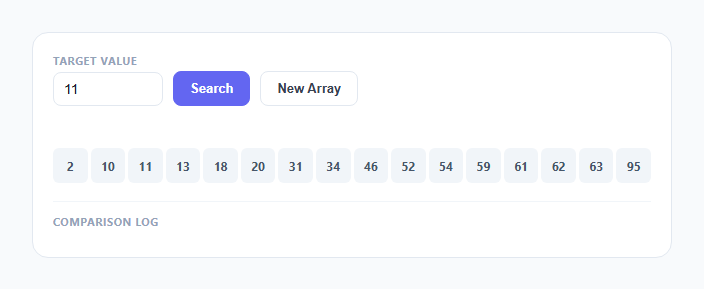
Binary search is usually taught with a paragraph of pseudocode and a static diagram, which hides the thing that actually makes it fast: every single comparison throws away half of what's left. This snippet makes that visible by animating the low, mid, and high pointers as they crawl across a row of sorted number boxes, dimming the eliminated half after every comparison and printing a plain-English log line for each step.
Why the array must be sorted
Binary search's entire correctness argument depends on one guarantee: if array[mid] is less than the target, every value to the left of mid is also less than the target, so the whole left half can be discarded without checking it individually. That guarantee only holds because the array is sorted ascending. This snippet enforces it structurally — randomArray() builds a Set of 16 unique random integers and immediately calls .sort((a,b) => a - b) before the array is ever rendered, so there is no code path that produces an unsorted state. If you swap in your own data, sorting it first isn't optional decoration, it's the precondition the entire algorithm depends on; run this same logic on unsorted data and the left/right elimination becomes wrong on the very first step.
Step pre-computation, same architecture as the sorting visualizer
buildSteps(target) runs the full binary search synchronously before any animation happens, pushing one record per comparison: {lo, hi, mid, value, target}, followed by either a {found: true, mid} or {notFound: true} terminal step. This mirrors the step-array architecture used across this library's other algorithm visualizers — the search logic and the on-screen playback are entirely separate concerns. The advantage here specifically is that the log panel and the box highlighting are guaranteed to describe exactly the same sequence of comparisons, since both are driven off the identical pre-computed step list rather than being narrated separately.
The O(log n) intuition made concrete
Each step computes mid = Math.floor((lo + hi) / 2) and then narrows either lo to mid + 1 or hi to mid - 1 — never both, and never a small adjustment, always cutting the live range [lo, hi] exactly in half. With 16 elements, that means the range shrinks 16 → 8 → 4 → 2 → 1, so the search is guaranteed to finish in at most 4 comparisons regardless of where the target sits or whether it's present at all. That is the entire content of "O(log n)": every step does a constant amount of work but eliminates a *proportion* of what's left rather than a fixed count, so the number of steps needed grows logarithmically, not linearly, as the array grows. Doubling the array to 32 elements adds only one more possible step, not sixteen — a fact that becomes visually obvious once you've watched the elimination happen a few times.
Rendering the elimination and pointer animation
Every comparison step repaints all boxes: indices outside the current [lo, hi] window get the .eliminated class (22% opacity, slightly scaled down via a CSS transition), indices still in play get a light indigo .range background, and the mid box itself gets a distinct violet .mid style with a scale-up and shadow so it's unmistakable which element is being compared right now. A separate row of pointer labels above the boxes — L, M, H in cyan, violet, and red respectively — is cleared and repositioned above the correct box index on every step using querySelectorAll('.ptr')[index], giving a textbook-style visual of the three pointers converging without needing any SVG or canvas.
The comparison log as a plain-English trace
Every step also appends a line to the log panel in the exact format lo=3 hi=10 mid=6, arr[6]=42 > 30, search left half — deliberately readable without any algorithm background, generated by a simple three-way branch comparing value to target. This log is what turns an abstract animation into something closer to a textbook walkthrough: a learner can pause at any point, read the last log line, and understand exactly why the algorithm chose to look left or right next, reinforcing the pointer movement they're watching simultaneously above.
Async/await pacing instead of a manual timer loop
Unlike the sorting and pathfinding visualizers in this library, which use a setTimeout-driven tick() function, this one uses a single async function runSearch() with a wait(ms) helper that wraps setTimeout in a Promise. Because binary search never has more than a handful of steps (at most log2(n)), a simple for...of loop with await wait(650) between iterations is simpler to read and reason about than a recursive scheduler, while still keeping the algorithm (buildSteps) and the animation (runSearch) in clearly separate functions.
Build with AI
Build, Understand, Optimize, and Extend It With AI
Hand this snippet's JavaScript to an AI assistant like Claude and ask it to walk through exactly why Math.floor((lo + hi) / 2) combined with lo = mid + 1 / hi = mid - 1 guarantees termination — a surprisingly common source of infinite-loop bugs when written slightly differently. Good extensions to request: finding the first/last occurrence of a duplicated target, an "exponential search" variant for unbounded/streamed arrays, or a side-by-side race between binary search and linear search showing comparison counts diverge as array size grows.
Prompt to recreate it
Copy this into your AI assistant of choice to build the effect from scratch, or as a jumping-off point for your own variant:
Build an animated binary search visualizer in plain HTML, CSS, and JavaScript, no libraries or frameworks.

Requirements:
- Generate and display a sorted row of unique random number boxes (roughly 16 values), guaranteeing sort order is enforced before display, never left to chance.
- Provide a numeric input for a target value and a Search button that starts the animation.
- Pre-compute the entire search as a flat array of step objects (lo, hi, mid, value at mid) by running the real binary search algorithm to completion before any animation begins, keeping the algorithm function pure and separate from the rendering/animation function.
- Animate three labeled pointers (low, mid, high) that reposition above the correct box index on every step, using distinct colors for each.
- On every step, visually fade/dim the half of the array outside the current [low, high] range using a CSS transition, and highlight the mid box distinctly (different color, slight scale-up).
- Append a plain-English log line for every comparison in the format "lo=X hi=Y mid=Z, arr[Z]=V > target, search left half" (or the appropriate direction/equality case), so a reader can trace the algorithm's decisions without reading code.
- Show a clear success state (found box pulses a success color) or a not-found state (distinct log entry) once the search terminates, and support re-running with a new randomly generated sorted array.
Want to tighten it up first? Run this prompt through the AI Prompt Studio to score it across 8 quality dimensions, catch anti-patterns, and tune the wording for Claude, ChatGPT, or Gemini before you paste it in.
Step by step
How to Use
- 1Enter a target value in the input fieldType any number. New Array pre-fills a value that actually exists in the current array so you can see a successful search on first load.
- 2Click Search to start the animationThe low (cyan), mid (violet), and high (red) pointers appear above the boxes, and the array boxes reset to their full, non-eliminated state.
- 3Watch the mid box highlight and half the array dimEach step highlights the current mid box in violet and fades the eliminated half to 22% opacity, visually shrinking the active search range on every comparison.
- 4Read the comparison log as it appends liveEach step logs a line like "lo=0 hi=15 mid=7, arr[7]=51 > 30, search left half" so you can follow exactly why the algorithm moved the pointers where it did.
- 5See the found box turn green, or a not-found messageIf the target exists, its box pulses green and scales up; if the range collapses without a match, the log shows a red "not in the array" line instead.
- 6Click New Array to reset with fresh sorted valuesGenerates 16 new unique random integers, sorts them ascending, and clears the pointers and log so you can try another search from scratch.
Real-world uses
Common Use Cases
Got questions?
Frequently Asked Questions
Yes. Move buildSteps() into a utils function that takes an array and target and returns the step list — it is pure and framework-agnostic. In React, trigger the animation from a click handler that runs an async loop inside a useCallback, and if the component can unmount mid-search, guard each await wait() continuation with an isMounted ref check, or track the pending timeout id in a ref and clear it in a useEffect cleanup. In Vue, run the same async function from a method and check a component-level flag before updating state after each await. In Angular, run it from a component method and check an isDestroyed flag set in ngOnDestroy before touching the DOM after each awaited step.
The algorithm decides which half to discard based on a single comparison at the midpoint, assuming everything to one side is uniformly smaller and everything to the other side is uniformly larger. If the array is not sorted, that assumption is false, so eliminating an entire half based on one comparison can throw away the target itself. This snippet guarantees the precondition by always sorting the generated array before it is ever displayed or searched.
Every comparison discards roughly half of the remaining search range, so after k comparisons the range has shrunk by a factor of 2^k. The search ends when the range is reduced to zero elements, which happens once 2^k >= n, i.e. k >= log2(n). That is why the number of steps grows logarithmically with array size rather than linearly like a plain scan — doubling the array size adds only one more possible comparison, not double the work.
This implementation stops at the first index where array[mid] equals the target, which is not guaranteed to be the first or last occurrence of a duplicated value — standard binary search only guarantees finding *a* match, not a specific one. To find the leftmost occurrence, change the found branch to keep narrowing hi = mid - 1 instead of breaking immediately, and track the best match found so far; a symmetric change finds the rightmost occurrence.
Change the SIZE constant to generate a different number of unique random values (the Set-based generator scales to any size). To let users type their own sorted list, add a text input, parse it with .split(",").map(Number), sort it defensively with .sort((a,b) => a - b) even if you expect it pre-sorted, and assign the result to array before calling renderBoxes() — never skip the defensive sort, since an unsorted input silently breaks the algorithm's core guarantee.