Learn Coding Visually
Learn to code with interactive, live-preview playgrounds — HTML, CSS, JavaScript, React & more.
 HTML Playground42 lessons · Click-based · Live preview
 CSS PlaygroundLearn CSS with a live editor
 JavaScript Playground60 lessons · DOM · Async · Canvas
 React PlaygroundLearn React with a live code editor
 GSAP PlaygroundLearn GSAP animation interactively
 SVG Playground44 lessons · shapes · paths · animation
 SCSS Playground45 lessons · Sass modules · tokens
 Tailwind PlaygroundLearn Tailwind CSS with a live editor
 Bootstrap 5 Playground50 lessons · live preview
Regex Match Game — Free HTML CSS JS Snippet
Regex Match Game · Games · Plain HTML, CSS & JS · Live preview
What's included
Features
About this UI Snippet
Regex Match Game — Live RegExp.test Grading, Positive and Negative String Sets & Too-Loose Diagnosis
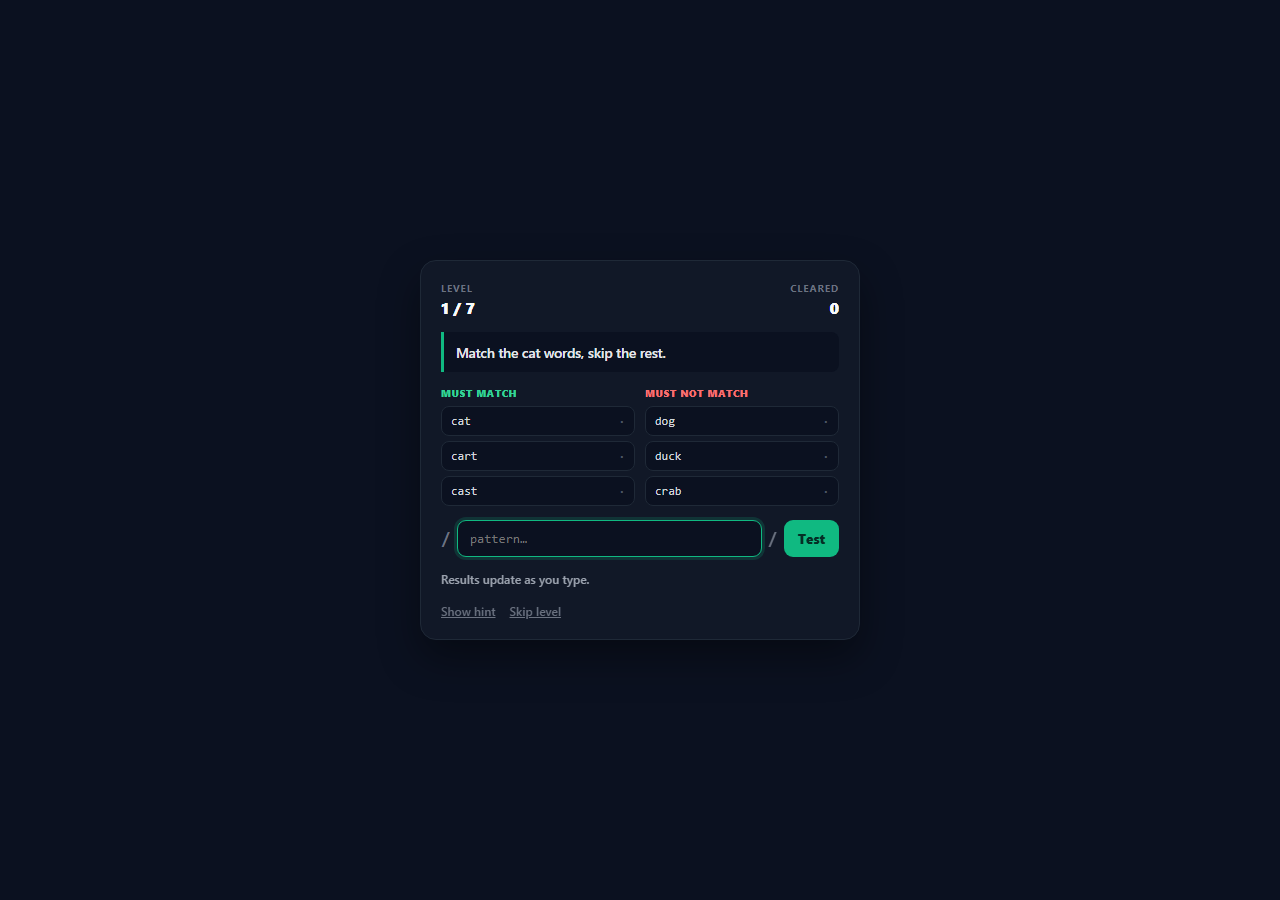
The hard part of regular expressions is never writing something that matches — it is writing something that matches the right things and nothing else. A pattern that passes your three examples and quietly also matches half your production data is the classic regex bug, and it is invisible if you only ever test the positive cases. This snippet is a playable trainer built around that exact tension: every level gives a list of strings the pattern must match and a second list it must reject, and a level is only cleared when both lists are fully satisfied.
Grading against string sets, not a stored answer
There is no reference pattern anywhere in the level data. Each level is defined purely by its yes and no arrays, and grading runs the player's compiled RegExp against every string in both lists with re.test(s), requiring true for every positive and false for every negative. That means any pattern satisfying the specification passes — on the file-extension level, \.(png|jpg)$, \.(jpe?g|png)$ and other equivalent formulations are all accepted. Because the specification *is* the test set, the game teaches the habit of thinking about a regex in terms of what it accepts and rejects rather than in terms of a memorised incantation.
Compiling user input without letting it break the page
compile() wraps new RegExp(pattern) in try/catch and returns null on failure, because a half-typed pattern like [a- or (png| throws a SyntaxError on nearly every keystroke while the player is composing. Returning null lets callers distinguish three states cleanly — empty input, invalid syntax, and a usable expression — so the input can show a red border mid-typing without clearing the result marks or spilling errors into the console. The input is also length-capped in the markup, which keeps a pathological pattern from being pasted in wholesale.
Live per-string verdicts on both columns
paint() walks a list, tests each string, and applies a pass or fail class based on whether the actual result equals the *desired* result for that column — so in the left column a match is a pass, and in the right column a match is a failure. Each row also prints the raw verdict ("match" or "no") next to the string, which separates the two things a learner needs to see at once: what the regex did, and whether that was what the level wanted. Because both columns are repainted on every input event, a player watches strings flip between columns' pass states character by character as the pattern is built.
Failure messages that name the direction of the error
When a submission is not perfect, the status line compares the two column scores and reports the specific failure mode: "too strict" when every negative is correctly rejected but some positives are still unmatched, "too loose" when every positive matches but some negatives matched too, and a plain score when both columns have problems. Too-loose is the regex bug that matters most in real code, and naming it explicitly — rather than saying "wrong" — is what turns a wrong answer into a lesson about over-broad patterns.
Levels as a progression of concepts
The seven levels move through literal substrings, character classes, the + quantifier, the ^ start anchor, the \d digit shorthand, alternation with an escaped literal dot and the $ end anchor, and finally a both-ends-anchored email-shaped pattern. Each carries a one-line hint explaining the technique rather than giving the answer, and the negative lists are chosen adversarially — level four rejects "blog", "catalog" and "analogue" specifically so an unanchored log fails and the player has to discover ^.
Build with AI
Build, Understand, Optimize, and Extend It With AI
Paste this snippet into an AI assistant like Claude and ask it to add a flags row (g, i, m) with levels that only solve when a specific flag is set, which teaches the part of regex most tutorials skip. Other strong extensions: add a capture-group mode where the level specifies expected captured values rather than just match/no-match, add a "shortest pattern wins" scoring rule to discourage brute-force alternation lists, show a live visualisation of which characters in each string the regex consumed using match indices, or add a catastrophic-backtracking guard that times a test run and warns when a pattern is pathologically slow on the sample strings.
Prompt to recreate it
Copy this into your AI assistant of choice to build the effect from scratch, or as a jumping-off point for your own variant:
Build a playable regular-expression game in plain HTML, CSS, and JavaScript — no frameworks or libraries.

Requirements:
- A levels array where each level is specified ONLY by a plain-English goal, an array of strings the pattern must match, an array of strings it must not match, and a one-line hint. Do not store a reference answer — the string sets are the specification.
- An input styled between two literal slashes, where the typed pattern is compiled with new RegExp() inside a try/catch. Return a three-state result: empty, invalid syntax, or usable, so a half-typed pattern shows an invalid-input state rather than throwing.
- Re-test every string in both lists on every keystroke with RegExp.test(), and show two things per row: the raw verdict (matched or not) and whether that verdict was correct for its column — a match in the must-not-match column is a failure.
- Clear a level only when every string in both columns is correct, accepting any pattern that satisfies the specification.
- On a failed submission, diagnose the direction of the error: "too strict" when negatives are all correctly rejected but positives remain unmatched, "too loose" when all positives match but some negatives matched too, with counts.
- Make the must-not-match lists adversarial near-misses so anchors, escaping and precise quantifiers have to be discovered — for example a level whose positives all start with "log" and whose negatives include "blog" and "catalog".
- Include at least seven levels progressing through literal substrings, character classes, the + quantifier, the ^ anchor, \d, alternation with an escaped literal dot and the $ anchor, plus hint and skip buttons and a cleared-levels counter.
Want to tighten it up first? Run this prompt through the AI Prompt Studio to score it across 8 quality dimensions, catch anti-patterns, and tune the wording for Claude, ChatGPT, or Gemini before you paste it in.
Source Code
<div class="demo-wrap">
  <div class="rx-game">
    <div class="rx-head">
      <div class="rx-meta"><span class="rx-label">Level</span><span class="rx-value" id="rxLevel">1 / 7</span></div>
      <div class="rx-meta rx-right"><span class="rx-label">Cleared</span><span class="rx-value" id="rxScore">0</span></div>
    </div>

    <p class="rx-goal" id="rxGoal">Match every string on the left, none on the right.</p>

    <div class="rx-lists">
      <div class="rx-col">
        <span class="rx-col-title rx-col-yes">must match</span>
        <ul class="rx-items" id="rxYes"></ul>
      </div>
      <div class="rx-col">
        <span class="rx-col-title rx-col-no">must not match</span>
        <ul class="rx-items" id="rxNo"></ul>
      </div>
    </div>

    <div class="rx-input-row">
      <span class="rx-slash">/</span>
      <input class="rx-input" id="rxInput" type="text" spellcheck="false" autocomplete="off" maxlength="60" placeholder="pattern…">
      <span class="rx-slash">/</span>
      <button class="rx-btn" id="rxCheck">Test</button>
    </div>

    <p class="rx-status" id="rxStatus">Results update as you type.</p>

    <div class="rx-actions">
      <button class="rx-link" id="rxHint">Show hint</button>
      <button class="rx-link" id="rxSkip">Skip level</button>
    </div>
  </div>
</div>
* { box-sizing: border-box; margin: 0; padding: 0; }
body { font-family: system-ui, -apple-system, sans-serif; background: #0b1120; min-height: 100vh; }
.demo-wrap { display: flex; align-items: center; justify-content: center; min-height: 100vh; padding: 28px 16px; }
.rx-game {
width: 100%; max-width: 440px; padding: 20px;
background: #111827; border: 1px solid #1f2937; border-radius: 16px;
display: flex; flex-direction: column; gap: 14px;
box-shadow: 0 18px 40px rgba(0,0,0,0.4);
}
.rx-head { display: flex; justify-content: space-between; }
.rx-meta { display: flex; flex-direction: column; gap: 2px; }
.rx-right { align-items: flex-end; }
.rx-label { font-size: 10px; font-weight: 700; letter-spacing: 0.08em; text-transform: uppercase; color: #6b7280; }
.rx-value { font-size: 16px; font-weight: 800; color: #f9fafb; }
.rx-goal {
font-size: 13.5px; font-weight: 600; color: #e5e7eb; line-height: 1.5;
background: #0b1120; border-left: 3px solid #10b981; border-radius: 0 8px 8px 0; padding: 10px 12px;
}
.rx-lists { display: grid; grid-template-columns: 1fr 1fr; gap: 10px; }
.rx-col { display: flex; flex-direction: column; gap: 6px; }
.rx-col-title { font-size: 10px; font-weight: 800; letter-spacing: 0.06em; text-transform: uppercase; }
.rx-col-yes { color: #34d399; }
.rx-col-no { color: #f87171; }
.rx-items { list-style: none; display: flex; flex-direction: column; gap: 5px; }
.rx-items li {
display: flex; align-items: center; justify-content: space-between; gap: 6px;
padding: 7px 9px; border-radius: 8px; background: #0b1120; border: 1.5px solid #1f2937;
font-family: ui-monospace, SFMono-Regular, Menlo, monospace; font-size: 12px; color: #d1d5db;
transition: border-color 0.15s, background 0.15s;
}
.rx-items li .mark { font-size: 12px; font-weight: 800; color: #4b5563; }
.rx-items li.pass { border-color: #10b981; background: rgba(16,185,129,0.08); }
.rx-items li.pass .mark { color: #34d399; }
.rx-items li.fail { border-color: #ef4444; background: rgba(239,68,68,0.08); }
.rx-items li.fail .mark { color: #f87171; }
.rx-input-row { display: flex; align-items: center; gap: 6px; }
.rx-slash { font-family: ui-monospace, SFMono-Regular, Menlo, monospace; font-size: 18px; font-weight: 700; color: #6b7280; }
.rx-input {
flex: 1; min-width: 0; padding: 10px 12px; border-radius: 9px;
border: 1.5px solid #1f2937; background: #0b1120; color: #f9fafb;
font-family: ui-monospace, SFMono-Regular, Menlo, monospace; font-size: 13px; outline: none;
}
.rx-input:focus { border-color: #10b981; box-shadow: 0 0 0 3px rgba(16,185,129,0.18); }
.rx-input.bad { border-color: #ef4444; }
.rx-btn {
padding: 10px 14px; border: none; border-radius: 9px; background: #10b981; color: #052e26;
font-size: 13px; font-weight: 800; font-family: inherit; cursor: pointer;
}
.rx-btn:hover { background: #059669; color: #ecfdf5; }
.rx-status { font-size: 12px; font-weight: 600; color: #9ca3af; min-height: 18px; }
.rx-status.ok { color: #34d399; }
.rx-status.err { color: #f87171; }
.rx-actions { display: flex; gap: 14px; }
.rx-link {
background: none; border: none; padding: 0; cursor: pointer; font-family: inherit;
font-size: 12px; font-weight: 600; color: #6b7280; text-decoration: underline;
}
.rx-link:hover { color: #6ee7b7; }var LEVELS = [
{
goal: 'Match the cat words, skip the rest.',
yes: ['cat', 'cart', 'cast'],
no: ['dog', 'duck', 'crab'],
hint: 'The simplest pattern is just literal characters that all three share.',
},
{
goal: 'One character varies — match only these three vowels.',
yes: ['hat', 'hot', 'hut'],
no: ['hit', 'het', 'hbt'],
hint: 'A character class [abc] matches any ONE character listed inside it.',
},
{
goal: 'One or more of the same letter.',
yes: ['hi', 'hii', 'hiiii'],
no: ['h', 'hey', 'oh'],
hint: 'The + quantifier means "one or more of the thing before it".',
},
{
goal: 'Only strings that START with "log".',
yes: ['login', 'logout', 'logger'],
no: ['blog', 'catalog', 'analogue'],
hint: '^ anchors the pattern to the start of the string.',
},
{
goal: 'Only strings containing a digit.',
yes: ['a1', 'x9y', 'v2.0'],
no: ['abc', 'xy', 'version'],
hint: '\\d is shorthand for any digit 0-9.',
},
{
goal: 'Only image file names — png or jpg, at the end.',
yes: ['photo.png', 'me.jpg', 'a.b.png'],
no: ['png.txt', 'photo.gif', 'jpg'],
hint: 'Alternation is (a|b); $ anchors to the end; a literal dot needs escaping as \\.',
},
{
goal: 'Only well-formed-ish email addresses.',
yes: ['me@site.io', 'a.b@mail.co.uk', 'dev@fwdtools.com'],
no: ['me@site', '@site.io', 'me site.io'],
hint: 'Anchor both ends, and require a non-space run, an @, another run, a dot, then more.',
},
];
var yesEl = document.getElementById('rxYes');
var noEl = document.getElementById('rxNo');
var goalEl = document.getElementById('rxGoal');
var input = document.getElementById('rxInput');
var statusEl = document.getElementById('rxStatus');
var levelEl = document.getElementById('rxLevel');
var scoreEl = document.getElementById('rxScore');
var index = 0;
var cleared = 0;
var locked = false;
function level() { return LEVELS[index]; }
function renderList(el, strings) {
el.innerHTML = '';
strings.forEach(function (s) {
var li = document.createElement('li');
var text = document.createElement('span');
text.textContent = s;
var mark = document.createElement('span');
mark.className = 'mark';
mark.textContent = '·';
li.appendChild(text);
li.appendChild(mark);
el.appendChild(li);
});
}
function setStatus(msg, kind) {
statusEl.textContent = msg;
statusEl.className = 'rx-status' + (kind ? ' ' + kind : '');
}
// Compile the typed pattern; null means "not valid regex syntax yet".
function compile(pattern) {
if (!pattern) return null;
try {
return new RegExp(pattern);
} catch (err) {
return null;
}
}
function paint(listEl, strings, re, shouldMatch) {
var items = listEl.children;
var okCount = 0;
strings.forEach(function (s, i) {
var li = items[i];
var mark = li.querySelector('.mark');
li.classList.remove('pass', 'fail');
if (!re) { mark.textContent = '·'; return; }
var hit = re.test(s);
var correct = hit === shouldMatch;
li.classList.add(correct ? 'pass' : 'fail');
mark.textContent = hit ? 'match' : 'no';
if (correct) okCount++;
});
return okCount;
}
function evaluate(announce) {
var pattern = input.value.trim();
var re = compile(pattern);
input.classList.toggle('bad', pattern !== '' && re === null);
var lv = level();
var goodYes = paint(yesEl, lv.yes, re, true);
var goodNo = paint(noEl, lv.no, re, false);
if (!announce) return;
if (!pattern) { setStatus('Type a pattern first.', 'err'); return; }
if (!re) { setStatus('That is not valid regex syntax.', 'err'); return; }
var total = lv.yes.length + lv.no.length;
var score = goodYes + goodNo;
if (score === total) {
locked = true;
cleared++;
scoreEl.textContent = cleared;
if (index === LEVELS.length - 1) {
setStatus('Perfect — all ' + LEVELS.length + ' levels cleared!', 'ok');
setTimeout(function () { index = 0; cleared = 0; loadLevel(); }, 1800);
} else {
setStatus('All ' + total + ' strings correct. Next level…', 'ok');
setTimeout(function () { index++; loadLevel(); }, 1000);
}
} else if (goodYes < lv.yes.length && goodNo === lv.no.length) {
setStatus('Too strict — ' + (lv.yes.length - goodYes) + ' string(s) on the left still unmatched.', 'err');
} else if (goodNo < lv.no.length && goodYes === lv.yes.length) {
setStatus('Too loose — ' + (lv.no.length - goodNo) + ' string(s) on the right matched too.', 'err');
} else {
setStatus(score + ' of ' + total + ' correct — check both columns.', 'err');
}
}
function loadLevel() {
var lv = level();
locked = false;
goalEl.textContent = lv.goal;
levelEl.textContent = (index + 1) + ' / ' + LEVELS.length;
scoreEl.textContent = cleared;
renderList(yesEl, lv.yes);
renderList(noEl, lv.no);
input.value = '';
input.classList.remove('bad');
setStatus('Results update as you type.', '');
input.focus();
}
input.addEventListener('input', function () { if (!locked) evaluate(false); });
input.addEventListener('keydown', function (e) { if (e.key === 'Enter' && !locked) evaluate(true); });
document.getElementById('rxCheck').addEventListener('click', function () { if (!locked) evaluate(true); });
document.getElementById('rxHint').addEventListener('click', function () { setStatus(level().hint, ''); });
document.getElementById('rxSkip').addEventListener('click', function () {
index = index === LEVELS.length - 1 ? 0 : index + 1;
loadLevel();
});
loadLevel();Step by step
How to Use
- 1Read both columns before typingThe green column lists strings your pattern must match; the red column lists strings it must not. The negative list is chosen adversarially — on the "log" level it contains blog, catalog and analogue, so an unanchored pattern will visibly fail.
- 2Type a pattern between the slashesThe input sits between two literal slashes to mirror regex literal syntax. Every keystroke recompiles the pattern and retests all six strings, so you see the effect of adding a single character immediately.
- 3Watch the per-string verdictsEach row prints whether the regex matched it ("match" or "no") and turns green or red depending on whether that was the desired outcome for its column — a match in the right-hand column is a failure, not a success.
- 4Press Enter or click Test to submitA submission is only accepted when every string in both columns is correct. There is no reference answer to guess: any pattern that satisfies the specification clears the level.
- 5Read the direction of your missA failed submission tells you whether you were too strict (positives still unmatched) or too loose (negatives matched as well) with counts, which is the distinction that matters most when debugging a real regex.
- 6Use hints and work through all seven levelsShow hint explains the technique the level is about — character classes, the + quantifier, anchors, \d, alternation, escaping a literal dot — without giving the pattern away. Levels ramp from a literal substring to an anchored email-shaped expression.
Real-world uses
Common Use Cases
Got questions?
Frequently Asked Questions
No. Each level is defined only by its list of strings that must match and strings that must not; grading runs your compiled pattern against all of them with RegExp.test() and clears the level when every verdict is correct. On the image-extension level, \.(png|jpg)$ and \.(jpe?g|png)$ both pass because both satisfy the specification.
Incomplete patterns like [a-z or (png| are invalid regex and make new RegExp() throw a SyntaxError. compile() catches that and returns null, which the UI treats as "not valid yet" — the input border turns red, the string verdicts reset to a neutral dot, and nothing is logged as an error.
It means every string in the must-match column matched, but at least one string in the must-not-match column matched as well — your pattern is over-broad. That is the most common and most dangerous regex bug in real code, which is why the game names it specifically instead of just saying the answer was wrong.
Push an object onto LEVELS with four keys: goal (the instruction), yes (an array of strings the pattern must match), no (an array it must reject), and hint (a one-line explanation of the technique). No answer key is needed. Make the no array adversarial — near-misses of the yes strings are what force precise patterns.
Yes. Keep LEVELS and the compile() helper in a plain module, hold the pattern string and level index in component state, and derive the per-string verdicts during render instead of mutating classes — the whole grading step is a pure function of (pattern, level), which maps neatly onto useMemo in React, a computed property in Vue, or a computed signal in Angular. The only imperative bits are focusing the input and the advance timeout, which belong in useEffect/onMounted/ngAfterViewInit with clearTimeout on cleanup.