Learn Coding Visually
Learn to code with interactive, live-preview playgrounds — HTML, CSS, JavaScript, React & more.
 HTML Playground42 lessons · Click-based · Live preview
 CSS PlaygroundLearn CSS with a live editor
 JavaScript Playground60 lessons · DOM · Async · Canvas
 React PlaygroundLearn React with a live code editor
 GSAP PlaygroundLearn GSAP animation interactively
 SVG Playground44 lessons · shapes · paths · animation
 SCSS Playground45 lessons · Sass modules · tokens
 Tailwind PlaygroundLearn Tailwind CSS with a live editor
 Bootstrap 5 Playground50 lessons · live preview
Trie Autocomplete Visualizer — Free HTML CSS JS Snippet
Trie Autocomplete Visualizer · Visualizers · Plain HTML, CSS & JS · Live preview
What's included
Features
About this UI Snippet
Trie Autocomplete Visualizer — Animated Prefix Tree Walk, Live Suggestions & Dead-End Detection in Vanilla JS
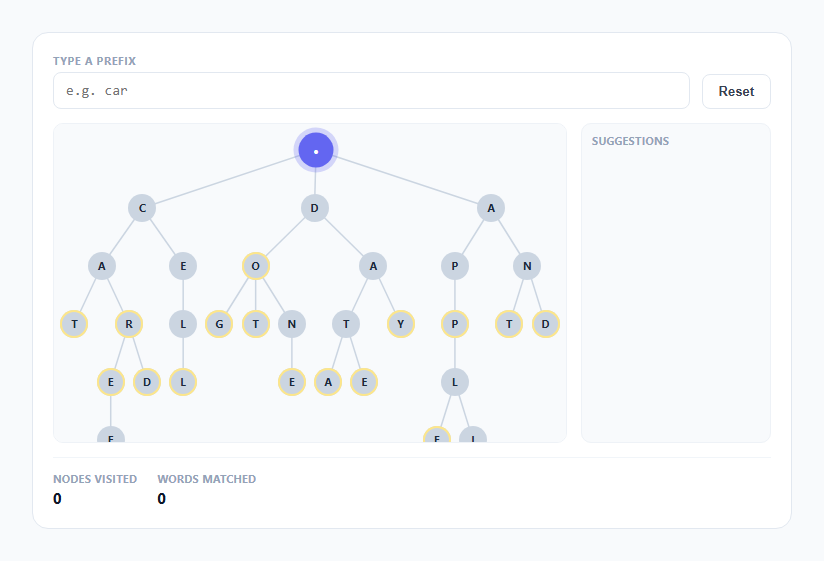
Most explanations of a trie show you a finished diagram and ask you to trust that it makes autocomplete fast. This snippet builds the diagram from a real word list, lays it out as a node graph, and then animates the exact node-by-node descent that happens every time you type a character into a search box backed by a trie — so the claim "lookup time depends on prefix length, not dictionary size" becomes something you can watch happen rather than something you have to take on faith.
Building the trie: a nested object, not a library
The word list WORDS (18 overlapping words like cat, car, care, card, careful, dog, dot, do, done) is inserted one character at a time into a plain nested-object structure. makeNode(char) creates { id, char, children: {}, isEnd, word }, and insertion walks the existing tree, creating a new child node only when the current character has not been seen at that position before. This is the entire trie data structure — no class hierarchy, no external library, just objects referencing objects. Shared prefixes like "car" and "care" and "careful" literally share the same three nodes in memory; the tree only branches at the point the words actually diverge, which is the structural property that makes the whole algorithm work.
Layout: leaf-counting, the same technique real tree-drawing libraries use
layout(node, depth) assigns each node a y equal to its depth and computes x recursively: a leaf node claims the next integer from a shared leafCounter, and every internal node's x is the average of its children's x values. This is a standard "assign leaves left to right, average parents upward" tree-layout algorithm — it guarantees siblings never overlap regardless of how unbalanced the tree is, without needing a charting library. The computed x values are then mapped to a percentage width with pctX, and y to a fixed pixel row height with pxY, exactly the same node-and-edge rendering approach as this library's recursion-tree-visualizer and linked-list-visualizer: absolutely-positioned div.node elements over an SVG layer of <line> edges.
The walk: recomputed from scratch on every keystroke, not incrementally patched
walk() runs on the input's input event, so it fires once per keystroke, backspace, or paste. Rather than trying to incrementally track "what changed since last time," it simply re-walks from the root using the full current input string: for each character, if node.children[ch] exists, descend and push that node onto a path array; the moment a character has no matching child, the loop stops and records deadAt, the index where the walk failed. Recomputing from scratch every time is deliberately simple — the trie is small enough that walking it top to bottom on every keystroke costs nothing measurable, and it completely avoids a class of bugs where a stale highlight from a previous, since-abandoned prefix stays lit after a backspace.
Why this is faster than filtering the whole word list
A naive autocomplete does words.filter(w => w.startsWith(prefix)), which touches every single word in the list on every keystroke — with 18 words that is invisible, but with 200,000 dictionary words it means scanning 200,000 strings per character typed. The trie walk in this snippet touches exactly prefix.length nodes, full stop, regardless of whether the dictionary behind it has 18 words or 18 million: each step is a single object-property lookup (node.children[ch]), and the total work to validate a prefix is bounded by how many characters were typed, never by how many words exist. The Nodes Visited counter makes this concrete — type "care" and it reads 4, never more, no matter how large WORDS becomes.
Suggestions: DFS from the current node, not a fresh scan
Once the walk lands on a live node, collectWords(node, limit) performs a depth-first search rooted at that exact node — not the tree root — collecting the word string stored on every isEnd node it encounters, in sorted child-key order, up to a limit of 8. Because the DFS starts already positioned at the end of the typed prefix, it only ever visits the sub-tree of words that could possibly match; it is structurally incapable of returning a word that does not start with the typed prefix, so no separate startsWith filter is needed anywhere in the suggestion logic.
Dead-end handling as a first-class visual state
When a character has no matching child, the loop breaks immediately rather than continuing to search elsewhere in the tree, and the last successfully matched node gets the .dead-end class — a red fill plus a short CSS shake keyframe — while the message panel explains exactly which prefix substring was still valid. This mirrors what a real trie-backed autocomplete does in production: it does not fall back to fuzzy matching, it reports "nothing here" precisely at the character where the tree structurally has nothing to offer, and this snippet makes that failure mode as visible as the success path.
Build with AI
Build, Understand, Optimize, and Extend It With AI
Hand this snippet's JavaScript to an AI assistant like Claude and ask it to trace exactly how the leaf-counting layout() function assigns x positions, or why collectWords() can never return a word that does not match the typed prefix. Worth asking for as extensions: a mode that also visualizes trie deletion (removing a word and pruning now-unused nodes), a fuzzy-match fallback when the walk dead-ends, or swapping the word list for a live-typed custom dictionary the user enters themselves before testing prefixes against it.
Prompt to recreate it
Copy this into your AI assistant of choice to build the effect from scratch, or as a jumping-off point for your own variant:
Build an animated trie (prefix tree) autocomplete visualizer in plain HTML, CSS, and JavaScript, no libraries or frameworks.

Requirements:
- Insert a small fixed list of 15-20 overlapping words (e.g. cat, car, care, card, careful, dog, dot, do, done) into a nested-object trie structure built from scratch, where each node tracks its children, whether it terminates a word, and the completed word string if it does.
- Compute a non-overlapping node-graph layout for the tree using a leaf-counting algorithm (leaves get sequential x positions, parents average their children's x, depth determines y) and render it as absolutely-positioned div nodes connected by SVG line edges.
- Provide a text input; on every keystroke, walk from the trie root matching one character per typed letter, highlighting each newly visited node and edge along the way with a brief pulse animation, so the descent visibly happens one node per character rather than jumping straight to the result.
- If the typed prefix has no matching path in the trie, stop the walk at the last valid node, visually flag that node as a dead end (distinct color plus a shake animation), and show a message naming exactly which prefix substring was still valid before the failure.
- When the walk succeeds, run a depth-first search rooted at the current node (not the tree root) to collect all words reachable from that point, and render them as a live-updating suggestions list.
- Display a running counter of how many trie nodes were visited for the current input, to make the point that lookup cost scales with the typed prefix length, not with how many words are in the dictionary.
Want to tighten it up first? Run this prompt through the AI Prompt Studio to score it across 8 quality dimensions, catch anti-patterns, and tune the wording for Claude, ChatGPT, or Gemini before you paste it in.
Source Code
<div class="wrap">
  <div class="header">
    <div class="field">
      <label class="label">Type a prefix</label>
      <input type="text" id="query-input" placeholder="e.g. car" autocomplete="off" spellcheck="false" />
    </div>
    <button class="btn" id="btn-reset" type="button">Reset</button>
  </div>
  <div class="main-row">
    <div class="tree-panel">
      <svg id="tree-svg"></svg>
      <div class="tree-nodes" id="tree-nodes"></div>
    </div>
    <div class="side-panel">
      <div class="side-title">Suggestions</div>
      <div class="suggestions" id="suggestions"></div>
      <div class="dead-msg" id="dead-msg"></div>
    </div>
  </div>
  <div class="stats-row">
    <div class="stat"><span class="stat-label">Nodes visited</span><span class="stat-val" id="stat-visited">0</span></div>
    <div class="stat"><span class="stat-label">Words matched</span><span class="stat-val" id="stat-matched">0</span></div>
  </div>
</div>
* { box-sizing: border-box; margin: 0; padding: 0; }
body { font-family: system-ui, -apple-system, sans-serif; background: #f8fafc; min-height: 100vh; display: flex; align-items: center; justify-content: center; padding: 24px; }
.wrap { width: 100%; max-width: 760px; background: #fff; border: 1px solid #e2e8f0; border-radius: 16px; padding: 20px; }
.header { display: flex; align-items: flex-end; gap: 12px; margin-bottom: 14px; }
.field { display: flex; flex-direction: column; gap: 4px; flex: 1; }
.label { font-size: 11px; font-weight: 700; color: #94a3b8; text-transform: uppercase; letter-spacing: 0.05em; }
.field input { width: 100%; padding: 9px 12px; border: 1.5px solid #e2e8f0; border-radius: 8px; font-size: 14px; color: #0f172a; font-family: ui-monospace, monospace; }
.field input:focus { outline: none; border-color: #6366f1; }
.btn { font-size: 13px; font-weight: 600; padding: 9px 16px; border-radius: 8px; border: 1.5px solid #e2e8f0; background: #fff; color: #374151; cursor: pointer; transition: all 0.15s; }
.btn:hover { border-color: #cbd5e1; background: #f8fafc; }
.main-row { display: flex; gap: 14px; }
.tree-panel { flex: 1; position: relative; height: 320px; background: #f8fafc; border: 1px solid #eef2f7; border-radius: 10px; overflow: auto; }
#tree-svg { position: absolute; top: 0; left: 0; width: 100%; height: 100%; overflow: visible; pointer-events: none; }
.tree-nodes { position: relative; width: 100%; height: 100%; }
.node { position: absolute; width: 28px; height: 28px; margin-left: -14px; margin-top: -14px; border-radius: 50%; background: #cbd5e1; color: #1e293b; display: flex; align-items: center; justify-content: center; font-size: 11px; font-weight: 700; transition: background-color 0.2s ease, transform 0.2s ease, box-shadow 0.2s ease; }
.node.root { background: #94a3b8; color: #fff; }
.node.endword { box-shadow: 0 0 0 2px #fde68a inset; }
.node.trail { background: #a5b4fc; color: #1e1b4b; }
.node.active { background: #6366f1; color: #fff; transform: scale(1.25); animation: pulse 0.4s ease; box-shadow: 0 0 0 4px rgba(99,102,241,0.25); }
.node.dead-end { background: #ef4444 !important; color: #fff; animation: shake 0.3s ease; }
@keyframes pulse { 0% { transform: scale(0.8); } 60% { transform: scale(1.35); } 100% { transform: scale(1.25); } }
@keyframes shake { 0%, 100% { transform: translateX(0); } 25% { transform: translateX(-3px); } 75% { transform: translateX(3px); } }
.edge { stroke: #cbd5e1; stroke-width: 1.5; transition: stroke 0.2s ease, stroke-width 0.2s ease; }
.edge.trail { stroke: #6366f1; stroke-width: 2.5; }
.side-panel { width: 190px; background: #f8fafc; border: 1px solid #eef2f7; border-radius: 10px; padding: 10px; display: flex; flex-direction: column; gap: 8px; }
.side-title { font-size: 10.5px; font-weight: 700; color: #94a3b8; text-transform: uppercase; letter-spacing: 0.05em; }
.suggestions { display: flex; flex-direction: column; gap: 4px; overflow-y: auto; max-height: 220px; }
.sugg-item { font-size: 13px; font-weight: 600; font-family: ui-monospace, monospace; background: #eef2ff; color: #4338ca; padding: 6px 8px; border-radius: 6px; animation: fadeIn 0.2s ease; }
@keyframes fadeIn { from { opacity: 0; transform: translateY(-4px); } to { opacity: 1; transform: translateY(0); } }
.dead-msg { font-size: 12px; color: #ef4444; font-weight: 600; line-height: 1.4; }
.stats-row { display: flex; gap: 20px; margin-top: 14px; padding-top: 14px; border-top: 1px solid #f1f5f9; }
.stat { display: flex; flex-direction: column; gap: 2px; }
.stat-label { font-size: 10.5px; font-weight: 700; color: #94a3b8; text-transform: uppercase; letter-spacing: 0.05em; }
.stat-val { font-size: 15px; font-weight: 700; color: #0f172a; }const WORDS = ['cat','car','care','card','careful','cell','dog','dot','do','done','data','date','day','app','apple','application','ant','and'];
let idCounter = 0;
function makeNode(char) {
return { id: idCounter++, char: char, children: {}, isEnd: false, word: null, x: 0, y: 0 };
}
const root = makeNode('');
WORDS.forEach(w => {
let node = root;
for (const ch of w) {
if (!node.children[ch]) node.children[ch] = makeNode(ch);
node = node.children[ch];
}
node.isEnd = true;
node.word = w;
});
let leafCounter = 0;
function layout(node, depth) {
node.y = depth;
const keys = Object.keys(node.children);
if (keys.length === 0) {
node.x = leafCounter;
leafCounter += 1;
return node.x;
}
let sum = 0;
keys.forEach(k => { sum += layout(node.children[k], depth + 1); });
node.x = sum / keys.length;
return node.x;
}
layout(root, 0);
const maxLeaf = Math.max(1, leafCounter - 1);
const allNodes = [];
(function collectAll(node) {
allNodes.push(node);
Object.values(node.children).forEach(collectAll);
})(root);
function pctX(x) { return 4 + (x / maxLeaf) * 92; }
function pxY(y) { return 26 + y * 58; }
const svg = document.getElementById('tree-svg');
const nodesLayer = document.getElementById('tree-nodes');
function drawStatic() {
allNodes.forEach(node => {
const el = document.createElement('div');
el.className = 'node' + (node.id === 0 ? ' root' : '');
el.textContent = node.id === 0 ? '\u2022' : node.char.toUpperCase();
el.style.left = pctX(node.x) + '%';
el.style.top = pxY(node.y) + 'px';
el.dataset.id = node.id;
if (node.isEnd) el.classList.add('endword');
nodesLayer.appendChild(el);
Object.values(node.children).forEach(child => {
const line = document.createElementNS('http://www.w3.org/2000/svg', 'line');
line.setAttribute('x1', pctX(node.x) + '%');
line.setAttribute('y1', pxY(node.y));
line.setAttribute('x2', pctX(child.x) + '%');
line.setAttribute('y2', pxY(child.y));
line.setAttribute('class', 'edge');
line.dataset.from = node.id;
line.dataset.to = child.id;
svg.appendChild(line);
});
});
}
drawStatic();
function clearHighlights() {
document.querySelectorAll('.node.trail, .node.active, .node.dead-end').forEach(el => {
el.classList.remove('trail', 'active', 'dead-end');
});
document.querySelectorAll('.edge.trail').forEach(el => el.classList.remove('trail'));
}
function collectWords(node, limit) {
const out = [];
function dfs(n) {
if (out.length >= limit) return;
if (n.isEnd) out.push(n.word);
Object.keys(n.children).sort().forEach(k => { if (out.length < limit) dfs(n.children[k]); });
}
dfs(node);
return out;
}
function renderSuggestions(words) {
const box = document.getElementById('suggestions');
box.innerHTML = '';
words.forEach(w => {
const el = document.createElement('div');
el.className = 'sugg-item';
el.textContent = w;
box.appendChild(el);
});
}
function walk() {
const raw = document.getElementById('query-input').value.toLowerCase();
clearHighlights();
document.getElementById('dead-msg').textContent = '';
document.getElementById('suggestions').innerHTML = '';
let node = root;
const path = [node];
let deadAt = -1;
for (let i = 0; i < raw.length; i++) {
const ch = raw[i];
if (node.children[ch]) {
node = node.children[ch];
path.push(node);
} else {
deadAt = i;
break;
}
}
path.forEach((n, i) => {
const el = nodesLayer.querySelector('[data-id="' + n.id + '"]');
if (!el) return;
if (i === path.length - 1 && deadAt === -1) {
el.classList.add('active');
} else {
el.classList.add('trail');
}
});
for (let i = 1; i < path.length; i++) {
const line = svg.querySelector('[data-from="' + path[i - 1].id + '"][data-to="' + path[i].id + '"]');
if (line) line.classList.add('trail');
}
document.getElementById('stat-visited').textContent = String(path.length - 1);
if (deadAt !== -1) {
const lastEl = nodesLayer.querySelector('[data-id="' + path[path.length - 1].id + '"]');
if (lastEl) lastEl.classList.add('dead-end');
document.getElementById('dead-msg').textContent = 'No word starts with "' + raw + '" \u2014 walk dead-ends after "' + raw.slice(0, deadAt) + '"';
document.getElementById('stat-matched').textContent = '0';
return;
}
const words = raw.length === 0 ? [] : collectWords(node, 8);
document.getElementById('stat-matched').textContent = String(words.length);
renderSuggestions(words);
}
document.getElementById('query-input').addEventListener('input', walk);
document.getElementById('btn-reset').addEventListener('click', () => {
document.getElementById('query-input').value = '';
walk();
});
walk();Step by step
How to Use
- 1Look at the static tree before typing anythingAll 18 words are already laid out as a node graph — the root branches into first letters, and shared prefixes like "car", "care", and "careful" visibly share the same early nodes before splitting apart.
- 2Type a single letter, like "c"The root-to-c edge and the c node light up in indigo with a short pulse animation, and the Suggestions panel instantly lists every word starting with "c".
- 3Keep typing to spell out "car"Watch the highlighted path extend one node deeper with each keystroke. The Nodes Visited counter climbs by exactly one per character typed, never more.
- 4Type a prefix with no match, like "cx"The walk highlights "c" successfully, then the next node turns red and shakes — the panel explains that the walk dead-ends right after "c" because no word in the list has "cx".
- 5Backspace back to a shorter prefixThe red dead-end state clears immediately and the trail retracts to whatever prefix is still valid, since walk() recomputes the entire path from the root on every keystroke.
- 6Clear the input with the Reset buttonAll highlighting is removed, the suggestions list empties, and both stat counters return to zero, ready for a fresh prefix.
Real-world uses
Common Use Cases
Got questions?
Frequently Asked Questions
Yes. Move the trie construction (WORDS, makeNode, the insertion loop, and layout()) into a module-level utility that runs once, since it is pure and produces plain objects with no DOM references. In React, call walk() from an onChange handler on a controlled input and store the computed path/suggestions in state to drive rendering declaratively instead of using querySelector. In Vue, do the same inside a method bound to v-model, updating a reactive ref. In Angular, bind to (input) and update component fields in ngAfterViewInit-safe code. There is no interval or animation loop to clean up on unmount here — walk() runs synchronously per keystroke and every animation is a CSS transition, so the only cleanup concern is removing the input listener itself, which React, Vue, and Angular handle automatically when they own the event binding.
A naive words.filter(w => w.startsWith(prefix)) inspects every single word in the list on every keystroke, so cost scales with dictionary size. A trie walk inspects exactly prefix.length nodes total, because each character maps to a direct object-property lookup on the current node's children — the cost scales with how many letters the user typed, never with how many words exist in the tree. This snippet's Nodes Visited counter demonstrates it directly: it always equals the length of the current prefix.
Add strings to the WORDS array at the top of the script and reload. The insertion loop, the layout() leaf-counting algorithm, and the DFS suggestion logic all work unmodified for any list of lowercase words — the tree layout recalculates its positions automatically based on however many leaves and branch points the new list produces.
The insertion loop walks or creates nodes for each character and simply sets isEnd = true and word = w again at the final node — inserting a duplicate is idempotent and does not create a second path or a duplicate entry in the suggestions list, since collectWords only ever visits each isEnd node once during its depth-first traversal.
Recomputing the full path from root to current node on every input event keeps the logic trivially correct for backspace, paste, and select-and-retype, all of which are hard to handle correctly with incremental "diff the old prefix against the new one" logic. Since a trie walk of even a fairly deep prefix touches only a handful of nodes, the performance cost of restarting from scratch every time is negligible, and the simplicity avoids an entire class of stale-highlight bugs.