Learn Coding Visually
Learn to code with interactive, live-preview playgrounds — HTML, CSS, JavaScript, React & more.
 HTML Playground42 lessons · Click-based · Live preview
 CSS PlaygroundLearn CSS with a live editor
 JavaScript Playground60 lessons · DOM · Async · Canvas
 React PlaygroundLearn React with a live code editor
 GSAP PlaygroundLearn GSAP animation interactively
 SVG Playground44 lessons · shapes · paths · animation
 SCSS Playground45 lessons · Sass modules · tokens
 Tailwind PlaygroundLearn Tailwind CSS with a live editor
 Bootstrap 5 Playground50 lessons · live preview
CSS Specificity Visualizer — Free HTML CSS JS Snippet
CSS Specificity Visualizer · Visualizers · Plain HTML, CSS & JS · Live preview
What's included
Features
About this UI Snippet
CSS Specificity Visualizer — Animated Selector Weight Comparison with !important Override in Vanilla JS
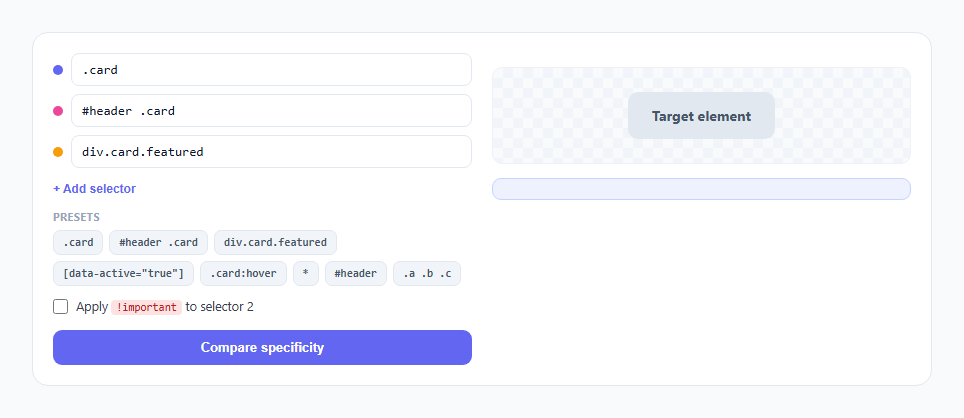
CSS specificity is usually taught as a memorization trick — "IDs beat classes, classes beat elements" — without ever showing the actual tuple comparison that determines which rule wins when two selectors target the same element. This snippet computes real specificity tuples from selectors you type or pick, animates each tier counting up one at a time, and then applies the genuinely winning selector's style to a demo element by running the same three-way tuple comparison browsers themselves use — including the two well-known exceptions that outrank specificity entirely: inline styles and !important.
Parsing specificity with regex tiers, not a full CSS parser
specificityOf(sel) counts three tiers directly from the selector string using targeted regular expressions, mirroring the W3C's own three-part specificity model: ids counts #id matches, classes counts class selectors (.class), attribute selectors ([attr]), and pseudo-classes (:hover, :nth-child()) together since the spec weights all three identically, and elements counts bare type selectors (div, span) and pseudo-elements. This is not a full CSS parser — it is a purpose-built counter that strips each matched pattern out of the string as it counts it (so .card.featured correctly yields two class matches instead of one), then counts whatever bare identifiers remain as element selectors. This mirrors how you'd manually count specificity by eye, just automated and instant.
Why classes, attributes, and pseudo-classes share one tier
A common point of confusion is that [data-active="true"], .card, and :hover all look like different kinds of selectors but contribute identically to specificity — the CSS spec deliberately groups them into a single middle tier, distinct from IDs (highest) and elements/pseudo-elements (lowest). The preset chips deliberately include one of each (.card, [data-active="true"], .card:hover) so comparing their resulting tuples side by side makes this grouping visible rather than assumed.
Animating the tuple count-up, tier by tier
compare() builds one badge row per selector, each containing three .tier spans (ID, class, element) that start scaled down and transparent. The function then awaits a short delay before adding the .shown class to each tier in sequence — ID tier first, then class, then element — producing a visible "counting in" animation using a spring-like cubic-bezier(0.34,1.56,0.64,1) easing curve that gives each badge a small bounce as it appears. This tier-by-tier reveal is deliberate: it mirrors the actual order specificity comparison happens in (ID tier is compared first and can short-circuit the whole comparison before class or element tiers are ever consulted), so watching badges fill in that exact order builds the correct mental model of the comparison algorithm, not just the final numbers.
Correct three-tier tuple comparison, not total-score addition
A common misconception is that specificity is a single summed number — that ten classes could outweigh one ID. resolveWinner() deliberately never sums the tiers together; it compares ids first and only moves to comparing classes if the two selectors' ID counts are exactly equal, then only compares elements if both ID and class counts tie. This lexicographic tuple comparison is exactly how the CSS specification defines specificity resolution, and it is why a selector with one ID ((1,0,0)) always beats a selector with fifty classes ((0,50,0)) — a fact that a naive "add up the numbers" implementation would get wrong.
The two real exceptions: !important and inline styles
The !important checkbox does not add weight to a tuple at all — it is implemented as a completely separate override path in resolveWinner(), checked before the tuple comparison even runs: if a selector has !important applied, it wins outright regardless of what its own or any other selector's specificity tuple says, exactly matching real CSS cascade behavior where !important promotes a declaration to a separate, higher-priority origin layer rather than adjusting its specificity score. The winner readout explicitly calls this out with its own sentence ("winning purely because of !important...") whenever it is the deciding factor, so the override is never confused with a naturally high specificity value.
Build with AI
Build, Understand, Optimize, and Extend It With AI
Hand this snippet's JavaScript to an AI assistant like Claude and ask it to walk through why resolveWinner() compares ids, then classes, then elements as three separate if-blocks rather than computing one combined numeric score — that structural choice is the entire reason the comparison behaves correctly for edge cases like one ID versus fifty classes. It's also worth asking how specificityOf()'s regex approach would break on more exotic selectors (like :not(.foo), which nests another selector inside a pseudo-class) and what a more robust parser would need to handle it. Good extensions to request: an inline-style override tier, support for comma-separated selector lists, or a "why did this win" step-by-step tuple trace shown as its own animated readout.
Prompt to recreate it
Copy this into your AI assistant of choice to build the effect from scratch, or as a jumping-off point for your own variant:
Build an interactive CSS specificity visualizer in plain HTML, CSS, and JavaScript that compares two or three user-provided selectors and shows which one wins, no frameworks or libraries.

Requirements:
- Text inputs (up to three) for CSS selectors, plus a row of clickable preset chips offering common comparison cases: a class selector, an ID-plus-descendant-class selector, a type-plus-two-classes selector, an attribute selector, a class-plus-pseudo-class selector, and the universal selector.
- Parse each selector's specificity into a three-part tuple following the real CSS model: count of ID selectors, count of class/attribute/pseudo-class selectors combined, and count of type/pseudo-element selectors — using targeted string parsing or regular expressions, not a hardcoded lookup table.
- Display each selector's tuple as three color-coded segments (e.g. red for ID count, amber for class count, green for element count), animating each segment counting/popping in one at a time in ID-then-class-then-element order when a "Compare" button is clicked, so the reveal order matches the real comparison priority.
- Implement the actual winner-resolution logic as a proper lexicographic tuple comparison — compare ID counts first and only fall through to comparing class counts if IDs tie, then only fall through to element counts if classes also tie — never summing the three tiers into a single combined number.
- After the animation, visibly apply the winning selector's assigned color to a demo target element with a smooth CSS transition, and print a plain-language line stating the winning selector and its exact tuple.
- Add an "!important" toggle for one selector that, when enabled, must make that selector win outright regardless of what the tuple comparison alone would produce, implemented as a separate override check rather than added specificity weight — and clearly state in the result when !important, not specificity, decided the outcome.
Want to tighten it up first? Run this prompt through the AI Prompt Studio to score it across 8 quality dimensions, catch anti-patterns, and tune the wording for Claude, ChatGPT, or Gemini before you paste it in.
Source Code
<div class="wrap">
  <div class="left-panel">
    <div class="selector-inputs" id="selector-inputs"></div>
    <button class="btn-add" id="btn-add" type="button">+ Add selector</button>

    <div class="presets">
      <div class="presets-label">Presets</div>
      <div class="preset-chips" id="preset-chips"></div>
    </div>

    <label class="important-toggle">
      <input type="checkbox" id="important-check" />
      <span>Apply <code>!important</code> to selector 2</span>
    </label>

    <button class="btn-compare" id="btn-compare" type="button">Compare specificity</button>
  </div>

  <div class="right-panel">
    <div class="badges" id="badges"></div>
    <div class="demo-stage">
      <div class="demo-el" id="demo-el">Target element</div>
    </div>
    <div class="winner-line" id="winner-line"></div>
  </div>
</div>
* { box-sizing: border-box; margin: 0; padding: 0; }
body { font-family: system-ui, -apple-system, sans-serif; background: #f8fafc; min-height: 100vh; display: flex; align-items: center; justify-content: center; padding: 24px; }
.wrap { width: 100%; max-width: 900px; display: flex; gap: 20px; background: #fff; border: 1px solid #e2e8f0; border-radius: 16px; padding: 20px; flex-wrap: wrap; }
.left-panel { flex: 1 1 340px; display: flex; flex-direction: column; gap: 12px; }
.selector-inputs { display: flex; flex-direction: column; gap: 8px; }
.selector-row { display: flex; align-items: center; gap: 8px; }
.selector-row .swatch { width: 10px; height: 10px; border-radius: 50%; flex-shrink: 0; }
.selector-row input { flex: 1; padding: 8px 10px; border: 1.5px solid #e2e8f0; border-radius: 8px; font-size: 13px; font-family: ui-monospace, monospace; color: #0f172a; }
.selector-row input:focus { outline: none; border-color: #6366f1; }
.btn-add { align-self: flex-start; font-size: 12px; font-weight: 600; color: #6366f1; background: none; border: none; cursor: pointer; padding: 2px 0; }
.btn-add:hover { text-decoration: underline; }
.presets { display: flex; flex-direction: column; gap: 6px; }
.presets-label { font-size: 10.5px; font-weight: 700; color: #94a3b8; text-transform: uppercase; letter-spacing: 0.06em; }
.preset-chips { display: flex; flex-wrap: wrap; gap: 6px; }
.chip { font-size: 11px; font-family: ui-monospace, monospace; font-weight: 600; padding: 5px 9px; border-radius: 7px; background: #f1f5f9; color: #475569; border: 1px solid #e2e8f0; cursor: pointer; transition: background 0.15s; }
.chip:hover { background: #e2e8f0; }
.important-toggle { display: flex; align-items: center; gap: 8px; font-size: 12.5px; color: #374151; cursor: pointer; }
.important-toggle input { accent-color: #ef4444; width: 15px; height: 15px; }
.important-toggle code { background: #fee2e2; color: #b91c1c; padding: 1px 5px; border-radius: 4px; font-size: 11px; }
.btn-compare { margin-top: 4px; padding: 10px 16px; background: #6366f1; color: #fff; border: none; border-radius: 9px; font-size: 13px; font-weight: 700; cursor: pointer; transition: background 0.15s; }
.btn-compare:hover { background: #4f46e5; }
.right-panel { flex: 1 1 340px; display: flex; flex-direction: column; gap: 14px; }
.badges { display: flex; flex-direction: column; gap: 8px; }
.badge-row { display: flex; align-items: center; gap: 10px; opacity: 0.35; transition: opacity 0.3s; }
.badge-row.counted { opacity: 1; }
.badge-sel { font-family: ui-monospace, monospace; font-size: 12px; color: #334155; flex: 1; overflow: hidden; text-overflow: ellipsis; white-space: nowrap; }
.badge-tuple { display: flex; gap: 3px; }
.tier { min-width: 24px; height: 24px; border-radius: 6px; display: flex; align-items: center; justify-content: center; font-size: 12px; font-weight: 800; color: #fff; transform: scale(0.6); opacity: 0; transition: transform 0.25s cubic-bezier(0.34,1.56,0.64,1), opacity 0.25s; }
.tier.shown { transform: scale(1); opacity: 1; }
.tier-id { background: #ef4444; }
.tier-class { background: #f59e0b; }
.tier-el { background: #22c55e; }
.badge-important { font-size: 9px; font-weight: 800; background: #ef4444; color: #fff; padding: 2px 6px; border-radius: 5px; text-transform: uppercase; opacity: 0; transition: opacity 0.2s; }
.badge-important.shown { opacity: 1; }
.demo-stage { display: flex; align-items: center; justify-content: center; padding: 24px; background: repeating-conic-gradient(#f1f5f9 0% 25%, #f8fafc 0% 50%) 0 0 / 20px 20px; border: 1px solid #eef2f7; border-radius: 10px; }
.demo-el { padding: 14px 24px; border-radius: 10px; font-size: 14px; font-weight: 700; transition: background 0.35s ease, color 0.35s ease, transform 0.35s ease, box-shadow 0.35s ease; background: #e2e8f0; color: #475569; }
.demo-el.winning { transform: scale(1.06); }
.winner-line { font-size: 12.5px; font-weight: 600; color: #4338ca; background: #eef2ff; border: 1px solid #c7d2fe; border-radius: 9px; padding: 10px 12px; min-height: 20px; line-height: 1.5; }const COLORS = ['#6366f1', '#ec4899', '#f59e0b'];
let selectors = ['.card', '#header .card', 'div.card.featured'];
let importantIndex = null;
const PRESETS = ['.card', '#header .card', 'div.card.featured', '[data-active="true"]', '.card:hover', '*', '#header', '.a .b .c'];
function specificityOf(sel) {
let s = sel.trim();
let ids = 0, classes = 0, elements = 0;
const idMatches = s.match(/#[a-zA-Z0-9_-]+/g);
if (idMatches) ids += idMatches.length;
const classMatches = s.match(/\.[a-zA-Z0-9_-]+/g);
if (classMatches) classes += classMatches.length;
const attrMatches = s.match(/\[[^\]]+\]/g);
if (attrMatches) classes += attrMatches.length;
const pseudoClassMatches = s.match(/:(?!:)[a-zA-Z-]+(\([^)]*\))?/g);
if (pseudoClassMatches) classes += pseudoClassMatches.length;
let stripped = s
.replace(/#[a-zA-Z0-9_-]+/g, ' ')
.replace(/\.[a-zA-Z0-9_-]+/g, ' ')
.replace(/\[[^\]]+\]/g, ' ')
.replace(/:(?!:)[a-zA-Z-]+(\([^)]*\))?/g, ' ')
.replace(/::[a-zA-Z-]+/g, ' ')
.replace(/[>+~,]/g, ' ')
.replace(/\*/g, ' ');
const elMatches = stripped.match(/[a-zA-Z][a-zA-Z0-9-]*/g);
if (elMatches) elements += elMatches.length;
return { ids, classes, elements };
}
function buildInputs() {
const wrap = document.getElementById('selector-inputs');
wrap.innerHTML = '';
selectors.forEach((sel, i) => {
const row = document.createElement('div');
row.className = 'selector-row';
const swatch = document.createElement('span');
swatch.className = 'swatch';
swatch.style.background = COLORS[i % COLORS.length];
const input = document.createElement('input');
input.type = 'text';
input.value = sel;
input.dataset.index = i;
input.addEventListener('input', () => { selectors[i] = input.value; });
row.appendChild(swatch);
row.appendChild(input);
wrap.appendChild(row);
});
}
function buildPresets() {
const wrap = document.getElementById('preset-chips');
wrap.innerHTML = '';
PRESETS.forEach(p => {
const chip = document.createElement('button');
chip.type = 'button';
chip.className = 'chip';
chip.textContent = p;
chip.addEventListener('click', () => {
const emptyIndex = selectors.findIndex(s => !s.trim());
const targetIndex = emptyIndex >= 0 ? emptyIndex : selectors.length - 1;
selectors[targetIndex] = p;
buildInputs();
});
wrap.appendChild(chip);
});
}
document.getElementById('btn-add').addEventListener('click', () => {
if (selectors.length >= 3) return;
selectors.push('');
buildInputs();
});
function wait(ms) { return new Promise(res => setTimeout(res, ms)); }
async function compare() {
const badgesWrap = document.getElementById('badges');
badgesWrap.innerHTML = '';
const specs = selectors.map(specificityOf);
const rows = selectors.map((sel, i) => {
const row = document.createElement('div');
row.className = 'badge-row';
row.innerHTML =
'<span class="badge-sel">' + (sel || '(empty)') + '</span>' +
'<div class="badge-tuple">' +
'<span class="tier tier-id" data-tier="id">' + specs[i].ids + '</span>' +
'<span class="tier tier-class" data-tier="class">' + specs[i].classes + '</span>' +
'<span class="tier tier-el" data-tier="el">' + specs[i].elements + '</span>' +
'</div>' +
'<span class="badge-important" id="important-flag-' + i + '">!important</span>';
badgesWrap.appendChild(row);
return row;
});
for (let i = 0; i < rows.length; i++) {
rows[i].classList.add('counted');
const tiers = rows[i].querySelectorAll('.tier');
for (const tier of tiers) {
await wait(120);
tier.classList.add('shown');
}
if (importantIndex === i) {
document.getElementById('important-flag-' + i).classList.add('shown');
}
await wait(160);
}
await wait(200);
resolveWinner(specs);
}
function resolveWinner(specs) {
let winnerIndex = 0;
if (importantIndex !== null && selectors[importantIndex] && selectors[importantIndex].trim()) {
winnerIndex = importantIndex;
} else {
for (let i = 1; i < specs.length; i++) {
if (!selectors[i] || !selectors[i].trim()) continue;
if (!selectors[winnerIndex] || !selectors[winnerIndex].trim()) { winnerIndex = i; continue; }
const a = specs[i];
const b = specs[winnerIndex];
if (a.ids !== b.ids) { if (a.ids > b.ids) winnerIndex = i; continue; }
if (a.classes !== b.classes) { if (a.classes > b.classes) winnerIndex = i; continue; }
if (a.elements > b.elements) winnerIndex = i;
}
}
const demo = document.getElementById('demo-el');
demo.style.background = COLORS[winnerIndex % COLORS.length];
demo.style.color = '#fff';
demo.classList.remove('winning');
void demo.offsetWidth;
demo.classList.add('winning');
const s = specs[winnerIndex];
const winnerLine = document.getElementById('winner-line');
const importantNote = (importantIndex === winnerIndex) ? ' — winning purely because of !important, which overrides normal specificity entirely.' : '.';
winnerLine.textContent = 'Winner: "' + selectors[winnerIndex] + '" with specificity (' + s.ids + ', ' + s.classes + ', ' + s.elements + ')' + importantNote;
}
document.getElementById('btn-compare').addEventListener('click', compare);
document.getElementById('important-check').addEventListener('change', e => {
importantIndex = e.target.checked ? 1 : null;
});
buildInputs();
buildPresets();Step by step
How to Use
- 1Type or pick two or three CSS selectorsUse the preset chips (.card, #header .card, div.card.featured, [data-active="true"], .card:hover, *) or type your own into the selector inputs — each gets its own colored swatch.
- 2Click "Compare specificity"Each selector's badge animates in tier by tier: the ID count bounces in first, then the class/attribute/pseudo-class count, then the element count — in the same order the real comparison algorithm evaluates them.
- 3Read each badge's three-segment tupleThe red segment is ID count, the amber segment is class/attribute/pseudo-class count, and the green segment is element/pseudo-element count — the standard (IDs, classes, elements) specificity model.
- 4Watch the demo element take on the winning selector's colorAfter all badges finish animating, the target element smoothly transitions to the winning selector's color with a small scale pop, and a winner line explains exactly why that selector won by tuple comparison.
- 5Enable "Apply !important to selector 2"Re-run the comparison. Selector 2 now wins outright regardless of its specificity tuple, and the winner line explicitly states it won purely because of !important, not because of higher specificity.
- 6Try #header vs .card.featured.active.large (four classes)Confirm that #header (a single ID, tuple (1,0,0)) still wins over four stacked classes (tuple (0,4,0)) — the clearest possible demonstration that specificity tiers are compared in order, never summed together.
Real-world uses
Common Use Cases
Got questions?
Frequently Asked Questions
Yes. Move the selectors array and importantIndex into component state and call the pure specificityOf() and resolveWinner()-style comparison logic from an event handler — neither function touches the DOM directly, so they port unchanged. Put the tier-by-tier reveal animation (the compare() function's sequential awaited class toggles) inside a click handler, and if you want it interruptible, track a "cancelled" flag set in a useEffect cleanup function (or onUnmounted in Vue, ngOnDestroy in Angular) so a component unmount during the animation doesn't try to update removed DOM nodes or state on an unmounted component.
Because specificity tiers are compared in strict priority order — ID count first — and a higher-tier win is decisive regardless of what the lower tiers contain. A selector with one ID and zero classes, tuple (1,0,0), is compared against a selector with fifty classes and zero IDs, tuple (0,50,0): since 1 > 0 in the ID tier, the comparison stops right there and the ID selector wins, exactly the way this snippet's resolveWinner() function short-circuits on the first tier where the two tuples differ.
The CSS specification explicitly defines them as equally weighted, grouped into a single specificity tier distinct from ID selectors and type/pseudo-element selectors. .card, [data-active="true"], and :hover therefore each contribute exactly one unit to the same middle tier of the tuple — this snippet's specificityOf() function reflects that by incrementing the same classes counter for all three pattern types.
It does not participate in the specificity tuple comparison at all — !important promotes a declaration to a separate, higher-priority tier in the CSS cascade's own resolution order, which is evaluated before normal specificity is even consulted. That is why a declaration with !important on a low-specificity selector like .card still overrides a declaration on a much higher-specificity selector like #header .card.featured with no !important — this snippet's !important toggle is implemented as exactly that kind of separate override check, not as an addition to any tuple.
Two things: !important declared in a user-agent or user stylesheet can outrank an author stylesheet's !important in specific cascade-origin scenarios, and an inline style attribute's declaration (style="...") without !important would normally beat any external selector, but a competing !important external rule still beats a non-important inline style. This visualizer focuses specifically on the author-stylesheet, non-inline case most developers hit daily; a natural extension is adding an "inline style" toggle as a fourth override tier above the tuple comparison and below !important.