Learn Coding Visually
Learn to code with interactive, live-preview playgrounds — HTML, CSS, JavaScript, React & more.
 HTML Playground42 lessons · Click-based · Live preview
 CSS PlaygroundLearn CSS with a live editor
 JavaScript Playground60 lessons · DOM · Async · Canvas
 React PlaygroundLearn React with a live code editor
 GSAP PlaygroundLearn GSAP animation interactively
 SVG Playground44 lessons · shapes · paths · animation
 SCSS Playground45 lessons · Sass modules · tokens
 Tailwind PlaygroundLearn Tailwind CSS with a live editor
 Bootstrap 5 Playground50 lessons · live preview
Stacking Context Visualizer — Free HTML CSS JS Snippet
Stacking Context Visualizer · Visualizers · Plain HTML, CSS & JS · Live preview
What's included
Features
About this UI Snippet
Stacking Context Visualizer — Animated z-index & Nested Stacking Context Demo in a Tilted 3D Panel Stack
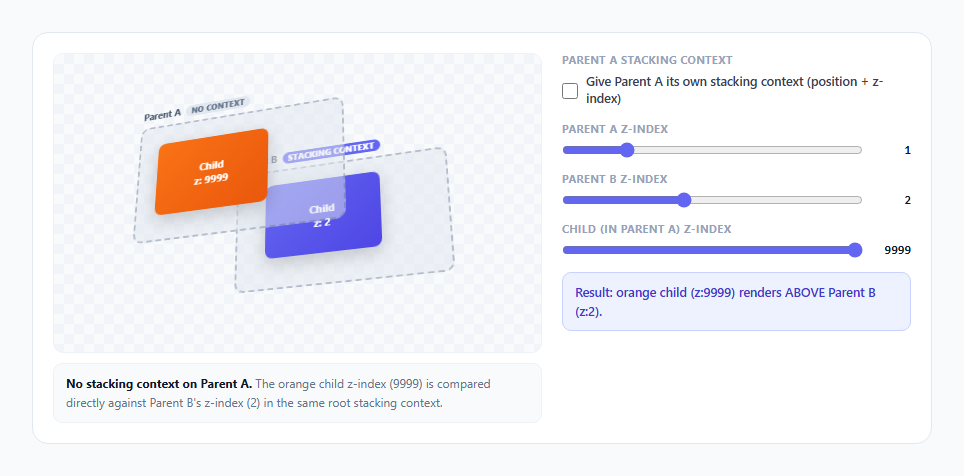
z-index is one of the few CSS properties where the number you write is not actually compared globally — it is only ever compared against sibling elements that share the same stacking context, and creating a new stacking context on a parent silently traps every z-index value inside it. This is the classic bug behind "why doesn't z-index: 9999 work," and it cannot be explained with a flat diagram, because the entire problem is about nesting and containment, not magnitude. This snippet uses a tilted pseudo-3D panel stack, a real position: relative toggle, and a plain-language explanation panel that updates live to make the trap visible and mechanically undeniable.
The isometric tilt is cosmetic, the z-index logic underneath is real
The outer .tilt container gets transform: rotateX(24deg) rotateY(-18deg) inside a .perspective parent with perspective: 900px, giving the whole stack a slight 3D lean so overlapping panels read as physically stacked layers rather than flat overlapping rectangles. This tilt is purely cosmetic — it does not participate in the actual z-index computation at all. The real stacking order is computed by the browser exactly as normal CSS z-index and position rules dictate; render3d() only reads the *result* of that computation (which parent should visually be on top) and applies a translateZ() offset along the Z axis to visually separate the two parents in the tilted 3D space, so the animation you see is a direct visualization of a real stacking decision, not a simulated one.
Building the actual bug: a child with z-index 9999 inside a positioned parent
Parent A contains an orange child panel with an inline z-index: 9999 and Parent B contains an indigo child panel with z-index: 2. By default, Parent A itself has no position set (so no stacking context of its own), which means its orange child's z-index: 9999 is evaluated in the same root stacking context as Parent B's z-index value, and — because 9999 genuinely is larger — the orange child correctly renders above Parent B. This first state is intentionally the *unsurprising* case, so the second state's contrast is legible.
Toggling the stacking-context trap
Checking "Give Parent A its own stacking context" sets parentA.style.position = 'relative' and parentA.style.zIndex = state.parentAZ — the textbook minimal combination that creates a new stacking context per the CSS spec (any of position: relative/absolute + a non-auto z-index, or transform, or opacity < 1, or several other properties, all independently trigger the same containment behavior). The moment that happens, the orange child's z-index: 9999 stops being compared to Parent B at all. It is now only ever compared against *other children of Parent A*, and Parent A itself — as a single unit — is what gets compared against Parent B, using Parent A's own z-index (state.parentAZ, a small number from 0-5), not its child's. updateExplain() recomputes which comparison is actually in effect on every state change and writes the correct plain-language explanation and the correct winner into the result box — the same branching logic a browser's own stacking algorithm follows, just narrated in English instead of executed silently.
Why the result can flip counter-intuitively
With the context toggle on and Parent B's z-index set higher than Parent A's, Parent B visually renders above Parent A's entire subtree — including the orange child, whose z-index of 9999 is still sitting right there in the DOM, completely unable to win. This is the exact real-world bug: a developer sees z-index: 9999 in DevTools on an element that still renders behind something with z-index: 2, and the reason is almost always an ancestor further up the tree that quietly created its own stacking context, usually for an unrelated reason like adding a transform for a hover animation. The three sliders (Parent A z-index, Parent B z-index, child z-index) let you reproduce every combination of this bug on demand and watch render3d() and the explanation panel react to each one in real time.
Build with AI
Build, Understand, Optimize, and Extend It With AI
Give this snippet's JavaScript to an AI assistant like Claude and ask it to trace exactly which comparison is active in updateExplain() for each of the four toggle/slider combinations — the branching there mirrors the real browser algorithm and is worth understanding line by line. It's also worth asking which other CSS properties besides position + z-index would trigger the same trap if applied to Parent A instead. Good extensions to request: a third nested grandchild level to show multi-level trapping, a live DevTools-style "computed stacking context" tree readout, or an opacity/transform toggle as an alternate context trigger alongside the existing position + z-index one.
Prompt to recreate it
Copy this into your AI assistant of choice to build the effect from scratch, or as a jumping-off point for your own variant:
Build an animated stacking-context visualizer in plain HTML, CSS, and JavaScript that demonstrates how a CSS stacking context traps a descendant's z-index value, no frameworks or libraries.

Requirements:
- Two sibling "parent" boxes, each containing one visibly distinct colored child panel, arranged inside a container with a slight CSS 3D tilt (perspective + rotateX/rotateY) purely for visual clarity — the tilt must be cosmetic only and must not affect the actual z-index computation.
- Give the first parent's child an inline z-index of 9999 and the second parent's child a small z-index like 2, and by default leave the first parent with no position/stacking-context-triggering property, so the high child z-index correctly wins against the sibling parent's child in the shared root stacking context.
- Add a checkbox that toggles a real stacking-context trigger (position: relative combined with a numeric z-index) on the first parent. When enabled, the first parent's own z-index — not its child's — must be what gets compared against the second parent, demonstrating that the trapped child's 9999 no longer matters outside its own parent.
- Add independent sliders for the first parent's z-index, the second parent's z-index, and the trapped child's z-index, and recompute which element visually renders on top after every change, animating the two parents' relative depth with a CSS transform (e.g. translateZ) so the reordering is visible, not instant.
- Include a live, plain-language explanation panel that states which specific z-index comparison is currently in effect (child vs sibling parent, or parent vs parent) and a result line stating which element actually wins in the current state, both updating in real time as sliders and the checkbox change.
Want to tighten it up first? Run this prompt through the AI Prompt Studio to score it across 8 quality dimensions, catch anti-patterns, and tune the wording for Claude, ChatGPT, or Gemini before you paste it in.
Source Code
<div class="wrap">
  <div class="stage-wrap">
    <div class="perspective">
      <div class="tilt" id="tilt">
        <div class="parent parent-a" id="parent-a">
          <span class="parent-label">Parent A <span class="ctx-badge" id="badge-a">no context</span></span>
          <div class="panel panel-a1" id="panel-a1" style="z-index: 9999;">
            <span class="panel-label">Child<br/>z: 9999</span>
          </div>
        </div>
        <div class="parent parent-b" id="parent-b">
          <span class="parent-label">Parent B <span class="ctx-badge context-on">stacking context</span></span>
          <div class="panel panel-b1" style="z-index: 2;">
            <span class="panel-label">Child<br/>z: 2</span>
          </div>
        </div>
      </div>
    </div>
    <div class="explain" id="explain"></div>
  </div>

  <div class="controls">
    <div class="control-group">
      <div class="group-title">Parent A stacking context</div>
      <label class="link-toggle">
        <input type="checkbox" id="context-toggle" />
        <span>Give Parent A its own stacking context (position + z-index)</span>
      </label>
    </div>

    <div class="control-group">
      <div class="group-title">Parent A z-index</div>
      <div class="slider-row">
        <input type="range" id="parent-a-z" min="0" max="5" value="1" />
        <span class="slider-val" id="parent-a-z-val">1</span>
      </div>
    </div>

    <div class="control-group">
      <div class="group-title">Parent B z-index</div>
      <div class="slider-row">
        <input type="range" id="parent-b-z" min="0" max="5" value="2" />
        <span class="slider-val" id="parent-b-z-val">2</span>
      </div>
    </div>

    <div class="control-group">
      <div class="group-title">Child (in Parent A) z-index</div>
      <div class="slider-row">
        <input type="range" id="child-z" min="0" max="9999" value="9999" />
        <span class="slider-val" id="child-z-val">9999</span>
      </div>
    </div>

    <div class="result-box" id="result-box"></div>
  </div>
</div>
* { box-sizing: border-box; margin: 0; padding: 0; }
body { font-family: system-ui, -apple-system, sans-serif; background: #f8fafc; min-height: 100vh; display: flex; align-items: center; justify-content: center; padding: 24px; }
.wrap { width: 100%; max-width: 900px; display: flex; gap: 20px; background: #fff; border: 1px solid #e2e8f0; border-radius: 16px; padding: 20px; flex-wrap: wrap; }
.stage-wrap { flex: 1 1 400px; display: flex; flex-direction: column; gap: 10px; }
.perspective { perspective: 900px; background: repeating-conic-gradient(#f1f5f9 0% 25%, #f8fafc 0% 50%) 0 0 / 20px 20px; border: 1px solid #eef2f7; border-radius: 10px; height: 300px; display: flex; align-items: center; justify-content: center; }
.tilt { position: relative; width: 320px; height: 200px; transform: rotateX(24deg) rotateY(-18deg); transform-style: preserve-3d; transition: transform 0.4s ease; }
.parent { position: absolute; width: 220px; height: 130px; border-radius: 10px; border: 2px dashed rgba(100,116,139,0.4); background: rgba(226,232,240,0.5); transition: transform 0.4s cubic-bezier(0.4,0,0.2,1); }
.parent-a { top: 10px; left: 0; }
.parent-b { top: 55px; left: 90px; }
.parent-label { position: absolute; top: -22px; left: 0; font-size: 10.5px; font-weight: 700; color: #475569; white-space: nowrap; display: flex; align-items: center; gap: 6px; }
.ctx-badge { font-size: 8.5px; font-weight: 800; text-transform: uppercase; letter-spacing: 0.04em; padding: 1px 6px; border-radius: 10px; background: #e2e8f0; color: #64748b; transition: background 0.25s, color 0.25s; }
.ctx-badge.context-on { background: #6366f1; color: #fff; }
.panel { position: absolute; width: 120px; height: 80px; border-radius: 8px; display: flex; align-items: center; justify-content: center; box-shadow: 0 6px 18px rgba(0,0,0,0.18); transition: transform 0.4s cubic-bezier(0.4,0,0.2,1), z-index 0s; }
.panel-label { color: #fff; font-size: 11px; font-weight: 700; text-align: center; line-height: 1.4; }
.panel-a1 { top: 20px; left: 20px; background: linear-gradient(135deg, #f97316, #ea580c); }
.panel-b1 { top: 15px; left: 30px; background: linear-gradient(135deg, #6366f1, #4f46e5); }
.explain { font-size: 12px; color: #64748b; line-height: 1.6; background: #f8fafc; border: 1px solid #eef2f7; border-radius: 9px; padding: 10px 12px; }
.explain strong { color: #0f172a; }
.controls { flex: 1 1 260px; display: flex; flex-direction: column; gap: 14px; }
.control-group { display: flex; flex-direction: column; gap: 6px; }
.group-title { font-size: 10.5px; font-weight: 700; color: #94a3b8; text-transform: uppercase; letter-spacing: 0.06em; }
.link-toggle { display: flex; align-items: center; gap: 8px; font-size: 12.5px; color: #374151; font-weight: 500; cursor: pointer; line-height: 1.4; }
.link-toggle input { accent-color: #6366f1; width: 16px; height: 16px; flex-shrink: 0; margin-top: 1px; }
.slider-row { display: flex; align-items: center; gap: 8px; }
.slider-row input[type="range"] { flex: 1; accent-color: #6366f1; }
.slider-val { font-size: 12px; font-weight: 700; color: #0f172a; font-family: ui-monospace, monospace; width: 40px; text-align: right; }
.result-box { font-size: 12.5px; font-weight: 600; padding: 10px 12px; border-radius: 9px; background: #eef2ff; color: #4338ca; border: 1px solid #c7d2fe; line-height: 1.5; }const state = {
parentAContext: false,
parentAZ: 1,
parentBZ: 2,
childZ: 9999,
};
function applyState() {
const parentA = document.getElementById('parent-a');
const parentB = document.getElementById('parent-b');
const child = document.getElementById('panel-a1');
const badgeA = document.getElementById('badge-a');
if (state.parentAContext) {
parentA.style.position = 'relative';
parentA.style.zIndex = state.parentAZ;
badgeA.textContent = 'stacking context';
badgeA.classList.add('context-on');
} else {
parentA.style.position = 'absolute';
parentA.style.zIndex = 'auto';
badgeA.textContent = 'no context';
badgeA.classList.remove('context-on');
}
parentB.style.zIndex = state.parentBZ;
child.style.zIndex = state.childZ;
document.getElementById('parent-a-z-val').textContent = state.parentAZ;
document.getElementById('parent-b-z-val').textContent = state.parentBZ;
document.getElementById('child-z-val').textContent = state.childZ;
updateExplain();
}
function updateExplain() {
const explain = document.getElementById('explain');
const result = document.getElementById('result-box');
if (!state.parentAContext) {
explain.innerHTML = '<strong>No stacking context on Parent A.</strong> The orange child z-index (' + state.childZ + ') is compared directly against Parent B\'s z-index (' + state.parentBZ + ') in the same root stacking context.';
const childWins = state.childZ > state.parentBZ;
result.textContent = childWins
? 'Result: orange child (z:' + state.childZ + ') renders ABOVE Parent B (z:' + state.parentBZ + ').'
: 'Result: Parent B (z:' + state.parentBZ + ') renders ABOVE the orange child (z:' + state.childZ + ').';
} else {
explain.innerHTML = '<strong>Parent A now creates its own stacking context</strong> (position: relative + z-index). Its child\'s z-index of ' + state.childZ + ' is now trapped inside Parent A and can only compete with Parent A\'s OWN z-index (' + state.parentAZ + ') against Parent B\'s z-index (' + state.parentBZ + ') — the child\'s huge number no longer matters outside Parent A.';
const parentAWins = state.parentAZ > state.parentBZ;
result.textContent = parentAWins
? 'Result: Parent A (z:' + state.parentAZ + ') and its trapped child render ABOVE Parent B, regardless of the child\'s z-index of ' + state.childZ + '.'
: 'Result: Parent B (z:' + state.parentBZ + ') renders ABOVE Parent A and its ENTIRE subtree — even the child\'s z-index: ' + state.childZ + ' cannot escape and win.';
}
render3d();
}
function render3d() {
const parentA = document.getElementById('parent-a');
const parentB = document.getElementById('parent-b');
let aOnTop;
if (!state.parentAContext) {
aOnTop = state.childZ > state.parentBZ;
} else {
aOnTop = state.parentAZ > state.parentBZ;
}
parentA.style.transform = aOnTop ? 'translateZ(40px)' : 'translateZ(-10px)';
parentB.style.transform = aOnTop ? 'translateZ(-10px)' : 'translateZ(40px)';
}
document.getElementById('context-toggle').addEventListener('change', e => {
state.parentAContext = e.target.checked;
applyState();
});
document.getElementById('parent-a-z').addEventListener('input', e => {
state.parentAZ = Number(e.target.value);
applyState();
});
document.getElementById('parent-b-z').addEventListener('input', e => {
state.parentBZ = Number(e.target.value);
applyState();
});
document.getElementById('child-z').addEventListener('input', e => {
state.childZ = Number(e.target.value);
applyState();
});
applyState();Step by step
How to Use
- 1Observe the default state: child z-index 9999 vs Parent B z-index 2The orange child correctly renders above Parent B's indigo panel — 9999 beats 2 in the same stacking context, exactly as you'd expect from the raw numbers.
- 2Check "Give Parent A its own stacking context"Watch the badge next to Parent A change from "no context" to "stacking context," and the explanation panel update to describe that the child's z-index is now trapped.
- 3Lower Parent B's z-index slider below Parent A'sParent A (and its orange child) rises above Parent B in the tilted stack, animating a visible translateZ shift — this still matches intuition since Parent A's own z-index is now higher.
- 4Now raise Parent B's z-index above Parent A's, leaving the child at 9999Parent B rises above Parent A's entire subtree, dragging the orange child down with it — even though the child's z-index is still 9999, printed right there in the panel label.
- 5Read the result box's plain-language explanationIt states explicitly which comparison is in effect (child vs Parent B, or Parent A vs Parent B) and why, based on the exact toggle and slider state you've set.
- 6Toggle the stacking context checkbox off and on repeatedlyCompare the two explanation states side by side to build the core intuition: stacking contexts are not a display effect, they are a containment boundary that reroutes which comparison z-index values actually participate in.
Real-world uses
Common Use Cases
Got questions?
Frequently Asked Questions
Yes. Move parentAContext, parentAZ, parentBZ, and childZ into component state and bind the parent/child style attributes to it. In React this is plain useState updated in each control's onChange handler with no useEffect required, since translateZ and z-index changes are driven by CSS transitions triggered by state, not a running animation loop. Vue and Angular follow the same pattern with a reactive ref or component property bound to :style or [ngStyle]. The one thing to preserve in any framework port is recomputing the "who is on top" boolean from the same branching logic (compare child vs sibling parent when no context exists, else compare the two parents' own z-index values) rather than hardcoding one comparison.
Any non-auto z-index combined with position: relative, absolute, fixed, or sticky; any transform, filter, or perspective other than none; opacity less than 1; will-change naming any of the above properties; and a handful of others like mix-blend-mode other than normal or isolation: isolate. This snippet demonstrates the position + z-index trigger specifically because it is the one developers reach for constantly, but any of these properties on an ancestor can silently trap a descendant's z-index the same way.
Because z-index values are only ever compared against other elements within the same stacking context — never globally across the whole page. Once Parent A becomes a stacking context, its child is sealed inside it: the child can still out-rank other children of Parent A, but it can no longer be compared directly to Parent B or anything outside Parent A. From that point on, Parent A as a whole (using its own z-index) is the only thing being compared against Parent B, so the child's 9999 becomes irrelevant to who renders on top externally.
Yes, it is the same underlying mechanism. A position: fixed element with a high z-index can still render behind another element if an ancestor of the fixed element has created its own stacking context (very commonly via a transform used for a modal or drawer animation), trapping the fixed element inside a context that itself loses to a sibling. This is why fixed-position tooltips, modals, and dropdowns sometimes need to be rendered via a portal directly under <body> rather than nested deep in a component tree with transformed ancestors.
Either remove the stacking-context-triggering property from the ancestor if it is not needed, or raise the ancestor's own z-index (not the trapped child's) so the ancestor as a whole wins against its sibling, or move the trapped element out of the ancestor entirely using a portal/teleport pattern so it is no longer a descendant of the context that was trapping it. Simply increasing the trapped child's z-index further, as this snippet's slider demonstrates, has no effect once it is sealed inside an ancestor context.