Learn Coding Visually
Learn to code with interactive, live-preview playgrounds — HTML, CSS, JavaScript, React & more.
 HTML Playground42 lessons · Click-based · Live preview
 CSS PlaygroundLearn CSS with a live editor
 JavaScript Playground60 lessons · DOM · Async · Canvas
 React PlaygroundLearn React with a live code editor
 GSAP PlaygroundLearn GSAP animation interactively
 SVG Playground44 lessons · shapes · paths · animation
 SCSS Playground45 lessons · Sass modules · tokens
 Tailwind PlaygroundLearn Tailwind CSS with a live editor
 Bootstrap 5 Playground50 lessons · live preview
Event Bubbling Visualizer — Free HTML CSS JS Snippet
Event Bubbling Visualizer · Visualizers · Plain HTML, CSS & JS · Live preview
What's included
Features
About this UI Snippet
Event Bubbling Visualizer — Animated Capture & Bubble Phase Demo with stopPropagation() in Vanilla JS
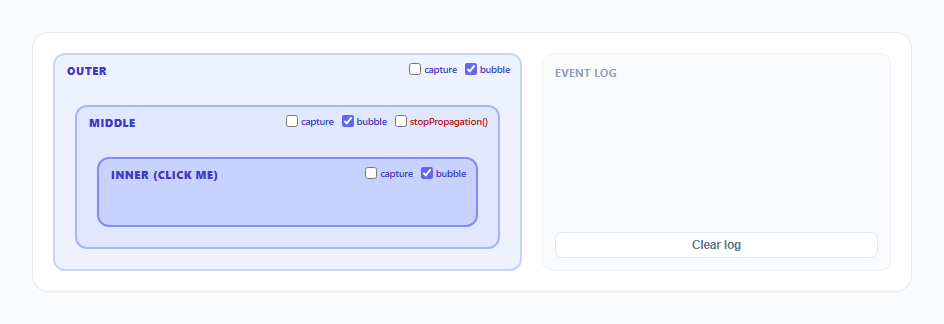
The DOM event model has three phases — capture, target, and bubble — and almost every explanation of it draws a static arrow diagram instead of showing an actual click event traveling through actual nested elements. This snippet fixes that: three real nested boxes (Outer, Middle, Inner) each carry genuine addEventListener handlers registered in both phases, a live log prints exactly which handler fires and in what order, and an animated pulse physically travels down through the tree during capture and back up during bubble — using the browser's real event dispatch, not a scripted approximation of it.
Real capture and bubble listeners, not a simulated order
Each box registers two listeners on the exact same element: addEventListener('click', handler, true) for the capture phase and addEventListener('click', handler, false) (the default) for the bubble phase. When Inner is clicked, the browser's actual dispatch algorithm runs: it walks from document down to inner calling every registered capture-phase listener along the way (outer capture, then middle capture, then inner capture), then calls the target's own bubble-phase listener, then walks back up calling every bubble-phase listener from inner to middle to outer. The log entries this snippet prints are not scripted to look like this order — they are the direct, real-time record of the callbacks the browser itself invoked, which is why toggling any of the six checkboxes (capture/bubble per box) genuinely changes which lines appear, because it genuinely changes which listeners exist.
Two animated pulses on the same physical positions
runVisualPulse() computes the screen-space center of each box with getBoundingClientRect() and animates a small SVG <circle> through those points using requestAnimationFrame with a cubic ease-out (1 - Math.pow(1 - p, 3)), not CSS keyframes, because the destination points depend on live layout measurements taken at click time rather than fixed values that could be hardcoded into a @keyframes rule. The first pulse (grey, thinner, radius 4) runs Inner → Middle → Outer to represent the capture phase's top-down path rendered in reverse for legibility, immediately followed by a second pulse (indigo, thicker, radius 6) that runs the same Inner → Middle → Outer path representing the bubble phase — the phase most real-world event listeners actually use, which is why it is drawn heavier and brighter.
Why capture is drawn dim and bubble is drawn bright
This is a deliberate legibility choice, not an accident: capture-phase listeners are comparatively rare in real code (most handlers use the default bubble phase), so demoting the capture pulse to a thin grey line keeps visual weight on the phase developers actually rely on day to day, while still making the true dispatch order — capture always completes fully before bubble begins — visible as two distinct, sequential animations rather than one ambiguous blur.
The stopPropagation() toggle and where it actually breaks the chain
Checking "stopPropagation()" on the Middle box's bubble-phase checkbox flips a flag that is read inside Middle's own bubble handler: if (name === 'middle' && stopChecked) { e.stopPropagation(); }. Calling stopPropagation() from inside a handler stops the event from continuing to any further listeners in the remaining phase — since this call happens during Middle's *bubble* handler, it prevents Outer's bubble listener from ever firing, but it does not retroactively undo the capture phase, which already ran to completion before bubbling even started. runVisualPulse() mirrors this precisely: when the stop toggle and Middle's bubble checkbox are both on, the second (bubble) pulse animation is only given two points, [innerPt, middlePt], so it visibly halts at Middle instead of continuing to Outer — and the log shows the real consequence, with no "OUTER — bubble phase handler fired" line ever appearing.
Independent per-box, per-phase toggles built for direct experimentation
Rather than one global on/off switch, each box exposes its own capture and bubble checkboxes (six total), checked via document.getElementById(name + '-capture').checked and ...'-bubble'.checked at the top of every handler before it logs anything or runs its side effects. This lets you construct any combination — for example, disabling Inner's own bubble listener while keeping Middle's and Outer's — and watch the log and pulse respond exactly as the real DOM event model dictates for that specific configuration, rather than only ever observing the one "all phases enabled" case most diagrams show.
Build with AI
Build, Understand, Optimize, and Extend It With AI
Give this snippet's JavaScript to an AI assistant like Claude and ask it to trace exactly why the stopPropagation() call inside Middle's bubble handler prevents Outer's bubble listener but not Middle's own already-completed capture listener — the phase-ordering logic is subtle and worth confirming you've internalized correctly. It's also worth asking how this would change if stopImmediatePropagation() were used instead, or if a capture-phase stopPropagation() call were added on Middle as well. Good extensions to request: a fourth nesting level, a visible phase-progress indicator (capture/target/bubble label) synced to the pulse, or a second simultaneous click target to show two independent dispatch paths.
Prompt to recreate it
Copy this into your AI assistant of choice to build the effect from scratch, or as a jumping-off point for your own variant:
Build an animated event bubbling and capturing visualizer in plain HTML, CSS, and JavaScript, no frameworks or libraries.

Requirements:
- Three nested boxes labeled Outer, Middle, and Inner, each with its own real addEventListener('click', handler, true) capture-phase listener and addEventListener('click', handler, false) bubble-phase listener — the actual browser event dispatch order must drive everything, not a scripted sequence.
- A checkbox per box per phase (six total) that enables or disables that specific listener before a click happens, so any combination of active capture/bubble handlers across the three boxes can be tested.
- Clicking the Inner box triggers two sequential animated pulses that travel between the real screen positions of the three boxes (measured with getBoundingClientRect at click time, not hardcoded coordinates): first a dim, thin pulse representing the capture phase traveling from Outer down to Inner, then a brighter, thicker pulse representing the bubble phase traveling from Inner back up to Outer.
- A live, scrolling event log that prints one line per handler invocation in the real order the browser called them, visually distinguishing capture-phase entries from bubble-phase entries.
- A stopPropagation() checkbox on the Middle box's bubble-phase handler that, when enabled, must genuinely call event.stopPropagation() inside that handler — causing the bubble-phase pulse animation to visibly halt at Middle instead of continuing to Outer, and the log to show that Outer's bubble handler never fires.
- Use requestAnimationFrame with an easing function for the pulse movement rather than fixed CSS keyframe animations, since the pulse's start and end coordinates depend on live layout measurements taken at the moment of the click.
Want to tighten it up first? Run this prompt through the AI Prompt Studio to score it across 8 quality dimensions, catch anti-patterns, and tune the wording for Claude, ChatGPT, or Gemini before you paste it in.
Source Code
<div class="wrap">
  <div class="stage-panel">
    <div class="boxes" id="boxes">
      <div class="box outer" id="box-outer">
        <span class="box-label">Outer</span>
        <div class="phase-toggles">
          <label><input type="checkbox" id="outer-capture" /> capture</label>
          <label><input type="checkbox" id="outer-bubble" checked /> bubble</label>
        </div>
        <div class="box middle" id="box-middle">
          <span class="box-label">Middle</span>
          <div class="phase-toggles">
            <label><input type="checkbox" id="middle-capture" /> capture</label>
            <label><input type="checkbox" id="middle-bubble" checked /> bubble</label>
            <label class="stop-label"><input type="checkbox" id="middle-stop" /> stopPropagation()</label>
          </div>
          <div class="box inner" id="box-inner">
            <span class="box-label">Inner (click me)</span>
            <div class="phase-toggles">
              <label><input type="checkbox" id="inner-capture" /> capture</label>
              <label><input type="checkbox" id="inner-bubble" checked /> bubble</label>
            </div>
          </div>
        </div>
      </div>
      <svg id="pulse-svg"></svg>
    </div>
  </div>
  <div class="log-panel">
    <div class="log-title">Event Log</div>
    <div class="log-list" id="log-list"></div>
    <button class="clear-btn" id="clear-log">Clear log</button>
  </div>
</div>
* { box-sizing: border-box; margin: 0; padding: 0; }
body { font-family: system-ui, -apple-system, sans-serif; background: #f8fafc; min-height: 100vh; display: flex; align-items: center; justify-content: center; padding: 24px; }
.wrap { width: 100%; max-width: 880px; display: flex; gap: 20px; background: #fff; border: 1px solid #e2e8f0; border-radius: 16px; padding: 20px; flex-wrap: wrap; }
.stage-panel { flex: 1 1 380px; }
.boxes { position: relative; }
.box { border-radius: 12px; padding: 20px; position: relative; cursor: pointer; transition: box-shadow 0.2s; }
.outer { background: #eef2ff; border: 2px solid #c7d2fe; }
.middle { background: #e0e7ff; border: 2px solid #a5b4fc; margin-top: 30px; }
.inner { background: #c7d2fe; border: 2px solid #818cf8; margin-top: 30px; padding: 28px 20px; }
.box:hover { box-shadow: 0 0 0 3px rgba(99,102,241,0.15); }
.box-label { position: absolute; top: 8px; left: 12px; font-size: 11px; font-weight: 800; color: #4338ca; text-transform: uppercase; letter-spacing: 0.05em; }
.phase-toggles { position: absolute; top: 8px; right: 10px; display: flex; gap: 8px; }
.phase-toggles label { font-size: 9.5px; font-weight: 600; color: #4338ca; display: flex; align-items: center; gap: 3px; cursor: pointer; }
.phase-toggles input { accent-color: #6366f1; width: 12px; height: 12px; }
.stop-label { color: #b91c1c !important; }
.stop-label input { accent-color: #ef4444; }
.inner { display: flex; align-items: flex-end; justify-content: center; min-height: 70px; }
#pulse-svg { position: absolute; top: 0; left: 0; width: 100%; height: 100%; pointer-events: none; overflow: visible; }
.pulse-dot { transition: opacity 0.15s; }
.log-panel { flex: 1 1 260px; display: flex; flex-direction: column; background: #f8fafc; border: 1px solid #eef2f7; border-radius: 10px; padding: 12px; max-height: 420px; }
.log-title { font-size: 10.5px; font-weight: 700; color: #94a3b8; text-transform: uppercase; letter-spacing: 0.06em; margin-bottom: 8px; }
.log-list { flex: 1; overflow-y: auto; display: flex; flex-direction: column; gap: 4px; font-family: ui-monospace, monospace; font-size: 11.5px; }
.log-entry { padding: 5px 8px; border-radius: 6px; background: #fff; border-left: 3px solid #cbd5e1; animation: logIn 0.18s ease; }
.log-entry.capture { border-left-color: #94a3b8; color: #64748b; }
.log-entry.bubble { border-left-color: #6366f1; color: #1e293b; font-weight: 600; }
.log-entry.stopped { border-left-color: #ef4444; color: #b91c1c; font-weight: 700; }
@keyframes logIn { from { transform: translateX(-6px); opacity: 0; } to { transform: translateX(0); opacity: 1; } }
.clear-btn { margin-top: 8px; font-size: 11.5px; font-weight: 600; padding: 6px; border-radius: 7px; border: 1.5px solid #e2e8f0; background: #fff; color: #64748b; cursor: pointer; }
.clear-btn:hover { border-color: #cbd5e1; }const outer = document.getElementById('box-outer');
const middle = document.getElementById('box-middle');
const inner = document.getElementById('box-inner');
const logList = document.getElementById('log-list');
const svg = document.getElementById('pulse-svg');
function log(text, cls) {
const entry = document.createElement('div');
entry.className = 'log-entry ' + cls;
entry.textContent = text;
logList.appendChild(entry);
logList.scrollTop = logList.scrollHeight;
}
function makeHandler(name, phaseLabel) {
return function (e) {
if (phaseLabel === 'capture') {
const enabled = document.getElementById(name + '-capture').checked;
if (!enabled) return;
log(name.toUpperCase() + ' — capture phase handler fired', 'capture');
} else {
const enabled = document.getElementById(name + '-bubble').checked;
if (!enabled) return;
log(name.toUpperCase() + ' — bubble phase handler fired', 'bubble');
if (name === 'middle' && document.getElementById('middle-stop').checked) {
log('MIDDLE called stopPropagation() — bubbling halted here', 'stopped');
e.stopPropagation();
}
}
};
}
outer.addEventListener('click', makeHandler('outer', 'capture'), true);
middle.addEventListener('click', makeHandler('middle', 'capture'), true);
inner.addEventListener('click', makeHandler('inner', 'capture'), true);
outer.addEventListener('click', makeHandler('outer', 'bubble'), false);
middle.addEventListener('click', makeHandler('middle', 'bubble'), false);
inner.addEventListener('click', makeHandler('inner', 'bubble'), false);
function rectCenter(el) {
const boxRect = document.getElementById('boxes').getBoundingClientRect();
const r = el.getBoundingClientRect();
return { x: r.left - boxRect.left + r.width / 2, y: r.top - boxRect.top + 20 };
}
function makeDot(x, y, color) {
const dot = document.createElementNS('http://www.w3.org/2000/svg', 'circle');
dot.setAttribute('r', '6');
dot.setAttribute('fill', color);
dot.setAttribute('cx', x);
dot.setAttribute('cy', y);
dot.classList.add('pulse-dot');
svg.appendChild(dot);
return dot;
}
function wait(ms) { return new Promise(res => setTimeout(res, ms)); }
async function animatePulse(points, color, radius) {
const dot = makeDot(points[0].x, points[0].y, color);
dot.setAttribute('r', radius);
for (let i = 1; i < points.length; i++) {
await animateTo(dot, points[i].x, points[i].y, 260);
}
dot.style.opacity = '0';
await wait(150);
dot.remove();
}
function animateTo(dot, x, y, duration) {
return new Promise(resolve => {
const startX = parseFloat(dot.getAttribute('cx'));
const startY = parseFloat(dot.getAttribute('cy'));
const t0 = performance.now();
function step(t) {
const p = Math.min(1, (t - t0) / duration);
const ease = 1 - Math.pow(1 - p, 3);
dot.setAttribute('cx', startX + (x - startX) * ease);
dot.setAttribute('cy', startY + (y - startY) * ease);
if (p < 1) requestAnimationFrame(step);
else resolve();
}
requestAnimationFrame(step);
});
}
async function runVisualPulse() {
const outerPt = rectCenter(outer);
const middlePt = rectCenter(middle);
const innerPt = rectCenter(inner);
await animatePulse([innerPt, middlePt, outerPt], '#94a3b8', 4);
const stopAtMiddle = document.getElementById('middle-stop').checked && document.getElementById('middle-bubble').checked;
if (stopAtMiddle) {
await animatePulse([innerPt, middlePt], '#6366f1', 6);
} else {
await animatePulse([innerPt, middlePt, outerPt], '#6366f1', 6);
}
}
inner.addEventListener('click', () => {
log('--- click dispatched on INNER ---', 'bubble');
runVisualPulse();
});
document.getElementById('clear-log').addEventListener('click', () => {
logList.innerHTML = '';
});Step by step
How to Use
- 1Click the Inner boxA dim grey pulse travels Outer to Middle to Inner during the capture phase (drawn first), followed by a brighter indigo pulse traveling Inner to Middle to Outer during the bubble phase.
- 2Read the event log on the rightEach line records a real handler firing, in the exact order the browser invoked it — capture-phase entries appear grey and thin, bubble-phase entries appear indigo and bold.
- 3Uncheck a box's "bubble" checkboxThat box's bubble-phase listener is removed entirely. Click Inner again and confirm no log entry appears for that box during the bubble pass, while capture (if enabled) still fires normally.
- 4Check a box's "capture" checkboxThat box's capture-phase listener is added. Click Inner again and watch a new grey log entry appear before any bubble entries, since capture always completes before bubbling begins.
- 5Enable stopPropagation() on the Middle boxClick Inner again. The bright bubble pulse now visibly stops at Middle instead of continuing to Outer, and the log confirms Outer's bubble handler never fires.
- 6Toggle stopPropagation() off and compare the two log sequencesWith it off, all six potential handlers can fire in full capture-then-bubble order; with it on, exactly one bubble-phase handler (Outer's) is missing from the second run — the clearest possible before/after contrast.
Real-world uses
Common Use Cases
Got questions?
Frequently Asked Questions
Yes, with one important adjustment: React's synthetic event system attaches a single delegated listener at the root and simulates bubbling through its own virtual tree, so onClickCapture and onClick props on JSX elements map to this snippet's capture and bubble listeners respectively, and calling e.stopPropagation() inside a React handler behaves the same way described here. Put the pulse animation loop (the requestAnimationFrame-based animateTo function) inside a useEffect or a plain event handler, and since it resolves via its own Promise chain rather than a persistent interval, there is no dangling timer to clear on unmount — just guard against updating state after unmount if the component could disappear mid-animation. Vue's @click.capture modifier and Angular's (click) with a manually attached capture listener follow the same conceptual mapping.
Because that mirrors the real DOM Level 3 event dispatch algorithm: the browser first walks from the document root down to the actual click target, invoking every capture-phase listener it encounters along the way, and only once that entire descent is complete does it begin the ascent back up, invoking bubble-phase listeners. There is no interleaving between the two phases — capture always fully completes first, which is exactly why this snippet always plays the grey pulse to completion before starting the indigo one.
No. stopPropagation() only prevents the event from continuing to listeners that have not yet run, at the point in the phase sequence where it is called. Since this snippet calls it from inside Middle's bubble-phase handler, Middle's own capture-phase listener (which ran earlier, during the descent) is unaffected — it already fired. What gets prevented is only Outer's bubble-phase listener, the next one in line after Middle's bubble handler runs.
stopPropagation() prevents the event from reaching listeners on other elements further along the capture or bubble path, but any other listeners already registered on the same element for the same event will still run. stopImmediatePropagation() does both of those things and additionally prevents any remaining listeners on the very same element from running, even ones registered for the same phase. This snippet only demonstrates stopPropagation(), since only one bubble listener is ever registered per element here — adding a second bubble listener to Middle and calling stopImmediatePropagation() instead would be a natural extension to see the extra effect.
Because whichever element you click becomes the actual event target, and only elements from that target up to the document root (or down to it, for capture) are part of that particular dispatch's path. Clicking Middle directly means Inner is never part of the path at all, so only Middle's and Outer's handlers (and Middle's own target-phase handler) can fire — Inner's listeners are only ever invoked when Inner itself, or one of Inner's own descendants, is what was actually clicked.