Learn Coding Visually
Learn to code with interactive, live-preview playgrounds — HTML, CSS, JavaScript, React & more.
 HTML Playground42 lessons · Click-based · Live preview
 CSS PlaygroundLearn CSS with a live editor
 JavaScript Playground60 lessons · DOM · Async · Canvas
 React PlaygroundLearn React with a live code editor
 GSAP PlaygroundLearn GSAP animation interactively
 SVG Playground44 lessons · shapes · paths · animation
 SCSS Playground45 lessons · Sass modules · tokens
 Tailwind PlaygroundLearn Tailwind CSS with a live editor
 Bootstrap 5 Playground50 lessons · live preview
CSS Selector Challenge Game — Free HTML CSS JS Snippet
CSS Selector Challenge Game · Games · Plain HTML, CSS & JS · Live preview
What's included
Features
About this UI Snippet
CSS Selector Challenge Game — Live querySelectorAll Evaluation, Set-Equality Grading & Progressive Levels
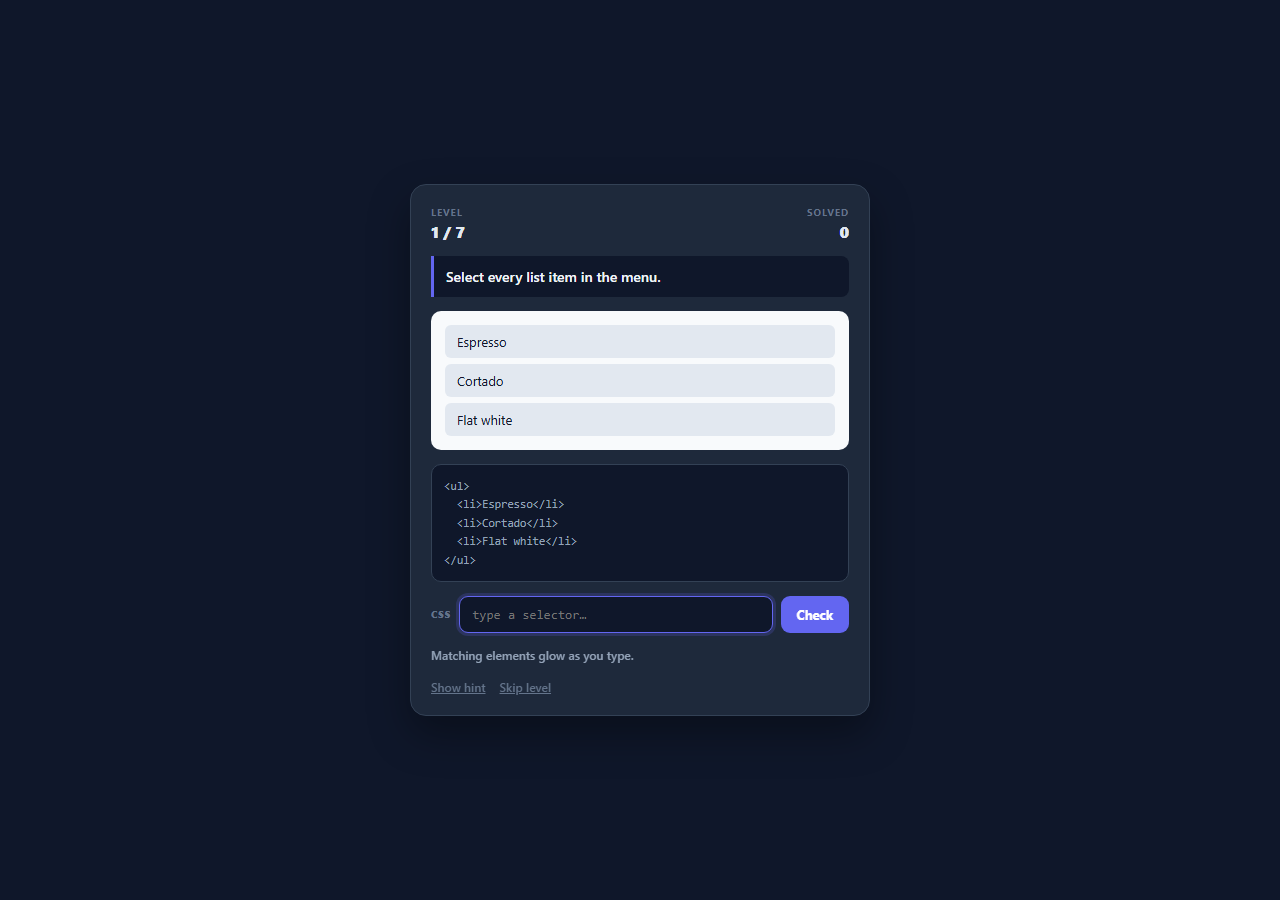
Most "learn CSS selectors" widgets check the player's answer against a stored string, which means a correct selector written a slightly different way is marked wrong and the whole exercise teaches memorisation rather than understanding. This snippet does the opposite: it runs the player's typed selector through the browser's own querySelectorAll against a small live DOM stage and compares the resulting element set against the set the target selector produces. Any selector that matches exactly the right elements is accepted, so a player who reaches the answer by a different valid route is rewarded rather than punished — which is the behaviour that actually builds selector intuition.
Evaluating the player's selector safely against a scoped stage
Every lookup runs as stage.querySelectorAll(selector) rather than document.querySelectorAll(selector), so a broad answer like * or div can only ever match elements inside the puzzle stage and never reaches the surrounding game chrome, the input, or the score display. The call sits inside a try/catch because a partially typed selector such as li:nth-child( throws a SyntaxError — the catch returns null, which the caller treats as "not valid yet" rather than "matches nothing", letting the input show a red border while the player is mid-keystroke without ever printing a console error.
Set equality instead of string comparison
sameSet(a, b) compares two arrays of DOM element references by length and membership: same count, and every element in the player's result also present in the target result. Because the comparison is on element identity rather than on selector text, .sold.seasonal, li.seasonal.sold and any other syntactically different selector that resolves to the same elements all grade as correct. This is the single design decision that separates a genuine selector trainer from a spelling test.
Feedback that names the failure mode
When the sets differ, the game does not simply say "wrong". It compares the two lengths and reports whether the answer was too broad (matched more elements than the target) or too narrow (matched fewer), then highlights both sets simultaneously — the player's matches with a solid .hit glow, the intended targets with a dashed .want outline. Seeing an over-matching selector light up two extra rows is far more instructive than a binary verdict, because it makes the specific over-reach visible in the same place the player is looking.
Live preview on every keystroke
An input listener re-runs the match and re-applies the .hit class as the player types, so the selector is evaluated continuously rather than only on submit. Highlights are cleared first by removing the classes from all previously marked elements, which keeps the highlight state derived purely from the current input rather than accumulating stale marks. Because querySelectorAll on a stage of a dozen elements is effectively instant, no debounce is needed — the feedback loop is tight enough that players discover how a selector behaves before they commit to it.
Level data as a single array
Each level is one object holding a plain-English goal, the markup string injected into the stage, the reference answer selector, and a hint. Adding a level is one array entry and no code change, and the same markup string is used twice — once as live DOM via innerHTML and once as readable source in the <pre> code panel — so what the player reads and what the selector runs against can never drift apart. The seven levels ramp from a bare type selector through classes, ids, chained classes, attribute selectors, :nth-child() and :not(), which is the practical core of day-to-day selector work.
Build with AI
Build, Understand, Optimize, and Extend It With AI
Paste this snippet into an AI assistant like Claude and ask it to add a timed speedrun mode that scores each level on how few characters the accepted selector used, which turns the game into a lesson about selector economy rather than just correctness. Other natural extensions: add combinator levels (descendant, child, adjacent sibling and general sibling) with markup nested deeply enough that the difference actually matters, add a "specificity score" readout next to each accepted answer so players see the cost of the route they chose, or invert the game so it shows a selector and asks the player to click the elements it matches. Each builds directly on the existing set-equality grading rather than replacing it.
Prompt to recreate it
Copy this into your AI assistant of choice to build the effect from scratch, or as a jumping-off point for your own variant:
Build a playable CSS selector challenge game in plain HTML, CSS, and JavaScript — no frameworks or libraries.

Requirements:
- A levels array where each level is a data object with a plain-English goal, an HTML markup string for the puzzle stage, a reference answer selector, and a one-line hint. Adding a level must require no code changes.
- Render each level's markup into a stage container AND show the same markup string as readable source in a code panel, so the player can read exactly what they are selecting against.
- Evaluate the player's typed selector with stage.querySelectorAll() scoped to the stage element only — never document-wide — so a broad selector like * cannot touch the surrounding game UI.
- Wrap the evaluation in try/catch: an incomplete selector such as li:nth-child( throws a SyntaxError, which must be surfaced as an invalid-input state (red border) rather than an uncaught error.
- Grade by set equality, not string comparison: collect the elements the player's selector matches and the elements the reference answer matches, and accept the answer when the two sets contain exactly the same elements. Any differently-written but equivalent selector must pass.
- Highlight matched elements live on every keystroke, and on a wrong submission report whether the answer was too broad or too narrow with both counts, glowing the player's matches while outlining the intended targets in a distinct style.
- Include at least seven levels ramping from a bare type selector through class, id, chained classes, attribute selectors, :nth-child() and :not(), plus a hint button, a skip button, and a solved counter.
Want to tighten it up first? Run this prompt through the AI Prompt Studio to score it across 8 quality dimensions, catch anti-patterns, and tune the wording for Claude, ChatGPT, or Gemini before you paste it in.
Source Code
<div class="demo-wrap">
  <div class="sel-game">
    <div class="sel-head">
      <div class="sel-meta">
        <span class="sel-label">Level</span>
        <span class="sel-value" id="selLevel">1 / 7</span>
      </div>
      <div class="sel-meta sel-meta-right">
        <span class="sel-label">Solved</span>
        <span class="sel-value" id="selScore">0</span>
      </div>
    </div>

    <p class="sel-goal" id="selGoal">Select every list item.</p>

    <div class="sel-stage" id="selStage"></div>

    <pre class="sel-code" id="selCode"></pre>

    <div class="sel-input-row">
      <span class="sel-prompt">CSS</span>
      <input class="sel-input" id="selInput" type="text" spellcheck="false" autocomplete="off" placeholder="type a selector…">
      <button class="sel-btn" id="selCheck">Check</button>
    </div>

    <p class="sel-status" id="selStatus">Matching elements glow as you type.</p>

    <div class="sel-actions">
      <button class="sel-link" id="selHint">Show hint</button>
      <button class="sel-link" id="selSkip">Skip level</button>
    </div>
  </div>
</div>
* { box-sizing: border-box; margin: 0; padding: 0; }
body { font-family: system-ui, -apple-system, sans-serif; background: #0f172a; min-height: 100vh; }
.demo-wrap { display: flex; align-items: center; justify-content: center; min-height: 100vh; padding: 28px 16px; }
.sel-game {
width: 100%; max-width: 460px; padding: 20px;
background: #1e293b; border: 1px solid #334155; border-radius: 16px;
display: flex; flex-direction: column; gap: 14px;
box-shadow: 0 18px 40px rgba(0,0,0,0.35);
}
.sel-head { display: flex; justify-content: space-between; align-items: center; }
.sel-meta { display: flex; flex-direction: column; gap: 2px; }
.sel-meta-right { align-items: flex-end; }
.sel-label { font-size: 10px; font-weight: 700; letter-spacing: 0.08em; text-transform: uppercase; color: #64748b; }
.sel-value { font-size: 16px; font-weight: 800; color: #e2e8f0; }
.sel-goal {
font-size: 14px; font-weight: 600; color: #f1f5f9; line-height: 1.5;
background: #0f172a; border-left: 3px solid #6366f1; border-radius: 0 8px 8px 0; padding: 10px 12px;
}
.sel-stage {
background: #f8fafc; border-radius: 10px; padding: 14px;
display: flex; flex-direction: column; gap: 8px; color: #0f172a; font-size: 13px;
}
.sel-stage ul { list-style: none; display: flex; flex-direction: column; gap: 6px; }
.sel-stage li, .sel-stage p, .sel-stage h3, .sel-stage button, .sel-stage span.tag {
border-radius: 6px; padding: 6px 10px; background: #e2e8f0; color: #0f172a;
font-size: 13px; font-family: inherit; border: 2px solid transparent; transition: all 0.15s;
}
.sel-stage h3 { font-size: 14px; font-weight: 700; }
.sel-stage .row { display: flex; gap: 6px; flex-wrap: wrap; }
.sel-stage .hit { background: #c7d2fe; border-color: #6366f1; box-shadow: 0 0 0 3px rgba(99,102,241,0.25); }
.sel-stage .want { outline: 2px dashed #f59e0b; outline-offset: 2px; }
.sel-code {
background: #0f172a; border: 1px solid #334155; border-radius: 10px; padding: 12px;
font-family: ui-monospace, SFMono-Regular, Menlo, monospace; font-size: 11.5px; line-height: 1.6;
color: #94a3b8; overflow-x: auto; white-space: pre;
}
.sel-input-row { display: flex; align-items: center; gap: 8px; }
.sel-prompt { font-size: 10px; font-weight: 800; letter-spacing: 0.08em; color: #64748b; }
.sel-input {
flex: 1; min-width: 0; padding: 10px 12px; border-radius: 9px;
border: 1.5px solid #334155; background: #0f172a; color: #e2e8f0;
font-family: ui-monospace, SFMono-Regular, Menlo, monospace; font-size: 13px; outline: none;
}
.sel-input:focus { border-color: #6366f1; box-shadow: 0 0 0 3px rgba(99,102,241,0.2); }
.sel-input.bad { border-color: #ef4444; }
.sel-btn {
padding: 10px 16px; border: none; border-radius: 9px; background: #6366f1; color: #fff;
font-size: 13px; font-weight: 700; font-family: inherit; cursor: pointer;
}
.sel-btn:hover { background: #4f46e5; }
.sel-status { font-size: 12px; font-weight: 600; color: #94a3b8; min-height: 18px; }
.sel-status.ok { color: #4ade80; }
.sel-status.err { color: #f87171; }
.sel-actions { display: flex; gap: 14px; }
.sel-link {
background: none; border: none; padding: 0; cursor: pointer; font-family: inherit;
font-size: 12px; font-weight: 600; color: #64748b; text-decoration: underline;
}
.sel-link:hover { color: #a5b4fc; }var LEVELS = [
{
goal: 'Select every list item in the menu.',
answer: 'li',
hint: 'A bare type selector matches every element of that tag name.',
markup: '<ul>\n <li>Espresso</li>\n <li>Cortado</li>\n <li>Flat white</li>\n</ul>',
},
{
goal: 'Select only the items marked as sold out.',
answer: '.sold',
hint: 'A class selector starts with a dot.',
markup: '<ul>\n <li>Espresso</li>\n <li class="sold">Cortado</li>\n <li class="sold">Affogato</li>\n</ul>',
},
{
goal: 'Select the one element with the id "special".',
answer: '#special',
hint: 'An id selector starts with a hash and must match exactly one element per page.',
markup: '<ul>\n <li>Espresso</li>\n <li id="special">Barista pick</li>\n <li>Flat white</li>\n</ul>',
},
{
goal: 'Select the list items that are BOTH sold out and seasonal.',
answer: '.sold.seasonal',
hint: 'Chain two class selectors with no space between them to require both.',
markup: '<ul>\n <li class="sold">Cortado</li>\n <li class="sold seasonal">Pumpkin latte</li>\n <li class="seasonal">Iced yuzu</li>\n</ul>',
},
{
goal: 'Select every checkbox input, and nothing else.',
answer: 'input[type="checkbox"]',
hint: 'An attribute selector goes in square brackets: [attr="value"].',
markup: '<div class="row">\n <input type="checkbox">\n <input type="radio">\n <input type="checkbox">\n</div>',
},
{
goal: 'Select the second item in the list — and only the second.',
answer: 'li:nth-child(2)',
hint: ':nth-child(n) counts position among siblings, starting at 1.',
markup: '<ul>\n <li>Espresso</li>\n <li>Cortado</li>\n <li>Flat white</li>\n <li>Mocha</li>\n</ul>',
},
{
goal: 'Select every list item that is NOT muted.',
answer: 'li:not(.muted)',
hint: ':not() takes a selector and matches everything that fails it.',
markup: '<ul>\n <li>Espresso</li>\n <li class="muted">Decaf</li>\n <li>Cortado</li>\n <li class="muted">Water</li>\n</ul>',
},
];
var stage = document.getElementById('selStage');
var codeEl = document.getElementById('selCode');
var goalEl = document.getElementById('selGoal');
var input = document.getElementById('selInput');
var statusEl = document.getElementById('selStatus');
var levelEl = document.getElementById('selLevel');
var scoreEl = document.getElementById('selScore');
var index = 0;
var solved = 0;
var locked = false;
function currentLevel() { return LEVELS[index]; }
function renderLevel() {
var lv = currentLevel();
locked = false;
goalEl.textContent = lv.goal;
stage.innerHTML = lv.markup;
codeEl.textContent = lv.markup;
levelEl.textContent = (index + 1) + ' / ' + LEVELS.length;
scoreEl.textContent = solved;
input.value = '';
input.classList.remove('bad');
setStatus('Matching elements glow as you type.', '');
input.focus();
}
function setStatus(msg, kind) {
statusEl.textContent = msg;
statusEl.className = 'sel-status' + (kind ? ' ' + kind : '');
}
// Run a selector against the stage only, never the whole document.
function match(selector) {
try {
return Array.prototype.slice.call(stage.querySelectorAll(selector));
} catch (err) {
return null; // invalid selector syntax
}
}
function clearHighlights() {
Array.prototype.forEach.call(stage.querySelectorAll('.hit, .want'), function (el) {
el.classList.remove('hit', 'want');
});
}
function preview() {
if (locked) return;
clearHighlights();
var value = input.value.trim();
if (!value) { input.classList.remove('bad'); return; }
var found = match(value);
if (found === null) { input.classList.add('bad'); return; }
input.classList.remove('bad');
found.forEach(function (el) { el.classList.add('hit'); });
}
function sameSet(a, b) {
if (a.length !== b.length) return false;
return a.every(function (el) { return b.indexOf(el) !== -1; });
}
function check() {
if (locked) return;
var value = input.value.trim();
if (!value) { setStatus('Type a selector first.', 'err'); return; }
var found = match(value);
if (found === null) { setStatus('That is not valid CSS selector syntax.', 'err'); return; }
var wanted = match(currentLevel().answer);
if (found.length === 0) { setStatus('That selector matches nothing here.', 'err'); return; }
if (sameSet(found, wanted)) {
locked = true;
solved++;
scoreEl.textContent = solved;
clearHighlights();
wanted.forEach(function (el) { el.classList.add('hit'); });
if (index === LEVELS.length - 1) {
setStatus('Correct — all ' + LEVELS.length + ' levels cleared!', 'ok');
setTimeout(function () { index = 0; solved = 0; renderLevel(); }, 1600);
} else {
setStatus('Correct! Next level…', 'ok');
setTimeout(function () { index++; renderLevel(); }, 900);
}
} else if (found.length > wanted.length) {
clearHighlights();
found.forEach(function (el) { el.classList.add('hit'); });
wanted.forEach(function (el) { el.classList.add('want'); });
setStatus('Too broad — you matched ' + found.length + ', the target is ' + wanted.length + ' (dashed).', 'err');
} else {
clearHighlights();
found.forEach(function (el) { el.classList.add('hit'); });
wanted.forEach(function (el) { el.classList.add('want'); });
setStatus('Too narrow — you matched ' + found.length + ' of ' + wanted.length + ' (dashed).', 'err');
}
}
input.addEventListener('input', preview);
input.addEventListener('keydown', function (e) { if (e.key === 'Enter') check(); });
document.getElementById('selCheck').addEventListener('click', check);
document.getElementById('selHint').addEventListener('click', function () {
setStatus(currentLevel().hint, '');
});
document.getElementById('selSkip').addEventListener('click', function () {
if (index === LEVELS.length - 1) { index = 0; } else { index++; }
renderLevel();
});
renderLevel();Step by step
How to Use
- 1Read the goal and the markupThe indigo-bordered line states the target in plain English, and the dark code panel below the stage shows the exact HTML your selector will run against — the same string that was injected into the live preview above it.
- 2Type a selector and watch it match liveAs you type, every element the selector currently matches lights up with an indigo glow. A partially typed selector like li:nth-child( turns the input border red instead of throwing — the syntax error is caught and reported as "not valid yet".
- 3Press Enter or click CheckThe game compares the elements your selector matched with the elements the reference answer matches. Any selector resolving to exactly the right set is accepted, so there is no single "official" spelling you have to guess.
- 4Read the miss diagnosisA wrong answer reports whether you were too broad or too narrow with the counts, glows your matches, and outlines the intended targets with a dashed amber border so you can see exactly which elements you over- or under-reached.
- 5Use a hint if you are stuckShow hint writes the level's one-line explanation of the technique into the status row — for example that :nth-child(n) counts position among siblings starting at 1 — without revealing the answer itself.
- 6Clear all seven levelsLevels ramp from a bare type selector through class, id, chained-class, attribute, :nth-child() and :not() selectors. Solving the last one shows a completion message and restarts the game from level 1 with a fresh score.
Real-world uses
Common Use Cases
Got questions?
Frequently Asked Questions
No. It runs your selector with stage.querySelectorAll() and compares the resulting element set with the set the reference answer produces, using sameSet() to check identical length and membership. Any valid selector matching exactly those elements is accepted — on the chained-class level, .sold.seasonal and li.seasonal.sold both pass because they resolve to the same element.
Every lookup is scoped to the puzzle stage element rather than the document, so querySelectorAll can only return descendants of that container. Typing * highlights every element inside the stage and nothing else — the score display, the input, and the code panel all sit outside it and are unreachable.
A partially typed selector such as li:nth-child( is invalid CSS and makes querySelectorAll throw a SyntaxError. The match() helper wraps the call in try/catch and returns null on failure, which the preview treats as "not valid yet" — showing a red border rather than clearing your highlights or logging an error.
Add an object to the LEVELS array with four keys: goal (plain-English instruction), markup (an HTML string, with newlines escaped), answer (a reference selector that matches the intended elements), and hint (a one-line explanation). No other code changes are needed — the same markup string is used for both the live stage and the readable code panel.
Yes. Move the LEVELS array and the match/sameSet helpers into a module, hold index, solved and the input value in component state, and keep a ref to the stage element so querySelectorAll stays scoped to it. In React set the stage content with dangerouslySetInnerHTML from the level markup and run highlighting inside a useEffect keyed on the input value; in Vue use v-html with a watcher; in Angular use [innerHTML] with an ElementRef and ngAfterViewInit for the initial render.