Learn Coding Visually
Learn to code with interactive, live-preview playgrounds — HTML, CSS, JavaScript, React & more.
 HTML Playground42 lessons · Click-based · Live preview
 CSS PlaygroundLearn CSS with a live editor
 JavaScript Playground60 lessons · DOM · Async · Canvas
 React PlaygroundLearn React with a live code editor
 GSAP PlaygroundLearn GSAP animation interactively
 SVG Playground44 lessons · shapes · paths · animation
 SCSS Playground45 lessons · Sass modules · tokens
 Tailwind PlaygroundLearn Tailwind CSS with a live editor
 Bootstrap 5 Playground50 lessons · live preview
Canvas Conway's Game of Life — Free Cellular Automaton Snippet
Canvas Conway's Game of Life · Games · Plain HTML, CSS & JS · Live preview
What's included
Features
About this UI Snippet
Canvas Conway's Game of Life — A Playable Cellular Automaton
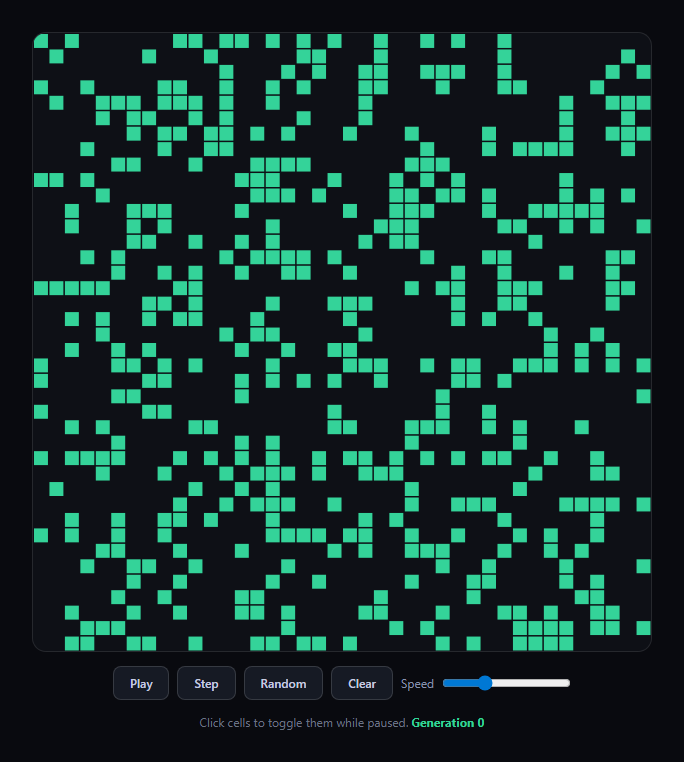
Conway's Game of Life is the classic cellular automaton: a grid of cells that are either alive or dead, evolving generation by generation according to four simple rules based purely on each cell's living neighbor count. This snippet implements it fully on the Canvas 2D API, with a typed-array grid, play/pause/step/random controls, and an adjustable simulation speed.
A Uint8Array grid, not a 2D array of booleans
The grid is stored as a single flat Uint8Array(COLS * ROWS), indexed with a helper idx(x, y) => y * COLS + x. A typed array of 1s and 0s is both faster to allocate and iterate than a nested array of arrays, and it maps cleanly onto the two states a Life cell can have — no need for a richer data structure for a strictly binary grid.
Neighbor counting wraps at the edges
countNeighbors checks all eight surrounding cells, but wraps out-of-bounds coordinates back around with (x + dx + COLS) % COLS — so the grid behaves like a torus, where the right edge is a neighbor of the left edge and the bottom wraps to the top. This is the standard way to avoid dead zones at the grid boundary that would otherwise behave differently from interior cells.
Rules apply to a snapshot, not in place
step() is the heart of the simulation: it builds a brand new next array and computes every cell's next state purely from the *current* grid, following Conway's four rules — a live cell with 2 or 3 neighbors survives, a dead cell with exactly 3 neighbors becomes alive, everything else dies or stays dead. Applying the rules to a fresh buffer (rather than mutating grid cell by cell) is essential: mutating in place would let cells computed earlier in the loop affect the neighbor counts of cells computed later in the same generation, corrupting the simulation.
A real play/pause loop with adjustable tick rate
loop(ts) runs every frame via requestAnimationFrame, but only calls step() when enough time has passed based on the speed slider (1000 / speed ms between generations) — decoupling the simulation's tick rate from the display's refresh rate, so speed changes take effect immediately without restarting the loop. Pausing simply stops the interval check from ever triggering step, while clicking a cell is only allowed while paused, matching the classic editable-then-run interaction.
Customizing it
Change COLS/ROWS for a finer or coarser grid, tweak the random seed density in randomize, or seed a specific classic pattern (glider, blinker) programmatically instead of randomizing. Pair it with tic tac toe game or whack a mole game for more canvas-and-grid-based casual games.
Build with AI
Build, Understand, Optimize, and Extend It With AI
Paste this snippet's HTML, CSS, and JS into an AI coding assistant like Claude and ask it to explain why computing the next generation into a separate buffer (rather than mutating the grid in place) is required for Conway's rules to apply correctly, and how the edge-wrapping neighbor count turns the flat grid into a torus. It's also a great snippet to extend with an assistant's help — ask for preset classic patterns (glider, glider gun, pulsar) placeable by click, a population-over-time graph, or a version that detects and highlights stable/oscillating patterns. Use the conversation to make sure you understand the simultaneous-update rule before adapting the simulation loop for a different cellular automaton ruleset.
Prompt to recreate it
Copy this into your AI assistant of choice to build the effect from scratch, or as a jumping-off point for your own variant:
Build a playable "Conway's Game of Life" simulation in plain HTML, CSS, and JavaScript using only the Canvas 2D API — no external libraries or CDNs.

Requirements:
- A fixed-size grid (e.g. 40x40 cells) stored in a flat typed array (Uint8Array or similar), not a nested array of arrays, with a helper function to convert (x, y) coordinates to a flat index.
- Implement neighbor counting for each cell that checks all eight surrounding cells and wraps out-of-bounds coordinates around to the opposite edge (torus/wrap-around behavior), so edge and corner cells are evaluated the same way as interior cells.
- Implement the generation-advance function so that it computes the entire next generation into a brand new array based purely on the current grid's state, following Conway's actual rules (a live cell with 2 or 3 live neighbors survives; a dead cell with exactly 3 live neighbors becomes alive; all other cells die or stay dead) — do not mutate the grid array in place during the same pass used to read neighbor counts.
- Provide UI controls for: Play/Pause (toggling automatic generation advancement), Step (advance exactly one generation while paused), Random (reseed the grid with a random distribution of live cells), and Clear (empty the grid).
- Provide a speed slider that controls how many generations run per second while playing, implemented by gating calls to the step function inside a requestAnimationFrame loop based on elapsed time (not by changing the animation frame rate itself).
- Allow the user to click individual cells to toggle them alive/dead, but only while the simulation is paused (not while playing).
- Display a live generation counter, and make the canvas responsive with correct device-pixel-ratio handling.
Want to tighten it up first? Run this prompt through the AI Prompt Studio to score it across 8 quality dimensions, catch anti-patterns, and tune the wording for Claude, ChatGPT, or Gemini before you paste it in.
Step by step
How to Use
- 1Paste HTML, CSS, and JSA grid canvas seeds randomly and controls render.
- 2Click PlayGenerations advance automatically at the set speed.
- 3Click PauseThe simulation freezes on the current generation.
- 4Click cells while pausedToggle individual cells alive or dead.
- 5Click StepAdvance exactly one generation at a time.
- 6Click Random or ClearReseed the grid randomly or wipe it empty.
- 7Drag the speed sliderChange how many generations run per second.
Real-world uses
Common Use Cases
Got questions?
Frequently Asked Questions
Any live cell with two or three live neighbors survives to the next generation; any dead cell with exactly three live neighbors becomes alive; every other live cell dies (from under- or overpopulation) and every other dead cell stays dead. All four outcomes are derived purely from each cell's eight-neighbor count, applied simultaneously to the whole grid.
Because every cell's next state depends on the current state of its neighbors, mutating cells one at a time in the same array would mean cells processed later in the loop see already-updated neighbors instead of the previous generation's values, corrupting the simulation. Building a separate next array from an untouched snapshot of grid guarantees every cell's rule is evaluated against the same consistent prior generation.
Without wrapping, cells at the grid's border would have fewer possible neighbors than interior cells, causing edge behavior to diverge from the mathematically "correct" infinite-plane Game of Life. Wrapping x and y coordinates with the modulo operator makes the grid behave like a torus, so every cell — edge or interior — always has exactly eight neighbors to evaluate.
The requestAnimationFrame loop runs every frame regardless of the slider, but it only calls step() when enough real time has elapsed since the last generation, computed as 1000 divided by the slider's value in generations-per-second. That decouples how often the simulation advances from the display's refresh rate, so dragging the slider changes speed immediately without restarting or re-scheduling the loop.
Move the canvas setup, grid state, and the requestAnimationFrame loop into a mount effect scoped to a canvas ref, keeping the grid, generation counter, and running flag in refs rather than component state so the loop doesn't get torn down on every render. Cancel the animation frame and remove event listeners in the cleanup function, and drive the play/pause/step buttons through the same refs.