
Learn Coding Visually
Learn to code with interactive, live-preview playgrounds — HTML, CSS, JavaScript, React & more.
 HTML Playground42 lessons · Click-based · Live preview
 CSS PlaygroundLearn CSS with a live editor
 JavaScript Playground60 lessons · DOM · Async · Canvas
 React PlaygroundLearn React with a live code editor
 GSAP PlaygroundLearn GSAP animation interactively
 SVG Playground44 lessons · shapes · paths · animation
 SCSS Playground45 lessons · Sass modules · tokens
 Tailwind PlaygroundLearn Tailwind CSS with a live editor
 Bootstrap 5 Playground50 lessons · live preview
Matter.js Stacking Tower Game — Free Physics Stacker Snippet
Matter.js Stacking Tower Game · Games · Plain HTML, CSS & JS · Live preview
What's included
Features
About this UI Snippet
Building a Physics Stacking Game — Swinging Blocks, Landing Detection and a Rising Camera
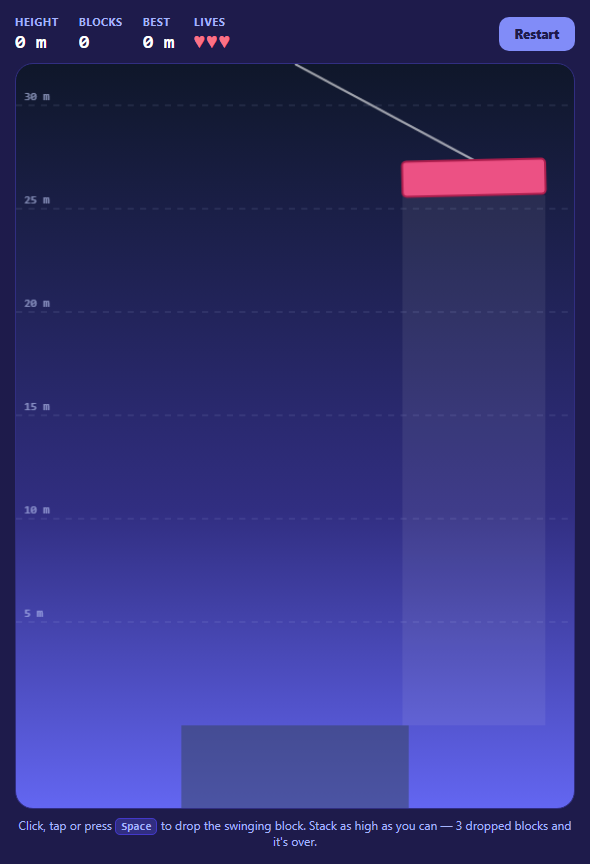
Stacking games look simple — drop a block, don't let the tower fall — but they rely on real physics: blocks that land off-centre tip, and a tall tower sways. Matter.js handles that, and this snippet adds the game layer around it.
The swinging block isn't a physics body (yet)
While it hangs, the next block is just a position animated along a sine wave across the top of the view, with a slight tilt that follows the swing. Keeping it out of the physics world means nothing can knock it. On drop it becomes a real body at the same position and tilt and falls straight down. Carrying over the swing's sideways velocity sounds realistic, but over a long fall it drifts the block far from where the guide pointed, which feels unfair — so timing is the whole skill, and the slight tilt adds just enough wobble on landing.
Stable stacking needs some tuning
Tall stacks of boxes are a stress test for any 2D engine. This snippet raises positionIterations and velocityIterations, uses high static friction and zero restitution, and turns on enableSleeping so settled blocks stop jittering. The swing speeds up as the tower grows.
Knowing when a block has landed
A block counts as landed once it's asleep or moving slower than a small threshold. Only landed blocks contribute to the tower's height, taken from the lowest bounds.min.y. A block that falls below the base platform or off its sides costs one of three lives.
A camera that climbs
With hasBounds, the renderer draws only what's inside render.bounds. Each frame the bounds' vertical position eases toward a target that keeps the tower's top in the lower half of the view, and the custom drawing (guide lines every 5 m, the best-height marker, the hanging block and its rope) uses the same offset through setTransform.
Controls
Click or tap the canvas, or press Space, to drop. A faint column shows where the block will fall.
Build with AI
Build, Understand, Optimize, and Extend It With AI
Paste this snippet into an AI assistant like Claude and ask it to explain the hand-off from animated block to physics body. Ask it to add perfect-drop bonuses when a block lands centred, wind that pushes the tower, different block shapes, a combo counter or sounds on impact. It can also help tune stability for very tall towers.
Prompt to recreate it
Copy this into your AI assistant of choice to build the effect from scratch, or as a jumping-off point for your own variant:
Build a physics stacking tower game with Matter.js 0.20 (from a CDN) in plain HTML, CSS and JavaScript.

Requirements:
- A tall canvas with a static base platform; enable sleeping and raise position/velocity iterations.
- The next block (random width, rotating hue) swings across the top on a sine wave with slight tilt, drawn with a rope and a faint drop guide; it is not a physics body until dropped.
- Click, tap or Space drops it: create a rectangle body at the same position and angle (no sideways velocity) with high friction.
- A block is landed when asleep or slow; the tower height comes from the highest landed block. Blocks that fall off cost one of three lives; game over shows blocks and height.
- A camera using hasBounds that eases upward to keep the tower top in view, with dashed guide lines every 5 m and a gold best-height marker.
- A HUD with height, blocks, best and hearts, plus Restart; the swing speeds up as the tower grows.
Want to tighten it up first? Run this prompt through the AI Prompt Studio to score it across 8 quality dimensions, catch anti-patterns, and tune the wording for Claude, ChatGPT, or Gemini before you paste it in.
Source Code
<div class="st">
  <div class="st-hud">
    <div><span>Height</span><b id="stHeight">0 m</b></div>
    <div><span>Blocks</span><b id="stBlocks">0</b></div>
    <div><span>Best</span><b id="stBest">0 m</b></div>
    <div><span>Lives</span><b id="stLives">♥♥♥</b></div>
    <button type="button" id="stRestart">Restart</button>
  </div>
  <div class="st-stage" id="stStage">
    <div class="st-over" id="stOver" hidden>
      <strong>Tower down!</strong>
      <span id="stOverText"></span>
      <button type="button" id="stAgain">Build again</button>
    </div>
  </div>
  <p class="st-hint">Click, tap or press <kbd>Space</kbd> to drop the swinging block. Stack as high as you can — 3 dropped blocks and it's over.</p>
</div>*{box-sizing:border-box;margin:0;padding:0}
body{font-family:system-ui,-apple-system,sans-serif;background:#1e1b4b;color:#e0e7ff;min-height:100vh;display:flex;align-items:center;justify-content:center;padding:18px}
.st{width:100%;max-width:560px}
.st-hud{display:flex;align-items:center;gap:20px;margin-bottom:10px;flex-wrap:wrap}
.st-hud div{display:flex;flex-direction:column;gap:2px}
.st-hud span{font-size:10.5px;text-transform:uppercase;letter-spacing:.08em;color:#a5b4fc;font-weight:700}
.st-hud b{font:800 19px ui-monospace,monospace;color:#fff}
#stLives{color:#fb7185;letter-spacing:2px}
.st-hud button,.st-over button{margin-left:auto;border:0;border-radius:10px;background:#818cf8;color:#1e1b4b;font:800 12.5px system-ui;padding:9px 16px;cursor:pointer}
.st :focus-visible{outline:2px solid #c7d2fe;outline-offset:2px}
.st-stage{position:relative;border-radius:18px;overflow:hidden;border:1px solid #312e81;background:linear-gradient(#0f172a,#312e81 60%,#6366f1)}
.st-stage canvas{display:block;width:100%;height:auto;cursor:pointer;touch-action:manipulation}
.st-over{position:absolute;inset:0;display:flex;flex-direction:column;align-items:center;justify-content:center;gap:10px;background:rgba(15,23,42,.7);backdrop-filter:blur(3px);text-align:center;padding:20px}
.st-over[hidden]{display:none}
.st-over strong{font-size:32px;color:#fde68a}
.st-over span{font-size:14px;color:#c7d2fe}
.st-over button{margin:6px 0 0}
.st-hint{font-size:12px;color:#a5b4fc;margin-top:8px;text-align:center}
.st kbd{font:700 11px ui-monospace,monospace;background:#312e81;border:1px solid #4338ca;border-radius:5px;padding:1px 5px}var M = Matter, Engine = M.Engine, Render = M.Render, Runner = M.Runner, Bodies = M.Bodies, Body = M.Body,
Composite = M.Composite, Events = M.Events, Sleeping = M.Sleeping;
var W = 540, H = 720, BLOCK_H = 34, PX_PER_M = 20;
var engine = Engine.create({ enableSleeping: true });
engine.positionIterations = 12;
engine.velocityIterations = 10;
var render = Render.create({
element: document.getElementById('stStage'),
engine: engine,
options: { width: W, height: H, wireframes: false, background: 'transparent', pixelRatio: window.devicePixelRatio || 1, hasBounds: true },
});
document.getElementById('stStage').prepend(render.canvas);
var HUES = [340, 20, 45, 150, 190, 220, 265, 300];
var base, hanging, blocks, lives, best = 0, over, camY, swingT, dropsInAir, towerTop;
function reset() {
Composite.clear(engine.world, false);
base = Bodies.rectangle(W / 2, H - 40, 220, 80, { isStatic: true, friction: 1, label: 'base', render: { fillStyle: '#334155' } });
Composite.add(engine.world, base);
blocks = []; lives = 3; over = false; camY = 0; swingT = 0; dropsInAir = 0;
towerTop = H - 80;
newHanging();
hud();
document.getElementById('stOver').hidden = true;
}
// The next block hangs from a pendulum at the top of the view. It's not a
// physics body yet — just a position we animate — so it can't be knocked.
function newHanging() {
var w = 90 + Math.random() * 60;
var hue = HUES[blocks.length % HUES.length];
hanging = { w: w, hue: hue, x: W / 2, y: 0, angle: 0 };
}
function drop() {
if (over || !hanging) return;
var h = hanging;
// Hand over to the physics engine: the block starts at the pendulum's
// position and tilt and falls straight down, so the drop guide is honest.
// (Carrying the swing's velocity makes it drift far over a long fall.)
var b = Bodies.rectangle(h.x, h.y, h.w, BLOCK_H, {
friction: 0.9, frictionStatic: 1.2, restitution: 0, density: 0.002, chamfer: { radius: 4 },
label: 'block', render: { fillStyle: 'hsl(' + h.hue + ',80%,62%)', strokeStyle: 'hsl(' + h.hue + ',70%,40%)', lineWidth: 2 },
});
Body.setAngle(b, h.angle);
b.landed = false;
b.age = 0;
Composite.add(engine.world, b);
blocks.push(b);
dropsInAir++;
hanging = null;
setTimeout(function () { if (!over) newHanging(); }, 650);
}
function loseLife(b) {
Composite.remove(engine.world, b);
blocks.splice(blocks.indexOf(b), 1);
lives--;
hud();
if (lives <= 0) {
over = true;
document.getElementById('stOverText').textContent = 'You stacked ' + blocks.length + ' blocks, ' + heightM() + ' m tall.';
document.getElementById('stOver').hidden = false;
}
}
function heightM() { return Math.max(0, Math.round((H - 80 - towerTop) / PX_PER_M * 10) / 10); }
function hud() {
var hm = heightM();
if (hm > best) best = hm;
document.getElementById('stHeight').textContent = hm + ' m';
document.getElementById('stBlocks').textContent = blocks.filter(function (b) { return b.landed; }).length;
document.getElementById('stBest').textContent = best + ' m';
document.getElementById('stLives').textContent = '♥♥♥'.slice(0, Math.max(0, lives)) + '♡♡♡'.slice(0, 3 - Math.max(0, lives));
}
Events.on(engine, 'beforeUpdate', function () {
// Pendulum: the hook moves across the top; speed rises with height.
swingT++;
if (hanging) {
var speed = 0.018 + Math.min(0.03, blocks.length * 0.0012);
hanging.x = W / 2 + Math.sin(swingT * speed) * (W / 2 - hanging.w / 2 - 20);
hanging.y = camY + 110;
hanging.angle = Math.cos(swingT * speed) * -0.08;
}
});
Events.on(engine, 'afterUpdate', function () {
var top = H - 80;
blocks.slice().forEach(function (b) {
// Fell past the base: a lost life.
if (b.position.y > H + 60 || (b.position.y > H - 80 && Math.abs(b.position.x - W / 2) > 120)) { loseLife(b); return; }
// Landed = asleep, or slow after it has had time to fall (a block is
// also slow for a moment right after release, hence the age check).
b.age++;
if (!b.landed && (b.isSleeping || (b.age > 30 && b.speed < 0.25))) { b.landed = true; hud(); }
if (b.landed) top = Math.min(top, b.bounds.min.y);
});
towerTop = top;
// Camera rises so the tower top stays in the lower-middle of the view.
var target = Math.min(0, towerTop - H * 0.62);
camY += (target - camY) * 0.05;
render.bounds.min.y = camY; render.bounds.max.y = camY + H;
render.bounds.min.x = 0; render.bounds.max.x = W;
hud();
});
Events.on(render, 'afterRender', function () {
var ctx = render.context, pr = render.options.pixelRatio;
ctx.save();
ctx.setTransform(pr, 0, 0, pr, 0, -camY * pr);
// Height guide lines every 5 m.
ctx.font = '700 11px ui-monospace,monospace'; ctx.textAlign = 'left';
for (var m = 5; m < 400; m += 5) {
var y = H - 80 - m * PX_PER_M;
if (y < camY - 20) break;
if (y > camY + H) continue;
ctx.strokeStyle = 'rgba(199,210,254,.18)'; ctx.setLineDash([6, 6]);
ctx.beginPath(); ctx.moveTo(0, y); ctx.lineTo(W, y); ctx.stroke();
ctx.setLineDash([]);
ctx.fillStyle = 'rgba(199,210,254,.6)'; ctx.fillText(m + ' m', 8, y - 5);
}
// Best-height marker.
if (best > 0) {
var by = H - 80 - best * PX_PER_M;
ctx.strokeStyle = '#fde68a'; ctx.lineWidth = 2;
ctx.beginPath(); ctx.moveTo(W - 90, by); ctx.lineTo(W, by); ctx.stroke();
ctx.fillStyle = '#fde68a'; ctx.textAlign = 'right'; ctx.fillText('best', W - 8, by - 5);
}
// The hanging block, its rope, and a drop-guide shadow.
if (hanging && !over) {
var h = hanging;
ctx.strokeStyle = 'rgba(255,255,255,.6)'; ctx.lineWidth = 2;
ctx.beginPath(); ctx.moveTo(W / 2, camY); ctx.lineTo(h.x, h.y - BLOCK_H / 2); ctx.stroke();
ctx.fillStyle = 'rgba(255,255,255,.07)';
ctx.fillRect(h.x - h.w / 2, h.y + BLOCK_H / 2, h.w, towerTop - h.y - BLOCK_H / 2);
ctx.save(); ctx.translate(h.x, h.y); ctx.rotate(h.angle);
ctx.fillStyle = 'hsl(' + h.hue + ',80%,62%)'; ctx.strokeStyle = 'hsl(' + h.hue + ',70%,40%)'; ctx.lineWidth = 2;
ctx.beginPath(); ctx.roundRect(-h.w / 2, -BLOCK_H / 2, h.w, BLOCK_H, 4); ctx.fill(); ctx.stroke();
ctx.restore();
}
ctx.restore();
});
function onDrop(e) { if (e) e.preventDefault(); drop(); }
render.canvas.addEventListener('pointerdown', onDrop);
document.addEventListener('keydown', function (e) { if (e.code === 'Space' && e.target.tagName !== 'BUTTON') onDrop(e); });
document.getElementById('stRestart').addEventListener('click', reset);
document.getElementById('stAgain').addEventListener('click', reset);
reset();
Render.run(render);
Runner.run(Runner.create(), engine);Step by step
How to Use
- 1Time the swingWatch the block swing on its rope.
- 2Drop itClick, tap or press Space.
- 3Keep it balancedOff-centre blocks tip the tower.
- 4Climb higherThe camera rises; the swing gets faster.
- 5Beat your bestA gold line marks your record height.
Real-world uses
Common Use Cases
Got questions?
Frequently Asked Questions
Increase engine.positionIterations and velocityIterations, use high friction and frictionStatic, zero restitution, and enable sleeping so settled bodies stop jittering.
Check body.isSleeping (with enableSleeping on) or treat body.speed below a small threshold as resting.
Create the renderer with hasBounds: true and move render.bounds.min.y and max.y each frame, easing toward a target based on the tower's highest point.
So nothing can collide with it while it hangs. On drop, create the body at the same position and angle and let it fall straight down so it lands where the guide shows.
Take the smallest bounds.min.y among landed blocks and convert the distance from the base top into metres with a pixels-per-metre scale.