Learn Coding Visually
Learn to code with interactive, live-preview playgrounds — HTML, CSS, JavaScript, React & more.
 HTML Playground42 lessons · Click-based · Live preview
 CSS PlaygroundLearn CSS with a live editor
 JavaScript Playground60 lessons · DOM · Async · Canvas
 React PlaygroundLearn React with a live code editor
 GSAP PlaygroundLearn GSAP animation interactively
 SVG Playground44 lessons · shapes · paths · animation
 SCSS Playground45 lessons · Sass modules · tokens
 Tailwind PlaygroundLearn Tailwind CSS with a live editor
 Bootstrap 5 Playground50 lessons · live preview
What's included
Features
About this UI Snippet
Predict the Output Quiz Game — Timed Rounds, Shuffled Question Order & An Explanation After Every Answer
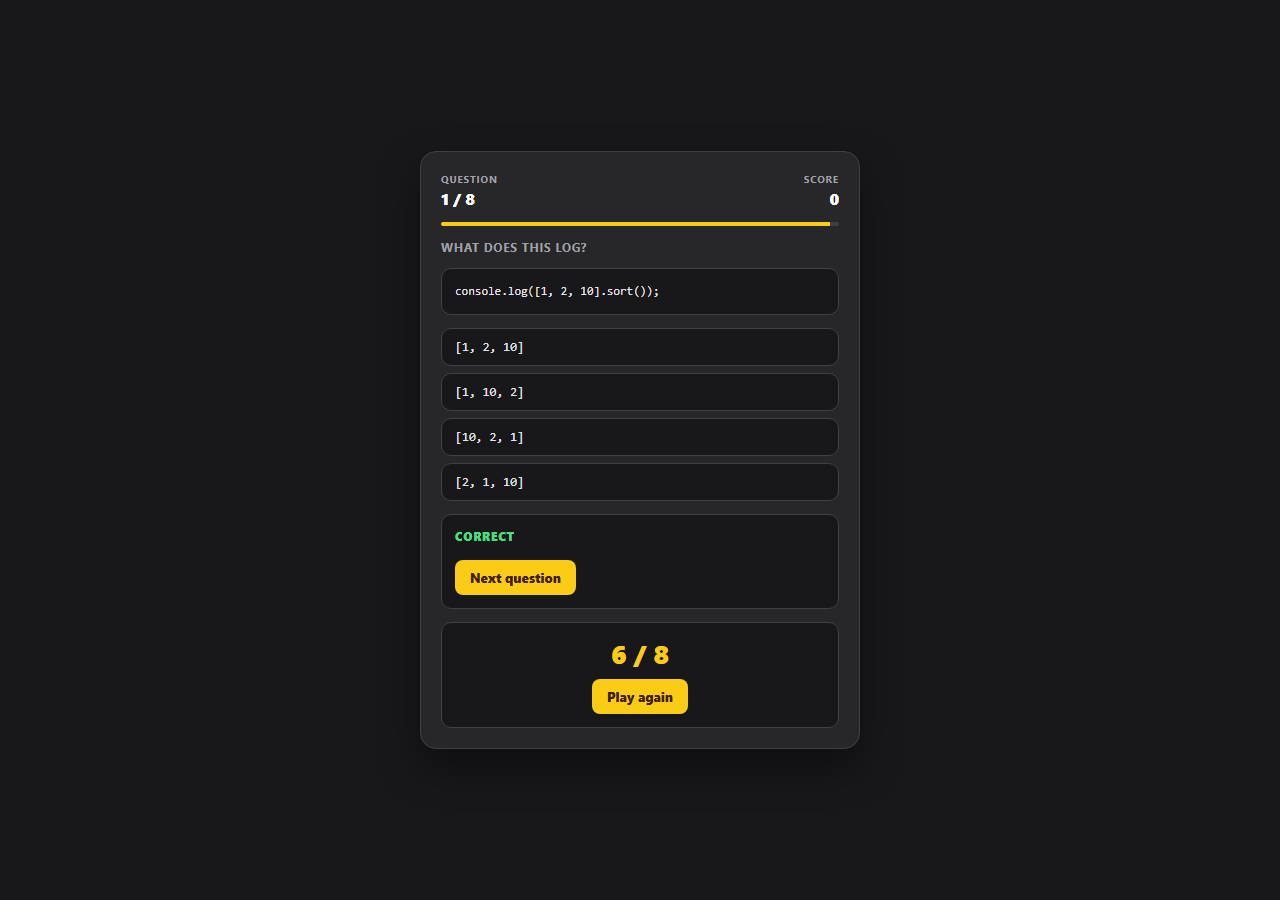
"What does this log?" is the single most efficient format for teaching a language's sharp edges, because the learner commits to a prediction before seeing the truth — and a wrong prediction is what makes the explanation stick. This snippet is a complete, playable version of that format for JavaScript: eight questions covering the quirks that actually cost people debugging hours, a per-question countdown, immediate colour-coded reveal, and a written explanation of the mechanism behind every answer.
The questions are real behaviour, not trivia
Each entry covers something a working developer genuinely hits: typeof null returning 'object', [1, 2, 10].sort() producing [1, 10, 2] because the default comparator stringifies, 0.1 + 0.2 === 0.3 being false under IEEE-754, var in a loop with setTimeout logging 3 3 3 because all callbacks share one binding, '5' - 3 and '5' + 3 diverging because + is overloaded, microtasks draining before macrotasks so a resolved promise beats setTimeout(fn, 0), const preventing reassignment but not mutation, and [] + {} coercing to '[object Object]'. Every explain string names the underlying rule and, where useful, the fix — pass a comparator, use let, compare floats with an epsilon.
Shuffled order with a stable answer index
restart() builds a shuffled array of question indices with a Fisher-Yates pass and walks that array rather than the questions themselves, so replaying the quiz presents a different sequence without ever mutating QUESTIONS. The answer for each question is stored as an index into its own options array, which keeps the data compact and makes the reveal logic trivial: mark the button at q.answer correct, and mark the chosen button wrong when it differs.
A countdown that ends the question rather than the game
Each question runs a one-second setInterval driving a width-animated bar that turns red in its last five seconds. Running out of time calls the same reveal() function the click handler uses, passing -1 as the choice — so a timeout is treated as an answered question with no selection: the correct option still highlights, the explanation still appears, and the player still learns the answer. Reusing one reveal path for both routes is what keeps the timeout case from becoming a second, subtly different code path.
Guarding against double scoring
reveal() returns immediately if answered is already true, and every option button is disabled the moment an answer lands. That double guard matters because the timer and a click can otherwise race: a click landing in the same tick as the countdown reaching zero would otherwise run the scoring branch twice. The interval is cleared inside reveal() rather than at the next render, so no stray tick can fire while the explanation is on screen.
Reveal, explanation, and final score as three states
The card shows one of three states at a time — the live question, the explanation panel with the verdict heading and the "Next question" button, or the final score panel — toggled with the hidden attribute rather than by swapping innerHTML. The verdict itself distinguishes three outcomes: correct, wrong, and out of time, so the feedback text always matches how the question actually ended.
Build with AI
Build, Understand, Optimize, and Extend It With AI
Paste this snippet into an AI assistant like Claude and ask it to add a "run it" button that executes each question's code in a sandboxed iframe with a captured console, so players can verify the stated answer themselves rather than taking the explanation on trust — a genuinely instructive extension that also raises real questions about safely executing untrusted code. Other good directions: add difficulty tiers with a scoring multiplier, add a streak bonus that shortens the timer as the player gets hotter, persist a high score and per-question accuracy to localStorage so weak topics can be replayed, or swap the question set for a CSS or TypeScript edition using the same engine.
Prompt to recreate it
Copy this into your AI assistant of choice to build the effect from scratch, or as a jumping-off point for your own variant:
Build a timed "predict the output" JavaScript quiz game in plain HTML, CSS, and JavaScript — no frameworks or libraries.

Requirements:
- A QUESTIONS array where each entry has a code string, an options array, the index of the correct option, and an explanation string that names the underlying language rule and the practical fix.
- Use real JavaScript behaviour that developers actually hit — typeof null, the default sort comparator stringifying elements, 0.1 + 0.2 !== 0.3, var closures in a setTimeout loop, + being overloaded for strings, microtasks draining before macrotasks, const preventing reassignment but not mutation, and [] + {} coercion.
- Render the code as text into a pre element with textContent — never evaluate it.
- A per-question countdown driving a width-animated bar that changes colour in its final seconds. When time runs out, call the SAME reveal function a click calls (passing -1 as the choice) so an unanswered question still highlights the correct option and shows its explanation.
- Guard against a click and the countdown both scoring the same question: an answered flag checked at the top of reveal, disabling every option button on reveal, and clearing the interval inside reveal.
- On reveal, mark the correct option green and a wrong choice red simultaneously, and show a verdict that distinguishes correct, incorrect, and out-of-time.
- Shuffle the question order on each play with a Fisher-Yates pass over an array of indices rather than mutating the source array, and show a final score panel with a play-again action after the last question.
Want to tighten it up first? Run this prompt through the AI Prompt Studio to score it across 8 quality dimensions, catch anti-patterns, and tune the wording for Claude, ChatGPT, or Gemini before you paste it in.
Source Code
<div class="demo-wrap">
  <div class="cq-game">
    <div class="cq-head">
      <div class="cq-meta"><span class="cq-label">Question</span><span class="cq-value" id="cqNum">1 / 8</span></div>
      <div class="cq-meta cq-right"><span class="cq-label">Score</span><span class="cq-value" id="cqScore">0</span></div>
    </div>

    <div class="cq-timer"><div class="cq-timer-fill" id="cqTimerFill"></div></div>

    <p class="cq-prompt">What does this log?</p>
    <pre class="cq-code" id="cqCode"></pre>

    <div class="cq-options" id="cqOptions"></div>

    <div class="cq-explain" id="cqExplain" hidden>
      <span class="cq-explain-title" id="cqVerdict">Correct</span>
      <p class="cq-explain-text" id="cqExplainText"></p>
      <button class="cq-next" id="cqNext">Next question</button>
    </div>

    <div class="cq-final" id="cqFinal" hidden>
      <p class="cq-final-score" id="cqFinalScore">6 / 8</p>
      <button class="cq-next" id="cqRestart">Play again</button>
    </div>
  </div>
</div>
* { box-sizing: border-box; margin: 0; padding: 0; }
body { font-family: system-ui, -apple-system, sans-serif; background: #18181b; min-height: 100vh; }
.demo-wrap { display: flex; align-items: center; justify-content: center; min-height: 100vh; padding: 28px 16px; }
.cq-game {
width: 100%; max-width: 440px; padding: 20px;
background: #27272a; border: 1px solid #3f3f46; border-radius: 16px;
display: flex; flex-direction: column; gap: 13px;
box-shadow: 0 18px 40px rgba(0,0,0,0.4);
}
.cq-head { display: flex; justify-content: space-between; }
.cq-meta { display: flex; flex-direction: column; gap: 2px; }
.cq-right { align-items: flex-end; }
.cq-label { font-size: 10px; font-weight: 700; letter-spacing: 0.08em; text-transform: uppercase; color: #a1a1aa; }
.cq-value { font-size: 16px; font-weight: 800; color: #fafafa; }
.cq-timer { height: 4px; border-radius: 999px; background: #3f3f46; overflow: hidden; }
.cq-timer-fill { height: 100%; width: 100%; background: #facc15; transition: width 0.25s linear; }
.cq-timer-fill.low { background: #f87171; }
.cq-prompt { font-size: 12px; font-weight: 700; color: #a1a1aa; text-transform: uppercase; letter-spacing: 0.06em; }
.cq-code {
background: #18181b; border: 1px solid #3f3f46; border-radius: 10px; padding: 13px;
font-family: ui-monospace, SFMono-Regular, Menlo, monospace; font-size: 12px; line-height: 1.65;
color: #e4e4e7; white-space: pre; overflow-x: auto;
}
.cq-options { display: flex; flex-direction: column; gap: 7px; }
.cq-opt {
text-align: left; padding: 11px 13px; border-radius: 10px; cursor: pointer;
background: #18181b; border: 1.5px solid #3f3f46; color: #e4e4e7;
font-family: ui-monospace, SFMono-Regular, Menlo, monospace; font-size: 12.5px;
transition: all 0.14s;
}
.cq-opt:hover:not(:disabled) { border-color: #facc15; }
.cq-opt:disabled { cursor: default; }
.cq-opt.right { border-color: #4ade80; background: rgba(74,222,128,0.12); color: #bbf7d0; }
.cq-opt.wrong { border-color: #f87171; background: rgba(248,113,113,0.12); color: #fecaca; }
.cq-explain, .cq-final {
display: flex; flex-direction: column; gap: 8px; padding: 13px;
border-radius: 10px; background: #18181b; border: 1px solid #3f3f46;
}
.cq-explain-title { font-size: 12px; font-weight: 800; text-transform: uppercase; letter-spacing: 0.06em; color: #4ade80; }
.cq-explain-title.bad { color: #f87171; }
.cq-explain-text { font-size: 13px; line-height: 1.6; color: #d4d4d8; }
.cq-final { align-items: center; }
.cq-final-score { font-size: 26px; font-weight: 900; color: #facc15; }
.cq-next {
align-self: flex-start; padding: 9px 15px; border: none; border-radius: 8px;
background: #facc15; color: #422006; font-size: 13px; font-weight: 800;
font-family: inherit; cursor: pointer;
}
.cq-next:hover { background: #eab308; }
.cq-final .cq-next { align-self: center; }var TIME_PER_QUESTION = 15;
var QUESTIONS = [
{
code: "console.log(typeof null);",
options: ["'null'", "'object'", "'undefined'", "TypeError"],
answer: 1,
explain: "typeof null returns 'object' — a bug from the first JavaScript implementation, where values were tagged by their low bits and the null pointer shared the object tag. It was never fixed because too much code depends on it.",
},
{
code: "console.log([1, 2, 10].sort());",
options: ["[1, 2, 10]", "[1, 10, 2]", "[10, 2, 1]", "[2, 1, 10]"],
answer: 1,
explain: "Array.prototype.sort() with no comparator converts every element to a string and sorts lexicographically, so '10' sorts before '2'. Pass a comparator — sort((a, b) => a - b) — whenever you sort numbers.",
},
{
code: "console.log(0.1 + 0.2 === 0.3);",
options: ["true", "false", "NaN", "TypeError"],
answer: 1,
explain: "Numbers are IEEE-754 doubles, and 0.1 and 0.2 have no exact binary representation. Their sum is 0.30000000000000004, so the strict comparison is false. Compare floats with a small epsilon instead.",
},
{
code: "for (var i = 0; i < 3; i++) {\n setTimeout(() => console.log(i), 0);\n}",
options: ["0 1 2", "3 3 3", "0 0 0", "1 2 3"],
answer: 1,
explain: "var is function-scoped, so all three callbacks close over the SAME i. The loop finishes before any timeout fires, by which point i is 3. Switching var to let creates a fresh binding per iteration and logs 0 1 2.",
},
{
code: "console.log('5' - 3, '5' + 3);",
options: ["2 8", "2 '53'", "'53' 2", "NaN '53'"],
answer: 1,
explain: "The - operator has no string meaning, so '5' is coerced to a number giving 2. The + operator is overloaded: with a string on either side it concatenates, giving the string '53'.",
},
{
code: "console.log(1);\nsetTimeout(() => console.log(2), 0);\nPromise.resolve().then(() => console.log(3));\nconsole.log(4);",
options: ["1 2 3 4", "1 4 3 2", "1 4 2 3", "1 3 4 2"],
answer: 1,
explain: "Synchronous code runs first (1, 4). Then the microtask queue drains before the next macrotask, so the promise callback (3) runs before the setTimeout callback (2) even with a 0ms delay.",
},
{
code: "const a = { x: 1 };\nconst b = a;\nb.x = 2;\nconsole.log(a.x);",
options: ["1", "2", "undefined", "TypeError"],
answer: 1,
explain: "const prevents reassigning the binding, not mutating the object it points to. a and b reference the same object, so writing through b is visible through a. Use structuredClone or a spread to copy.",
},
{
code: "console.log([] + {});\nconsole.log(typeof ([] + {}));",
options: ["'{}' 'object'", "'[object Object]' 'string'", "'' 'string'", "NaN 'number'"],
answer: 1,
explain: "The + operator converts both operands to primitives: [] becomes the empty string and {} becomes '[object Object]'. Concatenating them yields '[object Object]', which is a string.",
},
];
var order = [];
var pos = 0;
var score = 0;
var timeLeft = TIME_PER_QUESTION;
var tick = null;
var answered = false;
var codeEl = document.getElementById('cqCode');
var optionsEl = document.getElementById('cqOptions');
var explainEl = document.getElementById('cqExplain');
var explainText = document.getElementById('cqExplainText');
var verdictEl = document.getElementById('cqVerdict');
var finalEl = document.getElementById('cqFinal');
var timerFill = document.getElementById('cqTimerFill');
var numEl = document.getElementById('cqNum');
var scoreEl = document.getElementById('cqScore');
function shuffled(n) {
var arr = Array.from({ length: n }, function (_, i) { return i; });
for (var i = arr.length - 1; i > 0; i--) {
var j = Math.floor(Math.random() * (i + 1));
var tmp = arr[i]; arr[i] = arr[j]; arr[j] = tmp;
}
return arr;
}
function question() { return QUESTIONS[order[pos]]; }
function startTimer() {
clearInterval(tick);
timeLeft = TIME_PER_QUESTION;
paintTimer();
tick = setInterval(function () {
timeLeft--;
paintTimer();
if (timeLeft <= 0) { clearInterval(tick); reveal(-1); }
}, 1000);
}
function paintTimer() {
var pct = Math.max(0, (timeLeft / TIME_PER_QUESTION) * 100);
timerFill.style.width = pct + '%';
timerFill.classList.toggle('low', timeLeft <= 5);
}
function renderQuestion() {
var q = question();
answered = false;
explainEl.hidden = true;
finalEl.hidden = true;
numEl.textContent = (pos + 1) + ' / ' + QUESTIONS.length;
scoreEl.textContent = score;
codeEl.textContent = q.code;
optionsEl.innerHTML = '';
q.options.forEach(function (text, i) {
var btn = document.createElement('button');
btn.className = 'cq-opt';
btn.textContent = text;
btn.dataset.index = i;
optionsEl.appendChild(btn);
});
startTimer();
}
function reveal(chosen) {
if (answered) return;
answered = true;
clearInterval(tick);
var q = question();
var buttons = optionsEl.children;
for (var i = 0; i < buttons.length; i++) {
buttons[i].disabled = true;
if (i === q.answer) buttons[i].classList.add('right');
if (i === chosen && chosen !== q.answer) buttons[i].classList.add('wrong');
}
var correct = chosen === q.answer;
if (correct) { score++; scoreEl.textContent = score; }
verdictEl.textContent = correct ? 'Correct' : (chosen === -1 ? 'Out of time' : 'Not quite');
verdictEl.className = 'cq-explain-title' + (correct ? '' : ' bad');
explainText.textContent = q.explain;
explainEl.hidden = false;
}
function next() {
if (pos === QUESTIONS.length - 1) {
explainEl.hidden = true;
optionsEl.innerHTML = '';
document.getElementById('cqFinalScore').textContent = score + ' / ' + QUESTIONS.length;
finalEl.hidden = false;
return;
}
pos++;
renderQuestion();
}
function restart() {
order = shuffled(QUESTIONS.length);
pos = 0;
score = 0;
renderQuestion();
}
optionsEl.addEventListener('click', function (e) {
var btn = e.target.closest('.cq-opt');
if (btn && !btn.disabled) reveal(Number(btn.dataset.index));
});
document.getElementById('cqNext').addEventListener('click', next);
document.getElementById('cqRestart').addEventListener('click', restart);
restart();Step by step
How to Use
- 1Read the code blockEach question shows a short, self-contained snippet of real JavaScript in a monospaced panel — the kind of code that appears in a bug report rather than a textbook exercise.
- 2Answer before the bar runs outA fifteen-second countdown drains a bar across the top, turning red for the final five seconds. Running out of time reveals the answer and its explanation rather than skipping past it, so a timeout still teaches you something.
- 3Pick one of the four optionsClicking an option immediately locks the question: the correct answer turns green, and a wrong pick turns red alongside it so you can see both what you chose and what was right.
- 4Read the explanationEvery question carries a written explanation naming the actual rule — the microtask queue draining before macrotasks, the default sort comparator stringifying elements, IEEE-754 rounding — plus the practical fix where one exists.
- 5Work through all eight questionsThe score counter updates as you go and a final panel shows your total out of eight when the last question is answered.
- 6Play again for a different orderPlay again reshuffles the question order with a Fisher-Yates pass over an index array, so a replay is not the same sequence — and the QUESTIONS array itself is never mutated.
Real-world uses
Common Use Cases
Got questions?
Frequently Asked Questions
The countdown calls the same reveal() function a click does, passing -1 as the chosen index. The question is marked as answered, the correct option highlights, and the explanation appears — you simply score nothing for it. Reusing one reveal path means the timeout case cannot drift into behaving differently from a normal answer.
No. reveal() returns immediately if the answered flag is already set, and all option buttons are disabled the moment an answer lands. The interval is also cleared inside reveal() rather than at the next render, so no stray tick can fire while the explanation panel is showing.
Push an object onto QUESTIONS with four keys: code (the snippet string, with \n for line breaks), options (an array of answer strings), answer (the index of the correct option within that array), and explain (a sentence or two naming the rule and, where useful, the fix). The question count in the header derives from the array length automatically.
No — the snippets are rendered as text into a pre element with textContent, never evaluated. That is deliberate: eval or new Function on quiz content would be both unnecessary and a poor pattern to demonstrate, and the answers are authored rather than computed so the explanations can describe the mechanism rather than just the result.
Yes. Keep QUESTIONS in a module, hold the shuffled order, position, score and answered flag in component state, and render options from data rather than mutating classes. Run the countdown in useEffect / onMounted / ngOnInit keyed on the current question and return a clearInterval cleanup so a question change or unmount cannot leave a timer running — that cleanup is the one thing a naive port usually misses.